You are typing an email on the work laptop, a message pings on the tablet, and a note needs adding to the personal desktop. With most keyboards that means three keyboards, or a lot of unplugging. A wireless mechanical keyboard with multi-device pairing collapses all of that into one satisfying board and a single tap to jump between machines, so the tactile keys you love follow you across every screen on the desk.



A great multi-device mechanical keyboard gets three things right: it pairs painlessly with several gadgets, it switches between them instantly, and it feels good under the fingers all day. Whether the goal is a tidy home office, a laptop-plus-tablet workflow, or a single board that serves both a Mac and a PC, the four keyboards below cover the range, led by the proven best seller of the group.
At a glance
| Keyboard | Standout feature | Price tier | Link |
|---|---|---|---|
| TISHLED Typewriter Mechanical, 84-Key | Tri-mode connection, hot-swap switches | Budget | |
| ProtoArc KM310 Keyboard and Mouse | Mechanical keyboard plus mouse in one set | Mid-range | |
| Logitech MX Mechanical | Backlit tactile keys, cross-OS control | Premium | |
| Logitech POP Keys | Compact design with swappable emoji keys | Mid-range | |
How to choose a multi-device mechanical keyboard
Three questions decide whether a keyboard becomes the anchor of your desk or a source of quiet frustration: how it connects, how it feels, and how it fits your hands and your operating systems.
How multi-device pairing actually works
Two technologies do the connecting. Bluetooth pairs with almost anything, phones, tablets, laptops, with no dongle, and multi-device boards store several Bluetooth connections at once. A dedicated switch key, often labeled Easy-Switch or numbered one through three, jumps between them in an instant. The second option is a 2.4GHz USB receiver, a small dongle that trades a spare port for a rock-steady, low-latency link, which is handy on a primary computer. The most flexible keyboards, like the tri-mode TISHLED, offer both plus a wired mode, so you can hold three Bluetooth devices and a dongle-connected machine and rotate through all of them.
Switch feel: linear, tactile, or clicky
Mechanical switches are the whole point, and they come in three broad flavors. Linear switches, such as the red switches in the ProtoArc, move smoothly with no bump and stay relatively quiet, which suits fast, uninterrupted typing. Tactile switches give a gentle bump at the actuation point, the feel of the Logitech MX Mechanical’s Tactile Quiet keys, so you sense each keystroke register without much noise. Clicky switches, like the green switches on the TISHLED, add an audible click that many typists find deeply satisfying but office neighbors may not. If the keyboard is hot-swappable, you can pull and replace switches without soldering and change that feel later.
Size, layout, and the numpad question
Footprint is a real trade-off. A full-size board, like the ProtoArc’s 108-key layout, keeps a number pad for spreadsheet work at the cost of desk space and pushing the mouse further right. Compact layouts, the 84-key TISHLED or the space-saving POP Keys, drop the numpad and tighten the gaps to free up room and encourage a more centered posture. If you crunch numbers all day, keep the numpad; if you want a cleaner desk and shorter reach to the mouse, go compact.
Operating systems and the Mac question
Multi-device only pays off if the keyboard speaks to all your devices. The boards here span Windows, macOS, iOS, iPadOS, Android, and often Linux and ChromeOS. The detail worth checking is Mac support: a keyboard that maps the Command and Option keys correctly, or ships Mac-specific keycaps, makes switching between a PC and a Mac far less jarring. Logitech’s boards handle this cleanly through their software; simpler boards rely on a hardware toggle between Windows and Mac modes.
Software, shortcuts, and customization
The keyboard’s companion software often decides how much you get out of it. Logitech’s app lets you remap function keys, tune backlight effects, and set per-app shortcuts, and its Flow feature turns one keyboard into the controller for several computers at once. Simpler boards skip the software and rely on hardware shortcut layers reached with the Fn key, which covers media playback, volume, and lighting without installing anything. If you like to tailor a board to your exact habits, favor one with a full software suite; if you prefer plug-and-type simplicity, a solid set of built-in Fn shortcuts is all you really need.
Build quality and typing comfort
A keyboard you use for hours should feel solid and sit well under the hands. A metal or aluminum top case, found on the MX Mechanical and the ProtoArc, resists flex and adds a reassuring weight that keeps the board planted while you type. Keycap shape matters too: sculpted or scooped caps guide the fingers, while flat retro caps like the TISHLED’s take a short adjustment period. Adjustable feet or a slight incline help set a comfortable wrist angle, and a low-profile design lowers the reach to each key, which many people find easier on the wrists over a long day. None of these details show up in a spec sheet, but they decide whether the keyboard disappears under your fingers or nags at you.
Battery, charging, and backlight
Wireless means watching the battery, though the numbers are reassuring. Non-backlit boards can run for many months on a charge, and even backlit models manage weeks. Backlighting is the biggest drain, so a keyboard that lets you dim or disable it, or that uses proximity sensing to light up only when your hands approach, stretches the runtime considerably. Look for USB-C charging so a quick top-up gets you back to work, and remember that a board you can also use wired never truly runs out.
TISHLED Wireless Mechanical Typewriter Keyboard, 84-Key
The proven best seller of this group wraps serious connectivity in a retro typewriter look. Round, silver-ringed keycaps and warm white backlighting give it a vintage character, but the connectivity is thoroughly modern: a tri-mode setup pairs three Bluetooth devices plus one 2.4GHz link, and it also runs wired over USB-C. The 84-key compact layout keeps things tidy, hot-swappable green switches deliver a clicky, tactile response you can later change without soldering, and NKRO ensures every keystroke registers. With seven backlight effects and adjustable feet, it is a distinctive, capable board that happens to cost the least here.
Pros:
- Tri-mode: three Bluetooth devices, a 2.4GHz dongle, and wired
- Hot-swappable switches for future customization
- Compact 84-key layout with NKRO
- Warm white backlight with seven effects
Cons:
- Clicky green switches are audible in quiet offices
- Retro round keycaps take some adjustment
Best for: buyers who want the most connection options and a keyboard with personality.
ProtoArc KM310 Wireless Mechanical Keyboard and Mouse
The ProtoArc KM310 is the practical, do-it-all set: a full-size mechanical keyboard and a matching lightweight mouse that share a single USB receiver, plus dual Bluetooth. Between the 2.4GHz dongle and two Bluetooth channels, it connects up to three devices and switches with a single button. Low-profile linear red switches make for smooth, relatively quiet typing well suited to office and business use, the aluminum top case feels solid, and the 108-key layout keeps a full number pad. There is deliberately no backlight, which cuts glare and stretches battery life for people who work in well-lit rooms. As a complete desk in a box at a mid-range price, it is hard to fault.
Pros:
- Includes a matching lightweight mouse
- Full-size 108-key layout with number pad
- Smooth, quiet linear red switches
- Aluminum top case; no backlight glare or drain
Cons:
- No backlight for dim rooms
- Keyboard and mouse share one receiver
Best for: anyone who wants a complete, quiet mechanical desk setup in one purchase.
Logitech MX Mechanical Wireless Keyboard
The MX Mechanical is the polished flagship of the group, built for people who spend their whole day at the keyboard. Its Tactile Quiet low-profile switches give a satisfying bump with restrained noise, and smart backlighting lights the keys the moment your hands approach, then adjusts to the room and dims to save power. It pairs with up to three devices across nearly any operating system via Bluetooth or the included Logi Bolt receiver, and Logitech’s software adds Flow, letting one keyboard type across multiple computers and even copy between them. Battery life runs up to fifteen days with the backlight on, or many months with it off. The metal build and refined feel are what the premium price buys.
Pros:
- Refined tactile switches with low noise
- Proximity backlight that adjusts automatically
- Cross-computer typing and copy with Flow
- Sturdy metal build and full-size layout
Cons:
- Highest price in this comparison
- Full software features favor Windows and macOS
Best for: professionals who want the most refined all-day typing and multi-computer control.
Logitech POP Keys Wireless Mechanical Keyboard
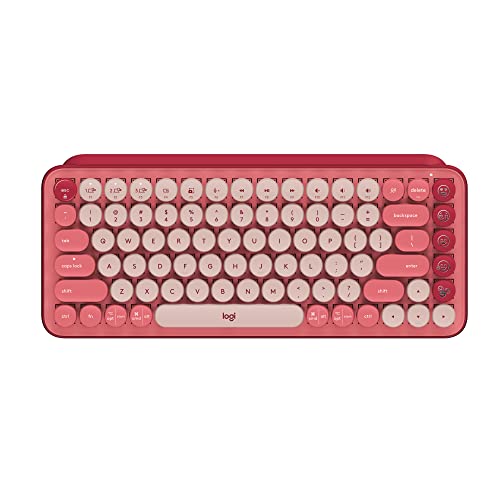
The POP Keys brings mechanical typing to a compact, colorful board with a playful twist: eight swappable emoji keys and an emoji menu key you can customize through Logitech’s software. Under the bold looks are bouncy, typewriter-style mechanical keys with scooped, round caps that are genuinely fun to type on. It pairs with up to three devices and hops between them with Easy-Switch, connecting by Bluetooth or the Logi Bolt receiver across Windows, macOS, ChromeOS, and mobile. The space-saving design frees desk room and travels well, and the long battery life means you rarely think about charging. It is the pick for a lively, portable setup that still feels mechanical.
Pros:
- Compact, portable, and eye-catching
- Customizable emoji keys and shortcuts
- Fun, bouncy mechanical typing feel
- Easy-Switch across three devices, long battery life
Cons:
- Compact layout drops the number pad
- Bold styling will not suit every desk
Best for: expressive users who want a small, portable mechanical board with character.
The verdict
Best overall: the TISHLED 84-Key is both the group’s best seller and its most versatile connector. Tri-mode pairing across three Bluetooth devices plus a 2.4GHz dongle, hot-swap switches, and a compact layout deliver genuine flexibility at the lowest price here, which makes it the easy first recommendation for most multi-device desks.
Best value: the ProtoArc KM310 gives you a mechanical keyboard and a matching mouse in one mid-range purchase, with a full number pad and quiet linear switches. For building a complete, tidy desk without paying flagship money, nothing here does more for the price.
Best premium: the Logitech MX Mechanical is the choice for all-day professionals. Refined tactile switches, smart proximity backlighting, and cross-computer Flow control justify the higher cost for anyone whose work lives on the keyboard.
Frequently asked questions
How many devices can these keyboards connect to?
Each board here pairs with up to three devices and switches between them with a dedicated key. The TISHLED goes further, holding three Bluetooth devices plus a separate 2.4GHz link, so it can juggle four connections in total. In practice, three is plenty for a laptop, a tablet, and a phone.
Will these work with both a Mac and a Windows PC?
Yes. All four support macOS and Windows, and most also cover iOS, iPadOS, Android, and often Linux or ChromeOS. Logitech’s models let you map Mac keys through their software; the others use a hardware toggle to switch between Windows and Mac layouts.
Are mechanical keyboards too loud for an office?
It depends on the switch. Clicky switches like the TISHLED’s green switches are noticeably audible. Tactile Quiet switches, as on the MX Mechanical, and smooth linear switches, as on the ProtoArc, are much quieter and better suited to shared spaces. Choose the switch feel with your surroundings in mind.
Bluetooth or the USB receiver, which should I use?
Use Bluetooth for devices without a spare USB port, like tablets and phones, and where a couple of extra devices need pairing. Use the 2.4GHz receiver on your main computer for the steadiest, lowest-latency connection. Boards that offer both let you mix the two as needed.
How long do the batteries last?
It varies with backlighting. Non-backlit boards such as the ProtoArc can run for months per charge, while backlit models like the MX Mechanical last around two weeks with lighting on and far longer with it off. USB-C charging makes topping up quick, and wired-capable boards can keep working while they charge.
This article may contain affiliate links; see our Affiliate Disclosure.