The three best-selling products in this category are two gaming headsets and a pair of music headphones. The purpose-built call headsets, the ones with a boom arm designed for exactly this job, sit further down with no sales rank shown at all. That gap tells you something worth knowing before you buy: most people working from home are wearing whatever they already owned.


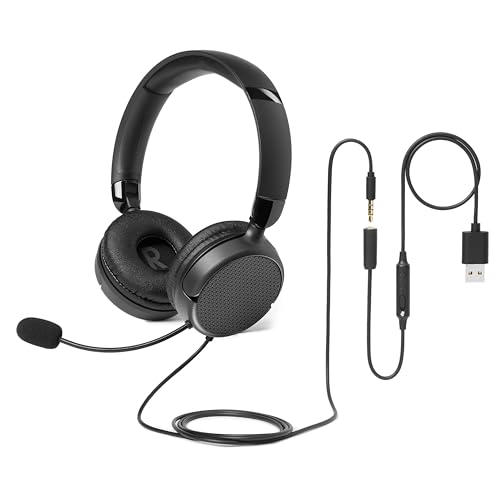



Here is the thing nobody buying headphones thinks about: on a work call, you are not the one listening to them. Everybody else is. So the specification that matters is the microphone, and specifically whether it points at your mouth or at your kitchen.
At a glance
| Headset | Standout feature | Price tier | Link |
|---|---|---|---|
| Sony MDREX15AP | Cheapest here; three earbud tip sizes | Budget | |
| Logitech H111 | Boom mic that swaps to either side | Budget | |
| Amazon Basics | The only unidirectional mic here | Budget | |
| Ozeino | RGB lights, on a work call | Budget | |
| Logitech H391 | Purpose-built for calls; USB-C | Mid-range | |
| Sony WH-CH520 | 50 hours wireless; works after hours too | Premium | |
| Razer BlackShark V2 X | The best seller here; 240g over-ear | Premium | |
How to choose a headset for work calls
Unidirectional beats omnidirectional, and only one here is
This is the specification that decides what your colleagues hear. A unidirectional microphone listens in one direction, at your mouth, and rejects everything to the sides and behind. An omnidirectional one listens in every direction equally, which for a gaming headset is fine and for a home office means your dishwasher, your family and the road outside all arrive on the call. Amazon Basics is the only product here stating unidirectional. Ozeino advertises a 360 degree omnidirectional mic as a feature, and for this job it is the opposite of one.
Noise-canceling on a microphone is not noise-canceling on headphones
The same phrase means two different things and the listings do not help. When Logitech says noise-canceling microphone, it means the mic tries to reject room noise so your voice arrives clean, which is what you want on a call. When Razer says advanced passive noise cancellation, it means the earcups physically block sound from reaching your ears, which is about your concentration. Both are useful and they solve opposite problems. Nothing on this page offers active noise cancellation in the earcups.
A boom arm puts the mic where your mouth is
Physics does most of the work here. A mic two inches from your mouth hears you loudly and the room quietly; a mic built into an earcup, or dangling on a cord at chest height, hears both about equally. The Logitech headsets use a rotating boom that swings to either side, Amazon Basics uses a flexible boom you can set at any angle, and Ozeino’s rotates through 360 degrees. Sony’s WH-CH520 has a built-in mic with no boom at all, which is why it is a music headphone that takes calls rather than a call headset.
Check the plug against your laptop
Genuinely the most common mistake in this category. Logitech sells effectively the same headset three ways: the H391 on USB-C, the H390 on USB-A, and the H111 on a 3.5mm jack. If your laptop only has USB-C ports, the H390 needs an adapter and the H391 does not. If you also want it on a phone or a console, the 3.5mm H111 goes anywhere. Amazon Basics hedges with a 3.5mm port or an inline USB option. Look at the side of your machine before you look at the price.
Wired never runs out mid-call
The unglamorous advantage. Every wired headset here is powered by the cable, so it cannot die halfway through a meeting, which is the single most avoidable embarrassment in remote work. Sony’s WH-CH520 answers with 50 hours of battery and quick charging, which is genuinely enough for a working two weeks and means you charge it on a Friday and forget. That is the trade: a cable you never think about, or a battery you occasionally do.
Weight matters over a six-hour day
Razer publishes 240g and builds the argument around it, with memory foam cushions and breathable fabric, because a gaming headset is designed to be worn for hours at a stretch, which happens to be exactly what a day of calls is. Sony leans on a lightweight build with swivel earcups and an adjustable headband. Amazon Basics is unusually real and warns that its on-ear design may feel snug at first and suggests wearing it 30 to 60 minutes a day to start with, which is a break-in note almost nobody prints.
Sony MDREX15AP
The cheapest thing here by a distance and a sensible spare to keep in a drawer. Three sizes of hybrid silicone tip are included, small, medium and large, and Sony bothers to note that a bad tip fit means poor sound, which is the real explanation for why cheap earbuds disappoint people. The 9mm dome drivers with neodymium magnets do a respectable job, and the Y-cord with a slider keeps it from knotting in a bag. The microphone is inline on the cord, at chest height, which is where a microphone hears your room rather than your mouth.
Pros:
- Cheapest option here by a wide margin
- Three tip sizes; Sony explains why fit matters
- 9mm drivers with neodymium magnets
- Cord slider stops tangles in a bag
Cons:
- Inline mic at chest height; hears the room as well as you
- No boom arm and no mute control
- Earbuds get uncomfortable over a day of calls
Best for: an emergency spare, not a working day.
Logitech H111
The cheapest proper call headset here, and it does the essential thing: a noise-canceling microphone on a rotating boom that reduces room noise for clearer calls, positioned at your mouth rather than somewhere near it. The boom swings to either side, so it suits whichever ear you prefer and whichever way your desk faces. It runs on a plain 3.5mm jack, which is the most universal connection here: laptop, phone, tablet, console, all the same plug. Full stereo for music between calls. Adjustable headband, nothing else, very little money.
Pros:
- Cheapest purpose-built call headset here
- Noise-canceling mic on a rotating boom
- Boom swaps to left or right
- 3.5mm jack works with everything
Cons:
- No inline volume or mute controls
- Mic direction not specified
- 3.5mm needs an adapter on modern laptops
Best for: a boom mic at your mouth, on any device, for almost nothing.
Amazon Basics
The only headset on this page with a unidirectional microphone, which is the correct answer for a home office and which nobody else here offers. Unidirectional means it listens at your mouth and rejects the sides, so the kitchen and the family stay off the call. The boom is flexible and positions at any angle, the 32mm drivers handle the listening, and it folds for a drawer. It is also the only listing here plain enough to warn that an on-ear fit may feel snug at first and to suggest 30 to 60 minutes a day while you break it in.
Pros:
- The only unidirectional mic here; the right kind for calls
- Flexible boom positions at any angle
- 3.5mm port or inline USB; covers most laptops
- Real break-in warning about the on-ear fit
Cons:
- On-ear rather than over-ear; snug by its own admission
- 32mm drivers; the smallest here
- No sales rank shown
Best for: keeping your household off the call, for very little.
Ozeino
The third best-selling product in this category, and worth reading carefully, because it is a gaming headset and it is clear about that. Colorful RGB lights create a gaming atmosphere, which on a video call creates a different kind of atmosphere. The 7.1 surround is built for hearing footsteps behind you rather than a colleague in front of you. The mic rotates 360 degrees and is omnidirectional, which for a home office is the wrong direction: it listens to your room as attentively as to you. The protein over-ear pads are genuinely comfortable and it costs very little.
Pros:
- The third best-selling product in this category
- Breathable protein over-ear pads; comfortable for hours
- Rotatable mic on a boom; very cheap
- 7.1 surround if you also game
Cons:
- Omnidirectional mic; hears your whole room
- RGB lights on a work video call
- 7.1 surround does nothing for a meeting
Best for: gaming in the evening, with calls as a compromise.
Logitech H391
The headset actually designed for the job on this page. A rotating noise-canceling boom mic sits at your mouth and cuts room noise, inline controls on the cable let you drop the volume or hit mute without hunting for a window while somebody is mid-sentence, and the fine-tuned drivers are aimed at calls and meetings first with music mentioned afterwards, which is the right order. It plugs in over USB-C, so on a modern laptop with no full-size ports it works without an adapter, and being wired it cannot run out halfway through anything.
Pros:
- Built for calls and meetings first
- Rotating noise-canceling boom mic
- Inline volume and mute; no hunting for a window
- USB-C plug and play; no adapter on a modern laptop
Cons:
- USB-C only; will not work on a phone jack or a console
- Mic direction not specified
- No sales rank shown
Best for: a working day of calls, on a laptop with USB-C.
Sony WH-CH520
The second best-selling product here, and the only one you would still want at the weekend. Fifty hours of battery with quick charging means you plug it in on a Friday and forget it exists, and Bluetooth means you can stand up and walk to the kettle without ending the call. The sound is properly good and adjustable through Sony’s EQ app, the earcups swivel and the headband adjusts. The microphone is built in, with no boom, which is why Sony describes it as hands-free calling rather than a headset: it hears you from the side of your head.
Pros:
- 50 hours of battery with quick charging
- Wireless; walk away from the desk mid-call
- Genuinely good sound with a custom EQ app
- Lightweight with swivel earcups; the second best seller
Cons:
- Built-in mic with no boom; it hears from your temple
- A battery to remember, unlike everything wired here
- On-ear rather than over-ear
Best for: one pair for calls and everything else, without a cable.
Razer BlackShark V2 X
The best-selling product in this category by a distance, and it is a gaming headset, which is the real fact this page keeps running into. What it brings across is the thing gaming headsets get right: it is built to be worn for six hours without complaint, at 240g with memory foam cushions and breathable foam, which happens to describe a day of meetings exactly. The closed earcups block room noise from reaching you, and the 50mm titanium-coated drivers are the best sound here. The 7.1 surround is for positional audio in games and does nothing for a call.
Pros:
- The best-selling product in this category
- 240g with memory foam; built for six-hour sessions
- Closed earcups block room noise reaching you
- 50mm titanium-coated drivers; the best sound here
Cons:
- 7.1 surround is for games; useless on a call
- Mic direction not specified
- Most expensive here, and it is a gaming headset
Best for: long days and evenings gaming, in one comfortable headset.
The verdict
Remember who the microphone is for. You will never hear it; everybody else on the call will hear nothing else. That is why a boom arm at your mouth beats a better-sounding headphone with a mic near your temple.
Best overall: Logitech H391. The headset built for this exact job rather than adapted to it. The noise-canceling boom mic rotates to your mouth where it hears you and not your kitchen, the inline controls mean you mute with a thumb instead of hunting for a window while somebody is talking, and USB-C plugs straight into a modern laptop with no adapter. Wired, so it cannot die mid-meeting. Dull, cheap, and correct.
Best value: Amazon Basics. The only headset on this page with a unidirectional microphone, which is the specification that decides whether your household joins the call. It listens at your mouth and rejects the sides, the boom bends to any angle, and it takes a 3.5mm jack or inline USB so it fits most machines. Amazon Basics also warns you that the on-ear fit needs breaking in, which almost nobody admits.
Best premium: Sony WH-CH520. The second best seller here and the only thing on this page you would keep wearing after five o’clock. Fifty hours of battery means charging it on a Friday, Bluetooth means walking to the kettle mid-call, and the sound is genuinely good with a proper EQ app. The mic is built in with no boom, so it hears you from the side of your head: a real trade for a headphone that does everything else.
FAQ
Why does the microphone matter more than the sound?
Because you never hear your own mic and everyone else hears nothing else. A boom puts it two inches from your mouth, so you arrive loud and the room arrives quiet. A mic built into an earcup or hanging on a cord hears both about equally, which is why calls on music headphones sound like calls from a kitchen.
What is the difference between unidirectional and omnidirectional?
Which way it listens. Unidirectional points at your mouth and rejects the sides, which is what a home office needs, and Amazon Basics is the only product here that specifies it. Omnidirectional, which Ozeino advertises as a feature, listens everywhere equally: you, the dishwasher, the road.
Is noise-canceling on the mic the same as on the headphones?
No, and the same phrase is used for both. Logitech’s noise-canceling microphone rejects room noise so your voice arrives clean. Razer’s passive noise cancellation is earcups blocking sound from reaching you. One helps your colleagues, one helps your concentration. Nothing here has active cancellation in the cups.
USB-A, USB-C or 3.5mm?
Whatever your laptop has. Logitech sells essentially the same headset as the H391 on USB-C, the H390 on USB-A and the H111 on a 3.5mm jack. The jack works with phones and consoles too; USB-C needs no adapter on a modern laptop. Check the side of your machine first.
Can I just use a gaming headset?
Plenty of people do, which is why they top this category. They are comfortable for long sessions, which a day of calls is. The catches are that 7.1 surround does nothing for a meeting, RGB lights do something unhelpful on video, and an omnidirectional mic sends your whole room along with you.
This article may contain affiliate links; see our Affiliate Disclosure.