The jump from a sharp 1080p screen to a high-refresh 1440p panel is the upgrade that makes a midrange graphics card feel new again: more pixels for crisp detail, plus enough frames per second that fast motion turns to glass. The catch has always been price, but a wave of 165Hz-and-up QHD monitors now lands well under the cost of a flagship, and a few even reach 240Hz or OLED contrast without breaking the bank.





A great budget pick at this resolution gets three things right: a fast refresh rate of 165Hz or more so motion stays fluid, a sharp QHD panel with accurate color, and adaptive sync that matches the screen to your graphics card to kill tearing. That balance suits a competitive shooter chasing frames, a single-player explorer who wants the prettiest world possible, and anyone splitting time between gaming and creative or office work on one screen. The picks below lead with the best sellers, so the most-bought models come first.
| Monitor | Standout features | Price | Link |
|---|---|---|---|
| Samsung Odyssey G55C 32" | QHD 1440p, 1000R curved VA, 165Hz, FreeSync, HDR10 | Mid-range | |
| SANSUI 24" 180Hz | Full HD 1080p, fast 180Hz, 110% sRGB, DP 1.4, cable included | Budget | |
| SANSUI 34" Ultrawide | UWQHD 3440×1440, up to 200Hz, 1500R curved VA, HDMI 2.1 | Mid-range | |
| AOC Q27G41ZE 27" | QHD 1440p IPS, 240Hz (260Hz OC), G-Sync compatible | Mid-range | |
| KTC H24T7 24" | QHD 1440p Fast IPS, 180Hz, HDR400, full ergonomic stand | Budget | |
| AOC Q27GAZD 27" QD-OLED | QHD 1440p QD-OLED, 240Hz, 0.03ms, HDR400 True Black | Premium | |
| Acer Nitro KG271U 27" | QHD 1440p IPS, up to 180Hz, 0.5ms, DCI-P3 95% | Mid-range | |
| CRUA 34" Ultrawide | UWQHD 3440×1440 IPS, 165Hz, PIP/PBP, built-in speakers | Budget | |
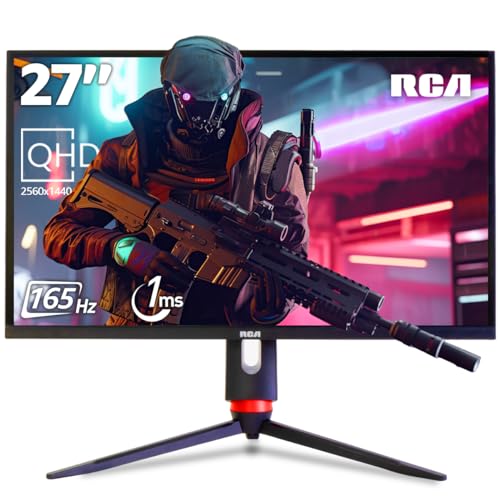
| RCA Evolution Select 27" | QHD 1440p IPS, 165Hz, HDR10, RGB, crosshair overlay | Budget | |
The price column shows a general tier only. Prices move often, so tap a link for the live figure on Amazon.
How to choose a budget 1440p high-refresh gaming monitor
The spec sheets on these monitors throw a lot of numbers at you, and not all of them carry equal weight. A screen that wins on one figure can lose on another that matters more for how games actually feel. Here is what separates a genuinely good QHD gaming monitor from one that just looks good on paper.
Resolution and screen size
QHD, also written 1440p or 2560×1440, packs roughly 1.7 times the pixels of Full HD, so edges look sharper and small text stays clean. How dense that looks depends on size: 1440p on 24 inches is extremely crisp but makes interface elements small, on 27 inches it hits a comfortable sweet spot, and on 32 inches it spreads out for an immersive, easier-to-read picture. Ultrawides go further, stretching to 3440×1440 across a 34-inch 21:9 frame. One screen here, the 24-inch 180Hz SANSUI, is Full HD rather than 1440p; it is included as the value high-refresh option for frame-chasers, and its section flags the difference clearly.
Refresh rate and response time
Refresh rate is how many times per second the screen redraws, measured in hertz, and it is the headline feature of every monitor here. Everything in this lineup runs 165Hz or faster, where motion already looks markedly smoother than 60Hz; the IPS and OLED picks push to 240Hz for competitive play, and one ultrawide reaches 200Hz. Response time, measured in milliseconds, is how quickly a pixel changes color; lower numbers mean less smearing behind fast objects. Note the difference between MPRT and GtG measurements, both appear here, and remember you need a graphics card that can push the frame rates to feel the higher refresh.
Panel type: IPS, VA, and OLED
The panel technology shapes how the image looks more than any single number. IPS panels, the most common here, give wide viewing angles and consistent, accurate color, which suits both gaming and creative work. VA panels, used in the curved Samsung and SANSUI ultrawide, trade some off-axis consistency for noticeably deeper blacks and contrast that flatter dark, atmospheric scenes. OLED, in the AOC QD-OLED, lights each pixel individually for perfect blacks, effectively infinite contrast, and the widest color of the group, the best image quality on offer and priced to match.
Adaptive sync: FreeSync and G-Sync
Adaptive sync matches the monitor’s refresh rate to your graphics card frame by frame, eliminating the screen tearing and stutter you get when the two fall out of step. Every pick here supports it in some form, AMD FreeSync, NVIDIA G-Sync compatibility, or both. If you already know your graphics card brand it is worth confirming the match, though most modern monitors, including several here, work smoothly with cards from either camp.
Color, HDR, and connectivity
For vivid, accurate color look at sRGB and DCI-P3 coverage; the IPS and OLED panels here reach the widest gamuts and double well for creative work. HDR support varies: entry-level HDR10 and HDR400 add some punch, while the OLED’s HDR400 True Black delivers the real thing. On connectivity, DisplayPort usually carries the highest refresh rate while HDMI may cap lower, so check which port unlocks full speed; HDMI 2.1 on one ultrawide also enables variable refresh on consoles. Finally, weigh the stand: most here tilt only, while the KTC adds height and pivot for better ergonomics.
Samsung Odyssey G55C 32" (QHD 1440p, 1000R Curved, 165Hz)
The best seller in this group is a big, immersive way into 1440p gaming. At 32 inches the QHD panel keeps roughly 1.7 times the pixel density of Full HD, so text and textures stay sharp, and the aggressive 1000R curve wraps the edges into your peripheral vision so an open-world map feels like it surrounds you. A 165Hz refresh rate and 1ms MPRT response keep fast motion clean, AMD FreeSync cuts tearing, and HDR10 widens the gap between bright highlights and shadow detail. The VA panel behind it delivers deep blacks that suit cinematic, atmospheric games particularly well.
Pros
- Large 32-inch QHD panel with high pixel density
- Steep 1000R curve for an enveloping field of view
- 165Hz with 1ms MPRT for smooth, low-blur motion
- VA panel produces deep, inky blacks
- FreeSync plus HDR10 for tear-free, vivid visuals
- Eye Saver low-blue-light and flicker-free modes
Cons
- VA viewing angles trail IPS for off-axis color
- Stand offers tilt only, no height adjustment
- 165Hz is lower than the 240Hz IPS and OLED picks
Best for: a large, immersive single-screen setup where the curve and deep blacks carry atmospheric and cinematic games.
Mid-range tier. Check price on Amazon
SANSUI 24" 180Hz (Full HD, Fast 180Hz, Cable Included)
A quick note up front: this SANSUI is a Full HD 1080p panel, not 1440p, and it earns its place as the value high-refresh option for anyone whose graphics card hammers frames more easily at the lower resolution. On a 24-inch screen 1080p still looks crisp at normal distance, and the payoff is a fast 180Hz refresh rate that competitive shooters live for, paired with 1ms MPRT response and Adaptive Sync to keep motion tight and tear-free. Color is respectable for the price at 110% sRGB and 300 nits, connectivity covers DisplayPort 1.4 and HDMI 2.0, and an HDMI cable is in the box. It is the smallest, most affordable, and frame-friendliest screen of the bunch.
Pros
- Fast 180Hz refresh, ideal for competitive FPS
- 1ms MPRT response with Adaptive Sync
- Easy frame rates from modest graphics cards at 1080p
- 110% sRGB coverage and 300 nits brightness
- DP 1.4 and HDMI 2.0, with an HDMI cable included
- Lowest price and smallest footprint here
Cons
- Full HD 1080p, not the 1440p resolution of the others
- 24 inches is the smallest screen in the group
- No built-in speakers; tilt-only stand
Best for: competitive players on a tight budget who value high frame rates over resolution, and tight-space or secondary setups.
Budget tier. Check price on Amazon
SANSUI 34" Ultrawide (UWQHD 3440×1440, Up to 200Hz, Curved)
If you would rather grow sideways than up, this 34-inch ultrawide trades the standard 16:9 frame for a 21:9 UWQHD canvas of 3440 by 1440. The extra width opens up more of the battlefield in strategy and racing titles and leaves room for a document or stream beside your game, while a gentle 1500R curve keeps the far edges angled toward you. The fast VA panel pushes up to 200Hz over DisplayPort (165Hz or 100Hz over HDMI) with 1ms OD response and VRR over HDMI 2.1, so motion stays smooth across that wide surface. Picture-in-picture and picture-by-picture run two sources at once, and an AI crosshair, sniper scope, and blue-light reduction round out the toolkit.
Pros
- Immersive 34-inch 21:9 UWQHD ultrawide canvas
- Up to 200Hz over DisplayPort for smooth motion
- 1500R curve plus fast VA panel with deep blacks
- HDMI 2.1 with VRR and PIP/PBP multitasking
- AI crosshair, sniper scope, and PQ enhancements
- DCI-P3 97% and 130% sRGB color coverage
Cons
- Ultrawide needs game support to fill the screen properly
- VA off-axis color trails IPS panels
- Tilt-only stand, no height adjustment
Best for: immersive single-player worlds, sim racing, and multitaskers who want one wide screen instead of two.
Mid-range tier. Check price on Amazon
AOC Q27G41ZE 27" (QHD 1440p IPS, 240Hz, G-Sync Compatible)
This is the sweet-spot 1440p gaming monitor for a lot of buyers: a 27-inch QHD IPS panel running a blazing 240Hz over DisplayPort, overclockable to 260Hz, with a 0.3ms MPRT response that keeps fast flick shots crisp. IPS means wide viewing angles and consistent color where the VA picks dim off-axis, Adaptive-Sync works with both AMD and NVIDIA cards, it is G-Sync compatible, and HDR-ready support adds punch. A three-sided frameless design suits multi-monitor lineups, the OSD packs Shadow Control and game presets, and AOC backs it with a three-year zero-bright-dot promise. For high-refresh esports at 1440p without OLED money, it is the standout.
Pros
- 240Hz QHD IPS, overclockable to 260Hz
- Ultra-low 0.3ms MPRT for crisp fast motion
- IPS wide viewing angles and consistent color
- Adaptive-Sync for AMD and NVIDIA, G-Sync compatible
- Three-sided frameless design for multi-monitor setups
- Three-year zero-bright-dot warranty
Cons
- 1000:1 contrast and 300 nits limit HDR impact
- Stand offers tilt only, no height or pivot
- 240Hz needs a strong GPU to fully exploit at 1440p
Best for: high-refresh 1440p esports and fast shooters where IPS color and 240Hz both matter.
Mid-range tier. Check price on Amazon
KTC H24T7 24" (QHD 1440p Fast IPS, 180Hz, Full Ergonomic Stand)
The KTC packs a sharp QHD 1440p resolution onto a compact 24-inch Fast IPS panel, which makes for an unusually dense, crisp image, and it is the only sub-32-inch screen here with a fully adjustable stand. Tilt, 90-degree pivot, and 110mm of height adjustment let you dial in ergonomics or rotate the panel vertical for code and documents, while a VESA mount keeps wall and arm options open. On the gaming side a 180Hz refresh (overclockable to 185Hz) with FreeSync and G-Sync compatibility keeps motion smooth, and HDR400 with 99% sRGB, 1.08 billion colors, and a 1000:1 contrast ratio brings color to life. KTC backs it with a three-year warranty.
Pros
- Sharp QHD 1440p on a compact 24-inch Fast IPS panel
- Full ergonomic stand: tilt, pivot, and height
- 180Hz refresh, overclockable to 185Hz
- FreeSync and G-Sync compatibility
- HDR400 with 99% sRGB and 1.08 billion colors
- Three-year warranty with responsive support
Cons
- 24 inches makes 1440p elements small for some
- HDMI is capped at 144Hz; use DisplayPort for 180Hz
- HDR400 is entry-level, not a true HDR experience
Best for: desk-ergonomics seekers and dual-use gaming-plus-productivity setups wanting a sharp, adjustable 1440p screen.
Budget tier. Check price on Amazon
AOC Q27GAZD 27" QD-OLED (QHD 1440p, 240Hz, 0.03ms)
This is the showcase of the group, and the one premium pick: a 27-inch QHD QD-OLED panel where every pixel lights itself, so blacks are truly black and contrast looks effectively infinite. Quantum Dot OLED drives extraordinarily wide color, 147.6% sRGB and 110.2% DCI-P3, with HDR400 True Black certification for highlights that pop against perfect shadows. It pairs that with a 240Hz refresh rate and a near-instant 0.03ms GtG response, so motion is as fast as it is gorgeous, and Adaptive-Sync plus G-Sync compatibility keep it tear-free. Console-gaming ready and VESA mountable, it is the upgrade for anyone who wants the best image quality in this lineup and will pay for it.
Pros
- Self-lit QD-OLED with perfect blacks and contrast
- Exceptionally wide color: 147.6% sRGB, 110.2% DCI-P3
- 240Hz with near-instant 0.03ms GtG response
- HDR400 True Black for vivid, deep HDR
- Adaptive-Sync and G-Sync compatible, console-ready
- VESA mountable for flexible placement
Cons
- Premium tier, the most expensive pick here
- OLED needs care to avoid long-term burn-in
- 240Hz at 1440p rewards a capable graphics card
Best for: image-quality enthusiasts who want OLED contrast and color with high-refresh speed, budget permitting.
Premium tier. Check price on Amazon
Acer Nitro KG271U 27" (QHD 1440p IPS, Up to 180Hz, DCI-P3 95%)
Acer’s Nitro KG271U is a well-rounded 27-inch QHD IPS monitor that balances gaming speed with color accuracy. The 2560 by 1440 IPS panel delivers detailed, consistent images with a zero-frame design that suits multi-monitor rigs, and DCI-P3 95% coverage lets it double as a screen for photo, design, and video work. For play, a refresh rate up to 180Hz with AMD FreeSync smooths fast motion and cuts tearing, while a rapid response of up to 0.5ms GtG keeps smearing and ghosting in check. Two HDMI 2.0 ports plus a DisplayPort 1.2 cover a console and a PC at once. It is the dependable all-rounder of the group.
Pros
- 27-inch QHD IPS with zero-frame design
- Up to 180Hz with AMD FreeSync
- Fast up to 0.5ms GtG response
- DCI-P3 95% for color-critical creative work
- Two HDMI 2.0 plus DisplayPort 1.2 inputs
- Trusted brand with HDR10 support
Cons
- 180Hz trails the 240Hz IPS and OLED picks
- DisplayPort 1.2 rather than the newer 1.4
- Stand is tilt-only, no height or pivot
Best for: a balanced gaming-and-creative screen with strong color and a familiar brand.
Mid-range tier. Check price on Amazon
CRUA 34" Ultrawide (UWQHD 3440×1440 IPS, 165Hz, PIP/PBP)
The CRUA is the budget route into a big 34-inch ultrawide, and unlike the VA ultrawide here it uses an IPS panel for wide, consistent viewing angles. The 21:9 UWQHD canvas adds about a third more horizontal space than a standard 1440p screen, enough for two documents side by side, and in games it reveals more of the map in strategy titles and broadens peripheral vision in racing sims. A 165Hz refresh with AMD FreeSync keeps that wide image fluid, 120% sRGB and 380 cd/m2 peak brightness give colors real pop, and PIP/PBP plus two HDMI and two DisplayPort inputs handle a PC and a laptop together. Built-in speakers and a 3.5mm jack round it out.
Pros
- Large 34-inch 21:9 UWQHD on an IPS panel
- IPS wide viewing angles, consistent off-axis color
- 165Hz with AMD FreeSync for smooth wide-screen motion
- 120% sRGB and bright 380 cd/m2 peak
- PIP/PBP with two HDMI 2.0 and two DP 1.4 inputs
- Built-in speakers and a 3.5mm audio jack
Cons
- Tilt-only stand; wall mount uses 75x75mm VESA
- 165Hz is the lowest refresh among the ultrawides
- Lesser-known brand than the majors here
Best for: budget-minded buyers who want an immersive, color-consistent ultrawide for gaming and multitasking.
Budget tier. Check price on Amazon
RCA Evolution Select 27" (QHD 1440p IPS, 165Hz, RGB, Crosshair)
The RCA Evolution Select is the wallet-friendly 27-inch QHD all-rounder, pairing a 2560 by 1440 Fast IPS panel with a 165Hz refresh and 1ms response (overclocked) for smooth, responsive play. It leans into gaming extras: HDR10 with 95% DCI-P3 color, both G-Sync and FreeSync support, a thin-bezel borderless design, plus RGB backlighting and a built-in crosshair overlay for consistent aiming across titles. It is console-friendly across current and recent systems, the ergonomic stand tilts and pivots, and flicker-free with a low-blue-light filter eases long sessions. For a feature-loaded 1440p screen on a budget, it covers a lot of ground.
Pros
- 27-inch QHD Fast IPS at a budget price
- 165Hz with 1ms response (overclocked)
- HDR10 and 95% DCI-P3 color coverage
- Both G-Sync and FreeSync supported
- RGB backlighting plus built-in crosshair overlay
- Console-friendly with a tilt-and-pivot stand
Cons
- 165Hz trails the faster IPS and OLED picks
- Lesser-known monitor brand in this category
- Entry-level HDR10 rather than a true HDR panel
Best for: budget buyers and console players wanting a big, feature-rich 1440p screen with gaming extras.
Budget tier. Check price on Amazon
The verdict
Best overall
The Samsung Odyssey G55C 32" takes the top spot, and it is the best seller here for good reason. A large 32-inch QHD panel, an enveloping 1000R curve, 165Hz with 1ms MPRT, and the deep blacks of a VA panel add up to the most immersive single-screen experience in this group, with FreeSync and HDR10 keeping it smooth and vivid. If you want speed over size, the AOC Q27G41ZE is the standout 1440p choice, delivering 240Hz on an IPS panel at a mid-range price. Check price on Amazon
Best value
The RCA Evolution Select 27" wins on value. It delivers a genuine 27-inch QHD Fast IPS panel, 165Hz with 1ms response, HDR10, both G-Sync and FreeSync, and gaming extras like RGB lighting and a crosshair overlay, all in the Budget tier. For frame-chasers who care more about raw speed than resolution, the SANSUI 24" 180Hz is the cheapest way to a fast panel, though it is 1080p rather than 1440p. Check price on Amazon
Best premium
The AOC Q27GAZD QD-OLED is the premium pick, and nothing else here comes close on image quality. Self-lit QD-OLED pixels deliver perfect blacks and effectively infinite contrast, the color gamut is the widest of the group, and 240Hz with a 0.03ms response means the speed matches the looks. It costs the most, but for image-quality enthusiasts it is the clear upgrade. Check price on Amazon
Frequently asked questions
Is 1440p worth it over 1080p for gaming?
For most setups, yes. QHD packs roughly 1.7 times the pixels of Full HD, so games look noticeably sharper and more detailed, especially on 27-inch and larger screens where 1080p starts to look soft. The trade-off is that your graphics card works harder to drive those extra pixels at a high frame rate. If your card is modest and you chase the highest frames for competitive play, a fast 1080p panel like the 24-inch SANSUI here can be the smarter call.
How many hertz do I actually need?
Anything from 144Hz up already feels dramatically smoother than a standard 60Hz screen, and every monitor here starts at 165Hz. For fast competitive shooters, 240Hz (on the IPS and OLED picks) gives the crispest motion and lowest perceived lag. For single-player and mixed use, 165Hz is plenty. Remember the refresh rate only helps if your graphics card can push frame rates near it, and that DisplayPort often unlocks the top speed where HDMI may cap lower.
IPS, VA, or OLED, which panel should I pick?
IPS gives the best balance of wide viewing angles and accurate color, making it the safe all-round choice for gaming plus creative work. VA delivers deeper blacks and higher contrast, which flatter dark, cinematic games, at the cost of off-axis consistency; it suits the curved Samsung and SANSUI ultrawide well. OLED, here the AOC QD-OLED, offers perfect blacks and the richest color of all, the best image quality if your budget reaches it, with a little care needed to avoid burn-in.
Do these work with both NVIDIA and AMD graphics cards?
Yes. Every monitor here supports adaptive sync, and most work with cards from both camps, either as AMD FreeSync, NVIDIA G-Sync compatible, or both. Several picks, including the AOC IPS, KTC, and RCA, explicitly list support for both. Tearing-free play just needs a DisplayPort or HDMI connection and adaptive sync enabled in your graphics driver.
Is an ultrawide better than a standard 16:9 monitor?
It depends on what you do. A 21:9 ultrawide like the 34-inch SANSUI or CRUA adds about a third more horizontal space, which is fantastic for immersion in supported games, sim racing, and multitasking with windows side by side. The catch is that some games do not support 21:9 and may show black bars or stretching, and the wider panel asks more of your graphics card. A standard 27-inch 16:9 is the more universally compatible and often faster choice.
This article may contain affiliate links; see our Affiliate Disclosure.