Drop the number pad and your mouse hand suddenly has room to swing, your shoulders unhunch, and the desk stops feeling cramped. The trick is cutting that slab of keys without losing the arrow cluster or the F-row you reach for a hundred times a day, and a 75% layout does exactly that, packing nearly everything into a footprint barely wider than the letters themselves.


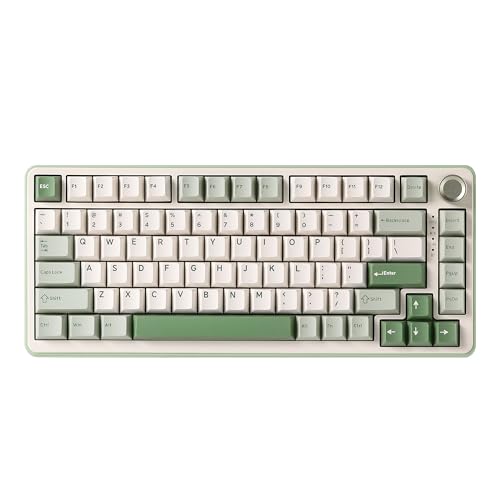


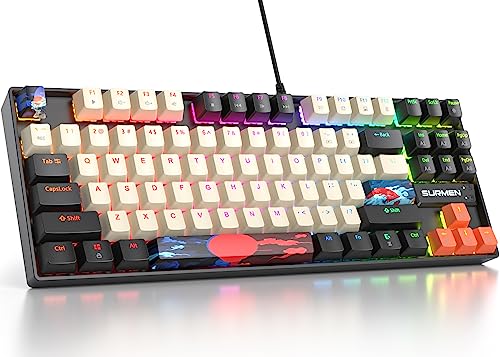

A 75% keyboard worth buying earns it three ways: it keeps the arrows and F-row a smaller 65% or 60% board would strip out, it feels good to type on rather than hollow and rattly, and it fits the way you actually connect, whether that is a single wired cable or three wireless modes across a laptop, tablet, and desktop. That suits a coder living in shortcuts, a gamer freeing up mouse room, a writer who wants the function keys close, or anyone tired of reaching across a number pad for the trackball. The picks below lead with the best sellers, so the most-bought models come first.
| Keyboard | Standout features | Price | Link |
|---|---|---|---|
| MageGee MK-Box (60%) | 68-key compact layout, red linear switches, blue LED backlight, detachable cable | Budget | |
| Redragon K673 PRO | 81 keys, tri-mode wireless, gasket mount, 5-layer dampening, control knob, hot-swap | Mid-range | |
| YUNZII B75 PRO | 82 keys, tri-mode wireless, gasket mount, pre-lubed switches, 4000mAh, knob, hot-swap | Mid-range | |
| Newmen GM326 (Black) | 82 keys, hot-swap, control knob, rainbow RGB, wired USB-C, red switches | Budget | |
| Newmen GM326 (White) | 82 keys, hot-swap, control knob, rainbow RGB, wired USB-C, red switches | Budget | |
| Newmen GM326 (White/Black) | 82 keys, hot-swap, control knob, rainbow RGB, wired USB-C, red switches | Budget | |
| Logitech G512 X 75 Dual SWAP | TMR analog + mechanical hot-swap, 8K polling, 0.1-4.0mm actuation, rapid trigger, PBT | Premium | |
| Fogruaden 75% NKRO | 87 keys, NKRO, red switches, 18 RGB modes, PBT dye-sub keycaps, wired | Budget | |
| MageGee 75% (White/Pink) | 87 keys, red switches, white LED backlight, 12 media keys, splash-proof, metal panel | Budget | |
The price column shows a general tier only. Prices move often, so tap a link for the live figure on Amazon.
How to choose a 75% compact keyboard
The whole appeal of this size is keeping the keys you use and cutting the ones you do not, so the first thing to confirm is exactly what each board includes. From there, build quality, switches, and connectivity decide whether a compact deck feels like a real upgrade or just a smaller version of a cheap keyboard.
Layout: what 75% actually keeps
A true 75% layout drops the number pad but keeps a full row of function keys across the top and a dedicated arrow cluster at the bottom right, usually landing around 81 to 84 keys. Everything sits closer together than on a full-size board, which is what frees the desk space. Watch the count: some keyboards labeled compact are really 65% (no F-row) or 60% (no F-row and no separate arrows), and the difference shows up the moment you reach for a function key. One pick here, the MageGee MK-Box, is a 60% board with separate arrows but no top F-row, included as the smallest, most portable option for anyone who values pocket-sized over a complete top row.
Switch type and feel
Mechanical switches come in three broad flavors. Linear switches, like the red switches on most boards here, press straight down smoothly with no bump and a quiet, fast action that many gamers and fast typists prefer. Tactile switches add a noticeable bump at the actuation point, useful for typing accuracy. Clicky switches add an audible click on top of that bump. If a keyboard is hot-swappable, you are not locked in: you can pull a switch out by hand and drop in a different one with no soldering, so the feel can change later without a new board.
Build: gasket mount, foam, and keycaps
This is where the budget and enthusiast tiers separate. A gasket mount suspends the key plate on soft gaskets instead of screwing it rigidly to the case, giving a slightly cushioned, less harsh typing feel and a softer sound. Layers of internal foam absorb the hollow, pingy echo a cheap empty case produces. Keycap material matters too: PBT plastic resists the greasy shine that ABS develops over time and tends to feel more textured under the fingers. Pre-lubricated switches and tuned stabilizers further smooth the sound and remove rattle from the bigger keys.
Connectivity: wired versus tri-mode wireless
Wired boards connect over a single USB cable, usually detachable USB-C, with zero latency and nothing to charge, which is plenty for a fixed desktop. Tri-mode wireless adds two more options on top of that cable: Bluetooth for pairing several devices like a laptop and a tablet, and a 2.4 GHz USB dongle for a stable, low-latency link closer to wired. If you switch between machines or want a clean cable-free desk, tri-mode is worth the small premium; a large battery, such as the 4000mAh cell in one pick here, keeps it going for long stretches between charges.
Extras: knobs, RGB, and anti-ghosting
A control knob in the top corner is a small luxury that earns its place fast, handling volume and backlight on the fly without a function-key combo, and on some boards switching modes or scrubbing media. RGB or single-color backlighting sets the mood and helps in the dark; most boards here offer multiple effects and brightness levels. Finally, anti-ghosting or full N-key rollover (NKRO) ensures every key registers when several are pressed at once, which matters for gaming and fast typing alike.
MageGee MK-Box (68-Key 60% Compact, Red Switches)
The best seller in this group is also the smallest: a 68-key 60% board that strips the layout right down while still keeping separate arrow keys and F1-F12 accessible through the function layer, so it travels easily in a bag or fits a tight desk. Linear red switches give a smooth, quiet keystroke with no tactile bump, and 16 blue LED backlight modes adjust for speed and brightness through Fn shortcuts. Full anti-ghosting across all 68 keys, a detachable USB cable, and dual kickstand feet round it out, and it plugs into Windows, Mac, or Linux with no drivers. Note this is a 60% layout, so the F-row lives on a function layer rather than its own dedicated row.
Pros
- Smallest, most portable layout here at just 68 keys
- Keeps separate arrow keys despite the tiny footprint
- Smooth, quiet red linear switches
- 16 backlight modes with Fn brightness and speed control
- Detachable cable and broad Windows, Mac, Linux support
Cons
- 60% layout: no dedicated F-row, function keys on a layer
- Wired only, no wireless modes
- No hot-swap, so switches are fixed
Best for: the tightest desks and travel bags, where pocketable size beats a full top row.
Budget tier. Check price on Amazon
Redragon K673 PRO (81-Key Tri-Mode, Gasket, Hot-Swap)
The K673 PRO packs a surprising amount of enthusiast hardware into the mid-range tier. Its gasket-out construction swaps rigid screws for precision covers on gaskets, adding flexibility and a softer, cleaner typing sound, backed by a five-layer dampening stack of foams and pads that kills the hollow echo cheaper boards suffer. Tri-mode connection covers USB-C wired, Bluetooth, and 2.4 GHz wireless, a single control knob handles brightness and media, and the hot-swap sockets let you change switches by hand. The 81-key layout keeps the full top function-key zone so there are no awkward Fn combos for F-keys, with extra room for the mouse where the number pad used to be.
Pros
- Tri-mode wireless: USB-C, Bluetooth, and 2.4 GHz
- Gasket mount plus five layers of noise dampening
- Hot-swap sockets for changing switches without soldering
- Control knob for backlight and media
- Dedicated top function-key row, no Fn combos needed
Cons
- Step up in price from the wired budget boards
- Wireless features add a learning curve over plug-and-play
- Linear red switches only in this configuration
Best for: anyone wanting wireless flexibility and a tuned typing feel without paying premium prices.
Mid-range tier. Check price on Amazon
YUNZII B75 PRO (82-Key Tri-Mode, Pre-Lubed, 4000mAh)
The B75 PRO leans into the creamy-sound, soft-feel side of the hobby. It pairs a gasket-mount structure with five-layer padding, double-shot keycaps, precision-tuned stabilizers, and pre-lubricated switches, all aimed at a smooth, solid keystroke and a muted, satisfying sound straight out of the box. An 82-key layout keeps number-row, function keys, and arrows together, while the multifunction knob adjusts volume and backlight and, on a long press, toggles between gaming and office modes. Tri-mode wireless and a large 4000mAh battery keep it untethered for long sessions, the sockets are fully hot-swappable for 3-pin and 5-pin switches, and south-facing RGB lights more than 20 effects with programmable software on Windows.
Pros
- Pre-lubed switches and tuned stabilizers for a smooth feel
- Gasket mount with five-layer padding for a muted sound
- Tri-mode wireless with a large 4000mAh battery
- Knob toggles gaming and office modes on a long press
- Full hot-swap for 3-pin and 5-pin switches
Cons
- Programmable software is Windows-only
- Higher price than the wired budget picks
- Heavier and less travel-friendly than slim boards
Best for: typists chasing a soft, creamy, pre-tuned feel without building a board from parts.
Mid-range tier. Check price on Amazon
Newmen GM326 in Black (82-Key Hot-Swap with Knob)
The GM326 is the value workhorse of the bunch, delivering hot-swap sockets and a control knob at a budget price most boards reserve for plain fixed-switch decks. The 82-key layout saves desk space while keeping a multifunction knob in the top corner for quick volume control, plus three indicator lights for Caps Lock, Win Lock, and the Windows/Mac switch. Linear red switches keep the action smooth and quiet, rainbow backlighting offers six colors and 20 modes, and a detachable USB-C cable makes it easy to pack. Full anti-ghosting suits gamers and typists alike, and two-stage tilt legs set the angle. This is the classic black colorway.
Pros
- Hot-swap sockets and a knob at a budget price
- 82-key layout keeps F-row and arrows
- Status indicators for Caps, Win Lock, and Mac switch
- Rainbow RGB with six colors and 20 modes
- Detachable USB-C cable and two-stage tilt legs
Cons
- Wired only, no wireless modes
- No gasket mount or heavy sound dampening
- Red linear switches only as shipped
Best for: a budget pick that still lets you swap switches and tweak volume with a knob.
Budget tier. Check price on Amazon
Newmen GM326 in White (Same Board, Lighter Look)
This is the same GM326 in an all-white finish for anyone matching a brighter desk setup. The hardware is identical to the black version: an 82-key compact layout, hot-swap sockets for 3-pin switches, a multifunction volume knob, and smooth red linear switches. Rainbow backlighting reads especially vivid against the white keycaps and case, with six colors and 20 modes to choose from. A detachable USB-C cable, three status indicators, and two-stage adjustable tilt legs carry over unchanged, as does the full-key anti-ghosting and broad Windows and Mac compatibility.
Pros
- Identical hot-swap and knob features in white
- RGB looks vivid against the white keycaps
- 82-key layout with F-row and arrows intact
- Detachable USB-C cable for easy transport
- Full anti-ghosting for gaming and typing
Cons
- Wired only, no wireless modes
- Light keycaps can show grime sooner than dark ones
- No gasket mount or heavy dampening
Best for: a bright, white-themed desk that still wants hot-swap and a control knob.
Budget tier. Check price on Amazon
Newmen GM326 in White/Black (Two-Tone Colorway)
The two-tone GM326 splits the difference with a white-and-black keycap scheme that adds contrast without committing to either extreme. Underneath it is the same dependable board: an 82-key portable layout, hot-swap sockets, a top-corner multifunction knob, and red linear switches that stay smooth and quiet. The rainbow backlight still runs six colors and 20 modes, the USB-C cable detaches for travel, and the three indicator lights plus two-stage tilt legs match the other finishes. Full anti-ghosting and plug-and-play support for Windows and Mac complete a familiar, no-fuss package in a fresh look.
Pros
- Two-tone styling for contrast on the desk
- Same hot-swap sockets and volume knob
- 82-key layout retains F-row and arrows
- Six-color, 20-mode rainbow backlight
- Detachable USB-C cable and tilt legs
Cons
- Wired only, no wireless modes
- No gasket mount or sound dampening
- Red linear switches only as shipped
Best for: those who want the GM326’s value features in a two-tone look between black and white.
Budget tier. Check price on Amazon
Logitech G512 X 75 Dual SWAP (TMR Analog, 8K Polling)
The G512 X 75 is the technical showpiece here, built for competitive play in a 75% frame. Its headline trick is Dual SWAP: you can run standard mechanical switches or drop in magnetic TMR analog switches across dozens of dedicated beds, mixing both on one board. Those analog sensors enable custom actuation anywhere from 0.1 to 4.0 mm and rapid trigger for instant re-actuation, while an 8K polling rate delivers a 0.125 ms response for near-zero latency. A silicone gasket mount, double-shot PBT keycaps, up to 44% recycled plastic, a LIGHTSYNC RGB lightbar, and deep G HUB programming with macros and analog profiles round out a serious, premium package.
Pros
- Dual SWAP runs analog and mechanical switches together
- Adjustable actuation from 0.1 to 4.0 mm with rapid trigger
- 8K polling rate for ultra-low 0.125 ms latency
- Durable double-shot PBT keycaps and gasket mount
- Deep G HUB remapping, macros, and analog profiles
Cons
- Premium tier, by far the priciest pick here
- Wired only, no wireless modes
- Analog features have a steeper setup curve
Best for: competitive gamers who want adjustable analog actuation and rapid trigger in a compact deck.
Premium tier. Check price on Amazon
Fogruaden 75% NKRO (87-Key Wired, PBT Dye-Sub)
The Fogruaden keeps things simple and wired while including a detail the other budget boards skip: PBT dye-sublimation, double-shot keycaps that resist shine and hold their legends rather than the cheaper ABS most low-cost boards use. Its 87-key 75% layout saves desk space and keeps the keys you need, full N-key rollover (NKRO) means every key registers at once for gaming and fast typing, and red linear switches keep the action smooth and quiet. Eighteen RGB modes across eight colors light the OEM-profile keycaps, and a kickstand sets the typing angle, all over a reliable USB wired connection with no battery to manage.
Pros
- PBT dye-sub keycaps resist shine and fading
- Full NKRO so every key registers at once
- 87-key 75% layout with arrows and F-row
- 18 RGB modes across eight colors
- Reliable wired connection, nothing to charge
Cons
- Wired only, no wireless modes
- No hot-swap or gasket mount
- Lesser-known brand than the majors here
Best for: a wired budget board where keycap durability matters more than wireless or hot-swap.
Budget tier. Check price on Amazon
MageGee 75% MK-Star (87-Key Wired, White/Pink)
This MageGee leans into looks as much as function, with a white-pink-purple colorway, an extra set of 16 purple keycaps in the box, and a durable metal panel that guards against scratches. The 87-key 75% layout keeps the F-row and arrows, red linear switches give a smooth, quiet press, and 19 white LED backlight modes, both static and dynamic, adjust through Fn shortcuts. Twelve multimedia keys handle playback and volume, full anti-ghosting suits gaming and typing, and a splash-proof design plus firm kickstand feet add everyday durability. It plugs into Windows, Mac, or Linux with no drivers needed.
Pros
- Eye-catching white/pink/purple finish with spare keycaps
- Durable metal panel and splash-proof design
- 87-key layout keeps F-row and arrows
- 19 backlight modes plus 12 multimedia keys
- Plug-and-play across Windows, Mac, and Linux
Cons
- Wired only, no wireless modes
- No hot-swap, so switches are fixed
- Single-color white backlight, not full RGB
Best for: a styled, splash-proof desk setup that still keeps the full 75% key set.
Budget tier. Check price on Amazon
The verdict
Best overall
The Redragon K673 PRO takes the top spot among the true 75% boards. It is the best seller of the full-layout picks and bundles features that usually cost more: tri-mode wireless, a gasket mount with five-layer dampening for a clean, soft sound, hot-swap sockets so you can change the feel later, and a control knob, all in the mid-range tier with the full top function row intact. It is the most complete package for the money. Check price on Amazon
Best value
The Newmen GM326 wins on value, in whichever colorway suits your desk. Hot-swap sockets and a control knob at a budget price are rare together, and the 82-key layout keeps the F-row and arrows that define the size. You give up wireless and a gasket mount, but for the money the ability to swap switches and adjust volume with a knob is hard to match. Check price on Amazon
Best premium
The Logitech G512 X 75 Dual SWAP is the premium pick. Its TMR analog switches with 0.1-4.0 mm adjustable actuation and rapid trigger, 8K polling for 0.125 ms latency, and Dual SWAP flexibility put it in a different performance class, backed by PBT keycaps and deep software. For a creamy typing feel at a gentler premium, the YUNZII B75 PRO with its pre-lubed switches and gasket build is the standout alternative. Check price on Amazon
Frequently asked questions
What is the difference between 75%, 65%, and 60% keyboards?
A 75% keyboard drops the number pad but keeps a full top row of function keys and a dedicated arrow cluster, usually around 81 to 84 keys. A 65% board removes the F-row, so function keys move to a layer. A 60% board removes both the F-row and the separate arrow cluster, shrinking further but relying on function combos for more keys. Most picks here are 75%; the MageGee MK-Box is a 60% board kept in for its portability.
Do 75% keyboards still have arrow keys and function keys?
Yes, that is the defining trait of the size. A genuine 75% layout keeps both the dedicated arrow keys and the full F1 to F12 row, which is exactly what separates it from smaller 65% and 60% boards. If you rely on arrows for editing or function keys for shortcuts, a 75% layout keeps them without the desk space a full-size board demands.
What does hot-swappable mean and do I need it?
Hot-swappable means you can pull a switch out of the board and push a new one in by hand, with no soldering, so you can change the typing feel or replace a faulty switch any time. You do not strictly need it if you are happy with the included switches, but it is a useful safety net and a path to experimenting later. Several boards here, including the Redragon, YUNZII, and Newmen picks, support it.
Should I choose wired or wireless?
Wired boards connect over one USB cable with no latency and nothing to charge, which is ideal for a permanent desktop. Tri-mode wireless adds Bluetooth for pairing multiple devices and a 2.4 GHz dongle for a stable, near-wired link, handy if you switch between a laptop, tablet, and desktop or want a cable-free desk. The Redragon K673 PRO and YUNZII B75 PRO offer all three modes; the rest here are wired.
Why do gasket-mount keyboards feel and sound better?
A gasket mount suspends the key plate on soft gaskets rather than screwing it rigidly into the case, giving a slightly cushioned keystroke and absorbing harsh vibration. Combined with internal foam layers, it removes the hollow, pingy echo that bare-case budget boards often produce, leaving a deeper, softer sound. It is one of the clearest upgrades you feel when stepping up from an entry-level board to the mid-range picks here.
This article may contain affiliate links; see our Affiliate Disclosure.