Weight is the number this category talks about more than any other, so here is the awkward part: of the mice on this page, exactly one publishes a figure under 60 grams. Most do not publish a weight at all, including the most expensive one here. Meanwhile the best-selling wireless gaming mouse in the world weighs nearly double the magic number and outsells everything else several times over.


That gap between what gets marketed and what gets bought is the useful thing here. Weight matters, but it is one of four decisions, alongside how the mouse is powered, how many buttons you actually need, and whether the shape suits your hand. The sensor, which gets the biggest numbers on the box, is the one that matters least.
At a glance
| Mouse | Standout feature | Price tier | Link |
|---|---|---|---|
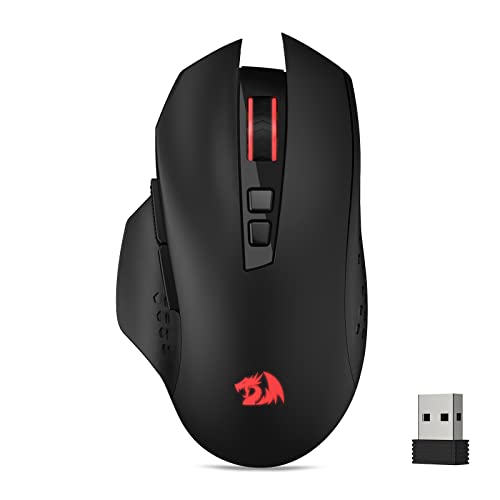
| Redragon M656 | Cheapest here; real sensor and macro buttons | Budget | |
| Logitech G305 | The best seller; 250 hours on one AA | Budget | |
| Redragon MMO | 16 programmable buttons | Budget | |
| Razer Basilisk V3 X | 285 hours wireless, 535 on Bluetooth | Budget | |
| Logitech G502 | Charges through the mat; tunable weights | Mid-range | |
| Razer Viper V4 Pro | 49g; the only sub-60g mouse here | Premium | |
| Logitech G PRO X2 | Magnetic analog switches with rapid trigger | Premium | |
How to choose a wireless gaming mouse
Weight is real, and it is mostly not published
A lighter mouse is genuinely easier to flick and stop, and over a long session your forearm knows the difference. So it is worth noticing who will actually commit to a number. Razer says the Viper V4 Pro is 49g, and is precise enough to add that this is 9% lighter than the model before it. Logitech says the G305 is 3.4 oz, which is about 96g, and frames it plainly as wireless not having to mean heavy rather than pretending it is featherweight. Everyone else here, including the dearest mouse on the page, says nothing at all. Take silence as an answer.
How it is powered decides half the design
This is the trade the G305 makes out loud. It runs 250 hours of continuous play on a single AA, which means it never needs charging and never dies mid-match, and it means carrying that AA around inside it. That battery is a good part of why it is not a sub-60g mouse. The rechargeables go the other way: Razer’s Basilisk V3 X claims 285 hours on its wireless mode and 535 on Bluetooth, Redragon’s MMO packs a 1000mAh cell. The G502 sidesteps the question entirely with PowerPlay, charging continuously from a compatible mat so the battery is never your problem.
Ignore the DPI figure
The numbers on this page run from 4000 to 50,000, and almost nobody plays above about 3,200. A 50K sensor is not four times better than a 12K sensor; it is a headline. The specifications that actually describe a sensor are tracking speed and acceleration, which is why Razer quotes 930 IPS and 90G and Logitech quotes over 888 IPS and 88G on its flagship. Every mouse here has a sensor good enough that you will never be the reason you lost. Buy on shape, weight and buttons instead.
Count the buttons you will really use
This is the biggest fork in the category and it has nothing to do with performance. Redragon’s MMO mouse has 16 programmable buttons, which is a keyboard under your thumb and exactly right if you play games with more abilities than fingers. The G502 has 11. The Basilisk has 9. The esports mice go the other way and strip back, because a competitive shooter needs five buttons and no distractions. More buttons is not better; it is different, and choosing wrong is the mistake people actually make here.
Switches are where the flagships are going
The genuinely new thing here is on the G PRO X2 SUPERSTRIKE: magnetic analog switches with a customisable rapid trigger, which means the click registers at a depth you choose and resets the instant you lift, rather than traveling a fixed distance. Logitech claims 30 ms faster clicks and adds haptic feedback through the mouse. Razer’s answer on the Viper is an optical scroll wheel, using light instead of mechanical contact so scrolling stays consistent as the mouse ages. Both target the same thing: the parts that wear out.
Shape beats specification
Razer describes the Basilisk’s form as favored by millions, and that is the real reason to buy it over a lighter mouse: it fits a palm grip, which no amount of grams fixes if the shape is wrong for your hand. The G502 goes further and lets you tune the weight with removable pieces. If you have a large hand or you rest your palm down, an ergonomic mouse you like will beat a 49g competitive shape you are fighting.
Redragon M656
The cheapest mouse here and a real one, not an office mouse with lights on it. It uses a Pixart PAW3104 optical sensor, which is a named part rather than a vague claim, running at 500Hz polling with five on-board DPI steps spanning 1000 up to 4000. Those steps are chosen sensibly around where people actually play instead of climbing to a marketing number. Seven programmable buttons take macros and keybinds, and the wireless connection is a 2.4Ghz dongle. Redragon also says the sensor choice is partly about power draw, which is the reasoning of someone who thought about it.
Pros:
- Cheapest mouse here by a wide margin
- Named Pixart sensor with sensible DPI steps
- Seven programmable macro buttons
- Sensor chosen partly for battery efficiency
Cons:
- 500Hz polling, half what the flagships offer
- No weight published
- 4000 DPI ceiling, though few will reach it
Best for: a genuine wireless gaming mouse on the smallest budget.
Logitech G305
The best-selling wireless gaming mouse here by an enormous distance, and the reason is that it solved the hard problem first. Lightspeed wireless gives a 1 ms response that Logitech describes as faster than wired, and the HERO sensor is efficient enough to run 250 hours of continuous play on one AA battery. No charging, no dock, no dying mid-match: you swap a battery twice a year. At 3.4 oz it is not a featherweight, and Logitech is straight about the trade rather than hiding it. Six programmable buttons and a classic shape, at a price that undercuts nearly everything.
Pros:
- Comfortably the best-selling mouse on this page
- 250 hours on one AA; no charging, ever
- 1 ms Lightspeed wireless; a proven competitive standard
- Publishes its weight, which most here do not
Cons:
- 3.4 oz; nowhere near the sub-60g class
- Six buttons only
- An AA in the hand is part of that weight
Best for: almost everyone, which is why almost everyone buys it.
Redragon MMO
Sixteen programmable buttons, which is the entire pitch and a good one. If you play games where every ability needs a key, this puts a grid of them under your thumb and every one is remappable through macro editing, so the rotation lives in your hand instead of across a keyboard. DPI adjusts from 100 to 16,000 with an adjustable polling rate, a 1000mAh battery keeps it going, and there is RGB across sixteen million colors in four modes if you want it. This is a specialist tool and it makes no attempt to be light, which for its job is the correct decision.
Pros:
- 16 fully remappable buttons; a thumb keyboard
- Wide DPI range with adjustable polling
- Large 1000mAh rechargeable battery
- Cheap for what it does
Cons:
- No weight published, and this will not be light
- Sixteen buttons is clutter if you play shooters
- Sensor not named
Best for: MMOs and anything with more abilities than fingers.
Razer Basilisk V3 X
The comfortable one. Razer leans on the Basilisk’s shape rather than its numbers, describing a signature ergonomic form favored by millions, and that is the real reason to pick it: it supports a palm grip properly, which is something a 49g competitive shape cannot do for you. Nine customisable controls sit within reach. Battery life is the standout figure, up to 285 hours on HyperSpeed wireless and up to 535 on Bluetooth, and having both means one mouse covers the gaming PC and the laptop. The 5G Advanced 18K optical sensor is more than enough.
Pros:
- Ergonomic shape built for palm grip
- Up to 285 hours wireless, 535 on Bluetooth
- Both HyperSpeed and Bluetooth; covers two machines
- Nine customisable controls
Cons:
- No weight published; an ergonomic shell is not light
- Mechanical switches rather than the optical ones above it
- Costs noticeably more than the G305
Best for: a palm grip and long sessions, over chasing grams.
Logitech G502
The one that refuses to answer the battery question, and gets away with it. Add a PowerPlay mat and the mouse charges continuously while you use it, which means the battery stops existing as a concept rather than merely lasting a long time. Eleven customisable buttons and a hyper-fast scroll wheel that free-spins, plus tunable weights so you can set the mass where you want it instead of accepting someone else’s. The HERO 25K sensor arrived as a free software update to everyone who already owned one, which is an unusually decent way to handle existing customers.
Pros:
- PowerPlay charges it through the mat as you play
- 11 customisable buttons and a free-spinning wheel
- Tunable weights; you choose the mass
- The 25K sensor came free to existing owners
Cons:
- Heavy, and the weights only go one way from there
- PowerPlay is a separate and not cheap purchase
- No weight published for the mouse itself
Best for: a loaded mouse you never have to charge or think about.
Razer Viper V4 Pro
The only mouse here that delivers what this category advertises. It is 49g, Razer says so plainly, and it is precise enough to tell you that is 9% lighter than the model it replaces, which is the language of a company that measured rather than estimated. Everything else follows from that number: HyperSpeed Wireless Gen-2, a Focus Pro 50K Gen-3 sensor tracking to 930 IPS and 90G, and an optical scroll wheel that actuates with light instead of mechanical contact, so it stays consistent as it wears. It was built with competitive players and it shows in what has been left out.
Pros:
- 49g, published; the only genuinely sub-60g mouse here
- Optical scroll wheel; no mechanical part to wear
- Tracks to 930 IPS and 90G
- Razer quantifies the improvement rather than gesturing
Cons:
- Expensive, and the price is mostly the weight
- Stripped back; wrong mouse for MMOs
- A competitive shape, not an ergonomic one
Best for: competitive shooters, where 49g is the whole point.
Logitech G PRO X2
The most interesting mouse here and the most expensive. Its magnetic analog switches bring rapid trigger to a mouse: the click registers at a depth you set and resets the moment you lift, instead of traveling a fixed distance every time, and Logitech claims 30 ms faster clicks from it. There is haptic feedback built in, which is genuinely new on a mouse, and a HERO 2 sensor tracking over 888 IPS at 88G. It was designed alongside esports professionals. What it does not do, on a page where weight is the headline, is tell you what it weighs.
Pros:
- Magnetic analog switches with adjustable rapid trigger
- Haptic feedback; nothing else here has it
- HERO 2 sensor at over 888 IPS and 88G
- Developed with competitive professionals
Cons:
- The most expensive mouse on this page
- No published weight, which is a loud silence here
- Rapid trigger matters far less on a mouse than a keyboard
Best for: wanting the newest switch technology before anyone else.
The verdict
Two things worth carrying into the picks. The DPI figures are noise: nothing here will hold you back, and nobody plays at 50,000. And a mouse that fits your hand beats a lighter one that does not, every time.
Best overall: Logitech G305. It outsells everything else here by a distance and it earns that. The 1 ms Lightspeed connection is a proven competitive standard, and the HERO sensor is efficient enough to run 250 hours on a single AA, so charging simply never enters your life. At 3.4 oz it is not light, and Logitech says so instead of hiding it. For most people this is the answer and the money saved buys a better mat.
Best value: Redragon M656. The cheapest thing here and still a proper gaming mouse: a named Pixart sensor, 500Hz polling, seven programmable buttons, and five DPI steps chosen around where people actually play rather than climbing to a headline. You give up polling rate and any published weight. For a first wireless mouse, very little is missing.
Best premium: Razer Viper V4 Pro. The only mouse on this page that does the thing this category is sold on. It is 49g, published, and Razer is exact enough to say that is 9% lighter than before. The optical scroll wheel removes a part that wears out, and it tracks to 930 IPS and 90G. If you play competitive shooters, this is the one; if you play anything else, it is a lot of money for lightness you will not use.
FAQ
Does a sub-60g mouse actually matter?
For competitive shooters, yes: lighter is easier to flick and stop, and your forearm notices over hours. For everything else it matters far less than shape. Only the Viper V4 Pro here is genuinely sub-60g at 49g. The G305 is 3.4 oz and outsells it many times over, which tells you how most people weigh that trade.
Should I care about a 50,000 DPI sensor?
No. Almost nobody plays above about 3,200, so a 50K sensor is not four times better than a 12K one. If you want a meaningful sensor number, look at tracking speed and acceleration: 930 IPS and 90G on the Viper, over 888 IPS and 88G on the G PRO X2. Every mouse here tracks better than you need.
AA battery or rechargeable?
An AA never needs charging and never dies mid-match, which is why the G305 does 250 hours on one and remains the best seller, and it is part of why it is not light. Rechargeables save that weight: the Basilisk claims 285 hours wireless. The G502 avoids the question altogether by charging from a PowerPlay mat while you play.
How many buttons do I need?
Five, if you play shooters, which is why the esports mice strip back. Sixteen, if you play MMOs, which is why the Redragon has that many. This is the biggest fork in the category and nothing to do with performance. Buying the wrong side of it is the common mistake.
What is a rapid trigger on a mouse?
The G PRO X2’s magnetic switches register a click at a depth you choose and reset the instant you lift, rather than always traveling the same distance. Logitech claims 30 ms faster clicks. It is real, and it matters much less on a mouse than on a keyboard, where you hold and release keys constantly.
This article may contain affiliate links; see our Affiliate Disclosure.