One controller in this search says, in its own listing, that it is not compatible with the Xbox system. The same listing then tells you how to pair it with your PC: turn on Bluetooth, and select “Xbox Wireless Controller” from the list. Both sentences are true, and read together they explain everything about how controllers work on Windows.



At a glance
| Product | Sticks | Price tier | Link |
|---|---|---|---|
| VOYEE Wired | Standard. Its own listing says not for FPS | Budget | |
| Logitech G F310 | Standard. Can fake a keyboard and mouse | Budget | |
| AceGamer Aurora II | Hall effect, and it admits they drifted | Budget | |
| 8BitDo Ultimate 2C | Hall sticks and Hall triggers, with metal rings | Budget | |
| GameSir G7 SE | Hall sticks and triggers. Officially Xbox | Mid-range | |
| Xbox Wireless | Standard, at nearly double the Hall pads’ price | Mid-range | |
| ManbaOne | Hall. And a screen instead of a config app | Premium | |
How to choose
Windows games expect an Xbox controller
PC games learned to read one controller, and it was Microsoft’s. That is why the pad here that says it is not compatible with the Xbox system also tells you to pair it by selecting “Xbox Wireless Controller” on your PC: it presents itself as one, because that is what games are listening for. It is also why the officially licensed Xbox pad here works with no drivers at all. Nothing is being hidden. It just means “works on PC” mostly means “convincingly pretends to be an Xbox pad”.
Hall effect sticks are the specification that matters
A normal stick reads its position by dragging a contact across a resistive strip. The strip wears, the reading wanders, and one day your character walks left on its own. That is stick drift, and it is why controllers die. A Hall effect stick reads a magnet with a sensor and nothing touches anything, so there is no strip to wear out. Four controllers here have them, four do not, and the split does not follow the price.
The cheapest controller here disqualifies itself
Read the first bullet of the least expensive pad in this search and it says, plainly, plug and play, not for FPS games. That is a controller telling you not to aim with it. It is an unusually real sentence and it points straight at the previous section: a stick that cannot hold a precise center is fine for a platformer and hopeless in a shooter. It is not a bad controller. It is a controller that knows what it is.
Watch a Hall listing admit its Hall sticks drifted
The whole point of a magnetic stick is that nothing rubs, so nothing wears, so it should not drift. One listing here lists among its upgrades “reduced Hall stick drift for improved accuracy”. If a contactless sensor is drifting, the wear is not the problem and the fix is in the electronics or the calibration. It is worth reading twice, because it is a company quietly telling you its previous version had the fault the technology exists to avoid.
A polling number is only true on some cables
One controller here quotes 1000Hz and then does something the rest do not: it puts the qualifying condition in brackets, for 2.4G and wired connection. So over Bluetooth, you do not get it. That parenthesis is the most accurate thing on this page, because every wireless pad has this asymmetry and almost none of them mention it. Another qualifies its own figure as a wired polling rate. If a controller quotes a number with no connection attached, the number is for the best case.
Remapping without software is worth more than it sounds
Extra paddles on the back are common now, and what separates them is what it takes to program one. Two controllers here need you to install an application to remap anything, one of them the official pad, one of them explicitly noting the software is a requirement. One does its remapping on the controller itself with no software at all. One replaces the app with a two inch screen on the pad. The buttons are the same. The Tuesday evening where you just want to move jump is not.
Back paddles get pressed by accident
Nobody mentions this until you own a pad with paddles: you grip harder in a tense moment and fire your ultimate by mistake. One controller here fits physical switches to lock the back buttons out, which is the correct fix and costs nothing. Another sells its back buttons as a way to eliminate false triggers by keeping your thumbs on the sticks. Both are addressing something real, and the switch is the one you will use.
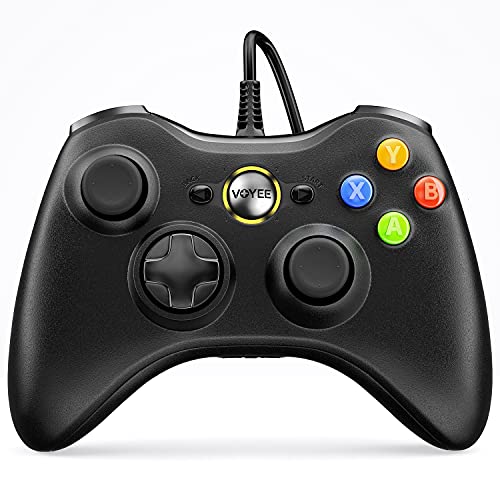
VOYEE Wired
The cheapest controller in this search and the most self-aware. It is a wired 360-pattern pad for Windows 11 down to 7, plug and play, with rumble that responds automatically to the game, upgraded triggers, contoured grips and a 7.2 foot cord. It comes with 45 days money back and a year against defects. And its own first bullet says, without being asked, that it is not for FPS games, which tells you exactly where its sticks sit and saves you from finding out in a match.
Pros:
- The lowest price here by a wide margin
- Tells you upfront it is not for shooters
- Plug and play back to Windows 7
- 45 days money back and a year against defects
Cons:
- Not for FPS games, by its own listing
- No Hall effect sticks; expect drift eventually
- Wired only, on a 7.2 foot cord
Best for: platformers and emulators, not aiming.
Logitech G F310
An old design that still does one thing nothing else here can. Its Profiler software programs the pad to send keyboard and mouse commands, which means it works with games that have no controller support whatsoever, and PC libraries are full of those. The floating D-pad sits on four separate switches rather than one pivot, so quick direction changes register properly, and there are ten programmable buttons and an eight-way D-pad. Six foot cord, 360-era layout, no learning curve.
Pros:
- Profiler sends keyboard and mouse commands
- Works with games that have no gamepad support
- D-pad on four switches, not one pivot
- Ten programmable buttons; familiar layout
Cons:
- No Hall sticks; an old design
- Profiler needs software installed, and says so
- Six foot cord; the shortest here
Best for: old PC games that never heard of a gamepad.
AceGamer Aurora II
The pad that accidentally explains the category: it says it is not compatible with the Xbox system, then instructs you to pair it on your PC by choosing “Xbox Wireless Controller”. Beyond that it is a lot for the money: Hall sticks, 2.4G with an encrypted dongle or Bluetooth, a 1000mAh battery, RGB, two programmable back buttons and, better, two physical switches to lock those back buttons out when you are gripping hard. It runs on PC, Switch, iOS and Android. Its upgrade list includes reduced Hall stick drift.
Pros:
- Physical switches to lock out the back buttons
- Hall sticks, 2.4G dongle or Bluetooth, 1000mAh
- Works across PC, Switch, iOS and Android
- Sleeps after five minutes; wakes on the Home button
Cons:
- Lists reduced Hall stick drift as an upgrade
- Explicitly not compatible with Xbox consoles
- Pairing needs a two-button sequence to remember
Best for: back paddles you can switch off.
8BitDo Ultimate 2C
Five bullets, no adjectives, and everything that matters in them. Hall effect on both the sticks and the triggers, wear-resistant metal rings around the sticks, extra L4 and R4 bumpers, and custom mapping done on the controller with no software to install. The 1000Hz polling rate comes with the real bracket nobody else writes: for 2.4G and wired, which is to say not over Bluetooth. It is Windows and Android only, and it costs a little over half what the pad without Hall sticks costs.
Pros:
- Hall effect on sticks and triggers both
- Remaps on the controller; no software at all
- States that 1000Hz applies to 2.4G and wired only
- Metal stick rings; extra L4 and R4 bumpers
Cons:
- Windows and Android only; no Xbox, no PlayStation
- No audio jack for a headset
- Bluetooth drops you below the headline polling rate
Best for: everything that matters, at almost the lowest price.
GameSir G7 SE
Hall sticks and Hall triggers inside an officially licensed Xbox pad, which is the combination the rest of this page makes you choose between. Because it is licensed, Windows recognizes it with no drivers and no pretending, and it works on the consoles too. The USB cable is removable, there are two back buttons, a 3.5mm jack for a headset, pulsating trigger vibration and an asymmetric grip motor. Laser-engraved texture on the handles. It is wired only, which is the trade for the price.
Pros:
- Hall sticks and triggers in a licensed Xbox pad
- No drivers needed; Windows already knows it
- Two back buttons and a 3.5mm headset jack
- Removable USB cable; works on the consoles too
Cons:
- Wired only; no wireless at all
- Costs half again what the wireless Hall pad costs
- No polling rate published
Best for: Hall sticks that Windows recognizes on sight.
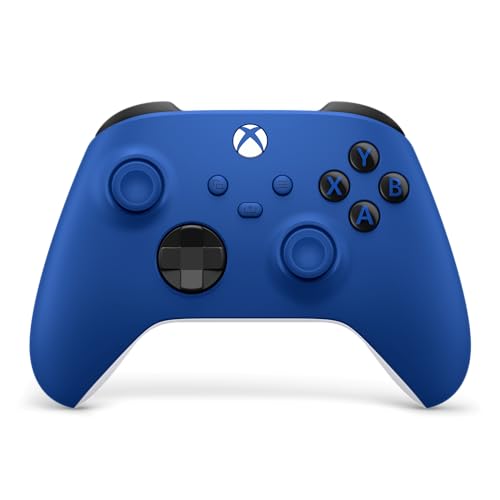
Xbox Wireless
The pad every other controller here is imitating, and the one thing it is not is drift-proof. Sculpted surfaces, textured grips on the triggers, bumpers and back case, a hybrid D-pad, a Share button, a 3.5mm jack, and three ways to connect: USB-C, Bluetooth, or the Xbox wireless protocol, switching between devices as you go. Remapping runs through the Xbox Accessories app. Its listing never mentions Hall effect sticks, and it costs nearly double the controller here that has them on sticks and triggers both.
Pros:
- The pad every PC game is written to expect
- USB-C, Bluetooth and Xbox wireless; switches between devices
- Hybrid D-pad; textured grips; 3.5mm jack
- Share button for screenshots and clips
Cons:
- No Hall effect sticks named anywhere
- Nearly double the price of the Hall pads here
- Remapping needs the Accessories app installed
Best for: the original, if compatibility beats drift-proofing.
ManbaOne
It puts a two inch screen on the controller, and that solves a real annoyance: no app, no software, no five-button key combinations, you just set vibration, sticks, buttons and lights on the pad itself and save four profiles for four games. The four back keys take macros. Hall sticks and Hall triggers, micro switch buttons, a six-axis gyroscope, 800Hz wired polling, an 1800mAh battery and a charging dock that holds the wireless receiver. Swappable high and low sticks. It does not work with Xbox, PlayStation or cloud streaming.
Pros:
- Two inch screen replaces the configuration app entirely
- Four saved profiles; four back keys with macros
- Hall sticks and triggers; micro switch buttons
- 1800mAh with a dock that stores the receiver
Cons:
- No Xbox, no PlayStation, no cloud streaming
- The highest price on this page
- Its own listing advises against Bluetooth on PC
Best for: tuning the pad without ever opening an app.
The verdict
Two things decide this page. Windows games expect an Xbox pad, which is why the controller that says it is not Xbox-compatible pairs as an Xbox controller. And Hall effect sticks are the difference between a controller that lasts and one that walks left on its own eventually. Four here have them. The most expensive mainstream pad does not.
Best overall: 8BitDo Ultimate 2C. Hall effect on the sticks and the triggers, metal rings around the sticks, extra L4 and R4 bumpers, and remapping done on the pad with nothing to install. Its 1000Hz polling comes with the bracket nobody else prints, telling you it applies to the dongle and the cable rather than Bluetooth. It costs a little over half what the official pad costs, and the official pad does not name Hall sticks anywhere.
Best value: Logitech G F310. Old, wired, no Hall sticks, and still the answer to a question nothing else here can touch: its Profiler software turns the pad into a keyboard and mouse, so it drives games that have no controller support at all. PC libraries are full of those. The D-pad sitting on four separate switches rather than one pivot is a genuinely better design than most modern pads use.
Best premium: ManbaOne. The two inch screen is not a gimmick, it is the config app moved onto the device, so setting vibration, sticks, lighting and four game profiles never involves your phone or a driver download. Four back keys take macros, the sticks and triggers are Hall, and the dock charges it while storing the wireless receiver. Check your platforms first: no Xbox, no PlayStation, no cloud streaming.
FAQ
Why do non-Xbox controllers pair as “Xbox Wireless Controller”?
Because Windows games are written to read an Xbox pad. A controller that is not one has to present itself as one to be seen at all. That is why the listing here that says it is not Xbox-compatible tells you to select “Xbox Wireless Controller” when pairing.
What is stick drift and what stops it?
A normal stick drags a contact across a strip, the strip wears, and the reading wanders until your character moves on its own. Hall effect sticks read a magnet with nothing touching, so nothing wears. Four controllers here use them.
Why does one listing say it is not for FPS games?
Because its sticks cannot hold a precise center, and the seller decided to tell you rather than let you find out mid-match. It is the cheapest pad here and a perfectly good one for platformers and older games.
Is 1000Hz polling always 1000Hz?
No. One controller here states that its 1000Hz applies to the 2.4G dongle and the cable, which means not over Bluetooth. Almost every wireless pad has that asymmetry and almost none of them mention it.
Do I need software to remap buttons?
Depends on the pad. Two here need an app installed, including the official one. One remaps on the controller with no software. One puts a screen on the pad and does it there.
This article may contain affiliate links; see our Affiliate Disclosure.