Drop a 27-inch 4K panel onto your desk and the first thing you notice is text: razor-sharp letters, no jagged edges, photos that look printed rather than rendered. That 3840 by 2160 resolution stuffs four times the pixels of Full HD into a size that sits at a normal arm’s-length distance, which is exactly why it has become the sweet spot for editing, spreadsheets, and games that finally have a screen worthy of the detail.





A standout 27-inch 4K monitor nails three things: a sharp IPS panel with fair, wide-gamut color, enough connectivity to fit your machines without dongles, and a refresh rate that matches how you use it. That balance serves a photo or video editor chasing accurate skin tones, a programmer who wants crisp small text across stacked windows, a console or PC gamer after a detailed picture, and anyone who simply wants one clean screen that does everything. The lineup below leads with the best sellers, so the most-bought models come first.
| Monitor | Standout features | Price | Link |
|---|---|---|---|
| Dell 27 Plus S2725QS | 4K IPS, 120Hz, FreeSync Premium, 99% sRGB, speakers | Mid-range | |
| Dell 27 Plus USB-C S2725QC | 4K IPS, 120Hz, single-cable USB-C 65W, FreeSync Premium | Mid-range | |
| LG 27UP650K-W | 4K IPS, DisplayHDR 400, 95% DCI-P3, height/pivot stand | Mid-range | |
| LG 27US500-W | 4K IPS, HDR10, 90% DCI-P3, borderless design | Budget | |
| Sceptre Prime U275W-UPT | 4K IPS, up to 70+Hz, 100% sRGB, built-in speakers | Budget | |
| Philips 27E1N1800A | 4K IPS, HDR10, FreeSync, 4-year replacement warranty | Budget | |
| ASUS TUF VG27UQEL5A | 4K Fast IPS, dual mode 4K 80Hz / FHD 310Hz, 0.3ms, G-Sync | Mid-range | |
| Acer Nitro VG270K | 4K IPS, up to 72Hz (DFR to FHD 144Hz), FreeSync, HDR10 | Budget | |
| Samsung ViewFinity S7 S70H | 4K IPS, HDR10, TÜV Eye Comfort, KVM and PIP/PBP | Mid-range | |
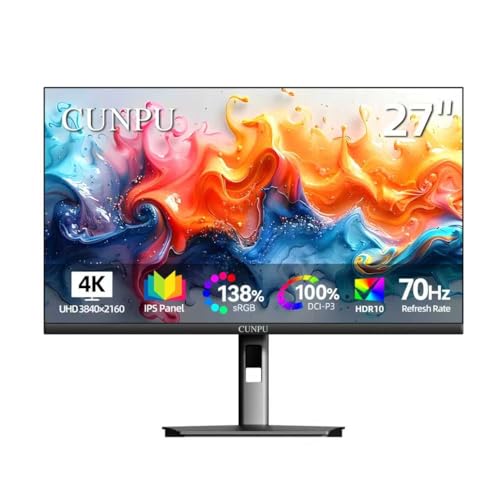
| CUNPU 27" 4K | 4K IPS, 100% DCI-P3, ΔE<2, 70Hz, PIP/PBP | Budget | |
The price column shows a general tier only. Prices move often, so tap a link for the live figure on Amazon.
How to choose a 27-inch 4K monitor
Every monitor here shares the same headline numbers, 27 inches and 3840 by 2160, yet they feel very different in use. The spec that decides whether a screen suits you is rarely the resolution; it is the panel quality, the color coverage, the ports on the back, and how the picture moves. Here is what to weigh before you buy.
Why 27 inches at 4K is the sweet spot
Pixel density is the quiet hero of this size. Spreading 8.3 million pixels across 27 inches yields roughly 163 pixels per inch, dense enough that individual pixels disappear at a normal desk distance and text turns crisp without the staircase edges you see on lower-resolution screens. Go bigger and the same resolution spreads thinner; go smaller and you fight tiny interface elements. At 27 inches you usually run Windows or macOS scaling around 150% so everything stays readable while photos, video, and game detail keep all their sharpness.
Color accuracy and gamut
If you edit photos, grade video, or just want colors that look right, check two figures. sRGB coverage near 99 to 100% means the panel reproduces the standard web and office color space faithfully, which several picks here do. DCI-P3 coverage, listed at 90 to 100% on the LG, ASUS, Acer, and CUNPU, measures the wider cinema gamut that makes HDR content and vivid scenes pop. A few models go further with a quoted Delta-E under 2, meaning measured color error small enough to be invisible to most eyes, useful for color-critical work straight out of the box.
Refresh rate and response time
Most 4K monitors run at 60Hz, which is smooth for desktop work and fine for slower games. Several picks here go faster: the two Dell 27 Plus models reach 120Hz, and the ASUS TUF hits 4K at 80Hz or drops to Full HD for a blistering 310Hz in its dual mode. Response time, measured in milliseconds, describes how quickly pixels change shade; lower numbers mean less smearing behind fast motion, with the ASUS leading at 0.3ms. If you mostly write, browse, and edit, 60Hz is plenty; if you game, the faster panels and their adaptive sync are worth seeking out.
Connectivity and USB-C
Every screen here includes HDMI and DisplayPort, but the standout convenience is USB-C with power delivery, found on the Dell S2725QC: one cable carries video and charges a laptop up to 65W, so a notebook docks and powers from a single connection. Look too at the count of inputs if you juggle a PC and a console, as on the Acer’s dual HDMI, and at extras like a built-in KVM switch on the Samsung that lets one keyboard and mouse drive two computers through the monitor.
Stand, ergonomics, and eye comfort
A good stand earns its keep daily. Several models, including the LG 27UP650K-W, tilt, raise, and pivot so you can set an ergonomic height or rotate the panel vertical for long documents and code; others tilt only and lean on a VESA mount for an arm. For long sessions, look for flicker-free backlighting and a low-blue-light mode, which Dell’s ComfortView Plus, Philips’ LowBlue, and Samsung’s TUV-certified Eye Saver all provide to ease eye strain without washing out color.
Dell 27 Plus 4K S2725QS (4K IPS, 120Hz, FreeSync Premium)
The best seller in this group is also one of the most versatile. Dell’s 27 Plus pairs a sharp 4K IPS panel with a 120Hz refresh rate, double the usual 60Hz at this resolution, so the desktop scrolls cleanly and games look fluid where most 4K screens feel stiff. AMD FreeSync Premium and a quoted 0.03ms response keep motion tear-free, 99% sRGB coverage handles everyday color faithfully, and a 1500:1 contrast ratio with HDR readiness adds depth. Re-engineered built-in speakers, ultra-thin bezels, and a clean ash white finish round out a screen that looks at home on a work or living-room desk.
Pros
- 120Hz refresh rate, unusual and welcome at 4K
- Sharp IPS panel with 99% sRGB color
- FreeSync Premium plus fast 0.03ms response
- 1500:1 contrast and HDR readiness for added depth
- Re-engineered speakers with fuller sound
- ComfortView Plus low-blue-light, ultra-thin bezels
Cons
- No USB-C; the S2725QC sibling adds it
- HDR readiness is entry-level, not true HDR
- 120Hz at 4K rewards a capable graphics card
Best for: a do-everything home or office screen that wants smooth 120Hz motion and faithful color without USB-C.
Mid-range tier. Check price on Amazon
Dell 27 Plus 4K USB-C S2725QC (4K IPS, 120Hz, Single-Cable USB-C)
This is the laptop-friendly version of the best seller above, and the difference is one very useful cable. The S2725QC shares the same 4K IPS panel, 120Hz refresh, FreeSync Premium, 99% sRGB color, and 1500:1 contrast, then adds USB-C with up to 65W power delivery: connect a notebook and it receives video and charges at once, keeping the desk clutter-free. The same re-engineered speakers, ComfortView Plus low-blue-light comfort, and ash white styling carry over. If you dock a laptop daily, the single-cable convenience makes this the smarter of the two Dell twins.
Pros
- USB-C with 65W power delivery, one cable for video and charging
- 120Hz refresh rate at 4K resolution
- IPS panel with 99% sRGB color accuracy
- FreeSync Premium for smooth, tear-free motion
- 1500:1 contrast with HDR readiness
- Built-in speakers and low-blue-light comfort
Cons
- 65W may not fully power the most demanding laptops
- HDR readiness is entry-level, not true HDR
- Costs a little more than the non-USB-C S2725QS
Best for: laptop owners who want to dock, charge, and display through a single USB-C cable with 120Hz to spare.
Mid-range tier. Check price on Amazon
LG 27UP650K-W (4K IPS, DisplayHDR 400, 95% DCI-P3, Ergonomic Stand)
LG’s UltraFine 27UP650K-W leans into color and ergonomics. Its 4K IPS panel reaches up to 95% DCI-P3 coverage, the wide cinema gamut that brings HDR shows, films, and edited photos to vivid life, and it carries VESA DisplayHDR 400 certification for brighter highlights than an ordinary screen. The stand is a genuine highlight here, adjusting tilt, height, and pivot so you can rotate the panel vertical for documents or dial in a comfortable posture. Gaming extras like Black Stabilizer to brighten dark corners and Dynamic Action Sync, plus the multitasking Switch app with up to six screen sections and a built-in webOS streaming platform, make it a flexible all-rounder.
Pros
- Up to 95% DCI-P3 wide color gamut
- VESA DisplayHDR 400 certification
- Full ergonomic stand: tilt, height, and pivot
- Black Stabilizer and Dynamic Action Sync for gaming
- Switch app with up to six-section split-screen
- Built-in webOS streaming platform and Reader Mode
Cons
- 60Hz refresh trails the 120Hz Dell and ASUS picks
- DisplayHDR 400 is entry-level HDR
- Glossy white styling shows fingerprints
Best for: color-minded creators and multitaskers who want wide DCI-P3 color plus a fully adjustable stand.
Mid-range tier. Check price on Amazon
LG 27US500-W (4K IPS, HDR10, 90% DCI-P3, Borderless Design)
The 27US500-W is the leaner, more affordable UltraFine, and it keeps the essentials that matter for sharp, accurate work. The 4K IPS panel delivers up to 90% DCI-P3 color and HDR10 support, with a 1000:1 contrast ratio for deep blacks and wide viewing angles that hold color steady off-axis, qualities creative professionals lean on for detailed digital imagery. A near-borderless three-side design suits dual-monitor setups, On-Screen Control splits the display or tweaks settings with a few mouse clicks, and Reader Mode plus Flicker Safe ease long sessions. The trade for the lower price is a tilt-only stand rather than the full ergonomics of its pricier sibling.
Pros
- 4K IPS with up to 90% DCI-P3 color
- HDR10 support and 1000:1 contrast
- Borderless three-side design for dual-monitor rigs
- On-Screen Control for quick split-screen and settings
- Reader Mode and Flicker Safe for eye comfort
- Comes with HDMI cable and power adapter in the box
Cons
- Tilt-only stand, no height or pivot
- 60Hz refresh rate, not for high-frame gaming
- 90% DCI-P3 trails the 95% of the 27UP650K-W
Best for: budget-conscious creators wanting accurate 4K color and a clean borderless look for stacked screens.
Budget tier. Check price on Amazon
Sceptre Prime U275W-UPT (4K IPS, Up to 70+Hz, 100% sRGB, Speakers)
Sceptre’s Prime is the value entry into 27-inch 4K, and it covers more than its price suggests. The IPS panel renders all 8 million pixels of 4K with consistent color and sharp visibility across wide viewing angles, and 100% sRGB coverage means everyday photos, web, and office color land accurately. A DisplayPort connection accelerates the refresh rate to over 70Hz, a touch smoother than the standard 60Hz at this resolution, and built-in speakers plus an audio-out jack keep the setup simple without external gear. For a no-frills, color-correct 4K screen that gets the fundamentals right, it is an easy recommendation.
Pros
- Strong value for a 4K IPS panel
- 100% sRGB coverage for accurate everyday color
- Up to 70+Hz over DisplayPort, above the usual 60Hz
- Wide IPS viewing angles and sharp detail
- Built-in speakers with an audio-out jack
- DisplayPort and HDMI inputs
Cons
- No USB-C connectivity
- No quoted HDR or wide DCI-P3 gamut
- Basic stand; relies on VESA wall mount for flexibility
Best for: value seekers who want accurate sRGB color and 4K sharpness for work and media without paying extra.
Budget tier. Check price on Amazon
Philips 27E1N1800A (4K IPS, HDR10, FreeSync, 4-Year Warranty)
The Philips 27E1N1800A is a sensible, fuss-free 4K screen with one quietly reassuring feature: a four-year advance-replacement warranty, longer than most rivals here. Its IPS panel delivers crisp 4K detail with wide viewing angles and rich, accurate color suited to both professional and recreational use, while Adaptive-Sync smooths motion artifact-free at varying frame rates and HDR10 adds contrast punch. Flicker-free technology and LowBlue Mode reduce eye strain on long days, built-in speakers handle casual audio, and HDMI plus DisplayPort inputs and a VESA mount cover the practical bases. It is the dependable, well-backed budget option.
Pros
- Four-year advance-replacement warranty
- 4K IPS panel with wide viewing angles and accurate color
- HDR10 support for added contrast
- Adaptive-Sync for smooth, artifact-free motion
- Flicker-free and LowBlue Mode for eye comfort
- HDMI and DisplayPort inputs with built-in speakers
Cons
- 60Hz refresh, not aimed at high-frame gaming
- No USB-C connectivity
- Basic stand without height or pivot
Best for: buyers who value a long warranty and a reliable, color-accurate 4K screen for mixed work and play.
Budget tier. Check price on Amazon
ASUS TUF VG27UQEL5A (4K Fast IPS, Dual Mode 4K 80Hz / FHD 310Hz)
This is the gamer’s pick, and its party trick is dual mode: run native 4K at 80Hz for detail-rich single-player worlds, or switch to Full HD at a blistering 310Hz when a competitive shooter calls for raw speed, all on one Fast IPS panel. A 0.3ms minimum response time, the quickest here, plus Extreme Low Motion Blur, NVIDIA G-Sync compatibility, AMD FreeSync, and Variable Overdrive keep motion crisp and tear-free in either mode. Color is wide at 120% sRGB, the DisplayWidget Center tunes settings with a mouse, and TUF Gaming AI features add extras, all backed by a three-year warranty. It is the most flexible high-refresh screen in the lineup.
Pros
- Dual mode: 4K at 80Hz or Full HD at 310Hz
- Fast IPS with 0.3ms minimum response, the quickest here
- Extreme Low Motion Blur to cut ghosting
- NVIDIA G-Sync compatible and AMD FreeSync
- 120% sRGB color and DisplayWidget Center control
- Three-year warranty plus bundled Adobe Creative Cloud trial
Cons
- 310Hz mode drops to Full HD, not 4K
- Quoted in sRGB rather than wider DCI-P3
- High-refresh 4K demands a strong graphics card
Best for: gamers who want 4K detail and competitive-grade speed in one panel, switchable to suit the game.
Mid-range tier. Check price on Amazon
Acer Nitro VG270K (4K IPS, Up to 72Hz, DFR to FHD 144Hz, FreeSync)
Acer’s Nitro VG270K brings a gaming flavor to the budget tier. The 4K IPS panel produces stunning, detailed images with a ZeroFrame near-bezel-less design that frees up screen space and lines up neatly in multi-monitor setups. Its standout is Dynamic Refresh Rate, which lets you choose more resolution or more speed: up to 72Hz at native 4K for sharp visuals, or 144Hz when dropped to Full HD for fast-paced play. AMD FreeSync banishes tearing and stutter, a quick response of up to 0.5ms GtG keeps smearing down, and Acer HDR10 support with up to 95% DCI-P3 widens color. Dual HDMI 2.0 ports plus DisplayPort 1.4 connect a PC and a console at once.
Pros
- Dynamic Refresh Rate: up to 72Hz 4K or 144Hz Full HD
- 4K IPS with up to 95% DCI-P3 color and HDR10
- ZeroFrame near-bezel-less design for multi-monitor use
- AMD FreeSync for tear-free motion
- Fast up to 0.5ms GtG response
- Two HDMI 2.0 plus DisplayPort 1.4 inputs
Cons
- 72Hz native 4K trails the Dell’s 120Hz
- 144Hz mode drops to Full HD resolution
- No USB-C connectivity
Best for: budget gamers who want 4K detail with the flexibility to trade resolution for higher frame rates.
Budget tier. Check price on Amazon
Samsung ViewFinity S7 S70H (4K IPS, HDR10, TÜV Eye Comfort, KVM)
Samsung’s ViewFinity S7 is built for productivity. The high-pixel-density 4K IPS panel reveals fine detail across spreadsheets, documents, and timelines, while HDR10 optimizes contrast for darker blacks and brighter highlights in engaging content, and a 178-degree viewing angle holds brightness steady from any seat. Where it pulls ahead is the toolkit: Samsung Display Manager handles split-screen layouts, brightness, PIP/PBP, and precise calibration, and a built-in KVM switch lets one keyboard and mouse control two connected computers through the monitor. TUV-certified Eye Comfort with Eye Saver Mode and flicker protection keeps long workdays gentle on the eyes.
Pros
- High-pixel-density 4K IPS for fine detail
- HDR10 with deeper blacks and brighter highlights
- Built-in KVM switch for two computers, one keyboard and mouse
- Display Manager: split-screen, PIP/PBP, and calibration
- TUV-certified Eye Saver Mode and flicker protection
- 178-degree wide viewing angle
Cons
- 60Hz refresh, not aimed at high-frame gaming
- No USB-C among the listed connections
- No quoted wide DCI-P3 gamut figure
Best for: multitaskers and dual-PC desks that want sharp 4K detail with KVM and split-screen productivity tools.
Mid-range tier. Check price on Amazon
CUNPU 27" 4K (4K IPS, 100% DCI-P3, ΔE<2, PIP/PBP)
The CUNPU is the budget surprise on color. It quotes a full 100% DCI-P3 gamut, 1.07 billion colors, and a Delta-E under 2, the kind of measured accuracy usually reserved for pricier creative panels, making it a strong pick for photo and video editing on a tight budget. The 27-inch IPS panel runs at 300 nits with a 1200:1 contrast ratio and a sharp 163 PPI, and a three-sided ultra-thin bezel with a 178-degree viewing angle keeps the picture clean from any angle. A 70Hz refresh edges past standard 60Hz, Adaptive Sync cuts tearing, and PIP/PBP runs two full-resolution sources side by side; DisplayPort 1.4 and HDMI 2.0 connect PCs, laptops, and consoles alike.
Pros
- Quoted 100% DCI-P3 gamut and Delta-E under 2
- 1.07 billion colors and sharp 163 PPI density
- PIP/PBP for two full-resolution inputs at once
- 70Hz refresh with Adaptive Sync
- Three-sided ultra-thin bezel, 178-degree viewing angle
- DisplayPort 1.4 and HDMI 2.0 for wide device support
Cons
- Lesser-known brand than the majors here
- No USB-C connectivity
- 70Hz is modest next to the 120Hz Dell screens
Best for: budget creators who want wide, accurate DCI-P3 color and dual-source multitasking without the premium price.
Budget tier. Check price on Amazon
The verdict
Best overall
The Dell 27 Plus 4K S2725QS takes the top spot, and it is the best seller here for good reason. A sharp 4K IPS panel with 99% sRGB color, an uncommon 120Hz refresh rate, FreeSync Premium, and a 1500:1 contrast ratio make it equally at home with spreadsheets, photos, and games, while re-engineered speakers and slim bezels keep the desk tidy. If you dock a laptop, the near-identical Dell S2725QC adds single-cable USB-C with 65W charging and earns the nod instead. Check price on Amazon
Best value
The CUNPU 27" 4K wins on value. It delivers a quoted 100% DCI-P3 gamut, 1.07 billion colors, and a Delta-E under 2, color credentials usually found far higher up the price ladder, plus PIP/PBP multitasking and a 70Hz panel, all in the Budget tier. For buyers who prize a long safety net over wide color, the Philips 27E1N1800A pairs solid 4K IPS quality with a four-year advance-replacement warranty. Check price on Amazon
Best premium
For the most capable screen, the ASUS TUF VG27UQEL5A is the standout. Its dual mode runs detail-rich 4K at 80Hz or switches to Full HD at 310Hz for competitive speed, backed by a 0.3ms response, Extreme Low Motion Blur, G-Sync compatibility, and a three-year warranty. For creators who want wide color with a fully adjustable stand instead of raw speed, the LG 27UP650K-W with 95% DCI-P3 and DisplayHDR 400 is the alternative. Check price on Amazon
Frequently asked questions
Is 4K worth it on a 27-inch monitor?
For most uses, yes. At 27 inches, 4K resolution yields about 163 pixels per inch, dense enough that text turns crisp and photos, video, and game detail look noticeably sharper than on a 1080p or 1440p screen of the same size. The main trade-offs are that games need a stronger graphics card to drive 8.3 million pixels at a high frame rate, and you will usually enable display scaling around 150% so interface elements stay comfortably readable.
Do I need 120Hz, or is 60Hz fine at 4K?
It depends on what you do, not your identity. For writing, browsing, photo editing, and slower games, the 60Hz panels here are perfectly smooth. If you game and want fluid fast motion, the 120Hz Dell models and the dual-mode ASUS feel markedly slicker, and the ASUS can drop to Full HD for 310Hz when a competitive shooter demands it. Higher refresh only helps if your graphics card can push frame rates near that ceiling.
What is the benefit of a USB-C monitor?
A USB-C monitor with power delivery, such as the Dell S2725QC, lets a single cable carry the video signal and charge a connected laptop at the same time, here up to 65W. That turns the monitor into a simple dock: plug in one cable and your notebook displays and powers at once, with far less desk clutter than a separate charger and video cable. Confirm your laptop’s charging needs, since very power-hungry machines may want more than 65W.
Which of these is best for photo and video editing?
Look at color gamut and accuracy. The CUNPU quotes a full 100% DCI-P3 with a Delta-E under 2, the LG 27UP650K-W reaches 95% DCI-P3 with DisplayHDR 400, and several others including the Dell pair and Sceptre cover 99 to 100% sRGB for faithful standard-space color. For wide-gamut work the CUNPU and LG 27UP650K-W stand out, with the LG adding a fully adjustable stand that helps for long editing sessions.
Can these monitors connect to a game console?
Yes. Every screen here has HDMI, and several, including the Acer Nitro with its two HDMI 2.0 ports and the CUNPU, are explicitly console-friendly across current and recent systems. The Acer’s Dynamic Refresh Rate and the ASUS dual mode are especially handy for consoles, letting you favor 4K detail or a higher frame rate depending on the game. Check that your console outputs 4K and use an HDMI port rated for the resolution and refresh you want.
This article may contain affiliate links; see our Affiliate Disclosure.