One 49-inch curved screen does the work of two monitors with none of the bezel running down the middle, and the moment a racing cockpit or a wall of trading charts wraps into your peripheral vision, going back to a single 16:9 panel feels like squinting through a letterbox. The trick is that these 32:9 giants range wildly, from self-lit QD-OLED showpieces to wallet-friendly VA workhorses, and the spec sheets bury the differences that actually change how the screen feels.




A great 49-inch super-ultrawide gets a few things right at once: a wide enough resolution that text stays crisp across all that glass, a refresh rate fast enough for the games you play, and a curve plus connectivity that turn one cable into a clean two-machine desk. That balance serves a sim racer chasing immersion, a day trader who wants six windows in view, a creator stretching a timeline edge to edge, and anyone tired of a bezel splitting their screen in half. The picks below lead with the best sellers, so the most-bought models come first.
| Monitor | Standout features | Price | Link |
|---|---|---|---|
| Samsung Odyssey G9 G95C 49" | DQHD 5120×1440, 1000R curved VA, 240Hz, FreeSync Premium Pro, HDR1000 | Mid-range | |
| Amzfast 49" DQHD | DQHD 5120×1440 VA, 120Hz, 1500R, 120% sRGB, HDR, dual HDMI/DP | Mid-range | |
| Samsung Odyssey OLED G9 G91SD 49" | QD-OLED DQHD 5120×1440, 144Hz, 0.03ms, G-Sync compatible, 3-yr warranty | Premium | |
| Deco Gear 49" DQHD USB-C/KVM | DQHD 5120×1440 VA, 120Hz, 1500R, HDR400, USB-C 65W, built-in KVM | Budget | |
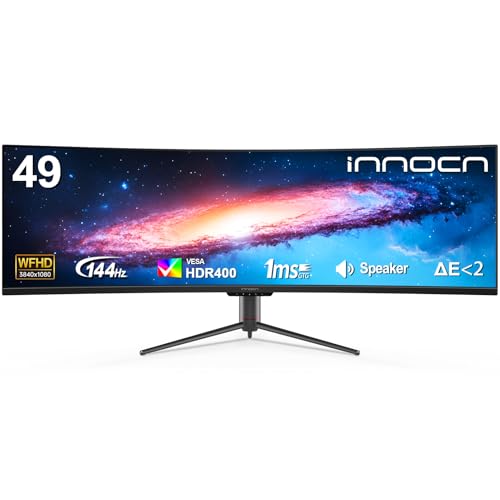
| INNOCN 49" WFHD | WFHD 3840×1080, 144Hz, 1800R, HDR400, USB-C, built-in speakers | Mid-range | |
| INNOCN 49C1S DQHD | DQHD 5120×1440 VA, 240Hz, 1800R, HDR400, USB-C 65W, HDMI 2.1, RJ45 | Mid-range | |
| Samsung Business 49" DQHD | DQHD 5120×1440, 1000R curved, 120Hz, HDR400, 90W USB-C dock, speakers | Premium | |
| Deco Gear 49" DFHD White | DFHD 3840×1080 VA, 144Hz, 1800R, HDR, dual HDMI/DP, white finish | Budget | |
| Deco Gear 49" DQHD KVM (speakers) | DQHD 5120×1440 VA, 120Hz, 1500R, HDR400, USB-C 65W, KVM, speakers | Budget | |
| Reletech R49BVR Raptor 49" | DQHD 5120×1440 VA, 165Hz, 1500R, 1ms, 125% sRGB, dual HDMI/DP | Budget | |
The price column shows a general tier only. Prices move often, so tap a link for the live figure on Amazon.
How to choose a 49-inch super-ultrawide monitor
At this size the headline spec, 49 inches and 32:9, is the same across every model, so the real decisions hide in the details: how many pixels fill that width, what panel produces the image, how fast it refreshes, and whether it can replace a docking station. Here is what separates a super-ultrawide that earns its desk space from one that just looks big in photos.
Resolution: DQHD, WFHD, and DFHD
Two screens that are both 49 inches can have very different sharpness. Dual QHD, also written DQHD or 5120×1440, is the standard target: it stitches two 1440p panels side by side for roughly 110 pixels per inch, so text stays crisp and you get real working space. Watch for the lower-resolution variants in this group. WFHD and DFHD, both 3840×1080, are effectively two 1080p screens joined together; they look fine for gaming and entertainment and ask far less of your graphics card, but text and dense spreadsheets are noticeably softer than on a DQHD panel. The INNOCN 49" WFHD and the white Deco Gear DFHD are the two 3840×1080 picks here, and their sections flag that clearly.
Refresh rate and response time
Refresh rate, measured in hertz, is how many times per second the screen redraws, and it is the clearest divide in this lineup. The picks here span 120Hz, which is smooth for work and most games, up to 240Hz on the Samsung G95C and the INNOCN 49C1S for fast competitive play. Response time, in milliseconds, is how quickly a pixel changes shade; lower numbers mean less smearing behind fast objects, with the QD-OLED’s 0.03ms in a class of its own. Two things matter at 32:9: many monitors hit their top refresh only over DisplayPort, and driving 5120×1440 at a high frame rate asks a lot of a graphics card, so match the screen to the hardware behind it.
Panel type: VA versus QD-OLED
Almost every super-ultrawide uses a VA panel, and VA is a good fit here: it delivers deep blacks and high contrast, usually around 3000:1, which flatter dark games and movies, and a curve hides VA’s weaker off-axis viewing angles by aiming the edges at you. The exception is the Samsung Odyssey OLED G9, which uses QD-OLED: every pixel lights itself for true black, effectively infinite contrast, and the widest color of the group. It is the best image quality on offer and priced to match, with the usual OLED care needed to avoid burn-in, which Samsung counters with thermal management, logo dimming, and a screen saver.
Curve: 1000R, 1500R, and 1800R
Curvature is written as a radius in millimeters, and a smaller number means a more aggressive curve. At 49 inches the curve does real work, pulling the far edges into your peripheral vision so the screen surrounds rather than stretches away from you. The 1000R Samsung panels are the most wrapped and immersive, 1500R is the common middle ground on the Amzfast, Deco Gear, and Reletech picks, and 1800R on the INNOCN models is the gentlest, which some find more natural for spreadsheet and text work spread across the width.
Connectivity: USB-C, KVM, and ports
A super-ultrawide is most useful when it doubles as a desk hub. Look for USB-C with power delivery, which carries video and charges a laptop over one cable; several picks here deliver 65W and the Samsung Business model pushes 90W. A built-in KVM, found on the Deco Gear DQHD models, lets one keyboard and mouse switch between two computers on the same screen, ideal for a work laptop beside a gaming PC. Beyond that, count your HDMI and DisplayPort inputs, check which port unlocks the full refresh rate, and note that built-in speakers are present on some models and absent on others.
Samsung Odyssey G9 G95C 49" (DQHD 5120×1440, 1000R Curved, 240Hz)
The best seller in this group is also its speed champion among VA panels. The G95C pairs a Dual QHD 5120×1440 resolution with a fast 240Hz refresh rate and 1ms GtG response, so even at this enormous width fast motion stays sharp and tear-free, helped by AMD FreeSync Premium Pro. The aggressive 1000R curve is the most wrapped here, pulling both far edges into your peripheral vision until an open-world map or a racing track genuinely surrounds you. DisplayHDR 1000 with 1000-nit peak brightness and a deep contrast ratio gives highlights real punch against shadow detail, while picture-by-picture and picture-in-picture let you run two sources at once. The Hexa stand swivels, tilts, and adjusts height, and CoreSync lighting adds ambient color to the setup.
Pros
- Fast 240Hz refresh, the quickest VA pick here
- Dual QHD 5120×1440 for crisp text and detail
- Steep 1000R curve for the most enveloping view
- DisplayHDR 1000 with 1000-nit peak brightness
- FreeSync Premium Pro plus 1ms GtG response
- Full height, tilt, and swivel stand with VESA support
Cons
- VA contrast trails OLED’s true blacks
- 240Hz at 5120×1440 demands a strong graphics card
- Premium feature set sits above budget VA rivals
Best for: high-refresh gamers and sim racers who want the most immersive curve and the fastest motion without stepping up to OLED prices.
Mid-range tier. Check price on Amazon
Amzfast 49" DQHD (5120×1440 VA, 120Hz, 1500R Curved)
The Amzfast delivers the full Dual QHD 5120×1440 experience at a more approachable price than the marquee names. Its 49-inch VA panel keeps the standard 110 pixels per inch sharpness, a 1500R curve wraps the edges toward you, and a 178-degree viewing angle keeps color shift to a minimum across the width. A 120Hz refresh rate, available over DisplayPort 1.4, with 1ms MPRT response and adaptive sync keeps motion smooth and tear-free, which suits FPS and RPG play alike. Color comes from 120% sRGB coverage with HDR and a 3000:1 contrast ratio for deep blacks, while eye-care features like low blue light, flicker-free, and anti-glare ease long sessions. Dual HDMI 2.0 and dual DisplayPort 1.4 inputs plus PIP/PBP cover a multi-device desk, and the stand adjusts for height, swivel, and tilt.
Pros
- Full Dual QHD 5120×1440 resolution and sharpness
- 1500R curve with a wide 178-degree viewing angle
- 120% sRGB color with HDR and 3000:1 contrast
- PIP/PBP with dual HDMI 2.0 and dual DP 1.4
- Height, swivel, and tilt adjustment plus VESA 75×75
- Eye-care low-blue-light, flicker-free, anti-glare modes
Cons
- 120Hz trails the 165Hz and 240Hz picks
- 120Hz available only over DisplayPort 1.4
- Lesser-known brand than the majors here
Best for: buyers who want genuine Dual QHD resolution and a smooth 120Hz for mixed gaming and productivity without a flagship price.
Mid-range tier. Check price on Amazon
Samsung Odyssey OLED G9 G91SD 49" (QD-OLED DQHD, 144Hz, 0.03ms)
This is the showcase of the group and the one to beat on image quality. The Odyssey OLED G9 uses a QD-OLED panel where every pixel lights itself, so blacks are truly black, contrast is effectively infinite, and the Quantum Dot layer drives a wider, more vibrant color spectrum than any VA screen here. It still carries the full Dual QHD 5120×1440 resolution at 110 pixels per inch, so detail never gives way to the larger canvas. A near-instant 0.03ms response and a 144Hz refresh keep motion exhilaratingly clean, while G-Sync compatibility and AMD FreeSync Premium Pro sync the panel to your graphics card for tear-free play. Samsung addresses OLED’s main worry head-on with a thermal modulation system, logo and taskbar detection that dims static elements, and a screen saver after ten minutes of inactivity, all backed by a three-year warranty.
Pros
- Self-lit QD-OLED with true blacks and infinite contrast
- Widest, most vibrant color of any pick here
- Full Dual QHD 5120×1440 at 110 pixels per inch
- Near-instant 0.03ms response with 144Hz refresh
- G-Sync compatible and FreeSync Premium Pro
- Burn-in safeguards plus a three-year warranty
Cons
- Premium tier, the most expensive pick here
- 144Hz is lower than the 240Hz VA leaders
- OLED still needs care to avoid long-term burn-in
Best for: image-quality enthusiasts who want the deepest blacks and richest color in a super-ultrawide and will pay for it.
Premium tier. Check price on Amazon
Deco Gear 49" DQHD USB-C/KVM (5120×1440 VA, 120Hz, 65W PD)
This Deco Gear is the value route to a true Dual QHD desk hub. The 49-inch VA panel runs the full 5120×1440 resolution behind a 1500R curve, replacing a dual-monitor setup with one seamless canvas for multitasking, gaming, editing, and office work. Its standout is connectivity: a USB-C port carries video and up to 65W of laptop charging over one cable, and a built-in KVM switch lets one keyboard and mouse drive multiple devices for a cleaner desk. A 120Hz refresh with 1ms MPRT and Adaptive Sync keeps motion fluid, HDR400 with 100% sRGB, 85% NTSC, and a 3000:1 contrast ratio gives the VA panel rich, deep detail, and the stand adjusts for height, tilt, and swivel. Note there are no built-in speakers; an audio-out jack handles external sound.
Pros
- Full Dual QHD 5120×1440 at a budget tier
- USB-C with 65W power delivery over one cable
- Built-in KVM switch for two-machine workflows
- HDR400 with 100% sRGB and 3000:1 contrast
- 1500R curve with height, tilt, and swivel stand
- Broad ports: HDMI, DisplayPort, USB-C, USB-A/B
Cons
- 120Hz trails the faster gaming picks
- No built-in speakers; needs external audio
- Lesser-known brand than the majors here
Best for: hybrid workers and multitaskers who want genuine Dual QHD plus USB-C docking and a KVM on a budget.
Budget tier. Check price on Amazon
INNOCN 49" WFHD (3840×1080, 144Hz, 1800R Curved)
A quick note up front: this INNOCN is a WFHD 3840×1080 panel, effectively two 1080p screens joined together, not the Dual QHD of most picks here. That trade earns it a place as the easy-to-drive 144Hz option, since a modest graphics card can push high frame rates across the lower pixel count without strain. The 32:9 aspect ratio and gentle 1800R curve still deliver the full wrap-around, dual-screen feel for gaming and multitasking, and a 144Hz refresh with adaptive sync keeps motion smooth and tear-free. Color comes from 99% sRGB coverage with VESA DisplayHDR 400 for added contrast, a USB-C port carries video, audio, and power over one cable, and built-in speakers plus HDMI and DisplayPort make it ready to use out of the box. The fully adjustable stand handles height and tilt.
Pros
- Smooth 144Hz with adaptive sync for fluid motion
- Easy frame rates from modest graphics cards at WFHD
- Gentle 1800R curve with the full 32:9 wrap
- 99% sRGB color with DisplayHDR 400
- USB-C one-cable video, audio, and power
- Built-in speakers and height-adjustable stand
Cons
- WFHD 3840×1080 is softer than Dual QHD for text
- Lower pixel density than the 5120×1440 picks
- Entry-level HDR400 rather than true HDR
Best for: gamers and multitaskers who want the immersive 32:9 wrap and a high refresh while keeping demands on the graphics card low.
Mid-range tier. Check price on Amazon
INNOCN 49C1S DQHD (5120×1440 VA, 240Hz, 1800R Curved)
The 49C1S is the connectivity powerhouse of the group, pairing genuine Dual QHD 5120×1440 with a fast 240Hz refresh on a premium VA panel. That combination of full resolution and high refresh makes it a strong all-rounder for esports and immersive single-player worlds alike, and a 1800R curve maximizes screen real estate while easing eye fatigue across the width. Where it really stands apart is its port array: two DisplayPort 1.4, an HDMI 2.1, a 65W USB-C, two USB-A, a USB-B, a 3.5mm jack, and an RJ45 Ethernet port, so it doubles as a dock for a laptop, phone, tablet, or console such as a current-generation system. Adaptive Sync and HDR400 with 99% sRGB and 3000:1 contrast smooth and enrich the image, PIP/PBP runs two inputs at once, and the stand tilts, swivels, and adjusts height.
Pros
- Dual QHD 5120×1440 at a fast 240Hz
- Exceptional ports: HDMI 2.1, USB-C 65W, RJ45 Ethernet
- 1800R curve with PIP/PBP multitasking
- Adaptive Sync and HDR400 with 99% sRGB
- 3000:1 VA contrast for deep blacks
- Height, tilt, and swivel adjustable stand
Cons
- 240Hz at 5120×1440 demands a strong graphics card
- VA contrast trails OLED’s true blacks
- Lesser-known brand than the majors here
Best for: buyers who want Dual QHD, 240Hz, and the deepest connectivity for a one-screen multi-device command center.
Mid-range tier. Check price on Amazon
Samsung Business 49" DQHD (5120×1440, 1000R Curved, 90W USB-C Dock)
Samsung’s business super-ultrawide trades the gaming-first focus for the cleanest desk in the lineup. The 49-inch Dual QHD panel wraps you in a steep 1000R curve at a 32:9 aspect ratio that closely matches your field of view, ideal for spreading projects, documents, and reference windows across one continuous surface. Its calling card is acting as a monitor and docking station in one: DisplayPort, two HDMI inputs, USB, and a USB-C port that supports 90W charging, the highest here, let it serve as the hub that connects and powers your laptop while clearing the desk. A 120Hz refresh keeps scrolling smooth and adds a more fluid feel to off-hours gaming, VESA DisplayHDR 400 lifts contrast for design and video work, built-in speakers free up space, and a height-adjustable stand with eye-care features rounds it out.
Pros
- Full Dual QHD 5120×1440 on a steep 1000R curve
- Monitor-plus-dock with 90W USB-C charging
- DisplayPort plus two HDMI inputs and USB
- 120Hz for smooth scrolling and casual gaming
- DisplayHDR 400 with built-in speakers
- Height-adjustable stand with eye-care modes
Cons
- Premium tier, the highest price in this group
- 120Hz trails the dedicated gaming picks
- Tuned for productivity over fast-paced play
Best for: professionals and hybrid workers who want a single-cable docking super-ultrawide with top-tier charging and a clean desk.
Premium tier. Check price on Amazon
Deco Gear 49" DFHD White (3840×1080 VA, 144Hz, 1800R Curved)
A note up front to match its sibling: this Deco Gear is a DFHD 3840×1080 panel, two 1080p screens joined together, not Dual QHD. That makes it the budget-friendly, GPU-light gaming pick, since the lower resolution keeps frame rates strong on mid-range builds while still giving you the full 32:9 super-ultrawide width with no center bezel. A 144Hz refresh with 1ms MPRT, Adaptive Sync, and VRR support keeps racing, FPS, sports, and console play smooth, while a 1800R curve and a 3000:1 contrast VA panel wrap you into sim cockpits and dark UIs alike. PIP/PBP runs two inputs at once across two HDMI and two DisplayPort ports, letting you sit a work laptop beside a gaming PC. The standout extra is the clean white finish for bright rooms and creator desks; note this model has no audio-out port, so route sound through your PC, console, or external audio.
Pros
- 144Hz with 1ms MPRT and VRR for smooth gaming
- Easy frame rates on mid-range builds at DFHD
- Full 32:9 width with no center bezel
- 1800R curve and 3000:1 VA contrast for rich blacks
- PIP/PBP with two HDMI and two DisplayPort inputs
- Distinctive white finish for bright setups
Cons
- DFHD 3840×1080 is softer than Dual QHD for text
- No audio-out port; needs external audio routing
- Lower pixel density than the 5120×1440 picks
Best for: budget gamers on mid-range PCs who want a smooth, immersive 32:9 screen and a standout white look.
Budget tier. Check price on Amazon
Deco Gear 49" DQHD KVM (5120×1440 VA, 120Hz, Built-in Speakers)
This Deco Gear covers similar ground to its USB-C/KVM sibling but adds built-in speakers, making it the most self-contained value DQHD pick. The 49-inch VA panel runs the full 5120×1440 resolution behind a 1500R curve, replacing dual screens with one seamless canvas for gaming, creative work, and deep multitasking. A 120Hz refresh with 1ms MPRT keeps visuals fast and fluid, HDR support with 100% sRGB and a 3000:1 contrast ratio brings richer color and deeper blacks, and a USB-C port handles video plus 65W laptop charging over one cable. The built-in KVM switches one keyboard and mouse between devices, PIP/PBP shows two sources at once, and the stand adjusts for height, tilt, and swivel. A documented port layout, dual-band adaptive sync ranges, and U.S.-based support round out the package.
Pros
- Full Dual QHD 5120×1440 at a budget tier
- Built-in speakers for an all-in-one setup
- USB-C 65W charging plus a built-in KVM switch
- HDR with 100% sRGB and 3000:1 contrast
- 1500R curve with height, tilt, and swivel stand
- PIP/PBP and documented multi-port connectivity
Cons
- 120Hz trails the faster gaming picks
- HDMI adaptive-sync range is limited to 48-60Hz
- Lesser-known brand than the majors here
Best for: value seekers who want genuine Dual QHD, USB-C docking, a KVM, and built-in speakers in one package.
Budget tier. Check price on Amazon
Reletech R49BVR Raptor 49" (DQHD 5120×1440 VA, 165Hz, 1500R Curved)
The Reletech Raptor lands a sweet spot many shoppers miss: full Dual QHD 5120×1440 resolution with a 165Hz refresh rate at a budget price. That refresh sits above the 120Hz value crowd and below the 240Hz flagships, a practical middle ground that feels markedly smoother than 120Hz without demanding the most expensive graphics card to enjoy. The 49-inch VA panel delivers crisp detail and deep blacks behind a 1500R curve, a 1ms response time keeps motion blur and tearing in check, and FreeSync syncs the panel to your card. Color comes from 125% sRGB coverage with a 3000:1 contrast ratio for vivid, well-saturated images, and connectivity covers two HDMI and two DisplayPort inputs for running several devices at once, with VESA mounting for arms and walls.
Pros
- Full Dual QHD 5120×1440 at a budget tier
- 165Hz refresh, a step above the 120Hz value crowd
- 1ms response with FreeSync for smooth motion
- 125% sRGB color and 3000:1 VA contrast
- Two HDMI and two DisplayPort inputs
- 1500R curve with VESA mount compatibility
Cons
- No USB-C or KVM for laptop docking
- 165Hz trails the 240Hz flagship picks
- Lesser-known brand than the majors here
Best for: budget gamers who want genuine Dual QHD and a faster-than-baseline 165Hz refresh without paying flagship prices.
Budget tier. Check price on Amazon
The verdict
Best overall
The Samsung Odyssey G9 G95C 49" takes the top spot, and it is the best seller here for good reason. Genuine Dual QHD 5120×1440, the fastest 240Hz refresh among the VA panels, the most enveloping 1000R curve, DisplayHDR 1000 brightness, and a full ergonomic stand add up to the most complete blend of immersion and speed in this group, all below OLED money. If you want the same Dual QHD and 240Hz with the deepest connectivity, the INNOCN 49C1S is the standout alternative thanks to its HDMI 2.1, USB-C, and Ethernet ports. Check price on Amazon
Best value
The Reletech R49BVR Raptor 49" wins on value. It delivers full Dual QHD 5120×1440 and a 165Hz refresh, a real step above the 120Hz value crowd, plus 1ms response, FreeSync, 125% sRGB color, and dual HDMI and DisplayPort inputs, all in the Budget tier. If your workflow leans on docking, the Deco Gear 49" DQHD USB-C/KVM is the value pick for two-machine desks, adding USB-C 65W charging and a built-in KVM at the same budget level. Check price on Amazon
Best premium
The Samsung Odyssey OLED G9 G91SD is the premium pick, and nothing else here matches it on image quality. Self-lit QD-OLED pixels deliver true black and effectively infinite contrast, the color gamut is the widest of the group, and a 0.03ms response with 144Hz keeps motion as clean as the picture is gorgeous, with thoughtful burn-in safeguards and a three-year warranty. For productivity-first buyers, the Samsung Business 49" is the premium alternative, trading raw gaming speed for a 90W USB-C docking hub and the cleanest desk. Check price on Amazon
Frequently asked questions
What does 32:9 and DQHD actually mean?
A 32:9 aspect ratio is twice as wide as a standard 16:9 monitor, which is why a 49-inch super-ultrawide feels like two screens fused into one without a bezel down the middle. DQHD, or Dual QHD, is the resolution most of these use: 5120×1440, effectively two 1440p panels side by side, for around 110 pixels per inch and crisp text. Watch for WFHD and DFHD models at 3840×1080, which are two 1080p screens joined together; they are easier on your graphics card but noticeably softer for text and dense work.
Can a 49-inch ultrawide really replace dual monitors?
For most setups, yes, and it does so more cleanly. A single 32:9 panel gives you the horizontal space of two screens with no bezel splitting the image, no mismatched colors between panels, and one cable instead of two. Picture-by-picture, found on nearly every model here, even lets you feed two separate computers onto the one screen, and the Deco Gear models add a KVM so a single keyboard and mouse drive both. The main trade-off is that one tall window is less practical than a dedicated vertical second monitor.
How powerful a graphics card do I need?
It depends on the resolution and the frame rate you want. Driving Dual QHD 5120×1440 is demanding, roughly comparable to high-resolution gaming, so the 240Hz picks like the Samsung G95C and INNOCN 49C1S reward a strong graphics card to hit those frames. If your hardware is more modest, a WFHD or DFHD 3840×1080 model such as the INNOCN 49" WFHD or the white Deco Gear keeps frame rates high at a lower resolution, and the 120Hz DQHD picks are easier to drive than the 240Hz ones.
Is QD-OLED worth the extra cost over VA?
If image quality is your priority and the budget allows, it is a clear step up. The QD-OLED Samsung lights each pixel individually for true blacks, effectively infinite contrast, and the widest color here, which transforms dark games and movies in a way no VA panel can match. VA panels still look very good, with deep 3000:1 contrast that the curve flatters, and they cost far less. The OLED also needs a little care to avoid burn-in, which Samsung mitigates with thermal management, logo dimming, and a screen saver.
Does the curve and curvature rating matter?
At 49 inches the curve does real work rather than being cosmetic, pulling the far edges into your peripheral vision so the screen surrounds you instead of stretching away. A smaller radius number means a more aggressive curve: the 1000R Samsung panels are the most wrapped and immersive, 1500R is a comfortable middle ground on most picks here, and the gentler 1800R INNOCN models can feel more natural for spreadsheets and text spread across the width. It comes down to whether you favor maximum immersion or a flatter feel for productivity.
This article may contain affiliate links; see our Affiliate Disclosure.