The cheapest screen here is six inches, and it is the only one that can show you a waveform, load a look-up table, or monitor in HDR. The two large broadcast monitors, at two and four times the price, can do none of those things. One of them publishes eight-bit and a contrast ratio of 600 to 1, which is below an ordinary office display, on the one product category where contrast is the entire job.



At a glance
| Product | The number that decides it | Price tier | Link |
|---|---|---|---|
| Calibrite Creator Kit | Not a screen. The thing that makes a screen true | Budget | |
| FEELWORLD P6XL | 1,200 nits, 32 LUTs, waveform. Six inches | Budget | |
| Calibrite Video Photo Kit | Measures to 10,000 nits. Nothing here is close | Mid-range | |
| SEETEC P173-9HSD | Eight-bit. 400 nits. 600 to 1 | Mid-range | |
| SEETEC P238-9HSD | 23.8 inches at the same resolution as the 17.3 | Premium | |
How to choose
The page splits in half, and the cheaper half is the important one
Ten results came back. Three of them are books. Four are calibration devices and reference charts. Three are actual screens. That looks like a search gone wrong, and it is not: a grading monitor’s entire product is accuracy, accuracy is not a property a panel has on its own, and the devices that create it are sitting right there at a third of the price of the panels. The page is telling you something true about the category by accident.
Eight-bit is the whole argument
One monitor here publishes its bit depth: eight. That means 256 steps per color channel, and grading is precisely the operation that eats those steps, because lifting shadows or crushing highlights stretches a narrow band of levels across a wide range. Do that on eight bits and you get visible banding in skies and skin. The problem is not that the monitor bands; it is that the monitor cannot show you whether your grade bands, because it has already run out of levels. Ten-bit is the line, and nothing here states it.
600 to 1 is lower than the screen you already own
The same monitor publishes a contrast ratio of 600 to 1. An unremarkable office display does 1,000 to 1, a decent one does 1,300, and the panels people grade on are measured in the thousands or, for the black-level work, are OLED. Contrast is how far the black is from the white, which is another way of saying it is the entire tonal range you are grading inside. This is the most accurate spec on the page and the most damning, and the monitor at nearly twice the price simply does not print it.
Rec.709 is a limit wearing the costume of a feature
The larger monitor lists Rec.709 under accurate color reproduction. Rec.709 is the standard HD broadcast color space and it is roughly the same gamut as the sRGB your laptop uses. It is what you grade to when the deliverable is broadcast television, and it is genuinely correct for that. It is not a wide gamut, and if your work is going to cinema or HDR, a Rec.709 panel physically cannot display the colors you are grading. Naming the standard tells you the ceiling, not the quality.
The six-inch screen is the only one with grading tools
Read the three screens for what they can do rather than how big they are. The small one loads 32 look-up tables, draws a waveform and a histogram, monitors HDR, and does focus peaking. The two large ones do peaking, framing markers, image freeze and flip. Waveforms and LUTs are the instruments of grading; markers and tally lights are the instruments of directing. Two of these screens are built for someone watching the shoot, and one is built for someone judging the image.
Nits are where the small screen wins outright
The six-inch does 1,200 nits. The seventeen-inch does 400. That is a three-fold gap in favor of the cheapest screen, and it exists because the small one is built to be legible outdoors in sun while the large ones are built for a shaded studio cart. If any part of your work happens in daylight, that number decides it before any other spec gets a vote.
The two calibration kits differ by one part
Both kits include the same capture reference chart. The whole price difference between them is the colorimeter, and the dearer one exists to measure up to 10,000 nits on mini-LED, OLED and extreme-brightness panels. Against the screens on this page, which top out at 1,200, that headroom does nothing. Buy the ceiling you own, not the ceiling that exists.
Inches are not resolution
The 23.8-inch monitor and the 17.3-inch monitor are both 1920 by 1080. The bigger one costs substantially more and spreads the same pixel count over more glass, which lowers the pixel density rather than raising the detail. You are buying visibility across a room, which is a real thing to want on a set, and you are not buying a better picture.
Calibrite Creator Kit
A colorimeter that profiles your display and a reference chart you shoot on set, which between them close the loop that every screen on this page leaves open. The chart sets white balance and verifies exposure under the actual light you are shooting in, and matches multiple cameras to each other; the colorimeter then makes sure the screen you judge that footage on is telling the truth. It is the cheapest product here and the only one that addresses accuracy directly rather than claiming it.
Pros:
- The cheapest item here, and the one that creates accuracy
- Colorimeter plus on-set reference chart; both halves of the loop
- Matches multiple cameras to each other
- Same capture chart as the dearer kit
- Profiles whatever display you already own
Cons:
- It is not a monitor
- No stated brightness ceiling for the colorimeter
- Cannot fix a panel that lacks the bit depth or gamut
Best for: making the screen you own tell the truth.
FEELWORLD P6XL
Six inches, 332 grams, and the only screen here with the instruments a colorist uses: 32 custom look-up tables loaded at once, waveform, histogram, HDR monitoring, and focus peaking. Its 1,200 nits make it readable in sun, which is three times the brightness of the seventeen-inch. It runs two hours on its own battery, takes 4K over HDMI, and ships with the sunshade, hot shoe, cables and case. It is a field monitor, so it is small, and it costs a fraction of the large ones.
Pros:
- 32 custom 3D LUTs; the only screen here that loads them
- Waveform and histogram; the actual grading instruments
- 1,200 nits, three times the seventeen-inch
- Built-in battery, two hours; 332 grams
- 4K over HDMI; screenshot to USB; sunshade and case included
Cons:
- Six inches; a field monitor, not a suite monitor
- No bit depth or gamut published
- Two hours of battery
Best for: the grading tools, in the smallest possible screen.
Calibrite Video Photo Kit
The same on-set reference chart as the cheaper kit, paired with a colorimeter that reads up to 10,000 nits and is built to profile mini-LED, OLED and extreme-brightness panels. That is the specification that matters if you grade on a modern HDR display, where an older meter simply saturates and reports nonsense at the top end. Against the screens on this page, whose ceiling is 1,200 nits, it is measuring a range that does not exist. Buy it for the display you have, not the ones listed above it.
Pros:
- Reads to 10,000 nits; profiles mini-LED, OLED and XDR panels
- The only real answer for HDR grading displays
- Includes the same capture reference chart as the cheaper kit
- Camera matching and white point setting on set
Cons:
- Its headroom is wasted on every screen on this page
- Costs about twice the other kit for one different part
- It is not a monitor
Best for: an HDR display that a cheaper meter cannot read.
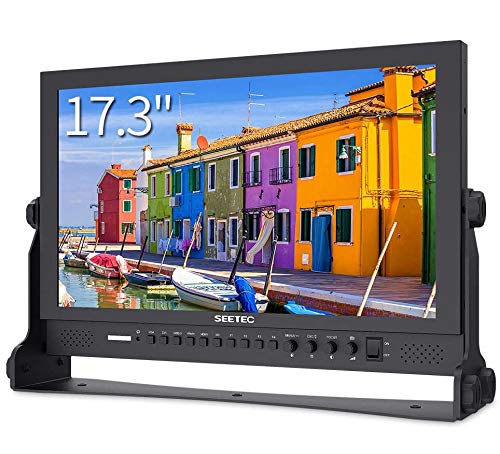
SEETEC P173-9HSD
A 17.3-inch studio monitor in a rugged aluminum shell, with two SDI inputs, 4K HDMI in and out, component, composite, audio, headphone jack, speaker, and three-color tally lights front and back. As a director’s monitor on a cart it is well equipped and plainly specified, and that clarity is the problem: it prints eight-bit, 400 nits, and 600 to 1, and each of those is below what grading needs. It also publishes viewing angles of 80 degrees left and right but only 60 up.
Pros:
- Publishes its bit depth, brightness and contrast; most do not
- Two SDI inputs plus 4K HDMI in and out
- Three-color tally, front and rear; rugged aluminum
- Pixel-to-pixel, check field, peaking, markers, freeze
- Built-in speaker and headphone jack
Cons:
- Eight-bit; grading is what exposes eight-bit
- 600 to 1 contrast, below an ordinary office display
- 400 nits, a third of the six-inch field monitor
- No waveform and no LUT loading
Best for: a director’s cart, told to you straight.
SEETEC P238-9HSD
The biggest screen here at 23.8 inches, with the same input list as its smaller sibling, the same three-color tally, and a V-mount battery plate and U-bracket in the box so it can leave the mains behind. It names Rec.709, which is the HD broadcast standard and is the correct target if television is the deliverable. It is also 1920 by 1080, exactly like the 17.3-inch, so the extra money buys glass and portability rather than picture, and it does not publish its bit depth at all.
Pros:
- 23.8 inches; visible across a room
- Names Rec.709; the right target for broadcast delivery
- V-mount battery plate and U-bracket included
- SDI, HDMI, component and composite in and out
- Three-color tally controlled over a DB-9 port
Cons:
- Same 1920 by 1080 as the far cheaper 17.3-inch
- Bit depth not published
- Rec.709 is a broadcast gamut, not a wide one
- No waveform and no LUT loading
Best for: the room, if broadcast is the deliverable.
The verdict
The plain summary of this page is that the two large monitors are director’s monitors, the small one is a field monitor with grading tools bolted on, and the true grading monitors, the ten-bit wide-gamut reference panels, are not here at any price. What is here instead is the other half of the answer, sitting at the cheap end.
Best overall: Calibrite Creator Kit. The product a grading monitor sells is accuracy, and accuracy is not something a panel possesses by itself. This is a colorimeter that profiles the display you already own plus a chart you shoot on set to nail white balance and match cameras to each other, and it costs less than any screen on this page. Start here whatever else you do, because an uncalibrated reference monitor is just an expensive television.
Best value: FEELWORLD P6XL. It is the only screen here that loads look-up tables, draws a waveform, monitors HDR, and reads in sunlight at 1,200 nits, which is three times what the seventeen-inch manages. Those are the instruments the job actually uses, and it costs a fraction of the panels that lack them. The catch is fair and unavoidable: it is six inches, it does not publish a bit depth, and its battery runs two hours.
Best premium: SEETEC P238-9HSD. Buy this if a room needs to see the shot and the deliverable is broadcast, because Rec.709 is genuinely the right target there, and the V-mount plate and tally kit are set equipment done properly. Know what you are paying for: it is the same 1920 by 1080 as the 17.3-inch at well over half again the money, so the difference is size and portability, not picture. It does not state its bit depth, and its sibling states eight.
FAQ
Why does eight-bit matter for grading?
Eight bits is 256 steps per channel, and grading stretches a narrow slice of those steps across a wide range, which is what makes banding appear. An eight-bit monitor cannot show you whether your grade bands, because it ran out of levels first.
Is 600 to 1 contrast bad?
It is below an ordinary office monitor, which does about 1,000 to 1. Contrast is the distance from black to white, which is the whole tonal range you are grading inside, so it is the wrong place to be short.
Is Rec.709 good or bad?
Correct for broadcast television and nothing wider. It is roughly the gamut your laptop already shows. If the work is going to cinema or HDR, a Rec.709 panel cannot display what you are grading.
Which calibration kit should I get?
They share the same on-set chart, so the price difference is entirely the meter. The dearer one reads to 10,000 nits for mini-LED, OLED and XDR panels. If your display is not one of those, that headroom does nothing.
Why is a six-inch screen beating the big ones?
Because it has the tools. LUTs, waveform, histogram and HDR are what grading uses; tally lights and framing markers are what directing uses. It is also three times brighter than the seventeen-inch.
This article may contain affiliate links; see our Affiliate Disclosure.