The keyboard that came with your computer makes a hollow, plasticky rattle, and you stopped noticing years ago. Then you type on a gasket-mounted board with lubed switches and foam packed under the plate, and the sound is a low thock instead of a clack. Going wireless used to mean giving that up for latency you could feel. It does not any more, provided you know which of the three connection modes to actually use.




Every board here is tri-mode: Bluetooth for the tablet, a 2.4GHz dongle for the game, USB-C when the battery dies. All are hot-swappable, so the switches are a preference rather than a purchase decision. What separates them is layout, how much foam sits under the plate, and battery. They suit a desk shared with a laptop and a tablet, a gamer counting milliseconds, and anyone who has decided their next keyboard should sound like something.
At a glance
| Product | Standout features | Price tier | Link |
|---|---|---|---|
| AULA F75 Pro | 75% layout, knob, pre-lubed Reaper switches, 4000mAh, side-printed PBT | Premium | |
| AULA F99 | 96% layout with numpad, 8000mAh, gasket build, double-shot PBT | Premium | |
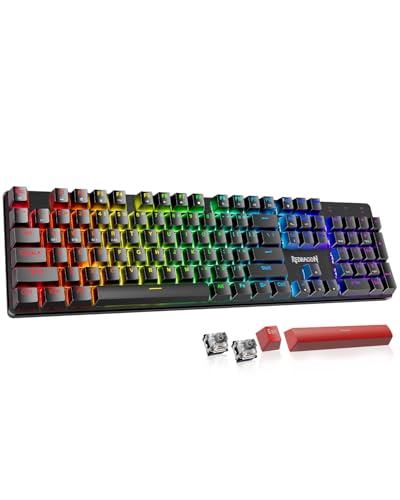
| Redragon K671KS | Metal panel, 8 spare switches included, keys tested to 500,000 presses | Budget | |
| Kisnt KN85 | Published latency figures, gasket mount, 5 foam layers, 2-year warranty | Budget | |
| Redragon K745 PRO | Full 108 keys, 4 extra hotkeys, 5-layer damping, thick-lubed switches | Mid-range | |
How to choose a wireless mechanical keyboard
Layout is the decision you live with
Everything else is adjustable; the layout is not. A 75% board, like the F75 Pro at 81 keys or the KN85 at 85, drops the numpad but keeps the arrows and function row, which is the sweet spot for most desks. A 96% layout, like the F99’s 99 keys, squeezes the numpad back in by removing the gaps, so you keep data entry without the width of a full board. The K745 PRO is a true full-size 108 keys. If you enter numbers all day, do not buy a 75% and plan to adapt; if you want mouse room, the KN85 frees around 25 percent of the desk a full board occupies.
The three connection modes, and which to use when
Tri-mode means Bluetooth, 2.4GHz via a dongle, and USB-C. They are not interchangeable. Kisnt publishes the numbers most makers avoid: about 2ms wired, 5ms on 2.4GHz, and 11ms on Bluetooth. That Bluetooth figure is fine for typing and email and is real enough to notice in a fast game, which is exactly why the dongle exists. Bluetooth’s advantage is device count, with the AULA boards holding five devices at once and switching by shortcut. Use 2.4GHz to play, Bluetooth to work across a laptop, tablet, and phone.
Hot-swap makes switches a preference, not a commitment
Every board here has a hot-swap socket taking 3-pin or 5-pin switches, so you can pull a switch with a puller and press in another, no soldering. That matters more than the switch it ships with: if the pre-lubed linears feel too light, a set of tactiles fixes it for the price of a takeaway. Redragon include 8 spare switches with the K671KS, and AULA supply a puller with the F99. Linear switches, which most of these use, move straight down with no bump; clicky and tactile switches announce themselves and annoy anyone sharing the room.
Why gasket mounts and foam are the real upgrade
This is where the sound comes from. In a traditional board the plate is screwed hard to the case, so every keystroke rings through the hollow shell. A gasket mount suspends the plate on silicone, softening both the feel and the noise. Then makers stack damping: the K745 PRO lists five layers, from PO foam to an IXPE switch pad, a PET sound sheet, socket foam, and a silicone bottom pad. AULA fill five layers between PCB, plate, and switch, and add per-key PCB slotting for flex. The result is what enthusiasts call a thock and what everyone else calls a keyboard that does not sound cheap.
Battery, and what actually drains it
Capacities here run from 4000mAh on the F75 Pro and KN85 up to 8000mAh on the F99. The number matters less than the RGB, which is the real drain by a distance. Kisnt say this outright: choose static effects over animated ones, dim the backlight, and power off during long breaks. A board that lasts weeks with the lights off may last days with a rainbow wave running. Kisnt also warn against fast chargers, asking for a 5V 1A supply or a computer USB port, which is worth reading before you reach for a phone charger.
Keycaps and software
PBT is the material to want, and all of these use it. It resists the shine that makes ABS caps greasy-looking within a year, and double-shot or dye-sublimated legends will not wear off. The variations are cosmetic: side-printed legends on the F75 Pro let light through the front, and the K745 PRO uses see-through round caps. The software is the catch. Kisnt’s driver is Windows only and works in wired or 2.4GHz mode, not over Bluetooth. If you are on a Mac, expect to do remapping and macros from a borrowed Windows machine, or do without.
AULA F75 Pro
The best-selling true wireless mechanical board of this group, and a genuinely complete one. It is 81 keys in a 75% layout, tri-mode across Bluetooth 5.0, 2.4GHz, and USB-C, holding five devices and switching by shortcut or a side button, with a 4000mAh battery behind it. The build is the pitch: pre-lubed LEOBOG Reaper switches, pre-lubed stabilizers, five layers of silicone filling between PCB, plate, and switch, and single-key PCB slotting so the board flexes rather than rings. The knob is smarter than most, long-pressing to swap between gaming mode, where it controls lighting, and office mode, where it handles volume and playback. Keycaps are side-printed PBT, double injection molded and heat sublimated, so the light comes through the front face rather than the top.
Pros
- The clear best seller among wireless mechanical boards here
- Pre-lubed switches and stabilizers, with five layers of damping
- Dual-mode knob switches between gaming and office control
- Tri-mode across five devices, with a 4000mAh battery
- Side-printed double-shot PBT keycaps, N-key rollover, Windows key lock
Cons
- The most expensive board here
- 75% layout means no numpad
- 4000mAh is half the F99’s capacity
Best for: the all-round pick for a desk that mixes work and games, where sound and feel matter as much as specs.
AULA F99
The F75 Pro’s answer for people who refuse to lose the numpad. At 99 keys in a 96% layout it keeps the number pad and arrows while stripping the dead space a full board wastes, and it carries an 8000mAh battery, double the F75 Pro’s and the largest here. Everything else follows the same recipe: tri-mode across BT5.0, 2.4GHz, and USB-C with five simultaneous devices, a gasket structure with an extended silicone pad, five layers of filling, per-key PCB slotting, and pre-lubed linear switches on a hot-swap PCB taking 3-pin or 5-pin. AULA include both keycap and switch pullers, so customizing starts the moment you open the box. Keycaps are double-shot PBT, molded from two colors so the legends cannot fade.
Pros
- 96% layout keeps a numpad without full-board width
- 8000mAh battery, the largest in this comparison
- Gasket structure with five damping layers and PCB slotting
- Keycap and switch pullers included for immediate customization
- Double-shot PBT keycaps and N-key rollover
Cons
- Wider than the 75% boards, so less mouse room
- No mode-switching knob like the F75 Pro’s
- Music-reactive lighting needs the driver installed
Best for: spreadsheets and games on one board, and the longest gaps between charges.
Redragon K671KS
The one that hands you the upgrade path in the box. It ships with red linear switches and then includes 8 spare switches and two red keycaps, so trying a different feel costs nothing and needs no research. Connection is tri-mode across USB-C, Bluetooth 3.0 and 5.0, and 2.4GHz for up to five devices, and Redragon put a physical switch on the back rather than burying mode changes in a shortcut, which is the sort of detail you appreciate at 7am. The panel is metal, which kills flex and adds weight where you want it, and Redragon rate the keys to 500,000 presses. RGB runs 16 presets with five brightness levels and per-key color, on double-injection PBT caps.
Pros
- 8 spare switches and two keycaps included for free experimentation
- Physical mode switch on the back, not a hidden shortcut
- Metal panel resists flex and adds solidity
- Keys rated to 500,000 presses; double-injection PBT keycaps
- Per-key RGB with macro editing and key remapping
Cons
- No gasket mount or foam stack quoted, unlike the AULA and Kisnt boards
- No battery capacity published
- Red linear switches only from new
Best for: a first hot-swap board, where trying different switches is part of the appeal rather than an extra order.
Kisnt KN85
The most accurate listing in the group, and the best budget build in it. Kisnt publish what others hide: latency of roughly 2ms wired, 5ms on 2.4GHz, and 11ms on Bluetooth, so you can decide rather than guess. The board is 85 keys at 13.68 by 5.51 inches, freeing about a quarter of the desk a full-size board eats. It is gasket-mounted with a base dampener, a silicone pad, and five foam layers, running pre-lubed Bsun linears at 45 to 50gf on a hot-swap socket. A 4000mAh battery keeps it going and it types while charging. Kisnt back it with a two-year warranty and 30-day returns, and they tell you plainly it is creamier rather than silent, front height is 0.79 inches, and a wrist rest is a good idea.
Pros
- Publishes real latency figures for all three modes
- Gasket mount, base dampener, and five foam layers at a budget price
- Pre-lubed Bsun linear switches at 45 to 50gf, hot-swappable
- Two-year warranty and 30-day returns
- Compact 85-key footprint frees about 25% of desk space
Cons
- Driver is Windows only, and will not work over Bluetooth
- Needs a 5V 1A charger; fast chargers may damage it
- No numpad, and the front height suggests a wrist rest
Best for: the enthusiast sound and feel on a budget, especially for a small desk or a laptop setup.
Redragon K745 PRO
The only true full-size board here, and the most heavily damped. It runs 108 keys, a standard 104 with anti-ghosting plus four extra hotkeys, so nothing is compressed or shifted the way a 96% layout does. The construction avoids traditional screw fixing in favor of precision-locked covers on gaskets, and the damping list is the longest of any board here: 3.5mm PO foam, IXPE switch foam, a PET sound pad, bottom socket foam, and a silicone bottom pad, on top of the silicone gasket. Switches are thick-lubed custom Mint Mambo linears in an upgraded socket Redragon say takes nearly any 3-pin or 5-pin switch. Two-stage feet and see-through round PBT keycaps finish it, with tri-mode connection across USB-C, Bluetooth, and 2.4GHz.
Pros
- True full-size 108 keys, with four extra hotkeys
- Five damping layers plus a silicone gasket, the most here
- Thick-lubed Mint Mambo linear switches
- Socket takes nearly all 3-pin and 5-pin switches
- Two-stage adjustable feet and see-through round PBT keycaps
Cons
- Full-size footprint takes the most desk space here
- No battery capacity or latency figures published
- Round keycaps are a stronger style choice than they first appear
Best for: a full-size layout with enthusiast damping, for anyone unwilling to give up the numpad or the nav cluster.
The verdict
Best overall: AULA F75 Pro. The best seller here and the most complete board: pre-lubed switches and stabilizers, five damping layers, PCB slotting, a knob that changes job between gaming and office, and side-printed PBT. The numpad is the price of admission, and for most desks that is a trade worth making.
Best value: Kisnt KN85. A gasket mount, five foam layers, pre-lubed linears, and a two-year warranty at the budget end, from the only maker here willing to publish its latency. The Windows-only driver is the real compromise.
Best premium: AULA F99. The same build as the F75 Pro with a numpad and double the battery at 8000mAh. If your work involves numbers, this is the one to buy.
The Redragon K671KS is the best way to learn what switches you like, since it hands you spares. The K745 PRO is the pick if only a true full-size layout will do.
Frequently asked questions
Is wireless fast enough for gaming?
On the 2.4GHz dongle, yes. Kisnt’s published figures put wired at about 2ms and 2.4GHz at about 5ms, a gap you are not going to feel. Bluetooth is around 11ms, which is fine for typing and noticeable in a fast shooter. The rule is simple: dongle for games, Bluetooth for everything else. Every board here has both, so you are not choosing once.
What does hot-swappable actually mean?
The switches sit in sockets rather than being soldered, so you can pull one out with a puller and press another in, with no iron and no risk. It means the switch a board ships with is a starting point rather than a decision. All five boards here take 3-pin or 5-pin switches. If a board is not hot-swappable, whatever switch it has is the switch it will always have.
Which layout should I buy?
Count how often you use the numpad plainly. A 75% board like the F75 Pro or KN85 keeps arrows and the function row and frees real desk space for the mouse. A 96% board like the F99 keeps the numpad by removing the gaps between clusters, at the cost of width. A full-size like the K745 PRO changes nothing about what you already know. Layout is the one thing you cannot swap later.
Why do these keyboards have foam in them?
To kill the hollow ring. A keyboard case is an empty box, and without damping every keystroke echoes inside it as a sharp clack. Foam layers and a silicone bottom pad absorb that resonance, while a gasket mount suspends the plate so it flexes instead of transmitting shock into the case. The result is deeper and quieter. It also adds weight, which is why these boards feel more planted than a hollow one.
Will my keyboard software work on a Mac?
Often not, and it is worth checking before buying. Kisnt state their driver is Windows only and works in wired or 2.4GHz mode, not Bluetooth. Redragon’s software is a Windows download too. The keyboards themselves work fine on macOS, and the AULA boards support Mac directly, but remapping keys, recording macros, and per-key lighting usually mean borrowing a Windows machine to set it up first.
This article may contain affiliate links; see our Affiliate Disclosure.