One product on this page is not a NAS, and it says so in its own title. The QNAP TR-004 is direct attached storage: it plugs into a computer over USB-C, and its own listing suggests using it as external storage for a NAS you already own. It is a good box. It has no network port, which means nothing on your network can reach it, which means Plex cannot serve from it. That is the first thing to sort out here.






The second thing: none of these devices has a meaningful sales rank, so there is no crowd to follow here. That is normal for a category people research rather than browse, and it means the picks below rest entirely on what each box can actually do.
At a glance
| Device | Standout feature | Price tier | Link |
|---|---|---|---|
| BUFFALO LinkStation 210 | Cheapest here; drive already installed | Budget | |
| SSK Personal Cloud | Two modes; states it has no Wi-Fi of its own | Budget | |
| QNAP TR-004 | Four bays and hardware RAID; not networked | Mid-range | |
| TERRAMASTER F2-425 | The only one that names Plex; 19dB | Mid-range | |
| TERRAMASTER F4-425 | Four bays with the same Plex decoding | Premium | |
| UGREEN DXP2800 | Intel N100 with 8GB of DDR5 | Premium | |
| UGREEN DXP4800 Pro | A real Core i3; Docker and virtual machines | Premium | |
How to choose a NAS for Plex and backup
One bay is not a backup
The cheapest devices here hold a single drive, and a single drive is a single point of failure with a network port attached. When it dies, and drives do, everything on it goes with it. That is worth being blunt about on a page where backup is in the title. Worth noticing too: the BUFFALO listing describes a value NAS with RAID, and RAID means spreading data across multiple drives so one can fail without loss. A one-bay unit has one drive. The description appears to be shared across a wider family; the arithmetic does not work on this model.
Plex lives or dies on hardware transcoding
Here is the specification that decides whether Plex works. When a device asking for a film cannot play the format it is stored in, the server has to convert it on the fly, and doing that in software will bring a small CPU to its knees on the first 4K file. Doing it in dedicated silicon is trivial. TERRAMASTER is the only brand on this page that names Plex at all, and it states hardware-level 4K H.265 decoding, compatible with Plex and Emby, on both its models. Everybody else describes storage and lets you find out.
Read what the CPU actually is
Where a brand names its processor, you can look it up, and the names here span an enormous range. UGREEN’s DXP4800 Pro carries an Intel Core i3-1315U, six cores and eight threads up to 4.5GHz, which is a laptop-class processor and comfortably more than a media server needs. The DXP2800 has an Intel N100, a modest quad-core that is nonetheless a real, known part. TERRAMASTER says Intel x86 quad-core without a model number. BUFFALO and SSK name no processor at all, which on a device you are asking to transcode video is the answer.
Bays are about failure, not capacity
The temptation is to read four bays as more space, and the real reason to want them is that they let a drive die. With two bays you can mirror, so one failure costs you nothing but the drive. With four you have more arrangements and more room to grow. The TERRAMASTER F2 and UGREEN DXP2800 are two-bay; the F4 and DXP4800 Pro are four. UGREEN quotes a maximum of 80TB on the two-bay and 144TB on the four-bay with SSDs alongside. Buy bays for resilience and take the capacity as a bonus.
Noise matters on something that never turns off
A NAS runs all the time, usually in a room somebody sleeps or works in, and exactly one brand here takes that as a specification. TERRAMASTER publishes 19dB(A) for the F2-425 and 21dB(A) for the F4-425, and says outright that this suits bedrooms. Those are real, comparable figures. Everyone else is silent, and a NAS you end up exiling to a cupboard is a NAS with worse cooling and a worse Wi-Fi path. It is the least glamorous number on this page and one of the more useful.
Check the network speed for 4K
Both TERRAMASTER units carry 2.5GbE, which is two and a half times ordinary gigabit and matters the moment more than one person is pulling a large file. QNAP’s TR-004 connects over USB Type-C to one computer, at 3Gb/s per SATA bay, which is fast and reaches exactly one machine. That is the whole difference: network attached storage serves everything in the house, direct attached storage serves the thing it is plugged into. Both are useful. Only one of them is what this page is about.
BUFFALO LinkStation 210
The cheapest way onto this page, and the drive is already in it, which removes the step that stops most people: you plug it into the router and it works. It gives shared network storage to every device in the house and a subscription-free personal cloud, so photos and video live at home rather than in somebody’s data center with a monthly bill. BUFFALO calls it a closed system built for data security. It is one bay, so there is one drive and no redundancy, and it names no processor, which on a Plex page is the specification you needed.
Pros:
- Cheapest device here; drive included and installed
- Plugs into the router and works; no build required
- Subscription-free personal cloud; no monthly bill
- Sold in several capacities under the same design
Cons:
- One bay means one drive and no redundancy
- The listing mentions RAID, which needs more than one drive
- No CPU named; nothing said about Plex or transcoding
Best for: shared storage in the house, with a real backup elsewhere.
SSK Personal Cloud
A 4TB personal cloud with a built-in 3.5 inch drive, and SSK deserves credit for the sentence most brands would bury: it does not have its own Wi-Fi. That is a genuine limitation stated first rather than discovered later, and it means this connects to your existing network rather than making one. Two working modes with an LED indicator cover the different jobs, there is proper client software for iOS, Android, Windows and Mac, and one-click backup handles photos and videos with real-time folder sync. Auto sleep keeps it quiet when nothing is asking.
Pros:
- States plainly that it has no Wi-Fi of its own
- 4TB drive built in; nothing to install
- Proper client software across iOS, Android, Windows and Mac
- One-click backup with real-time folder sync; auto sleep
Cons:
- Single drive; no redundancy
- No processor named and no mention of Plex
- 4TB fixed; no bays to grow into
Best for: phone and laptop backup, plainly described.
QNAP TR-004
Read the title before the price: this is direct attached storage, not network attached, and QNAP is entirely straight about it. It connects over USB Type-C to one Windows, Mac or Linux machine, and QNAP’s own suggested uses are telling: external storage for backing up a NAS, or expanding the capacity of a QNAP NAS you already own. Four 3.5 inch SATA bays at 3Gb/s with hardware RAID, which is a genuinely good enclosure and does the redundancy job properly. It has no network port, so nothing else in your house can see it and Plex cannot serve from it.
Pros:
- Four bays with real hardware RAID
- Real in its own title about being direct attached
- USB Type-C to Windows, macOS or Linux
- Excellent as backup for a NAS, or to expand one
Cons:
- Not a NAS; no network port at all
- Serves one computer, not a household
- Diskless; the drives are a separate cost
Best for: backing up a NAS you own, which is what QNAP suggests.
TERRAMASTER F2-425
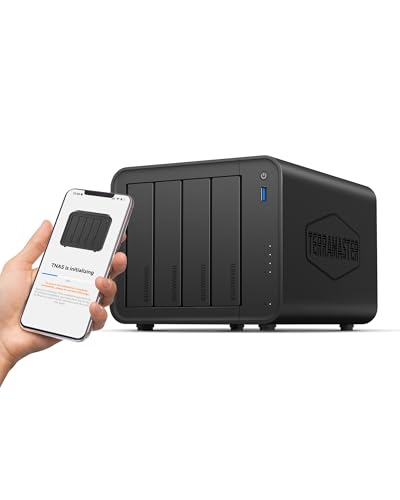
The only NAS on this page that names Plex, and it names the thing that makes Plex work: hardware-level 4K H.265 decoding, compatible with Plex and Emby. That is the difference between a film playing and a CPU melting. Two bays means you can mirror, so a dead drive costs you a drive rather than a decade of photographs. An Intel x86 quad-core with 4GB drives it, over 2.5GbE, which is two and a half times ordinary gigabit. It runs at 19dB(A), the quietest figure here and stated, and you can set it up from a phone with no PC involved.
Pros:
- The only NAS here naming Plex and hardware 4K H.265 decoding
- Two bays; you can mirror against a drive failure
- 2.5GbE networking, not plain gigabit
- 19dB(A) published; quiet enough for a bedroom
Cons:
- CPU named only as Intel x86 quad-core; no model number
- 4GB of RAM is modest
- Diskless; budget for drives on top
Best for: Plex, quietly, from the only listing that mentions it.
TERRAMASTER F4-425
The same machine with twice the bays, and bays are about failure rather than space. Four drives give you arrangements two cannot: room to lose a disk and keep working, and room to grow without starting again. Everything else carries over, including the specification that matters here, hardware-level 4K H.265 decoding for Plex and Emby, on an Intel x86 quad-core with 4GB over 2.5GbE. It runs at 21dB(A), two decibels up on the two-bay and still quiet, and TERRAMASTER publishes both figures rather than one. Setup runs from the phone app.
Pros:
- Four bays; real redundancy and room to grow
- Hardware 4K H.265 decoding for Plex and Emby
- 2.5GbE; 21dB(A) published
- Set up from a phone with no PC
Cons:
- Costs half again the two-bay for the same processing
- Still 4GB of RAM and an unnamed quad-core
- Diskless; four drives is a serious extra cost
Best for: a media library you would be upset to lose.
UGREEN DXP2800
The best-specified two-bay here on paper. An Intel N100 quad-core with 8GB of DDR5, which is double the RAM of the TERRAMASTER units and a named processor you can look up rather than a category. It holds up to 80TB across two bays, which is a great deal of film. UGREEN makes the argument for the whole category well: unlike a cloud subscription this is one purchase with no monthly bill, forever. The app covers Windows, macOS, Android, iOS, browsers and smart TVs. What the listing never mentions, on a page about Plex, is Plex.
Pros:
- Named Intel N100 processor; 8GB of DDR5
- Double the RAM of the TERRAMASTER machines
- Up to 80TB across two bays
- Apps for every platform including smart TVs
Cons:
- Never mentions Plex or hardware transcoding
- Costs half again the TERRAMASTER two-bay
- No noise figure published; diskless
Best for: a well-specified two-bay if you will research Plex yourself.
UGREEN DXP4800 Pro
A genuine computer that happens to hold drives. The Intel Core i3-1315U is six cores and eight threads running up to 4.5GHz, which is laptop-class silicon and far beyond what serving films requires, and that headroom is the point: it supports Docker and virtual machines, so the box runs whatever else you decide you want later rather than only what UGREEN shipped. Capacity reaches 144TB across four drive bays plus two M.2 SSD slots. It is aimed at offices and power users, and it is by a wide margin the most expensive thing here.
Pros:
- Intel Core i3-1315U; six cores, eight threads, up to 4.5GHz
- Docker and virtual machines; it runs whatever you add later
- Up to 144TB across four bays plus two M.2 SSD slots
- Genuine headroom rather than just enough
Cons:
- The most expensive device here by a wide margin
- Does not mention Plex either, despite the hardware
- Aimed at offices; overkill for a film library
Best for: a home server that is also a NAS, with room to grow into.
The verdict
Two checks first. Confirm it has a network port, because one product here is direct attached storage and clear about it. And count the bays, because a single drive is not a backup, it is one failure away from nothing.
Best overall: TERRAMASTER F2-425. The only NAS on this page that names Plex and, more importantly, names the thing that makes Plex work: hardware-level 4K H.265 decoding. Everything else here asks you to research whether transcoding will fall over. Two bays let you mirror against a drive failure, 2.5GbE handles more than one stream, and at a published 19dB(A) it can live in the room rather than a cupboard.
Best value: BUFFALO LinkStation 210. The cheapest way in and the drive is already installed, so it is a router cable away from working, with a subscription-free personal cloud and no monthly bill. Understand what it is: one bay, one drive, no redundancy, no processor named. Buy it as household storage with a real backup somewhere else, not as the backup itself.
Best premium: UGREEN DXP4800 Pro. A Core i3-1315U with six cores and eight threads is a proper computer, and the reason that matters is Docker and virtual machines: the box does whatever you decide next rather than only what it shipped with. Four bays plus two M.2 slots reach 144TB. It never mentions Plex, and with that processor it does not need to.
FAQ
What is the difference between NAS and DAS?
A network port. Network attached storage plugs into your router and serves everything in the house, which is what Plex needs. Direct attached storage plugs into one computer over USB. QNAP’s TR-004 is DAS, says so in its title, and suggests using it to back up a NAS you already have.
Is a one-bay NAS enough?
For sharing files, yes. For backup, no: one drive is one failure from nothing, and drives fail. Note also that BUFFALO’s one-bay listing mentions RAID, which by definition needs more than one drive. Two bays let you mirror, which is where redundancy actually starts.
What makes a NAS good for Plex?
Hardware transcoding. When a device cannot play a file’s native format, the server converts it live, and doing that in software kills a small CPU on the first 4K file. TERRAMASTER states hardware-level 4K H.265 decoding for Plex and Emby on both models. No other listing here mentions Plex at all.
How much CPU do I need?
Less than you think, if the decoding is in hardware. UGREEN’s Core i3-1315U is laptop-class and far beyond a film library, though it buys you Docker and virtual machines. The N100 is a real, modest part. BUFFALO and SSK name no processor, which tells you where they sit.
Does the noise figure matter?
More than it sounds, on something that never switches off. TERRAMASTER publishes 19dB(A) and 21dB(A) and says outright it suits a bedroom. Nobody else states a figure, and a NAS you banish to a cupboard gets worse cooling and a worse network path.
This article may contain affiliate links; see our Affiliate Disclosure.