Plug good headphones into a phone through the cheap adapter that came in the box and they sound thin, quiet, and lifeless. Swap in a proper dongle DAC, a thumb-sized bar of aluminum, and the same headphones suddenly have grip, detail, and volume to spare.

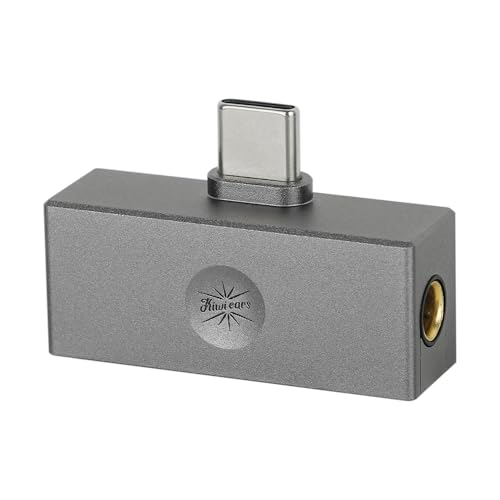


A dongle DAC does two jobs: it converts the digital signal properly, and it amplifies it with enough power to actually drive your headphones. What separates a great one is real output power, a low noise floor so sensitive earphones stay silent, and a build that survives living on the end of a cable. These picks suit anyone with wired earphones and a jack-free phone, gamers who want low-latency sound on a console, and listeners who want their laptop to sound better too.
At a glance
| Product | Standout feature | Price tier | Link |
|---|---|---|---|
| FiiO KA11 | Tiny, powerful, plug-and-play simplicity | Mid-range | |
| Kiwi Ears Allegro Mini | Both 3.5mm and 4.4mm outputs, low price | Budget | |
| Fosi Audio DS2 | Dual DAC chips and 60-step volume buttons | Premium | |
| Moondrop Dawn PRO 2 | App-based parametric EQ tuning | Premium | |
| FiiO KA13 | Desktop mode with 550mW balanced output | Premium | |
How to choose a dongle DAC
Power is what you are really buying
The specification that changes what you hear most is output power, quoted in milliwatts at a given impedance. Easy earphones need very little, but full-size headphones with higher impedance need real drive or they sound quiet and flat at high volume. Options here range from roughly 200mW to 550mW, so match the dongle to the hardest headphone you own, not the easiest.
3.5mm single-ended or 4.4mm balanced
The familiar 3.5mm jack works with virtually every cable and is all most listeners need. A 4.4mm balanced output uses separate channel grounds and typically delivers noticeably more power, which helps demanding headphones, but it requires a cable terminated in 4.4mm. Several dongles here offer both jacks, so you can start on 3.5mm and move up later.
DAC chips, in plain terms
The DAC chip converts the digital file into an analog signal, and the chips used here are well-regarded designs from Cirrus Logic. A dual-chip layout, one per channel, generally improves separation and lowers distortion, which is why the pricier dongles use two. All these models handle high-resolution files well beyond what streaming services deliver, so headroom is not the issue; the amplifier stage is.
Connector, compatibility, and gaming
Most modern phones use USB-C, and every dongle here connects that way, with one model also sold in a Lightning version for older iPhones. They work with Android, iOS, Windows, and Mac. If you want to plug into a games console, look for UAC 1.0 support, which lets a Switch or PlayStation recognize the dongle as a plug-and-play audio device.
Battery drain, noise, and heat
A dongle draws power from your phone, so a more powerful one drains the battery faster. That is the trade for volume. Also check the noise floor: sensitive in-ear monitors reveal hiss, and the models here quote very low noise figures. Aluminum bodies help shed heat, and a few place vents over the hottest chips.
Volume control: whose steps are you using
An overlooked frustration is that a phone’s volume slider can be too coarse for sensitive earphones, where step three is too quiet and step four is too loud. Some dongles solve this with their own hardware volume, taking over from the phone with sixty or a hundred fine steps and remembering the level between sessions. It sounds like a minor convenience and turns out to be one of the biggest day-to-day differences between a plain dongle and a better one.
Size, cables, and living on the end of a phone
Shape decides whether you actually carry it. A plug-sized dongle under ten grams disappears and can hang off a phone in a pocket without stressing the port. A larger dongle with a screen and buttons is better to use but needs somewhere to sit, and its weight tugs at a socket if you walk with it dangling. Look at the cable too: a short braided lead absorbs movement, and a replaceable one means a frayed cable is not the end of the device.
What you will and will not hear
Be clear-eyed about the gains. On hard-to-drive headphones, the difference is not subtle: more volume, tighter bass, and dynamics that a phone jack cannot produce. On easy, efficient earbuds already playing loud enough, the change is smaller and comes down to a quieter background and a little more control. What a dongle does not do is remix the recording. If you want a genuinely different tonal balance, the model here with parametric EQ is the real route to it.
FiiO KA11
The best-seller here is also the simplest. The KA11 is barely larger than a USB plug and weighs under nine grams, yet it packs a well-regarded CS43131 DAC and op-amp, handles files up to 32-bit/384kHz, and delivers up to 245mW into easy loads, which is enough for most earphones and many headphones. Distortion and noise figures are very low, so sensitive in-ears stay quiet. It supports UAC 1.0 mode for plug-and-play gaming on a Switch or PlayStation. This USB-C version suits Android and current iPhones; a Lightning version is sold for older iPhones.
Pros:
- Extremely small and light, no bulk on a phone
- Strong power for its size
- Very low noise floor for sensitive earphones
- UAC 1.0 mode for consoles
Cons:
- 3.5mm output only, no balanced jack
- No volume buttons or screen
Best for: most listeners who want a big upgrade over a stock adapter with zero fuss.
Kiwi Ears Allegro Mini
The Allegro Mini is the value standout because it gives you both a 3.5mm and a 4.4mm balanced output at the lowest price here. It handles PCM up to 32-bit/384kHz and DSD128, keeps distortion impressively low at 32 ohms, and wraps everything in an all-aluminum body that feels far more expensive than it is. USB-C plug-and-play covers most Android devices and computers. If you own or plan to buy a balanced cable for your in-ear monitors, this is the cheapest sensible way to use it.
Pros:
- Both 3.5mm and 4.4mm balanced outputs
- Lowest price in this comparison
- Solid aluminum build
- Very low distortion for the money
Cons:
- Less output power than the premium picks
- No onboard volume buttons
Best for: in-ear monitor owners who want balanced output without spending much.
Fosi Audio DS2
The DS2 steps up to two CS43131 DAC chips, one per channel, and delivers up to 170mW per channel through either the 3.5mm or 4.4mm balanced jack. It supports DSD256 and 32-bit/384kHz, and its noise floor and distortion figures are among the best here, which shows on quiet passages. The practical highlight is independent 60-step volume buttons with memory, so you set the level on the dongle rather than fighting your phone’s coarser steps. The CNC metal shell is solid and comfortable in hand.
Pros:
- Dual DAC chips for better channel separation
- Both 3.5mm and 4.4mm outputs
- 60-step volume control with memory
- Excellent measured noise and distortion
Cons:
- Larger and heavier than a plug-sized dongle
- Premium price
Best for: listeners who want fine volume control and cleaner sound than a basic dongle.
Moondrop Dawn PRO 2
The Dawn PRO 2 is the tuner’s dongle. Dual CS43198 chips with three separate power regulators and an independent crystal oscillator form a clean, efficient circuit, and both 3.5mm and 4.4mm outputs are on board with 124mW per channel and 4Vrms output. What sets it apart is the app: a proper parametric equalizer where you set filter type, frequency, gain, and Q, with a headphone response database to guide you. A near-lossless 100-level volume control separates the dongle’s level from your phone’s. The aluminum shell vents heat over the hottest chips.
Pros:
- Full parametric EQ through the app
- Dual flagship DAC chips, clean power design
- Both 3.5mm and 4.4mm outputs
- Fine 100-level volume control
Cons:
- EQ setup takes time to learn
- Premium price
Best for: anyone who wants to precisely tune the sound of specific headphones.
FiiO KA13
The KA13 is the power pick. A desktop mode pushes the balanced output to 550mW, comfortably the most muscle here, which lets it drive high-impedance headphones with real dynamics rather than polite background music. Two CS43131 DAC chips pair with two low-noise op-amps for a genuinely dual-core design, and it fits both 3.5mm and 4.4mm outputs into a compact shell. The FiiO Control app handles RGB lighting, SPDIF output, and audio filters. It costs the most here, and the extra power is exactly what you are paying for.
Pros:
- 550mW balanced output in desktop mode
- Dual DAC chips and dual op-amps
- Both 3.5mm and 4.4mm jacks
- App control for filters and settings
Cons:
- Highest price in this comparison
- Desktop mode drains a phone battery faster
Best for: harder-to-drive headphones that need serious power from a pocket device.
The verdict
Best overall: the FiiO KA11 is the right call for most people. It is tiny, quiet, powerful enough for typical earphones, and cheap enough to be an easy upgrade, which is why it leads this category.
Best value: the Kiwi Ears Allegro Mini gives you a balanced 4.4mm output and a metal body for the least money, an unusual amount of capability at the price.
Best premium: the FiiO KA13 is the pick when you need power, with 550mW on tap in desktop mode and a dual-chip design that keeps the sound clean while doing it.
Also worth a look: the Fosi Audio DS2 is the choice if fine hardware volume control and very low distortion matter most, and the Moondrop Dawn PRO 2 is the one to buy if you intend to tune a specific headphone rather than take it as it comes.
Getting the most out of a dongle DAC
Start by matching the dongle to the hardest headphone you own, not the easiest. Sensitive in-ear monitors need almost no power and are mostly asking for a quiet background, so a small, low-noise dongle serves them best and a powerful one can even leave audible hiss. Higher-impedance over-ear headphones want current, and that is where a 550mW balanced output stops being a spec sheet number and starts being the difference between flat and alive. Buying more power than your headphones can use costs you battery life and gains you nothing.
Then feed it properly. A dongle can only decode what your phone sends it, so a heavily compressed stream stays heavily compressed no matter how good the chip is. Set your streaming app to its highest quality on Wi-Fi, and if the app has its own volume normalization or effects, turn them off and let the dongle handle the signal cleanly. On a computer, check the system output is set to the dongle rather than defaulting back to internal speakers.
Finally, mind the practical side. Set volume at the dongle if it has its own control, and turn it down before you plug headphones in, since a dongle waking at full level is unpleasant and hard on your ears. Expect the device to get warm under load, which is normal. If your phone battery is the constraint, use the single-ended output and skip any high-power or desktop mode until you actually need it.
Look after the connector, because that is what fails first. A dongle hanging from a phone in a pocket levers on the USB-C port every time you sit down, and a worn port is a much bigger problem than a worn dongle. Tuck the phone and the dongle into the same pocket so the cable is not taking the weight, and unplug it by the housing rather than pulling the lead. Keep the plug free of pocket lint, which is a surprisingly common cause of a dongle that suddenly is not recognized.
Do not overlook the desk. It is easy to think of these as phone accessories, but the same dongle plugged into a laptop replaces a mediocre built-in output for calls, music, and games, which effectively doubles the value of the purchase. A model with UAC 1.0 also drops straight into a console with no drivers. If you already own good headphones, one dongle can quietly upgrade every device you own that has a USB-C port.
Frequently asked questions
Do I need a dongle DAC if my phone still has a headphone jack?
Not necessarily, but a dongle usually offers more power and a lower noise floor than a built-in phone output, which matters for demanding headphones. If your earphones already sound loud and clean, the gain is smaller.
How is this different from a cheap USB-C to 3.5mm adapter?
A basic adapter contains a bare-minimum converter and almost no amplification. A dongle DAC uses a proper DAC chip and an amplifier stage, so it plays louder, cleaner, and with better control, especially on headphones that are harder to drive.
Will a dongle drain my phone battery?
Yes, since it draws power from the phone, and the more powerful models draw more. Efficient designs limit the impact, and lowering the gain or using single-ended output rather than a high-power mode reduces the drain.
Is the 4.4mm balanced output worth it?
It typically delivers more power and better channel separation, which helps demanding headphones, but you need a cable terminated in 4.4mm. If your earphones use a standard 3.5mm plug and already sound great, the single-ended jack is fine.
Do these work with an iPhone or a games console?
All of them work with USB-C devices, including current iPhones, Android phones, laptops, and Macs, and the KA11 is also sold in a Lightning version for older iPhones. For a Switch or PlayStation, look for UAC 1.0 support, which makes the dongle plug-and-play.
This article may contain affiliate links; see our Affiliate Disclosure.