Your phone is at nine percent, the maps are running, and the ancient charger in the socket is trickling in power slower than the drive is draining it. A proper USB-C car charger fixes that in one plug: with Power Delivery, it pushes a modern phone from nearly empty to most of the way full in the time it takes to grab a coffee and get back on the highway. The right one turns dead-battery anxiety into a non-issue.



A great USB-C car charger delivers real fast-charging power, has the ports you need for the devices in your car, and runs cool and safe on a bumpy road. What separates the picks is total wattage, port count, whether a cable is built in, and whether it can also feed a laptop. The five below suit a solo commuter, a family charging four devices at once, a rideshare driver with passengers, and anyone who wants to top up a MacBook on the move.
At a glance
| Product | Standout feature | Price tier | Link |
|---|---|---|---|
| LISEN 69W Dual-Port | Mini aluminum design, two-pack value | Budget | |
| KENHAO 67W 3-Port | Three ports plus an included USB-C cable | Budget | |
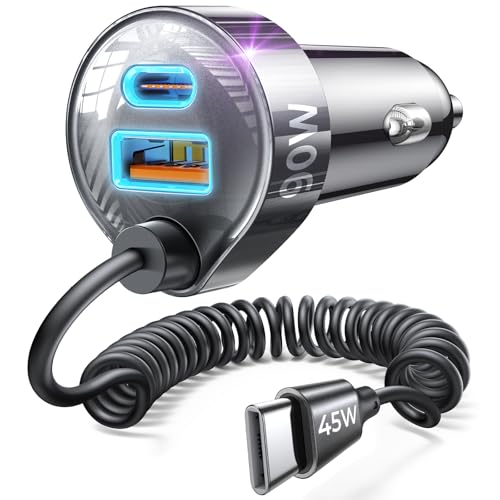
| LISEN 90W Built-In Cable | Retractable coiled cable plus extra ports | Mid-range | |
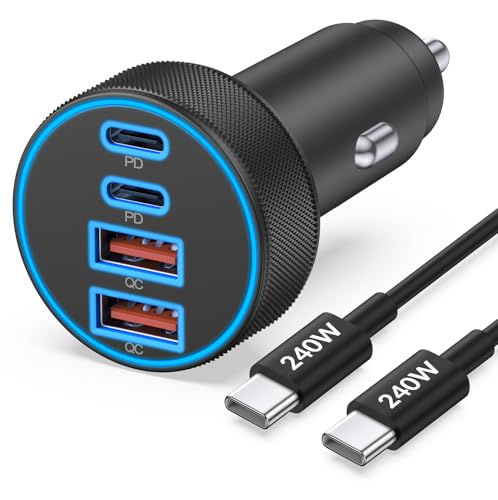
| JUNVANG 90W 4-Port | Four ports charge a whole car of devices | Mid-range | |
| Anker 167.5W 3-Port | 100W port charges a laptop, trusted brand | Premium | |
How to choose a USB-C car charger
The specs on these adapters can look like alphabet soup, but only a few numbers actually decide which is right for you. Here is how to read them.
Power Delivery and wattage
Fast charging over USB-C runs on a standard called Power Delivery, or PD, with PPS as an extension that phones like Samsung’s use for even smoother fast charging. Wattage is the headline: a phone charges happily at around 20 to 30 watts, a tablet wants 30 to 45, and a laptop needs 60 to 100 or more. Match the charger’s per-port wattage to your most demanding device, and remember a higher number only helps if your device and cable can accept it.
Ports and total power
Count how many devices you charge at once and of what type. USB-C is the modern, faster standard; a USB-A port is handy for older cables and accessories. The catch is total power sharing: a charger’s headline wattage is usually the sum across all ports, so plugging in three devices splits the budget and each charges slower than one alone. If full speed for a single phone matters most, a strong single port beats a crowded one; if you need to keep several devices topped up, more ports win.
Built-in cable or bring your own
Some chargers include a fixed, often retractable, cable, which ends the hunt for a lost cord and keeps the console tidy. Others are ports only, letting you plug in whatever cable suits each device. If you go ports-only and want top speeds, use a good PD-rated USB-C cable; for the highest-power charging, a cable rated to a high wattage ensures it is not the bottleneck. A built-in cable is convenient but locks you to one connector and length.
Device compatibility
Check that the charger suits your phones. Current iPhones and most Android phones use USB-C, so a USB-C PD port fast-charges them directly with the right cable. Older iPhones use a Lightning cable, which still fast-charges from a PD port. Samsung and some Android phones reach their fastest speeds with PPS support, so if you own one, look for a charger that lists it. For a laptop, you need a port rated at 60 watts or more, ideally 100.
Size, fit, and safety
A compact charger sits nearly flush in the socket and stays out of the way of the gear shift and controls, while a bulkier one may block nearby buttons. Most fit standard 12-volt sockets, and many also handle the 24-volt systems in trucks. On safety, look for a metal or well-vented shell for heat dissipation, an intelligent chip with protection against overcurrent, overvoltage, and overheating, and recognized certifications. A soft LED that helps you find the ports in the dark, without dazzling you, is a nice touch.
Real-world speed and the socket
Take charge-time claims as a best case, not a promise. Figures like empty to eighty percent in half an hour assume the fast-charging conditions line up: a device that accepts high power, a cable that can carry it, and a single port doing the work. In the real world, a warm phone, a cheap cable, or a second device sharing the port all trim the speed. Two practical points help. First, many cars only power the socket when the ignition is on, so a charger draws nothing with the engine off and will not flatten your battery overnight. Second, if a charger ever gets uncomfortably hot or a device stops charging, unplug it and check the cable, since a failing cable is the most common culprit behind slow or interrupted charging.
LISEN 69W Dual-Port
The best-selling pick keeps things simple and cheap. This mini dual-port charger pairs a 36-watt USB-C PD port, enough to fast-charge current iPhones and most Android phones, with an 18-watt USB-A port for older cables and accessories. An all-aluminum shell dissipates heat better than plastic and stays cool under load, and the thumb-sized body sits flush for a clean, clutter-free socket. Best of all it ships as a two-pack, so you can keep one in each car or hand a spare to family. For no-fuss, everyday phone charging at a rock-bottom price, it is the effortless favorite.
Pros:
- Fast USB-C PD plus a USB-A port
- All-aluminum shell runs cool
- Tiny, flush-fitting design
- Two-pack value with a long warranty
Cons:
- Not enough power for a laptop
- Two ports rather than three or four
Best for: everyday phone charging and drivers wanting a cheap spare.
KENHAO 67W 3-Port
The KENHAO stretches the budget to three ports and throws in a cable. A 37-watt USB-C PD port and a 30-watt USB-A QC port let two devices fast-charge at once, with a third port for a passenger’s phone or an accessory, and it covers everything from iPhones and Galaxy phones to an iPad or even a MacBook Air at a slower pace. A fireproof shell and intelligent chip guard against overcurrent, overheating, and short circuits, cutting off when a device is full. Getting a USB-C to USB-C cable in the box means you are charging the moment it arrives. For value with room for more devices, it is a smart pick.
Pros:
- Three ports for multiple devices
- Includes a USB-C cable
- Fast PD and QC output
- Full safety protections, low price
Cons:
- Total power splits across ports
- Not a true laptop-grade charger
Best for: value seekers who want three ports and a cable in the box.
LISEN 90W Built-In Cable
This LISEN solves cable clutter with a built-in one. A coiled 45-watt cable stretches to reach the back seat and snaps back automatically, so kids or rideshare passengers can charge without a loose cord across the console, and extra ports let three devices power up at once. It is genuinely fast, and a soft halo ring around the ports helps you plug in at night without glare. Certified by the usual safety bodies, it guards against overheating and overcurrent for cool, steady power on rough roads. If a permanently attached, tidy cable plus room for more devices is what you want, this is the standout.
Pros:
- Built-in retractable 45W coiled cable
- Reaches the back seat for passengers
- Charges three devices at once
- Soft halo light for night plugging
Cons:
- Built-in cable ties you to one connector
- Older iPhones still need a Lightning cable
Best for: tidy consoles and charging back-seat passengers.
JUNVANG 90W 4-Port
When the whole car needs charging, the JUNVANG’s four ports handle it. Two USB-C and two USB-A ports let everyone plug in at once, with PD and QC fast charging up to a strong per-port maximum for phones, tablets, and more. It supports PPS for Samsung’s fastest speeds, works across iPhone, Galaxy, and Pixel lineups, and ships with a heavy-duty high-wattage USB-C cable rated to survive tens of thousands of bends. It fits 12 to 24-volt vehicles, so it suits trucks and SUVs too. For a family road trip where four devices are always hungry, the extra ports earn their keep.
Pros:
- Four ports for up to four devices
- PD, QC, and PPS fast charging
- Includes a durable high-wattage cable
- Fits 12 to 24-volt vehicles
Cons:
- Total power divides among four ports
- Larger than a single-port mini
Best for: families and road trips charging several devices at once.
Anker 167.5W 3-Port
The Anker is the premium powerhouse, and the only one here that truly charges a laptop. Its first USB-C port delivers up to 100 watts, enough to power a 16-inch MacBook Pro at real speed, while a second USB-C port adds 45 watts and a USB-A port another 22.5, so a laptop, a phone, and earbuds can all charge together. Despite the output it stays ultra-compact and unobtrusive in the socket, and it carries Anker’s trusted engineering and warranty. It costs more than the others, but for anyone who works from the car or wants headroom for a laptop and tablet, it is the clear upgrade.
Pros:
- 100W USB-C port charges a laptop
- Three ports with strong total power
- Compact despite the high output
- Trusted brand and warranty
Cons:
- The priciest option here
- More power than a phone-only user needs
Best for: mobile workers charging a laptop and devices on the road.
The verdict
Best Overall: the LISEN 69W Dual-Port is the pick for most drivers. It fast-charges a phone, adds a USB-A port for everything else, runs cool in an aluminum shell, and comes as a two-pack for very little, which is exactly why it is the best seller. For everyday charging, it is all most people need.
Best Value: the KENHAO 67W 3-Port adds a third port and includes a cable for the same low price, giving you room for more devices and nothing else to buy.
Best Premium: the Anker 167.5W 3-Port is the one to get if you charge a laptop, with a 100-watt port that powers a MacBook plus two more devices from a trusted brand. For a tidy built-in cable, the LISEN coiled model is ideal, and the JUNVANG’s four ports suit a full car of devices.
Frequently asked questions
What does Power Delivery mean and do I need it? Power Delivery, or PD, is the USB-C fast-charging standard that lets a charger and device negotiate higher, safe power. It is what fills a modern phone quickly instead of trickling. Any charger here supports it; you just need a device and cable that also support PD to get the full speed.
Why does my phone charge slower when two devices are plugged in? Because a charger’s headline wattage is usually shared across its ports. Plug in a second device and the total splits between them, so each charges more slowly than it would alone. If fast single-device charging matters most, use one strong port; if you need to keep several devices topped up, accept the split and buy more total power.
Can a USB-C car charger charge a laptop? Some can. You need a USB-C port rated at 60 watts or more, ideally 100, and a laptop that charges over USB-C. The Anker here delivers 100 watts for exactly that. Most phone-focused chargers top out lower, which is fine for phones and tablets but too little for a hungry laptop.
Will it work with my older iPhone? Yes. Newer iPhones use USB-C and fast-charge directly from a PD port with a USB-C cable. Older iPhones use a Lightning cable, which still fast-charges when connected to a PD USB-C port. Just use the correct cable for your phone, and a PD-capable port does the rest.
Do I need to bring my own cable? It depends on the charger. Ports-only models need a cable, and for the fastest speeds a good PD-rated USB-C cable is worth using, with a high-wattage-rated cable for laptop charging. Some chargers include a cable or have one built in, which is convenient but limits you to that connector and length.
This article may contain affiliate links; see our Affiliate Disclosure.