One brick, two laptops charging at full speed, and two phones topping up beside them. That is the promise of a 200W GaN charger, and it clears a desk of the tangle of separate power bricks that used to fight over the same outlet.



These chargers share a 200W-class power budget and GaN internals that keep them compact, but they split into two shapes: a desktop station that stays on your desk and multi-port wall chargers you can pack. What separates a great one is how much power a single port can push for a demanding laptop, how the total wattage divides across ports, and whether the form factor fits your desk or your bag. The picks below suit a two-laptop household, a hybrid worker, or anyone consolidating a drawer of chargers into one.
At a glance
| Product | Standout feature | Price tier | Link |
|---|---|---|---|
| Anker Prime 200W Station | Six ports, two USB-C at 100W each | Mid-range | |
| ThunderGo 240W 4-Port | 140W single port, compact travel build | Budget | |
| UKCSIS 200W 4-Port (2 Pack) | Foldable plug, two chargers in the box | Budget | |
| UGREEN Nexode 200W 4-Port | 140W single port, true dual-laptop charging | Premium | |
| Belkin 200W 4-Port | PD 3.1 certified, detachable 5ft cord | Premium | |
How to choose a 200W multi-port charger
Total wattage versus per-port power
A 200W rating is the shared budget across all ports, not what each one delivers at once. What matters is how that budget splits when several devices are plugged in. Charging two laptops at full speed needs each of two ports to hold around 100W simultaneously, so check the port table in the listing, not just the headline number. Plug in a phone and the charger reallocates power, usually slowing the laptop ports a little.
Single-port maximum
A hungry 16-inch laptop can pull up to 140W over USB-C Power Delivery 3.1. If you own one, you want a charger with a 140W single-port mode so it charges at full speed when it is the only thing plugged in. Chargers that top out at 100W per port still charge these laptops, just more slowly under heavy load.
Ports and connector mix
Most units here offer three USB-C ports and one USB-A. USB-C handles laptops, tablets, and modern phones, while the USB-A port is handy for older cables and accessories. A desktop station may add more ports for headphones and a watch. Count how many devices you charge at once and leave a port spare.
Desktop station or travel charger
A desktop station is larger and heavier, meant to live on your desk with a long cord, and it trades portability for more ports and steady high output. A folding-plug wall charger is small enough to pack for a trip. Decide where the charger will spend most of its life before you choose a shape.
GaN, safety, and cables
Gallium nitride internals let these chargers run cooler and smaller than older silicon bricks, and reputable models add temperature monitoring and overcurrent protection. One easy-to-miss detail: hitting 140W requires a cable rated for 5A and 240W. A standard cable will still charge, just not at the top speed, so budget for a proper cable if you need the maximum.
How power sharing actually behaves
Chargers do not divide their budget evenly; they follow a priority table set by the maker, and that table is where the surprises live. Plug a laptop into the wrong port and it may be capped at 30W while a spare port sits idle at 65W. Adding a fourth device often forces a renegotiation that briefly interrupts charging on the others, which is why a laptop sometimes blinks its charging indicator when someone plugs in a phone. Read the port-combination chart in the listing and label your ports if the arrangement is not obvious.
Protocols: PD, PPS, and the rest
USB Power Delivery is the standard that lets a charger and a device agree on voltage, and PD 3.1 is the revision that unlocked the higher tiers up to 140W. PPS is a useful extra that lets the charger tune voltage in fine steps, which several phone makers use for their fastest and coolest-running charging. Older protocols like QC 3.0 cover legacy devices. Certification matters here: a certified charger has been tested to negotiate correctly, which is worth more than an eye-catching wattage claim.
Heat, noise, and where it sits
A charger pushing 200W has to shed real heat, and getting warm under load is normal rather than a fault. What matters is airflow: a brick crammed behind a sofa or under a pile of paper runs hotter and will throttle its output to protect itself. Desktop stations are designed with this in mind and stay stable on a desk; compact travel bricks are denser and lean harder on their thermal limits. Give any of them a few inches of clear air and they will hold their rated speed for longer.
Anker Prime 200W Charging Station
The most popular option here is a desktop station rather than a pocket charger, and that is exactly its strength. Six ports power a laptop, a tablet, and phones together, and when two USB-C ports are in use each can hold up to 100W, so it charges two 14-inch laptops at once, one of them to half in under half an hour. Anker builds in temperature monitoring across the session. It is about the width of a phone but sturdy and weighty, and the maker is clear it is designed for the desk, not travel.
Pros:
- Six ports for a full desk of devices
- Two USB-C ports at 100W each simultaneously
- Trusted brand with active temperature monitoring
- Long AC cord and stable desktop footing
Cons:
- Not a travel charger; heavier and desk-bound
- Tops out at 100W per port rather than 140W
Best for: a home or office desk that needs to charge several devices at once.
ThunderGo 240W 4-Port Charger
ThunderGo overshoots the 200W class with a 240W total budget and a primary USB-C port that hits 140W, enough to drive a large laptop at full pace. Three USB-C ports and one USB-A cover four devices, with power shared intelligently, and the GaN build stays compact for a bag. It accepts universal voltage for international travel. At a budget price with the highest single-port figure here, it is a lot of charger for the money, provided you are comfortable with a value brand.
Pros:
- 140W single-port mode for demanding laptops
- 240W total budget exceeds the 200W class
- Compact, travel-ready with universal voltage
- Budget price for the capability
Cons:
- Full output needs specific port combinations
- Less established brand than the majors
Best for: value hunters who want top single-port speed in a packable size.
UKCSIS 200W 4-Port Charger, 2-Pack
UKCSIS takes a different value angle: two foldable four-port chargers in one box, so you can keep one at home and one in a bag. Each has dual 65W USB-C ports, a 30W USB-C, and a 20W USB-A, which fast-charges phones, tablets, and lighter laptops, though it is not built to run two power-hungry laptops at full tilt. The foldable plug and compact GaN 5 body make each one genuinely pocketable. For most phone-and-tablet households, the two-for-one deal is compelling.
Pros:
- Two chargers in the box for home and travel
- Foldable plug and compact body
- Four ports each, good for phones and tablets
- Lowest entry price per charger here
Cons:
- 65W top ports are not ideal for two large laptops
- No 140W single-port mode
Best for: phone, tablet, and light-laptop users who want two chargers for the price.
UGREEN Nexode 200W 4-Port Charger
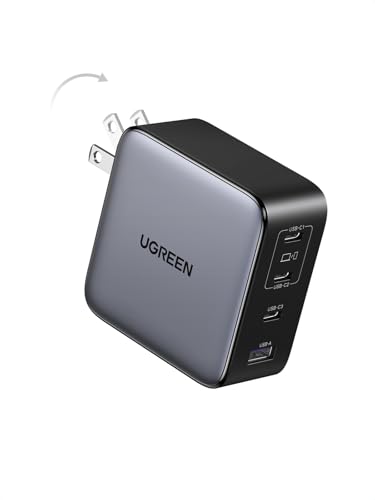
The UGREEN Nexode is the pick that most literally matches the brief: 200W total, a 140W single-port maximum, and a design specifically rated to charge two laptops at the same time. Three USB-C ports and one USB-A cover four devices, and it folds down for travel despite the power. It charges a 16-inch laptop to more than half in about half an hour on its own. UGREEN is a well-regarded brand in this space, and the Nexode reflects it. It sits at the premium end, and the capability earns it.
Pros:
- 140W single-port and genuine dual-laptop charging
- Four ports in a foldable, travel-friendly body
- Reputable brand with strong reliability record
- Balances desk and bag use well
Cons:
- Premium price
- Cable for full 140W is sold separately
Best for: two-laptop users who want full-speed charging in a packable wall charger.
Belkin 200W 4-Port Charger
Belkin brings a polished, safety-first take. Four ports charge with intelligent power sharing, PPS dynamically tunes the voltage for compatible phones, and the whole unit is USB-C PD 3.1 certified with integrated GaN. A detachable five-foot cord gives clean desk access, the housing uses a majority of recycled content, and Belkin backs it with a two-year warranty and a connected-equipment promise. It is among the priciest here, and you are paying for certification, build quality, and support rather than a higher wattage number.
Pros:
- PD 3.1 certified with PPS fine-tuning
- Detachable 5ft cord for tidy desk placement
- Recycled housing and two-year coverage
- Established brand with strong support
Cons:
- Premium price for a 200W-class unit
- Larger than the compact travel options
Best for: buyers who prioritize certification, warranty, and brand assurance.
The verdict
Best overall: the Anker Prime 200W station is the most chosen for good reason. Six ports and two full 100W USB-C outputs make it a superb desk hub for a multi-device setup, as long as you want a stationary charger.
Best value: the ThunderGo 240W delivers the highest single-port speed here at a budget price in a packable size, making it the standout if you want power for less.
Best premium: the UGREEN Nexode 200W is the pick for true dual-laptop charging on the move, pairing a 140W port with a foldable travel design from a trusted brand.
Also worth a look: the Belkin is the choice if certification and a long warranty matter more to you than a headline wattage figure, and the UKCSIS two-pack makes sense for a phone-and-tablet household that would rather have a charger in two places than maximum power in one.
Setting one charger up for a whole desk
Work out your real peak first. Add up what actually charges at the same time, not everything you own: a laptop at 65W to 100W, a phone at 20W to 30W, a tablet at 20W, earbuds at 5W. Most people discover their genuine peak is well under 200W, which means the headroom goes into charging faster rather than charging more. If two large laptops are on that list, that is the case where the 200W class stops being overkill and starts being the point.
Assign the ports deliberately. Put the laptop on the port with the highest rated output, usually the first USB-C, and hang the low-draw devices off the USB-A and the smaller USB-C ports. Doing it the other way around is the most common cause of a laptop that charges slowly or, on a busy day, drains while plugged in. Once you have a working arrangement, keep the cables in those ports.
Then get the cables right. The charger is only half the chain, and a tired cable is the usual culprit behind slow charging that gets blamed on the brick. A 100W device needs a 5A-rated cable, and 140W needs one rated for 240W; unmarked cables from a drawer are often 60W parts. Buy one good cable per high-draw device, leave them permanently attached to the charger, and the whole setup stops being a guessing game.
Consolidating also frees up more than outlets. Replacing four bricks with one means one plug, one place to look, and no more hunting for the laptop charger someone carried to another room. It is worth keeping one small charger in the bag as a backup rather than moving the main unit around, which is exactly the argument for the two-pack option here, or for choosing a foldable model that can do both jobs.
Frequently asked questions
Can a 200W charger really power two laptops at once?
Yes, if each of two ports can hold around 100W at the same time, as the Anker station and the UGREEN and Belkin wall chargers can. Always check the port breakdown, since adding a phone reallocates some power away from the laptop ports.
Do I need a special cable for 140W charging?
To reach 140W you need a cable rated for 5A and 240W. A standard USB-C cable still charges the device, just at a lower ceiling under heavy load, so pair a 140W charger with a matching cable.
What is the difference between a desktop station and a wall charger?
A desktop station stays on your desk, uses a long cord, and usually offers more ports and steady output. A wall charger has a folding plug and packs for travel. The Anker here is a station; the others are wall chargers.
Is GaN worth it?
GaN lets a charger deliver high power in a much smaller, cooler package than older silicon designs. Every option here uses it, which is why a 200W charger can be so compact.
Will these charge phones and tablets safely?
Yes. They support standard fast-charging protocols and adjust output to each device, and reputable models add overcurrent and temperature protection. A phone simply draws its safe maximum and no more.
This article may contain affiliate links; see our Affiliate Disclosure.