Your internet plan says 2 gigabits. Your router has gigabit ports. Somewhere in that sentence is money quietly evaporating every month, and no amount of rebooting fixes it. Wi-Fi 7 is the first generation where the wireless side genuinely outruns the wire, which makes the ports on the back as interesting as the antennas on top.




Wi-Fi 7’s headline trick is Multi-Link Operation, which lets a device talk on two bands at once instead of picking one and hoping. Add 320 MHz channels and 4K-QAM and the standard has real headroom. The catch is that the benefit only shows up if the rest of your setup can feed it, which is why this comparison pays as much attention to multi-gig ports and band count as to the big number on the box. These five span a dual-band starter to a quad-band mesh unit with two 10G ports.
At a glance
| Product | Standout feature | Price tier | Link |
|---|---|---|---|
| TP-Link Archer BE600 (BE9700) | Tri-band with a 10G port and four more multi-gig ports | Mid-range | |
| TP-Link Archer BE400 (BE6500) | Wi-Fi 7 essentials with dual 2.5G ports and USB 3.0 | Budget | |
| Amazon eero 7 | Two 2.5G ports, mesh expansion, minimal configuration | Budget | |
| TP-Link Archer BE550 (BE9300) | Tri-band with every port at 2.5G; VPN client and server | Mid-range | |
| TP-Link Deco 7 Elite BE95 | Quad-band BE33000, dual 10G ports, 16 streams | Premium | |
How to choose a Wi-Fi 7 router
Dual-band, tri-band, quad-band: what the 6 GHz band buys
This is the most consequential split on the list. A dual-band router has 2.4 GHz and 5 GHz. A tri-band adds 6 GHz, which is where Wi-Fi 7 does its best work: wide 320 MHz channels, almost no legacy congestion, and short range. The Archer BE400 and eero 7 are dual-band, so they support MLO across the bands they have but never touch 6 GHz. The BE600 and BE550 are tri-band. The Deco BE95 runs two separate 6 GHz bands plus 5 GHz and 2.4 GHz, which is what quad-band means, and it can hand one entire 6 GHz band to backhaul. If you are buying Wi-Fi 7 partly to be ready for what comes next, 6 GHz is the part worth paying for.
Match the ports to your actual plan
Router speed ratings describe wireless capacity you will likely never saturate. The ports are different: they set a hard ceiling on what enters the building. If your plan is 1 Gbps or less, a 2.5G WAN port is plenty and a 10G port is decoration. With multi-gig service, look at the WAN port first. The BE600 has a 10 Gbps WAN/LAN port plus four 2.5G ports. The BE550 skips 10G but makes every port 2.5G, arguably more useful day to day. The BE400 gives two 2.5G ports then drops to gigabit. The eero 7 has two auto-sensing 2.5G ports and supports plans to 2.5 Gbps.
Coverage numbers and where they stop
The square-footage figures assume an open plan and no plaster. Take them as ranking, not promises: the eero 7 quotes 2,000 sq ft as a 25-foot radius, a refreshingly plain way to put it. The BE550 also claims around 2,000, the BE400 2,400, and the BE600 2,600. Any single router in a long or multi-story home will leave a corner short, and 6 GHz especially does not travel through walls. That is the argument for mesh: not more speed, but the same speed further away. Both Archer models support EasyMesh, so you can add a node later.
One box or a system
A standalone router puts all the power in one spot and asks you to place it well. A mesh system spreads several units around and hands devices between them. The eero 7 and Deco BE95 are mesh units sold here as single packs, so both work as a normal router now and expand later. The difference is philosophy: eero hides nearly every setting behind clean software, while the Deco exposes far more and can run wireless and wired backhaul at once. One suits people who never want to think about it; the other suits people who enjoy it.
Security, VPN, and the fine print
All the TP-Link units include HomeShield for network protection, parental controls and IoT security, and TP-Link is a signatory to the US Cybersecurity and Infrastructure Security Agency’s Secure-by-Design pledge. The BE550 goes further with a private IoT network using WPA3, which quarantines smart plugs and cameras away from your laptops, plus VPN client and server support. Worth knowing: several vendors reserve some features for a subscription, so check what is included before assuming a feature is yours forever.
TP-Link Tri-Band BE9700 Wi-Fi 7 Router (Archer BE600)
The BE600 is the router on this list that leaves the least on the table, and it shares the top sales position in the group. Seven streams across three bands deliver up to 5,765 Mbps on 6 GHz, 2,882 Mbps on 5 GHz, and 1,032 Mbps on 2.4 GHz, with 320 MHz channels, Multi-Link Operation, Multi-RUs and 4K-QAM all present. The port array is the real story: a 10 Gbps WAN/LAN port, a 2.5 Gbps WAN/LAN port, and three 2.5 Gbps LAN ports, so nothing on the wired side bottlenecks. Coverage is quoted at 2,600 sq ft for up to 120 devices through six antennas and beamforming. HomeShield handles security and parental controls, VPN is supported, and setup runs through the Tether app or a web interface.
- Pros: Tri-band with a full-width 6 GHz band; 10G WAN/LAN port plus four 2.5G ports, no gigabit ports at all; 320 MHz channels and MLO; largest quoted coverage here at 2,600 sq ft; 120 devices; HomeShield and VPN; joint best seller.
- Cons: Costs more than the dual-band options; the 10G port is wasted on a sub-gigabit plan; single unit, so a large home still needs mesh nodes; six antennas mean a large footprint.
Best for: Multi-gig internet plans, wired home labs, and anyone who wants tri-band Wi-Fi 7 without buying a mesh system.
TP-Link Dual-Band BE6500 Wi-Fi 7 Router (Archer BE400)
Sharing the top sales spot with the BE600, the BE400 makes a different bet: skip 6 GHz, keep everything else, charge much less. Six streams across two bands give 5,764 Mbps on 5 GHz and 688 Mbps on 2.4 GHz for 6.5 Gbps of total bandwidth, and MLO, Multi-RUs and 4K-QAM are all here, so it is a genuine Wi-Fi 7 router rather than a rebadged Wi-Fi 6 unit. A quad-core CPU keeps up with 90 devices across 2,400 sq ft. Ports are a 2.5 Gbps WAN/LAN, a 2.5 Gbps LAN, and three gigabit LAN ports, plus USB 3.0 for shared storage, which the tri-band BE550 lacks. HomeShield, a private IoT network, and EasyMesh expansion round it out.
- Pros: Full Wi-Fi 7 feature set including MLO at the lowest tier here; two 2.5G ports; USB 3.0 for network storage; quad-core CPU; 2,400 sq ft and 90 devices; private IoT network; EasyMesh means you can add nodes later; joint best seller.
- Cons: No 6 GHz band, so no 320 MHz channels and less future headroom; three of its LAN ports are only gigabit; 90-device ceiling is the lowest here.
Best for: Gigabit-class plans and busy homes that want Wi-Fi 7 and USB storage without paying for 6 GHz.
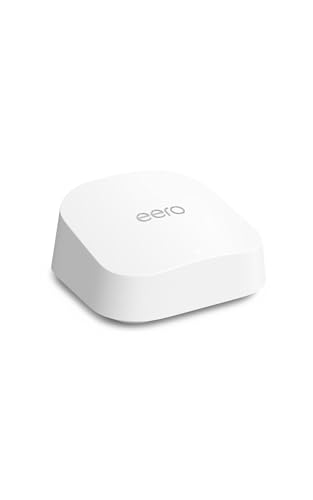
Amazon eero 7
The eero 7 sells on the promise that you will set it up in ten minutes and then never open the app again. It is dual-band, supports internet plans up to 2.5 Gbps through two auto-sensing 2.5 GbE ports, and reaches wireless speeds up to 1.8 Gbps. Coverage is a candid 2,000 sq ft, described as a 25-foot radius, for 120 or more devices. Multi-Link Operation is supported. What you are really buying is the software: eero’s TrueMesh, TrueRoam and TrueChannel work together to keep devices on the best connection and hand them between units without the drop-out that plagues cheaper mesh. It is backward compatible with every earlier eero generation, so it slots into an existing network, and works with eero Built-in on some Echo devices. Any single eero can be the gateway.
- Pros: Genuinely simple setup and management; two auto-sensing 2.5G ports; supports plans to 2.5 Gbps; mature mesh roaming software; backward compatible with all previous eero units; expands one node at a time; small and unobtrusive.
- Cons: Dual-band only, so no 6 GHz; 1.8 Gbps wireless is the lowest ceiling here; deliberately limited manual control; some advanced features sit behind an eero subscription.
Best for: Anyone who wants reliable whole-home coverage they never have to tune, or who already owns eero units.
TP-Link Tri-Band BE9300 Wi-Fi 7 Router (Archer BE550)
The BE550 is the quietly sensible one. Six streams across three bands give 5,760 Mbps on 6 GHz, 2,880 Mbps on 5 GHz and 574 Mbps on 2.4 GHz, with 320 MHz channels, MLO, Multi-RUs and 4K-QAM. It forgoes a 10G port and spends the difference making every single port 2.5G: one 2.5G WAN and four 2.5G LAN. For most homes that is the better trade, because four multi-gig LAN ports get used and one 10G port usually does not. Six internal antennas keep it tidy rather than spiky, and coverage is quoted at 2,000 sq ft. The security set is the most complete here: HomeShield, a private IoT network on WPA3 to isolate smart devices, and VPN client and server support so remote access works without installing anything on individual machines.
- Pros: Tri-band with 6 GHz and 320 MHz channels; every port is 2.5G, including four LAN; private IoT network with WPA3; VPN client and server; internal antennas look tidier; EasyMesh expansion; costs less than the BE600.
- Cons: No 10G port, so a very fast plan is capped at 2.5 Gbps; no USB port; 2,000 sq ft coverage is modest for a router at this tier.
Best for: Homes with several wired devices, smart-home gear worth isolating, and a plan at or below 2.5 Gbps.
TP-Link Deco 7 Elite BE95 Quad-Band Mesh System
The BE95 is where the compromises stop and the price starts. Sixteen streams across four bands: two separate 6 GHz bands at 11,520 Mbps each, 5 GHz at 8,640 Mbps, and 2.4 GHz at 1,148 Mbps, for a BE33000 rating and over 200 devices without strain. Two 10G WAN/LAN ports, one RJ45 and one SFP+ fiber and copper combo, cover fiber service directly, backed by two 2.5G ports and USB 3.0. The clever part is backhaul: it can run wireless and wired backhaul simultaneously, so a second 6 GHz band carries traffic between nodes while the rest stays free for your devices. Twelve high-gain antennas, 4×4 MU-MIMO and AI-Roaming handle coverage, with HomeShield and VPN for security. Sold here as a single pack, so it can start as your router and grow into a mesh.
- Pros: Quad-band with a dedicated 6 GHz band available for backhaul; dual 10G ports including an SFP+ combo for fiber; 16 streams and 200-plus devices; simultaneous wired and wireless backhaul; 12 high-gain antennas; USB 3.0; starts as one unit and expands.
- Cons: By far the highest outlay, and a multi-pack multiplies it; overkill for a normal plan in a normal house; physically large; most homes cannot supply enough internet to stretch it.
Best for: Large or awkward homes, fiber service beyond 2.5 Gbps, and anyone who wants mesh without giving up a band to backhaul.
The verdict
Best Overall: TP-Link Archer BE600. It shares the top sales rank in this group and it is the most complete single router here: tri-band with a proper 6 GHz band, a 10G WAN/LAN port, four more 2.5G ports, 320 MHz channels, and the widest quoted coverage. It costs more than the dual-band options and earns it by not capping anything you might plug into it.
Best Value: TP-Link Archer BE400. Joint best seller, and the cheapest plain way into Wi-Fi 7. You get MLO, 4K-QAM, two 2.5G ports, USB 3.0 and a quad-core CPU. Losing 6 GHz is a real cost, but for a gigabit plan in a normal-sized home you would struggle to notice, and EasyMesh means you can grow the network later.
Best Premium: TP-Link Deco 7 Elite BE95. Quad-band, 16 streams, dual 10G ports and a spare 6 GHz band for backhaul. Nothing else here competes, and almost nobody needs it. If you have fiber faster than 2.5 Gbps or a house that has defeated every router you have owned, this is the answer. Best balance is the Archer BE550, whose all-2.5G port layout and WPA3 IoT isolation suit more homes than a 10G port does.
FAQ
Will Wi-Fi 7 make my internet faster?
Not beyond what you pay for. Wi-Fi 7 raises the ceiling between your router and your devices, not between your house and your provider. On a 500 Mbps plan, a Wi-Fi 7 router will not deliver more than 500 Mbps from the internet. It helps with local traffic, congestion, and latency, since MLO lets a device use two bands at once instead of committing to one and stalling when it gets busy.
Do I need Wi-Fi 7 devices to benefit?
For MLO and 320 MHz channels, yes: both ends must support Wi-Fi 7. Older devices still connect and still gain something, because a modern router with more streams and a faster processor handles a crowded network better than an ageing one. But the marquee features need a Wi-Fi 7 client, so if you own none yet, the upgrade is an investment in later.
Is tri-band worth it over dual-band?
It depends on the walls. The 6 GHz band is fast and clean but does not travel well, so its benefit lands mostly in the same room or one room over. If your desk is near the router, tri-band is a real gain. If your problem is a far bedroom, a mesh node will serve you better than a 6 GHz band that cannot reach it.
Should I buy a router or a mesh system?
Buy a router if one well-placed unit can cover your home, and mesh if it cannot. Distance beats power: two modest nodes in the right places beat one powerful router in the wrong place. The eero 7 and Deco BE95 sell as single units that expand later, and the Archer models support EasyMesh, so none of these lock you out of adding coverage.
What do the BE numbers mean?
They add up the theoretical maximum speed of every band. BE9700 on the Archer BE600 is roughly 5,765 plus 2,882 plus 1,032, rounded. It is a marketing sum, not a speed you will see, since no single device connects to all bands at full rate at once. Use it to compare within a brand, and read the per-band figures and port list for anything that matters.
This article may contain affiliate links; see our Affiliate Disclosure.