A tower sitting on the floor is a dust magnet, a stubbed toe waiting to happen, and a casualty of the next spilled coffee. Lift it under the desk and you reclaim the floor space, pull cleaner air through the fans, and stop kicking the case every time you cross your legs.



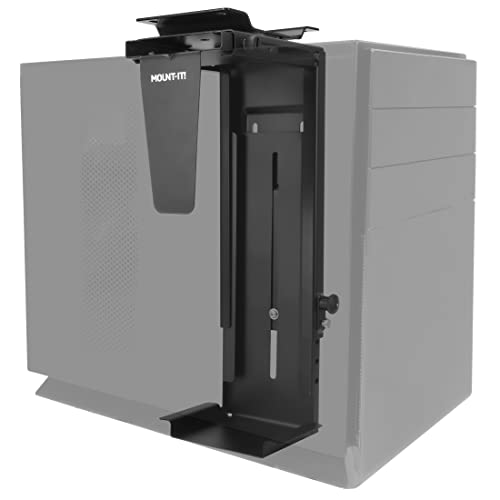
The choices come down to how it attaches, how much weight it holds, and how it adjusts to your case. Some screw into the underside of the desk for maximum strength; others clamp onto a standing-desk leg with no drilling so the PC rises with the desk. The five picks below suit a heavy gaming rig, a standing-desk user who cannot drill, and a renter who wants a simple, swivel-friendly mount.
| Mount | Standout feature | Price tier | Link |
|---|---|---|---|
| Ultimate Setup | Up to 77 lb capacity, best-selling | Mid-range | |
| TOPSKY No-Drill | Clamps to standing-desk legs, no drilling | Mid-range | |
| VIVO MOUNT-PC04B | Heavy-duty 66 lb, five height settings | Premium | |
| PEGZONE Swivel | Budget 360-degree swivel, easy port access | Budget | |
| Mount-It! Wall or Desk | Swivel plus wall-mount versatility | Mid-range | |
How to choose an under-desk CPU holder
The right mount depends mostly on your desk and your tower, so start there.
Drill-mount or no-drill clamp
This is the first decision. A drill-mount holder screws into the underside of a solid desktop for the strongest, most permanent hold, which suits heavy towers, and it needs a desk at least about three-quarters of an inch thick. A no-drill clamp attaches to a standing-desk leg with no holes, so the PC rises and lowers with the desk and your renter’s warranty stays intact. The Ultimate Setup and VIVO are drill-mount; the TOPSKY clamps on with no drilling.
Weight capacity
Match the rating to your rig with margin to spare. A light mini-tower may weigh under 20 pounds, but a full ATX gaming build with a big cooler and power supply can push 40 pounds or more, and you never want the mount at its limit. The Ultimate Setup leads at up to 77 pounds and the VIVO holds 66, giving plenty of headroom, while swivel mounts like the PEGZONE and Mount-It! are rated around 22 pounds for lighter cases.
Adjustable width and height
A good holder cradles your case snugly, so check the width and height ranges against your tower. Adjustable frames fit most cases and, just as importantly, let you keep the mount when you upgrade to a different case later. The VIVO offers five height settings from 16 to 24 inches and adjustable width, and most here span a useful range, so measure your case’s width and height before buying.
Swivel and port access
Reaching the ports on the back of a mounted tower can be awkward, which is where a swivel helps. A 360-degree or partial swivel lets you rotate the case to plug in a drive or cable without unmounting it. The PEGZONE and Mount-It! feature a full swivel, a real convenience if you frequently connect and disconnect peripherals.
Ventilation and protection
Getting the PC off the floor already improves airflow and cuts dust and pet-hair intake, and an open-frame design keeps air moving around the case. Protective padding matters too: rubber mats or padded contact points guard your case against scuffs and hold it steady without rattling. Every pick here uses an open frame with anti-slip padding to protect the finish and keep the tower secure.
Installation and desk fit
Read the fine print on compatibility before ordering. Drill-mount holders need adequate desktop thickness and enough clearance from the frame to the edge, while no-drill clamps fit only specific desk-leg sizes and shapes, so measure your legs first. Most include the hardware and a template or clear instructions, and no-drill models install in minutes with just the clamp.
Ultimate Setup Heavy Duty PC Holder
The Ultimate Setup holder is the best-seller here and the strongest in the group, rated to support heavy continuous loads up to 77 pounds, so even a big full-tower build sits with room to spare. Solid steel construction, two support pillars, and numerous protective mats hold and cushion the case securely, while plenty of ventilation slots keep air flowing, which matters for a high-performance PC. It is highly adjustable in height and width to fit all types of towers, and a drilling template makes mounting it under the desk quick and precise. Backed by a 30-day money-back promise, it is the reassuring choice for a serious rig.
Pros:
- Highest capacity here, up to 77 pounds
- Solid steel with protective padding
- Adjustable height and width for any tower
- Drilling template for easy mounting
Cons:
- Requires drilling into the desk
- Needs a sufficiently thick desktop
Best for: heavy gaming and workstation towers that need maximum, permanent support.
TOPSKY No-Drill Under-Desk Mount
The TOPSKY is the standing-desk specialist, using a no-drill clamp that mounts to compatible desk legs so your PC rises and falls with the desk and your desktop stays hole-free. A three-step install, attach the clamp, place the tower, secure it, takes minutes with no tools, and a reinforced steel frame with top-and-bottom clamping holds up to 50 pounds stably even as the desk moves. The open-frame design improves airflow and keeps the case off the floor away from dust and accidental kicks. It fits cases roughly 6.9 to 11.2 inches wide, and it is backed by three-year support. Note it fits only specific rectangular leg sizes, so measure first. For a standing desk, it is the clean solution.
Pros:
- No-drill clamp keeps the desktop intact
- PC rises and lowers with a standing desk
- Holds up to 50 pounds with secure clamping
- Fast, tool-free three-step install
Cons:
- Fits only specific desk-leg sizes and shapes
- Not for oversized full-tower cases
Best for: standing-desk users who want a no-drill mount that moves with the desk.
VIVO MOUNT-PC04B
The VIVO MOUNT-PC04B is the premium heavy-duty mount, pairing strong support with genuine adjustability. Its high-grade steel frame holds up to 66 pounds with a firm, wobble-free grip, and it adjusts across five height settings from 16 to 24 inches plus a 5 to 10-inch width range, so it fits the majority of PC models and adapts if you change cases. A secure locking mechanism keeps the tower planted, thick inner padding protects the case from scuffs and scratches, and the open-frame design promotes excellent ventilation for cooling. It mounts to a desktop at least three-quarters of an inch thick with adequate clearance. For a reliable, adjustable, heavy-capacity holder, it is a standout.
Pros:
- Sturdy steel frame holds up to 66 pounds
- Five height settings and adjustable width
- Secure locking with protective padding
- Open frame for strong ventilation
Cons:
- Requires drilling and a thick desktop
- Highest price in the group
Best for: users who want a heavy-capacity mount with the most fit adjustability.
PEGZONE Swivel PC Mount
The PEGZONE is the budget pick with a genuinely useful trick: a full 360-degree swivel. It rotates the tower 180 degrees each way so you can reach the rear ports and cables without unmounting anything, a real time-saver if you swap peripherals often. An adjustable frame spans 3.5 to 8 inches wide and 11.8 to 20 inches tall to cradle a compact rig or a mid-tower, and reinforced cold-rolled steel with a scratch-resistant finish holds cases up to 22 pounds. Twelve thick anti-skid pads protect the case and grip it firmly, and the kit includes all hardware plus a clear manual and a video tutorial. For a lighter tower on a budget, the swivel convenience stands out.
Pros:
- Lowest price with a full 360-degree swivel
- Easy access to rear ports and cables
- Adjustable width and height for most towers
- Anti-skid padding protects the case
Cons:
- 22-pound capacity suits lighter cases
- Drill-mount, so it needs a solid desktop
Best for: budget buyers with a lighter tower who want swivel port access.
Mount-It! Wall or Desk CPU Mount
The Mount-It! stands out for flexibility: it mounts under a desk or on a wall, so you can put the tower wherever it works best for your space. A 360-degree swivel gives easy access to the cables and ports on the back, and an adjustable frame fits towers from 11.8 to 21 inches tall and 3.5 to 8 inches wide, cradling most cases. High-strength steel holds up to 22 pounds with a firm top-and-bottom clamp, and included EVA pads protect both your case and the mount from scratches. Hardware and a detailed guide come in the box. For a wall-mounted workstation or anyone wanting placement options beyond just under the desk, it is a versatile choice.
Pros:
- Mounts under a desk or on a wall
- Full 360-degree swivel for port access
- Adjustable to fit most towers
- Protective EVA pads included
Cons:
- 22-pound capacity is for lighter cases
- Mounting requires drilling into desk or wall
Best for: those who want the option to wall-mount or under-desk mount a lighter tower.
The verdict
Best overall: the Ultimate Setup takes the top spot as the proven best-seller. Its class-leading 77-pound capacity, solid steel build, wide adjustability, and good ventilation handle almost any tower with confidence.
Best value: the PEGZONE adds a full swivel for the least money, ideal for a lighter tower, and the Mount-It! adds wall-mount flexibility.
Best for standing desks: the TOPSKY clamps on with no drilling and rises with the desk, while the VIVO is the most adjustable heavy-duty drill mount.
Frequently asked questions
Do I have to drill into my desk?
Not always. Drill-mount holders like the Ultimate Setup and VIVO screw into the underside for the strongest hold, but the no-drill TOPSKY clamps onto a standing-desk leg with no holes. If you rent or do not want to drill, choose a no-drill clamp and check it fits your desk legs.
How much weight can these hold?
It varies widely. The Ultimate Setup handles up to 77 pounds and the VIVO 66, plenty for a big gaming build, while the swivel PEGZONE and Mount-It! are rated around 22 pounds for lighter cases. Pick a mount rated well above your tower’s actual weight.
Will it fit my PC case?
Most have adjustable width and height, so measure your tower and check it falls within the mount’s range. The VIVO’s five height settings and wide adjustment fit the majority of cases, and adjustability also means you can keep the mount when you upgrade.
Does mounting the PC help with cooling and dust?
Yes. Lifting the tower off the floor pulls in cleaner air and less dust and pet hair, and the open-frame designs keep air moving around the case. Better airflow and fewer clogged intakes help your components run cooler and last longer.
Can I still reach the back ports once it is mounted?
Easily on a swivel model. The PEGZONE and Mount-It! rotate the tower so you can plug in cables and drives without unmounting. On fixed mounts, leave a little slack in your cables and position the case so the ports stay accessible.
How hard is installation?
No-drill clamp models like the TOPSKY install in a few minutes with no tools, just clamp and tighten. Drill-mount holders take longer since you mark holes with the included template, drill, and screw the frame to the underside of the desk, but they reward the effort with the strongest hold. Both types include the hardware and instructions you need.
This article may contain affiliate links; see our Affiliate Disclosure.