A modern gaming CPU under full load is a small electric heater bolted to your motherboard. Push a high-TDP chip hard enough and it will not fail, it will simply quietly stop trying, dropping clock speed to protect itself while you wonder why your frame rate sagged. A 360mm radiator exists to make sure that never becomes your problem.

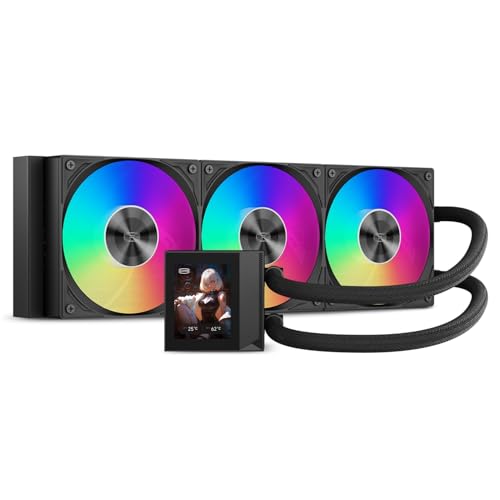


All five here are 360mm all-in-one coolers, meaning three 120mm fans on a sealed loop you never have to fill or maintain. They separate on things that are easy to miss on a spec sheet: how thick the radiator actually is, whether the cold plate sits over the hotspot or the geometric center, and how many cables end up in your case. This guide is for anyone building or upgrading around a chip that runs hot, whether that is a gaming rig, a streaming box, or a workstation that compiles all afternoon.
At a glance
| Product | Standout feature | Price tier | Link |
|---|---|---|---|
| ARCTIC Liquid Freezer III Pro 360 | 38mm thick radiator, VRM fan, offset cold plate, one visible cable | Budget | |
| PCCOOLER DC360 | 2.4-inch IPS display, 15 dBA pump, 90.56 CFM fans | Budget | |
| MSI MAG Coreliquid A13 360 | Split-flow radiator, 3800 RPM pump, evaporation-proof tubing | Mid-range | |
| NZXT Kraken Core 360 RGB | Single-frame triple fan, direct motherboard connection, 3100 RPM pump | Mid-range | |
| CORSAIR Titan 360 RX LCD | 2.1-inch IPS screen, iCUE LINK single-port wiring, FlowDrive pump | Premium | |
How to choose a 360mm AIO
Radiator thickness is the spec nobody quotes
Everyone advertises the 360mm length, because that is the number that sells. Almost nobody leads with thickness, and thickness is where the heat capacity actually lives. The common figure is around 27mm. The ARCTIC here is 38mm, which is roughly forty percent more fin area doing the work, and on a chip that dumps a lot of heat that shows up as either lower temperatures at the same fan speed or the same temperatures much more quietly. The catch is clearance: a thicker radiator plus fans needs more room at the top of the case, so measure before you buy.
Where the cold plate sits
Modern CPUs do not heat evenly. The cores cluster in one area, and that hotspot is often not the middle of the lid. A cooler whose cold plate is centered on the socket is therefore slightly missing the point, literally. Offset mounting shifts the plate toward the hotspot, and a contact frame replaces the stock retention bracket to spread clamping pressure evenly instead of bowing the chip. These sound like enthusiast fussiness. They are worth a few degrees, which is more than the difference between many coolers on this list.
Pump noise, fan noise, and which one you actually hear
Two sound sources sit in an AIO, and they behave differently. The pump runs at a near-constant speed and produces a steady hum you stop noticing, or a whine you never stop noticing. Quoted figures here run from 15 dBA on the PCCOOLER up to pumps spinning at 3800 RPM. The fans are the variable: they ramp with load, and a thick radiator lets them stay slow. If silence matters, look for a low pump figure, high static pressure fans, and a Zero RPM mode that stops the fans entirely when the chip is idle, as the CORSAIR units offer.
Cable clutter is a real design feature
Three fans, a pump, and RGB on all of them can mean eight or nine cables snaking through a build. Each maker attacks this differently, and the approaches genuinely differ. ARCTIC runs the fan PWM cables inside the sheathing of the tubes, so one cable leaves the radiator. NZXT molds the three fans into a single frame, cutting both screws and wires. CORSAIR’s iCUE LINK chains components together into one port on a hub. Any of these is better than the old way, and it changes how long the build takes.
Socket support and what is in the box
Check the socket list against your board rather than assuming. Everything here covers AMD AM5 and AM4 and Intel LGA 1700, and most add LGA 1851; the PCCOOLER reaches back to LGA 115X and 1200 for older builds. Thermal paste is pre-applied or included on all five. If you want the lighting to match the rest of your machine, confirm the ARGB standard your motherboard uses, since these sync with the usual ASUS, MSI, and Gigabyte software.
ARCTIC Liquid Freezer III Pro 360
This is the enthusiast’s answer, and it is also the cheapest cooler here, which is an unusual combination. The 38mm radiator gives it more thermal mass than anything else on this list. The cold plate uses native offset mounting for both Intel and AMD, shifted toward the CPU hotspot rather than the geometric center. A contact frame for LGA 1851 and 1700 replaces the stock bracket and distributes clamping pressure properly. There is even a PWM-controlled VRM fan built into the block, blowing across the voltage regulators beside the socket, which nothing else here bothers with and which matters on a board being pushed hard. The P12 PRO fans are quieter than the standard P12 at low speed and spin higher at the top end. All the fan cabling runs inside the tube sheathing, so a single cable reaches your motherboard.
Pros
- 38mm radiator: substantially more heat capacity than the usual 27mm
- Native offset mounting puts the plate over the hotspot
- Contact frame included for LGA 1851 and 1700
- Integrated VRM fan cools the voltage regulators too
- One visible cable, thanks to PWM lines run inside the tubing
- Lowest price here
Cons
- The thick radiator needs real clearance; measure your case first
- No screen, and this base version has no RGB at all
Best for: the highest-TDP chips, and anyone who would rather spend on cooling than on lighting.
PCCOOLER DC360
A screen on the block usually means paying a premium. This one puts a 2.4-inch IPS display, the largest here, on the cheapest cooler with a display by a very long way, showing live temperatures, logos, or animations. The rest is not an afterthought either: the pump spins at 2600 RPM while producing only 15 dBA, the quietest quoted figure in this group, and the three F5 ARGB fans reach 2500 RPM, 90.56 CFM of airflow, and 4.07 mmH2O of static pressure, which is the number that matters for pushing air through dense radiator fins. Socket coverage is the broadest here, spanning Intel LGA 115X, 1200, 1700 and 1851 plus AMD AM4 and AM5, and the ARGB syncs with ASUS Aura Sync, MSI Mystic Light, and Gigabyte RGB Fusion.
Pros
- Largest display here at 2.4 inches, on the cheapest screened cooler
- Quietest quoted pump at 15 dBA
- Strong fan figures: 90.56 CFM and 4.07 mmH2O static pressure
- Widest socket support, including older LGA 115X and 1200 builds
- Syncs with all the usual motherboard lighting software
Cons
- Standard radiator thickness, so less headroom than the ARCTIC
- Less established brand than the others here
Best for: a good-looking build on a budget, especially on an older socket the premium coolers have dropped.
MSI MAG Coreliquid A13 360
The interesting engineering choice here is moving the pump into the radiator rather than the block. MSI’s split-flow aluminum radiator houses an integrated three-phase pump, which improves durability and cuts the motor resonance you would otherwise feel transmitted through the CPU block. It runs at up to 3800 RPM on ceramic bearings, the fastest pump in this group. The tubing deserves a mention too: 390mm of triple-layered netted plastic under a reinforced mesh sheath, built specifically to stop coolant evaporating out of the loop over years, which is the slow death every sealed AIO eventually faces. It supports LGA 1851 out of the box, comes with triple 120mm ARGB PWM fans and a bracket for AM5, AM4, and LGA 1700, and thermal paste is included.
Pros
- Pump lives in the radiator, so no motor vibration through the block
- Fastest pump here at up to 3800 RPM, on ceramic bearings
- Evaporation-proof tubing directly targets long-term coolant loss
- LGA 1851 supported out of the box; thermal paste included
Cons
- No display on the block
- A fast pump can be a source of noise in a quiet build
Best for: anyone who wants the loop to still be working in five years and dislikes pump vibration.
NZXT Kraken Core 360 RGB
The one to buy if you have ever spent an hour fighting fan screws at the top of a case. Its three fans are molded into a single frame, which sounds cosmetic and is not: it means fewer screws, fewer cables, faster installation, and no chance of misaligning a fan. It connects directly to the motherboard with no proprietary controller in between, so there is one less box to find a home for and one less thing to fail. The 3100 RPM pump handles heavy gaming and multitasking while keeping noise down, the RGB Core fans use high static pressure blades shaped to push air through fin stacks rather than move it around a room, and PWM control lets you tune the curve yourself. It covers AMD AM5 and AM4 and Intel LGA 1851.
Pros
- Single-frame triple fan: fastest, cleanest install here
- Direct motherboard connection, no extra controller box
- 3100 RPM pump with noise kept in check
- High static pressure blades shaped for radiators
- Full PWM control over the fan curve
Cons
- A single frame means you cannot replace one fan on its own
- Costs more than the ARCTIC while cooling with a thinner radiator
Best for: first-time builders, and anyone who values a tidy, quick, low-cable install.
CORSAIR Titan 360 RX LCD
The showpiece, and clear about being one. A 2.1-inch IPS screen at 480 by 480 and 600 candelas of brightness sits on the block showing live CPU temperature, an animated image, or whatever else you point it at, and it is bright enough to read through tinted glass. Underneath it is a serious cooler: the FlowDrive engine runs a three-phase motor against a cold plate profiled to maximize contact with the CPU lid. The real argument is iCUE LINK, which chains components in sequence through universal connectors into a single port on the included hub, so a build with a dozen RGB devices ends up with almost no visible wiring. The pre-mounted RX RGB fans use AirGuide and magnetic dome bearings, run to 2100 RPM under PWM, and support Zero RPM mode so they stop completely when the chip is idle.
Pros
- Bright 2.1-inch IPS screen at 480 by 480
- iCUE LINK reduces a whole system’s cabling to one port
- Zero RPM mode: fans stop entirely at idle, so it is silent at the desktop
- FlowDrive three-phase pump with a profiled cold plate
- Fans arrive pre-mounted on the radiator
Cons
- Around two and a half times the price of the ARCTIC
- iCUE LINK works best once you commit to the ecosystem
Best for: a showcase build behind glass, especially one already running CORSAIR components.
The verdict
Best Overall: ARCTIC Liquid Freezer III Pro 360. On the specifications that decide temperatures, it wins on nearly every one: the thickest radiator here by a clear margin, offset mounting onto the hotspot, a contact frame in the box, and a VRM fan nothing else offers. That it is also the cheapest cooler on the list is the unusual part. For a high-TDP chip, this is the pick.
Best Value: PCCOOLER DC360. Near the same money as the ARCTIC, and it spends it differently: the biggest screen here, the quietest quoted pump, strong static pressure, and socket support stretching back to older builds. Take it if you want the display and the looks without the premium.
Best Premium: CORSAIR Titan 360 RX LCD. A bright IPS screen, Zero RPM silence at idle, and iCUE LINK wiring that transforms a cluttered build. You are paying for presentation and integration rather than degrees. If neither appeals, the MSI’s radiator-mounted pump and evaporation-proof tubing are the better long-term engineering, and the NZXT’s single-frame fan is the easiest install of the five.
Frequently asked questions
Do I actually need 360mm, or will 240mm do?
For a mid-range chip, 240mm is genuinely enough. For a high-TDP CPU, the extra radiator is not about avoiding disaster, since the chip will throttle rather than burn out. It is about holding boost clocks under sustained load and doing it quietly. More radiator means the fans can run slower for the same temperature, so the practical benefit is often silence rather than a number.
Is a thicker radiator worth it over more fans?
Thickness adds fin area without adding length, so it fits the same 360mm mount while holding more heat. The trade is clearance: a 38mm radiator plus 25mm fans needs over 60mm of room at the top of the case, and plenty of cases do not have it, particularly with tall memory beneath. Check your case specification before ordering the ARCTIC.
How long does an AIO last?
Years, and what eventually ends it is usually coolant slowly permeating out through the tubing rather than the pump dying. That is exactly what MSI’s triple-layered evaporation-proof tubing is built to slow. Nothing here needs topping up or maintaining; a sealed loop is sealed for its life.
Do the screens serve any purpose?
Live CPU temperature on the block is genuinely handy while you are tuning a fan curve or testing an overclock. Beyond that, they are decoration, and there is nothing wrong with that in a build you look at every day. Just do not pay for one expecting cooler temperatures; the ARCTIC has no screen and cools better than anything here.
Will these fit my socket?
All five cover AMD AM5 and AM4 and Intel LGA 1700, and most support LGA 1851 out of the box. If you are on an older Intel platform, the PCCOOLER is the one that still lists LGA 115X and 1200. Always check the current listing against your board rather than trusting a general answer.
This article may contain affiliate links; see our Affiliate Disclosure.