Drag a folder of raw video onto an external drive and watch the time estimate: on a slow enclosure it crawls, on a real 40 Gbps Thunderbolt enclosure it is done before your coffee cools. That gap is the whole reason this category exists. A fast NVMe drive is only as quick as the case around it, and the case is where most of the money is either well spent or wasted.



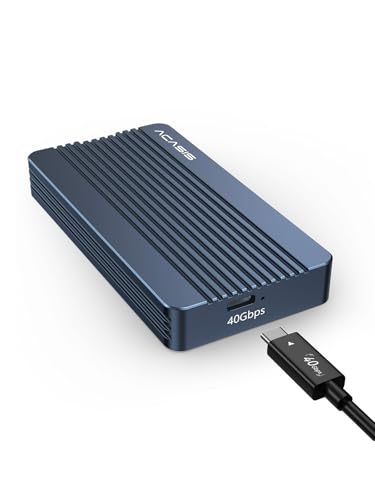
A great 40 Gbps enclosure combines the right controller chip, real cooling so the drive does not throttle mid-transfer, and real compatibility across Thunderbolt and USB4 ports. This comparison focuses on true 40 Gbps cases rather than the slower 10 Gbps adapters that share the same shelf. It suits video editors moving projects between machines, gamers expanding a handheld or laptop, and anyone tired of waiting on a backup.
At a glance
| Product | Standout features | Price tier | Link |
|---|---|---|---|
| UGREEN 40Gbps NVMe Enclosure | Silent fanless double-fin cooling, ASM2464PD chip | Mid-range | |
| SABRENT USB4 NVMe Enclosure | Up to 3,900 MB/s, tool-free, active fan | Premium | |
| ACASIS TBU405 Pro | Intel JHL7440 chip, built-in cooling fan | Mid-range | |
| MOKiN 40Gbps NVMe Enclosure | ASM2464PD chip, both USB-C and USB-A cables | Budget | |
| ACASIS TBU405 Air | Fanless silent aluminum body, USB4 focused | Budget | |
How to choose a Thunderbolt NVMe enclosure
Two enclosures can look identical and perform worlds apart. These are the details that decide which one is worth buying.
40 Gbps versus 10 Gbps
Plenty of cases on the same shelf top out at 10 Gbps, which caps real transfers around 1,000 MB/s. A true 40 Gbps enclosure over Thunderbolt or USB4 can push several times that, which is the difference between a backup that finishes in minutes and one you start and walk away from. If you paid for a fast Gen4 drive, a 10 Gbps case throws most of that speed away. Every enclosure below is a genuine 40 Gbps unit.
The controller chip is the engine
Real-world speed comes down to the bridge chip inside. The ASM2464PD is the current workhorse for USB4 and Thunderbolt enclosures and reaches the high 3,000 MB/s range. Intel’s JHL7440 is a certified Thunderbolt controller prized for stability on Mac hardware. Both are solid, so match the chip to your priorities: raw throughput or rock-steady compatibility.
Cooling: fan versus fanless
Fast NVMe drives run hot, and heat forces them to throttle, which quietly erases the speed you paid for. Cases solve this two ways. Fanned enclosures move air actively and hold peak speed through long transfers, at the cost of a faint whir. Fanless designs lean on thick aluminum and fins, staying silent but relying on good contact with the drive. Heavy, sustained workloads favor a fan; quiet desk use favors fanless.
Compatibility and cables
Check what your host actually offers. Full speed needs a Thunderbolt 3 or 4, or a native USB4 port. Some enclosures are backward compatible down to older USB standards, while a few are built strictly for 40 Gbps ports and will not fall back gracefully. Confirm the drive sizes supported as well; most take 2230 through 2280 NVMe, and none of these accept SATA M.2 drives. The cable matters more than people expect: a charging-only or older USB-C lead will quietly cap your speed, so use the cable in the box or a certified 40 Gbps one.
Why 40 Gbps does not mean 40 Gbps
The headline number is the interface ceiling, not the speed you will see. Protocol overhead, the controller, and the drive itself all take a cut, which is why accurate listings quote figures in the 2,800 to 3,900 MB/s range rather than the theoretical 5,000 MB/s that 40 Gbps implies. Your SSD is often the limit: a PCIe Gen4 drive will saturate these enclosures, while an older Gen3 drive caps out lower no matter which case surrounds it. Sustained writes are the other trap, because many drives are quick for the first few gigabytes, then slow sharply once their fast cache fills. None of this makes the numbers misleading; it just means you should expect real-world speeds a good margin below the badge.
Drives, capacity, and setup
These enclosures take M.2 NVMe drives in 2230, 2242, 2260, and 2280 lengths, with 2280 being the common full-size format, and most support capacities up to 8TB. A new drive arrives raw, so you will need to partition and format it before it shows up as usable storage. Pick a file system that suits your machines: one format reads and writes on both Windows and Mac if you move between them, while a native format is faster and safer if you stay on one platform. Tool-free cases let you swap drives in seconds, which is genuinely useful for cloning, testing, or rescuing data from a laptop drive.
Getting full speed from your setup
A fast case is only one link in the chain, and it is easy to lose speed somewhere else. Start by plugging directly into a Thunderbolt or USB4 port on the machine rather than through an unpowered hub or a dock, since many hubs downshift to slower USB speeds without telling you. Use the supplied 40 Gbps cable and keep it short, because long or uncertified leads are a frequent cause of mysterious slowdowns. Seat the thermal pad properly against the drive when you install it: that pad is the bridge that carries heat into the aluminum body, and a missing or badly fitted one turns a cool case into a hot one. If your drive is double-sided or unusually thick, a thinner pad may be needed for the shell to close without stress. Finally, eject the drive properly before unplugging, and expect the case to get warm in normal use, since that metal warmth is the enclosure doing its job and pulling heat away from the SSD.
UGREEN 40Gbps M.2 NVMe Enclosure
UGREEN’s 40 Gbps case is the all-rounder that is easy to recommend first. It runs the ASM2464PD chip for transfers up to roughly 3,600 MB/s, and it cools without a fan thanks to a double-sided fin design that stays completely silent. That combination, real speed and zero noise, is exactly what most desk users want. It handles drives up to 8TB across Windows, Mac, and Linux, and the slim aluminum shell travels well.
Pros
- Fast ASM2464PD controller reaching the high 3,000 MB/s range
- Silent fanless cooling with an effective finned design
- Supports large drives up to 8TB and all major operating systems
- Slim, sturdy aluminum build that is easy to carry
Cons
- Thick drives may need a thinner thermal pad to seat correctly
- Fanless cooling can trail a fanned case under the longest transfers
Best for: most people who want top speed and a silent desk.
SABRENT USB4 NVMe SSD Enclosure
Sabernt aims this one at the top of the speed chart, quoting up to 3,900 MB/s over USB4 and staying backward compatible down to older USB-C ports. Installation is tool-free, so a Gen4 drive drops in without a screwdriver, and an integrated cooling fan keeps performance steady during heavy file work. It is the pick when you want the highest headline number and do not mind a small fan noise as the trade.
Pros
- Among the fastest quoted speeds in the group over USB4
- Tool-free installation for quick drive swaps
- Active fan holds speed through sustained transfers
- Backward compatible across a range of USB-C speeds
Cons
- Fan adds a faint noise on a quiet desk
- Priced at the top of this group
Best for: creators chasing the highest sustained throughput.
ACASIS TBU405 Pro
The TBU405 Pro is built around the certified Intel JHL7440 controller, which is a reassuring choice if your main machine is a Mac. It pairs that chip with a switchable cooling fan and vented aluminum to fight thermal throttling under load. Compatibility spans recent Apple laptops and iPad Pro alongside Windows and Linux. It is the enclosure to grab when steady, certified Thunderbolt behavior matters as much as peak numbers.
Pros
- Certified Intel JHL7440 chip known for stability
- Switchable fan plus vented aluminum for real cooling
- Strong compatibility with recent Apple hardware
- Handles high-capacity drives for editing and backup
Cons
- Peak speeds sit a touch below the fastest ASM2464PD cases
- Fan is manual, so you choose noise versus cooling
Best for: Mac users who value certified Thunderbolt reliability.
MOKiN 40Gbps M.2 NVMe Enclosure
MOKiN delivers the 40 Gbps experience at the friendliest price here, and it does not cut the important corners. It uses the same ASM2464PD chip as the pricier cases, includes an active cooling system, and ships with both USB-C and USB-A cables so it works on more machines out of the box. Support for UASP, TRIM, and drive health monitoring rounds out a genuinely capable package. It is the value entry point to real Thunderbolt speed.
Pros
- Full 40 Gbps ASM2464PD performance at a budget price
- Active cooling to limit throttling
- Includes both USB-C and USB-A cables
- Supports UASP, TRIM, and drive monitoring
Cons
- Build feels a step below the premium brands
- Fits M and B+M key NVMe only, no SATA drives
Best for: anyone who wants true 40 Gbps speed for the least money.
ACASIS TBU405 Air
The TBU405 Air is the silent sibling in ACASIS’s lineup, a fanless case with a solid curved aluminum body that cools passively. It is engineered specifically for native USB4 and 40 Gbps ports, which means top speed on the right host but no fallback to older USB standards. Tool-free installation and hot-swap support make it convenient, and it supports drives up to 8TB. Pick it when a quiet, pocketable case matters and you know your ports are 40 Gbps.
Pros
- Completely silent fanless aluminum design
- Tool-free installation and hot-swap support
- Supports large drives up to 8TB
- Compact and travel friendly
Cons
- Built for 40 Gbps ports only, with no older-USB fallback
- Passive cooling can throttle sooner than a fanned case
Best for: users with modern USB4 machines who want silence in a small case.
The verdict
Best overall: the UGREEN 40Gbps NVMe Enclosure. It nails the balance most people actually want, real ASM2464PD speed with completely silent cooling, broad compatibility, and a trustworthy build. It is the safe first choice for editors and everyday users alike.
Best value: the MOKiN 40Gbps Enclosure, which brings the same fast chip and active cooling at the lowest price, and even bundles both cables.
Best premium: the SABRENT USB4 Enclosure, the pick for the highest sustained speed and tool-free swaps when you want the strongest numbers on the page.
Frequently asked questions
Do I need Thunderbolt to hit 40 Gbps? You need a Thunderbolt 3 or 4 port, or a native USB4 port. On those, these enclosures reach their full speed. On older USB-C ports, most fall back to slower rates, and one is 40 Gbps only.
Will any NVMe SSD work? Any PCIe NVMe drive in 2230 to 2280 sizes fits these cases. They do not accept M.2 SATA drives. For the fastest results, pair them with a PCIe Gen4 SSD.
Do I really need cooling? Yes for heavy use. Fast drives throttle when they get hot, so a fan or a good finned body preserves the speed you paid for during long transfers.
Is the SSD included? No. Every enclosure here is sold as a case only, so budget for a separate NVMe drive.
Fan or fanless, which should I pick? Choose a fan for long, sustained transfers where holding peak speed matters, and fanless for a silent desk with lighter, bursty workloads.
Can I edit video straight off one of these? Yes, and it is one of the best reasons to buy one. A 40 Gbps enclosure with a Gen4 drive is fast enough to run high-bitrate timelines directly, which is why creators use them as portable project drives rather than just backup targets.
Why is my enclosure slower than advertised? The usual suspects are the port, the cable, or the drive. Confirm you are in a Thunderbolt or USB4 port rather than a hub, use a certified 40 Gbps cable, and check whether your SSD is Gen3 or has filled its fast write cache.
Will these work with a Mac, a PC, and a gaming handheld? Broadly yes. Most support Windows, macOS, and Linux, and several call out recent Apple laptops specifically. Just format the drive for the system you use, and note one case here needs a native 40 Gbps port rather than older USB.
Do these need external power? No. They draw power from the host port, so a single cable carries both data and power. That is part of what makes them convenient for laptops and travel.
This article may contain affiliate links; see our Affiliate Disclosure.