Every monitor here is sold as a 144Hz screen for your PS5. Your PS5 does not output 144Hz. Neither does an Xbox. Both stop at 120, so on a console those extra frames are marketing you cannot spend, and that is before we get to which cable you plug in.


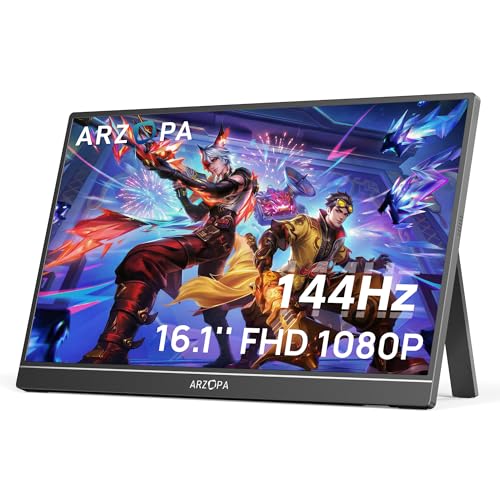


None of that makes these bad. A high refresh portable screen is genuinely excellent next to a laptop, and 120Hz on a console is still a real upgrade over 60. But the useful questions are narrower than the headline: which port carries the fast signal, what happens to the panel’s brightness, and whether the box contains the power supply it needs. Here is how they separate.
At a glance
| Monitor | Standout feature | Price tier | Link |
|---|---|---|---|
| ATWYWTA 16 inch | Cheapest here; lightest at 1.4 lbs | Budget | |
| InnoView 16 inch | FreeSync and an 18-month warranty; no adapter | Budget | |
| AHXJKA 16 inch | 2.5K resolution at a budget price | Budget | |
| ARZOPA Z1FC | The best-selling portable monitor here | Mid-range | |
| ARZOPA Z3FC | 180Hz, the fastest panel on this page | Mid-range | |
| UPERFECT | QLED panel at 400 nits with full DCI-P3 | Premium | |
| Upperizon | Real that HDMI only reaches 120Hz | Premium | |
| VisionOwl | Full-size HDMI and everything in the box | Premium | |
How to choose a portable gaming monitor
144Hz is a PC number
Current consoles top out at 120Hz. Plug a PS5 or an Xbox into any screen on this page and 120 is what you get, no matter what the box says. That is not a fault and 120Hz is still a genuine step up from 60, but if the reason you are buying is the 144, and your machine is a console, you are paying for headroom you cannot use. A gaming laptop or a PC is where those frames land.
Check which port carries the fast signal
Upperizon is the only brand here plain enough to spell it out in its own title: 144Hz over USB-C, 120Hz over HDMI. That distinction almost certainly applies more widely than one listing admits, and it matters enormously, because a console connects over HDMI. Everyone else prints one refresh number and lists both ports underneath, leaving you to discover the difference at home. Where a brand does not say, assume the headline figure belongs to USB-C.
Mini HDMI is a real annoyance
VisionOwl makes a point of fitting a full-size HDMI socket and calls the alternative what it is: fragile. It has a point. Mini HDMI means a special cable, an adapter to lose, and a small connector taking the strain of a stiff cable in a bag. The ARZOPA models, the UPERFECT and the AHXJKA all use Mini HDMI. It is not a dealbreaker, but check what is in the box before you assume your existing cable works.
The power supply is the gotcha
A 16-inch panel at 144Hz draws real current, and a single laptop USB-C port may not have it to give. InnoView says so twice, including in its own product title: adapter not included. VisionOwl goes the other way and ships a power adapter, an HDMI cable and two USB-C cables, so it works out of the box. UPERFECT includes a case and VESA hardware. Read the contents list before you compare prices, because a cheap monitor plus a power brick is not cheap.
Brightness is the spec most of them hide
Portable monitors are often dim, and only two here will tell you: VisionOwl at 470 nits and UPERFECT at 400. Everyone else says vivid, bright, immersive and nothing measurable. If you will use it near a window, in a hotel, or anywhere the light is not under your control, that number is the difference between a usable screen and a mirror.
Resolution costs you frames somewhere
Half these panels are 1080p or 1200p, the other half are 2.5K. Sharper is nicer, but your laptop has to render it, and driving 2560 by 1600 at 144Hz asks a lot more of a GPU than 1920 by 1200 does. If you have a gaming laptop, take the resolution. If you are running a thin-and-light or a Steam Deck, the 1200p panels here will hold a high frame rate far more comfortably.
Color: sRGB numbers are noise, DCI-P3 is not
Everyone quotes sRGB coverage, and 100, 106, 107 and 110 percent all mean roughly the same thing: it covers the basic gamut. The claim worth reading is DCI-P3, the wider gamut HDR content is mastered in. UPERFECT claims 100 percent DCI-P3 through a QLED panel, and Upperizon claims the same alongside 10-bit color. Those are meaningfully different statements from another sRGB percentage.
ATWYWTA 16 inch
The cheapest and lightest screen here: 1.4 pounds and 0.4 inches thick, which is genuinely bag-friendly. It runs 1920 by 1200 at 144Hz on an IPS panel with 100 percent sRGB and the useful 16:10 shape, and it covers the basics properly with USB-C and HDMI, VESA mounting, two built-in speakers, and four display modes including portrait for reading code. The Magic Cover doubles as the stand. It sells the least of anything here by a wide margin, which is the caveat that comes with the price.
Pros:
- Cheapest monitor here
- Lightest at 1.4 lbs and 0.4 inches thick
- VESA mountable with built-in speakers
- Four display modes including portrait
Cons:
- Sells far behind everything else here
- No brightness figure published
- Says nothing about which port carries 144Hz
Best for: the lightest possible second screen, at the lowest price.
InnoView 16 inch
A strong seller and the only budget screen here with FreeSync, which syncs the panel to your GPU so frames tear less when the rate wobbles. That is a real gaming feature rather than a number. It runs 1920 by 1200 at 144Hz on an IPS panel with HDR, low blue light and the 16:10 ratio InnoView correctly notes gives 11 percent more vertical space than a 16:9 screen. A protective sleeve is included, along with a 30-day return and an 18-month warranty. And read the title: the power adapter is not in the box.
Pros:
- FreeSync at a budget price; the only one here with it
- Second best-selling monitor on this page
- 16:10 panel with 11 percent more vertical space than 16:9
- Sleeve included, 18-month warranty and a 30-day return
Cons:
- No power adapter included, stated in the title
- No brightness figure published
- 1200p rather than 2.5K
Best for: laptop gaming on a budget, if you already own a USB-C brick.
AHXJKA 16 inch
The cheapest way to get 2.5K and 144Hz in the same screen. It is a 2560 by 1600 IPS panel in the 16:10 shape with HDR, 100 percent sRGB and a 1 ms response, at 1.5 pounds and 0.4 inches. Built-in speakers, Mini HDMI and USB-C. Buying 2.5K at this price means the compromises are elsewhere and unlisted: no brightness figure, no gamut claim beyond basic sRGB, no word on which port delivers the refresh rate. It sells modestly, though better than the very cheapest here.
Pros:
- 2.5K at 144Hz for a budget price
- 16:10 IPS panel with HDR and a 1 ms response
- 1.5 lbs and 0.4 inches thick
- Built-in speakers
Cons:
- No brightness published, and only basic sRGB coverage claimed
- Mini HDMI rather than full-size
- 2.5K at 144Hz will tax a thin-and-light laptop
Best for: a sharp screen on a small budget, with a GPU that can drive it.
ARZOPA Z1FC
The best-selling portable monitor in this group, and it wins on being unremarkable in the right ways. A 16.1 inch 1080p IPS panel at 144Hz with 106 percent sRGB, a built-in kickstand that tilts where you want it, and two fully functional USB-C ports plus Mini HDMI so it plugs into a laptop, a Mac, a Steam Deck, a PS5 or an Xbox without drivers or setup. Nothing here is a headline. Everything here works, which is why it sells.
Pros:
- The best-selling portable monitor here
- Two fully functional USB-C ports plus Mini HDMI
- Built-in adjustable kickstand
- True plug and play, no drivers or downloads
Cons:
- 1080p, where similar money buys 2.5K elsewhere
- No brightness figure and no FreeSync
- Mini HDMI
Best for: the safe choice that plugs into everything and just works.
ARZOPA Z3FC
The Z1FC’s ambitious sibling: 180Hz, the fastest panel on this page, at 2560 by 1440 with 107 percent sRGB and a 1000:1 contrast ratio. Same 16.1 inch chassis, same kickstand, same dual USB-C and Mini HDMI, same driver-free setup. Be clear with yourself about the 180: it needs a PC that can push 180 frames at 2.5K, and it is entirely wasted on a console capped at 120. If your machine can feed it, this is the most capable panel ARZOPA sells here for a modest step up in price.
Pros:
- 180Hz, the fastest panel here
- 2560 by 1440 with 107 percent sRGB
- Publishes its contrast ratio at 1000:1
- Same proven chassis, kickstand and connectivity as the best seller
Cons:
- 180Hz needs a serious GPU to mean anything
- Entirely wasted on a console
- No brightness figure; Mini HDMI
Best for: a gaming laptop strong enough to actually feed it.
UPERFECT
The only QLED panel here, and the claims that follow are the substantial kind: 100 percent DCI-P3, the gamut HDR content is actually mastered in, rather than another sRGB percentage. UPERFECT quotes 400 nits, a 0.1 ms response, and 2,000:1 contrast for deeper blacks, on a 2.5K panel at 144Hz with FreeSync. VESA mounting at 75 mm, a kickstand and a sleeve case all come in the box. It is one of only two screens here that publishes a brightness figure, which tells you they are not hiding it.
Pros:
- QLED panel claiming full DCI-P3 coverage
- Publishes brightness at 400 nits and contrast at 2,000:1
- FreeSync with a 0.1 ms quoted response
- VESA, kickstand and sleeve case included
Cons:
- Mini HDMI rather than full-size
- Sells modestly against the cheaper screens
- Says nothing about which port carries 144Hz
Best for: HDR games and color work, where the gamut genuinely matters.
Upperizon
The most accurate listing on this page, and the reason to read it carefully: 144Hz via USB-C, 120Hz via HDMI, stated plainly in the title. Nobody else admits their refresh rate depends on the cable. The panel is 2560 by 1600 at 16:10 with 145 percent sRGB, 100 percent DCI-P3 and 10-bit color for 1.07 billion shades, in an aluminum alloy chassis that helps with heat as well as feel, at 1.6 pounds. Dual full-featured USB-C plus HDMI, VESA compatible, with a kickstand and a speaker.
Pros:
- States plainly that HDMI runs at 120Hz, not 144
- 10-bit color with full DCI-P3 and 145 percent sRGB
- Aluminum alloy chassis for durability and heat
- Dual full-featured USB-C, HDMI, VESA and a kickstand
Cons:
- Heaviest screen here at 1.6 lbs
- No brightness figure published
- Its own clarity confirms consoles will not see 144Hz
Best for: a USB-C laptop, from a brand that tells you the truth up front.
VisionOwl
The one that solves the practical problems rather than the spec sheet ones. It fits a full-size HDMI socket instead of a Mini, which VisionOwl bluntly calls fragile, so your existing console cable works and nothing snaps in a bag. The box contains a sleeve, a power adapter, an HDMI cable and two USB-C display cables, so it works the moment it arrives rather than after another order. The panel is 2560 by 1600 at 144Hz, 10-bit, 110 percent sRGB, and the brightest here at a published 470 nits, in a metal body at 1.48 pounds with VESA holes.
Pros:
- Full-size HDMI; your console cable already fits
- Brightest panel here at a published 470 nits
- Everything in the box: adapter, sleeve, HDMI and two USB-C cables
- 10-bit metal-bodied 2.5K panel at 1.48 lbs, VESA mountable
Cons:
- Most expensive monitor here
- Sells modestly against the budget leaders
- Does not say which port carries the 144Hz
Best for: plugging a console in tonight with the cables you already own.
The verdict
Best overall: ARZOPA Z1FC. The best-selling screen here by a distance, and the reason is that it removes every obstacle: two fully functional USB-C ports and a Mini HDMI, no drivers, no setup, a kickstand that holds the angle, and a 144Hz panel that a normal laptop can actually drive at 1080p. It publishes no brightness figure and it is not the sharpest panel on this page. It is the one most likely to just work with whatever you own.
Best value: InnoView 16 inch. A strong seller with FreeSync, which none of the other budget screens offer and which does more for real gaming smoothness than another ten hertz. A 16:10 panel, HDR, a sleeve and an 18-month warranty for very little. One condition: the power adapter is not included, and InnoView puts that in the product title rather than the small print. Budget for a brick, then it is the bargain here.
Best premium: VisionOwl. It costs the most and spends it on the things that annoy you rather than the things that impress you: a full-size HDMI socket so your console cable fits, 470 published nits so the screen survives daylight, a 10-bit 2.5K panel, a metal body under a pound and a half, and a box containing the power adapter and every cable you need. Nothing else here arrives ready to use.
FAQ
Will I get 144Hz on my PS5?
No. Current consoles output up to 120Hz, so that is your ceiling regardless of the panel. It is still a real improvement over 60Hz and these screens deliver it happily. The 144 and the 180 are for a PC or a gaming laptop.
Does the cable change the refresh rate?
It can, and only one brand here says so. Upperizon states 144Hz over USB-C and 120Hz over HDMI in its own title. Since a console connects by HDMI, that distinction matters. Where a listing gives one number and lists both ports, assume the headline belongs to USB-C.
Do I need a separate power supply?
Often, yes. A 16-inch panel at 144Hz can draw more than a laptop port will give, and InnoView is upfront that no adapter is included. VisionOwl ships one along with all the cables. Check the box contents before comparing prices, because a monitor plus a brick is a different number.
Is 2.5K worth it over 1200p?
Only if your machine can drive it. Pushing 2560 by 1600 at 144Hz is far more work than 1920 by 1200, and a thin-and-light or a Steam Deck will struggle. With a gaming laptop, take the resolution. Otherwise the 1200p panels here will hold frame rates much more comfortably.
Which color spec actually means something?
DCI-P3. Every screen here quotes sRGB coverage and the numbers cluster meaninglessly around 100 percent. The wider DCI-P3 gamut is what HDR content is mastered in, and only UPERFECT and Upperizon claim full coverage of it. Brightness is the other spec worth chasing, and only two here will tell you.
This article may contain affiliate links; see our Affiliate Disclosure.