Three monitors on their factory stands eat the entire desk, sit at three different heights, and leave a nest of cables you cannot reach. The screens are fine. The problem is that each one came with a plastic foot designed as though it were the only display you would ever own. A single mount fixes the geometry and hands back the desk underneath.


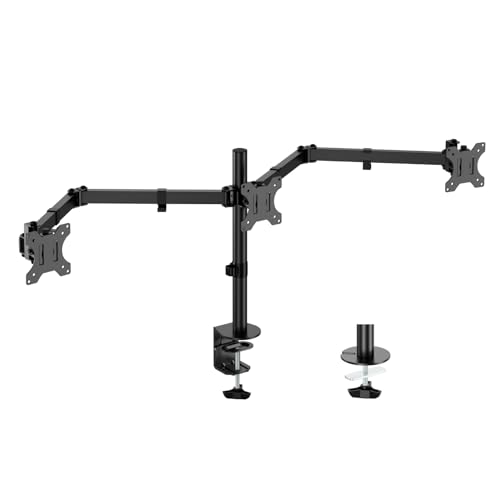
Three specifications decide whether a mount works for you, and none of them is the price: the weight of each screen, the VESA pattern on its back, and how your desk lets you attach anything at all. Get those right and the rest is preference. The five below cover a trading or monitoring setup, a developer who wants a portrait screen on the side, and anyone whose desk is currently 40 percent monitor foot.
At a glance
| Product | Standout features | Price tier | Link |
|---|---|---|---|
| HUANUO Triple Monitor Mount | Aluminum arms, 19.8 lbs each, 12.2 in. height range, 20,000-cycle tested | Mid-range | |
| VIVO Triple Pneumatic Mount | Gas-spring side arms, fits up to 32 in., adjustable tension, drill-free clamp | Premium | |
| ErgoFocus Triple Monitor Mount | Up to 32 in., 19.8 lbs each, clamp or grommet, cable management | Mid-range | |
| WALI Free Standing Triple Stand | V-base needs no clamp, 22 lbs each, grommet option, 16 in. pole | Mid-range | |
| UPGRAVITY Triple Monitor Mount | 17.6 lbs each, aligned height plates, cable channels, wrench storage | Budget | |
How to choose a triple monitor mount
Weigh your monitors first
This is the step people skip and then regret. Every mount here quotes a per-arm limit, and they differ: 17.6 pounds on the VIVO and UPGRAVITY, 19.8 on the HUANUO and ErgoFocus, 22 on the WALI. The figure that matters is the screen weight without its stand, usually a few pounds less than the boxed weight. There is a minimum too: the HUANUO range starts at 4.4 pounds, because a spring arm needs something to push against, and a featherweight panel will drift upward on its own.
VESA, and the monitors that do not have it
Every mount here needs a 75x75mm or 100x100mm VESA hole pattern on the back of the screen. Most monitors have it. A number of consumer models, particularly slim all-in-one styles, do not, and no amount of goodwill will attach them. Check the back of your actual monitors before ordering, and if there is no pattern, look for a VESA adapter bracket made for your model rather than assuming one exists.
How the mount attaches to your desk
Three answers, and your desk decides. A C-clamp grips the back edge and needs a lip: 0.39 to 3.15 inches on most of these, and up to 3.25 inches on the VIVO. A grommet mount drops a bolt through an existing hole, which is tidier and better on thick tops. Neither works on a desk with a raised back rail, a very thick top, or a glass surface, and that is where the WALI free-standing V-base matters, since it simply sits on the desk. Measure your desk thickness before anything else.
Pole height and desk depth
Pole height sets how high the screens sit and how well the arms clear a keyboard. A taller pole gives room to stack the center screen above the side ones. Depth gets ignored and matters just as much: monitors on arms sit further back than monitors on feet, and on a shallow desk against a wall the arms cannot extend, leaving screens too close to your eyes.
Gas springs versus friction arms
This is the real dividing line in feel. A friction or spring-tension arm, which is most of these, holds position once you set it and takes a firm shove to move. A pneumatic gas-spring arm, which is the VIVO’s whole point, counterbalances the monitor so it floats: nudge it with one finger and it stays. If your screens live in one position forever, friction is fine and cheaper. If you move them daily or switch between sitting and standing, gas springs are worth the premium. Both need their tension set to the actual monitor weight, and skipping that step is why arms sag.
Rotation, portrait mode, and cables
All of these rotate 360 degrees, so any screen can go portrait, which is the reason many people buy a triple mount in the first place. Swivel figures vary: 180 degrees on the VIVO, ErgoFocus, and UPGRAVITY, and up to 90 degrees each way on the HUANUO. Tilt runs from 15 degrees on some WALI arms to a full 90 up and down on the ErgoFocus. Cable management is not a luxury here, because a rotating screen drags three cables with it.
HUANUO Triple Monitor Mount
The most convincing specification sheet here for the money. The arms are aerospace-grade aluminum rather than stamped steel, rated to 19.8 pounds each, and HUANUO state each arm was tested through 20,000 lift cycles, which is a claim about the thing that actually fails on cheap mounts: the arm that will not hold height after a year. Movement is generous, with 360 degree rotation, 90 degrees of swivel each way, 45 degrees of tilt each way, and 12.2 inches of height adjustment, the widest range in this group. It fits screens up to 27 inches on 75×75 or 100×100 VESA, clamps to desks from 0.39 to 3.15 inches, and the tilt-lock bolt and tension are adjustable to your specific panels. Cable clips are built in.
Pros
- Aluminum arms rated to 19.8 lbs each, tested to 20,000 lift cycles
- 12.2 inches of height adjustment, the widest range here
- Full articulation: 360 degree rotation, 90 degree swivel, 45 degree tilt
- Tilt-lock bolt and tension adjust to your monitor weight
- Built-in cable clips and a mid-range price
Cons
- Stops at 27 inch screens, unlike the 32 inch VIVO and ErgoFocus
- Needs at least 4.4 lbs per screen, so very light panels drift
- Clamp or grommet only; no free-standing option
Best for: a standard three-screen desk of 24 to 27 inch monitors, where arm durability and height range matter most.
VIVO Triple Pneumatic Monitor Mount
The only mount here with real gas springs, and that changes how it feels rather than what it holds. Dual pneumatic side arms counterbalance the monitors so they move with a fingertip and stay where you leave them, while a fixed center bracket anchors the main screen. Tension can be dialed up for heavier panels or down for lighter ones, which is the adjustment that makes or breaks a spring arm. It takes screens from 17 to 32 inches at up to 17.6 pounds each, on 75×75 or 100×100 VESA, with 90 degrees of tilt each way, 180 degree swivel, and 360 degree rotation. Construction is steel and aluminum, and the drill-free C-clamp handles surfaces up to 3.25 inches, the most generous here.
Pros
- Dual pneumatic springs make the side screens float, not fight
- Adjustable tension for heavier or lighter panels
- Fits large screens, from 17 up to 32 inches
- Drill-free C-clamp handles desks up to 3.25 inches thick
- Steel and aluminum build with a fixed, solid center bracket
Cons
- Premium tier, the most expensive here
- 17.6 lbs per arm is the joint lowest limit in this group
- Center bracket is fixed, so the middle screen has less freedom
Best for: screens you reposition daily, or a sit-stand desk where the monitors need to move as easily as you do.
ErgoFocus Triple Monitor Desk Mount
The value route to 32 inch screens. Where the VIVO charges a premium for size and springs, ErgoFocus takes the size and skips the springs, holding up to 19.8 pounds per arm across 13 to 32 inch flat or curved panels. Its articulation is the most extreme here on paper: 90 degrees of tilt both up and down, 180 degree swivel to turn a screen toward someone beside you, and 360 degree rotation for portrait. Side arms extend, retract, and adjust height dynamically. Both mounting options are covered, with a C-clamp for desks 0.39 to 3.15 inches and a grommet base up to 1.97 inches, and cable management runs inside the arms. The center screen is the compromise: like several in this class, the flexibility is concentrated in the side arms.
Pros
- Handles up to 32 inch flat or curved screens at 19.8 lbs per arm
- 90 degrees of tilt up and down, more than anything else here
- 180 degree swivel and 360 degree rotation for portrait work
- Clamp and grommet hardware both included
- Integrated cable management inside the arms
Cons
- Friction arms rather than gas springs, so repositioning takes effort
- Grommet base tops out at 1.97 inch desks, thinner than the clamp allows
- Height adjustment range is not published
Best for: three larger or curved screens on a normal budget, especially if one needs to swivel toward a colleague.
WALI Free Standing Triple Monitor Stand
The answer for a desk you cannot clamp. Its V-base simply stands on the desktop, which makes it the only option here for glass tops, desks with a back rail, tops too thick for a clamp, or a rental where drilling a grommet hole is not happening. A 4-inch grommet base is included as a two-stage alternative for desks 0.3 to 2.4 inches. It carries the highest load here, 22 pounds per arm, across screens up to 27 inches, on a 16 inch pole with full height adjustment. The center monitor tilts 15 degrees either way, while the side monitors tilt and swivel 90 degrees each way and rotate a full 360 for portrait. The trade for standing free is footprint: the base occupies desk space a clamp would not.
Pros
- Free-standing V-base works where no clamp or grommet can
- 22 lbs per arm, the highest capacity in this group
- Grommet base included as a second mounting option
- 16 inch pole with full height adjustment
- Side arms swivel and tilt 90 degrees each way, with 360 degree rotation
Cons
- The base takes up desk space that a clamp mount frees
- Center monitor tilts only 15 degrees either way
- Limited to 27 inch screens
Best for: glass desks, rentals, and any top that a C-clamp cannot grip, without giving up load capacity.
UPGRAVITY Triple Monitor Desk Mount
The budget entry that does not feel like one. It takes flat or curved screens up to 27 inches at 17.6 pounds per arm, with 45 degrees of tilt each way, 180 degree swivel, and 360 degree rotation. The thoughtful part addresses what annoys people most about three-screen setups: the side VESA plates adjust in height independently, so all three screens line up level with the center. Cable management runs through the frame, and storage slots keep the Allen wrenches on the mount rather than in a drawer. The C-clamp hand-tightens onto desks up to 3.15 inches, a grommet option covers holes up to 2.36 inches, and soft padding protects the desktop.
Pros
- Budget tier with clamp and grommet hardware both included
- Independent height adjustment on the side plates for level alignment
- Cable management plus on-board Allen wrench storage
- Hand-tightening clamp with soft padding to protect the desk
- Fits flat or curved panels up to 27 inches
Cons
- 17.6 lbs per arm is the joint lowest here
- No published height adjustment range or pole height
- Friction arms, and no free-standing option
Best for: a first triple setup with ordinary 24 inch monitors, where leveling the screens matters more than a big spec sheet.
The verdict
Best overall: HUANUO Triple Monitor Mount. On the published data it is the most complete mid-range mount here: aluminum arms at 19.8 pounds each, a 20,000-cycle durability claim aimed at the exact part that fails, and 12.2 inches of height range, more than anything else in this group. The 27 inch ceiling is its real limit.
Best value: UPGRAVITY Triple Monitor Mount. Budget tier, both mounting options in the box, and independently adjustable side plates so the three screens actually line up. You give up load capacity and published height figures, and for three 24 inch panels neither is likely to bite.
Best premium: VIVO Triple Pneumatic Mount. Gas springs, 32 inch capability, adjustable tension, and the thickest desk clamp here. Worth it if the screens move often; overkill if they never do.
Two specialists worth knowing: the WALI free-standing stand is the only one that works on a desk you cannot clamp, and the ErgoFocus is the cheapest route to three 32 inch screens.
Frequently asked questions
How do I know if my monitors will fit?
Check three things on each screen. First, the VESA pattern on the back, which must be 75x75mm or 100x100mm for every mount here. Second, the panel weight without its stand, which must sit inside the arm’s range, including any minimum. Third, the screen size against the mount’s limit, which is 27 inches for the HUANUO, WALI, and UPGRAVITY, and 32 for the VIVO and ErgoFocus.
Will a triple mount damage my desk?
A C-clamp concentrates real load on the back edge, so the answer depends on the desk, not the mount. A solid wood or steel-framed top handles it easily. A thin particleboard top with a hollow core can dent under the clamp, and a pad or strip of hardwood underneath spreads that load. Glass tops should not be clamped at all; that is what the free-standing WALI base is for.
Can I mount three different-sized monitors?
Yes, provided each is within the size and weight limits and has a VESA pattern. Mixed sizes are exactly why independent height adjustment matters, since you will be aligning tops or centers by eye. The UPGRAVITY’s adjustable side plates and the HUANUO’s 12.2 inch height range both help. A heavier screen on one arm may also need its tension set differently from the other.
What is the difference between a clamp and a grommet mount?
A C-clamp pinches the back edge of the desk and needs a clear lip and the right thickness, and it leaves no marks. A grommet mount passes a bolt through a hole in the desktop, either an existing cable hole or one you drill, and it is more rigid and takes up less edge space. Most mounts here include both. Choose the clamp unless your desk has a rail, an obstruction, or a top too thick to grip.
Do gas-spring arms sag over time?
They sag when the tension is not matched to the monitor, which is a setup step rather than a fault. Every pneumatic arm has an adjustment to increase tension for a heavier screen or reduce it for a lighter one, and the VIVO states this plainly. Set it with the monitor attached, then check it again after a week. If an arm creeps down at rest, tighten it; if it rises on its own, the screen is too light for the current setting.
This article may contain affiliate links; see our Affiliate Disclosure.