Your laptop’s built-in port tops out at gigabit, but your NAS, your switch, and even some home internet plans have moved past it. A small USB adapter is the cheapest way to give a thin laptop a 2.5-gigabit wired connection it never shipped with.



USB 2.5GbE adapters are judged on connector fit, driver simplicity, and whether they reliably hold full speed under load. This guide compares proven options across USB-A and USB-C, so someone moving big files to a NAS, a remote worker on a fast plan, and a gamer chasing a rock-steady wired link each find the right adapter. A quick note: these are unranked by sales, so the order reflects fit and reputation rather than a sales chart.
| Product | Standout | Price | Link |
|---|---|---|---|
| Plugable 2.5Gbps USB-A and USB-C Ethernet Adapter | Works with both USB-A and USB-C | Mid-range | |
| UGREEN USB-C to 2.5G Ethernet Adapter | Compact USB-C, plug and play | Budget | |
| TP-Link USB-C to 2.5G Ethernet Adapter | Trusted networking brand, plug and play | Mid-range | |
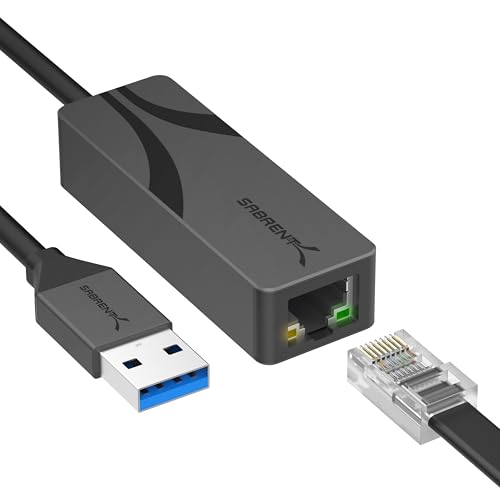
| SABRENT USB-A to 2.5G Ethernet Adapter | USB-A (USB 3.0), simple upgrade | Budget | |
| StarTech USB-C to 2.5GbE Ethernet Adapter | Business-grade NBASE-T, USB-A converter | Premium | |
How to choose a USB 2.5GbE adapter
USB-A, USB-C, or both
Match the adapter to the port your laptop actually has. USB-C is common on newer machines, USB-A on older ones, and plenty of people own a mix. A two-in-one connector, or one with an included converter, covers both and saves buying again when you change laptops, which is a genuine convenience if your household or office runs varied hardware. One adapter that fits all of them is simply less to track and less to buy twice.
You need a USB 3.0 port to exceed gigabit
2.5-gigabit speeds require the bandwidth of a USB 3.0 or newer port, which offers 5 gigabits or more. Plug the adapter into an old USB 2.0 port and it is capped well below its potential. Check your laptop’s port generation first, since a blue port or an SS logo usually signals USB 3.0 and the headroom the adapter needs.
The rest of your network has to keep up
To actually reach 2.5G, the other end needs a 2.5G switch or router port and Cat5e or better cabling. Against a plain gigabit switch, the adapter simply falls back to gigabit. The adapter is one link in a chain, so its speed is only as high as the slowest piece between your laptop and whatever you are talking to.
Drivers and plug-and-play
Many current systems recognize these adapters automatically and need no setup, while some ask for a quick driver install from the maker’s site. Adapters built on well-supported chipsets tend to have the smoothest experience across operating systems and updates, so it is worth a moment to confirm driver support for your platform before buying.
Heat, build, and reliability
Sustained 2.5G transfers warm the adapter, and a metal housing sheds that heat and helps hold speed over long copies. A braided or strain-relieved cable and a snug fit in the port improve reliability, especially if the adapter lives permanently plugged into a docking setup. Small build details separate an adapter that just works from one that drops out mid-transfer. A short, well-shielded cable also keeps the signal clean where a long, thin lead might not.
Plugable 2.5Gbps USB-A and USB-C Ethernet Adapter
The Plugable is the versatility pick: a single adapter with both USB-A and USB-C connectors, so it works with practically any laptop in your bag today and the next one you buy. From a networking-focused brand with a solid support reputation, it delivers 2.5-gigabit wired networking with the plug-and-play simplicity most people want. That dual-connector design is genuinely useful in a mixed-device household or an office where machines vary from year to year. It is priced sensibly in the middle of the field, and for anyone who does not want to think about which port their next laptop has, it removes the guesswork. As an all-purpose 2.5GbE adapter, it is the easy recommendation. Keeping one adapter that fits every machine you own also means one less thing to hunt for when you switch desks or grab a different laptop.
Pros
- Works with both USB-A and USB-C ports
- Trusted networking-focused brand and support
- Plug-and-play on most modern systems
- Future-proof across mixed devices
- Sensible mid-field pricing
Cons
- Dual connector is slightly bulkier
- Full speed still needs a 2.5G network
- No sales-rank track record to point to
Best for: Anyone with mixed USB-A and USB-C devices who wants one adapter to cover them all.
UGREEN USB-C to 2.5G Ethernet Adapter
The UGREEN is a compact, no-nonsense USB-C to 2.5G adapter from a popular accessories brand, aimed at modern laptops with USB-C ports. It is plug-and-play on most systems, small enough to live in a laptop sleeve, and priced at the budget end while still hitting full 2.5-gigabit speeds on a capable network. For a straightforward USB-C machine that just needs faster wired networking without any fuss, it covers the essentials cleanly. There is nothing exotic here, and that is the appeal: a well-made, affordable adapter from a brand many people already trust for cables and chargers, quietly doing one job reliably day after day. Its small size makes it just as at home clipped to a travel bag as left plugged into a home office setup.
Pros
- Compact USB-C design
- Plug-and-play on most systems
- Popular, widely trusted brand
- Budget-friendly price
- Full 2.5G on a capable network
Cons
- USB-C only, no USB-A option
- Full speed needs a 2.5G switch or router
- Warms up under sustained transfers
Best for: USB-C laptop owners who want a small, affordable, reliable 2.5G upgrade.
TP-Link USB-C to 2.5G Ethernet Adapter
The TP-Link comes from a name people already associate with home networking, which buys some peace of mind for a device whose whole job is a stable connection. It is a USB-C to 2.5G adapter with plug-and-play setup, sized to travel and priced fairly. Buying network gear from a networking brand is a reasonable instinct, and here it pays off with a straightforward, dependable adapter. It does the same core job as the other USB-C options, with the reassurance of a familiar logo and broad support behind it. For anyone who prefers sourcing their whole setup from a trusted networking maker, it is a natural, low-risk choice. If your router and switch already wear the same logo, keeping the adapter in the family is a tidy, no-surprises way to round out the setup.
Pros
- Trusted home-networking brand
- USB-C plug-and-play setup
- Compact and travel-friendly
- Fair, mid-range price
- Broad system support
Cons
- USB-C only connector
- Needs a 2.5G network for full speed
- No standout extras over rivals
Best for: Buyers who prefer sourcing network gear from an established networking brand.
SABRENT USB-A to 2.5G Ethernet Adapter
The SABRENT is the USB-A pick for the many laptops and desktops that still have those rectangular ports, delivering 2.5-gigabit networking over a USB 3.0 connection. It is a simple, affordable way to breathe faster wired networking into an older machine that never had USB-C, or to keep a USB-C port free for other accessories. Plugged into a USB 3.0 port it reaches full speed on a capable network, and it stays refreshingly uncomplicated. For anyone whose hardware is a generation or two back, or who simply prefers USB-A, it is the practical, budget-friendly route to 2.5G without changing anything else about their setup. It is also a tidy fix for a desktop tower whose motherboard predates 2.5G networking, adding the faster port without opening the case. Because it draws power from the USB port, there is no separate wall plug to find room for.
Pros
- USB-A fits older laptops and desktops
- Uses USB 3.0 bandwidth for full 2.5G
- Simple, affordable upgrade
- Keeps a USB-C port free
- Straightforward setup
Cons
- USB-A only, not for USB-C-only machines
- Must use a USB 3.0 port, not USB 2.0
- Needs a 2.5G network to hit full speed
Best for: Older laptops and desktops with USB-A ports that need a faster wired link.
StarTech USB-C to 2.5GbE Ethernet Adapter
The StarTech is the business-grade option: an NBASE-T USB-C adapter that includes a USB-A converter, so it covers both port types while aiming at the reliability standards office IT expects. It costs more than the consumer adapters, and that premium buys robust build quality, broad compatibility, and the kind of dependable performance valued in professional deployments. For a work laptop, a demanding home lab, or anyone who wants the sturdiest option and does not mind paying for it, StarTech’s reputation in networking hardware is the draw. It is the adapter to choose when uptime and build quality matter more than shaving a few dollars off the price. For a machine that stays docked and in daily use, that extra durability quietly pays for itself over the years.
Pros
- Business-grade NBASE-T support
- Includes a USB-A converter for both ports
- Robust build and broad compatibility
- Trusted in professional deployments
- Dependable sustained performance
Cons
- Priciest option here
- More than casual home users need
- Full speed still requires a 2.5G network
Best for: Professional and demanding setups that prioritize build quality and reliability.
The verdict
Best Overall: Plugable 2.5Gbps USB-A and USB-C Ethernet Adapter. Its dual USB-A and USB-C connectors make it the most broadly compatible choice, from a trusted networking brand, at a sensible price.
Best Value: UGREEN USB-C to 2.5G Ethernet Adapter. A compact, reliable USB-C adapter from a popular brand at a budget price, covering the essentials with no fuss.
Best Premium: StarTech USB-C to 2.5GbE Ethernet Adapter. Business-grade NBASE-T build and a bundled USB-A converter make it the sturdiest, most compatible pick for demanding use.
Frequently asked questions
Will a 2.5GbE adapter actually make my internet faster?
Only if your internet plan and router exceed gigabit. The adapter removes the laptop’s gigabit ceiling, but you still need faster-than-gigabit service and a 2.5G router port to see the difference. Its biggest wins are usually local: fast file transfers to a NAS or between computers on a 2.5G switch.
Do I need a USB 3.0 port?
Yes. 2.5-gigabit speeds need the bandwidth of a USB 3.0 or newer port, which offers 5 gigabits or more. Plugging the adapter into an older USB 2.0 port caps it well below its potential. Check that you are using a USB 3.0 port, often marked blue or with an SS logo.
USB-A or USB-C, which should I get?
Match it to your laptop. Newer machines favor USB-C; older ones have USB-A. If your devices vary, a two-in-one adapter like the Plugable, or one with an included converter like the StarTech, covers both and saves buying again when you change laptops.
What else do I need for full 2.5G speed?
A 2.5G switch or router port and Cat5e or better cabling. If any link in the chain, the switch, the cable, or the port at the other end, is only gigabit, the connection falls back to gigabit. The adapter is one piece; the whole path has to support 2.5G.
Do these adapters need drivers?
Many work plug-and-play on current systems, recognized automatically when you connect them. Some need a quick driver install from the maker’s site. Adapters built on well-supported chipsets tend to have the smoothest experience across system updates, which is worth confirming before buying.
This article may contain affiliate links; see our Affiliate Disclosure.