You lean back to grab a coffee, gesture at a whiteboard, or scoot your chair sideways, and on a normal webcam you drift right out of frame. A 4K camera with AI auto-framing fixes that: it finds you, keeps you centered, and zooms to fit whether you are presenting solo or wedged around a table with four colleagues. The best of them make a fidgety, moving speaker look composed without anyone touching a control.




Auto-framing sounds like one feature, but it hides a real divide. Some cameras crop and pan inside a wide 4K sensor, a smart digital trick that works well when you stay near your desk. Others physically move on a motorized gimbal to follow you across a room. This guide compares strong options across that spread, so a streamer who paces, a hybrid team sharing a huddle room, or a solo worker who just wants to stop drifting off-screen can each match a camera to how they actually move.
At a glance
| Product | Standout feature | Price tier | Link |
|---|---|---|---|
| OBSBOT Tiny PTZ 4K | Motorized gimbal physically follows you | Premium | |
| Insta360 Link 2C | 1/2-inch sensor, HDR, phase-detect focus | Premium | |
| OBSBOT Meet 4K | AI framing plus background blur, 60 fps | Mid-range | |
| TONGVEO 3-in-1 Conference | Group framing, voice tracking, built-in speaker | Mid-range | |
| N newline 4K | AI presenter tracking with hands-free gestures | Budget | |
How to choose a 4K auto-framing webcam
A moving camera versus digital framing
This is the single biggest choice. A motorized pan-tilt camera, like the gimbal-mounted OBSBOT Tiny, physically rotates to track you, so it can follow a presenter who walks the length of a room while keeping full resolution on the subject. A fixed camera with digital auto-framing instead crops and pans within its wide sensor; it is silent, cheaper, and excellent when you stay within a few feet of the desk, but push too far and it either loses you or trades away sharpness to zoom. If you present standing up and move around, the moving camera earns its price. If you sit and work, digital framing is plenty.
Sensor size decides low-light quality
Resolution is only half the picture. A camera can shoot 4K and still look muddy in a dim room if its sensor is tiny. Larger sensors, such as the 1/2 inch in the Insta360 Link 2C or the 1/1.8 inch in room cameras, gather more light and produce cleaner, less noisy video when the blinds are drawn or the lamp is weak. Pair that with HDR and auto light correction and your face stays balanced even with a bright window behind you. For anyone on camera daily, sensor size and HDR matter more than chasing the highest frame rate.
Gestures, remotes, and control
How you steer the camera matters when your hands are busy. Several models read simple hand gestures to start tracking or zoom, so a presenter can trigger a close-up without touching anything. Others ship an infrared remote for switching field of view, muting, or flipping the image, which suits a seated setup. A few pair with a phone or desktop app for fine control over framing, bokeh, and presets. Match the control method to your workflow: gestures for standing presenters, a remote for the desk, an app for creators who tune every setting.
Solo creator or a room full of people
Field of view and framing behavior should match your setting. A narrow-to-medium view flatters a single presenter and keeps the background tidy, while a 120 degree wide angle captures a whole table so nobody has to crowd in. Conference-focused cameras add group framing that fits everyone at once and can switch to a gallery view that boxes each face separately. If it is just you, a tighter creator webcam looks more polished; if it is a huddle room, prioritize the wide angle and multi-person framing.
Audio you can actually rely on
Great video with tinny audio still ruins a call. Most of these cameras include dual noise-canceling microphones, and the better ones pick up a clear voice several feet away while filtering keyboard clatter and room hum. Conference models go further with a built-in speaker, turning the camera into an all-in-one video bar so a small room needs no separate speakerphone. If you already own a headset or dedicated mic, focus the budget on the sensor and tracking instead.
Setup, mounting, and privacy
The practical details decide how a camera lives on your desk day to day. Every model here is USB plug-and-play, so it works the moment you connect it, with no drivers and no fuss for a laptop or desktop. Check the cable length against your setup, since a short lead limits where the camera can sit, and look at the clip or mount to be sure it grips your monitor or tripod securely. A physical privacy cover or shutter is worth having, letting you block the lens between calls without unplugging anything, which matters more in a shared office or a home space that doubles as a bedroom. Small touches like a standard tripod thread add flexibility if you later want the camera off the monitor entirely.
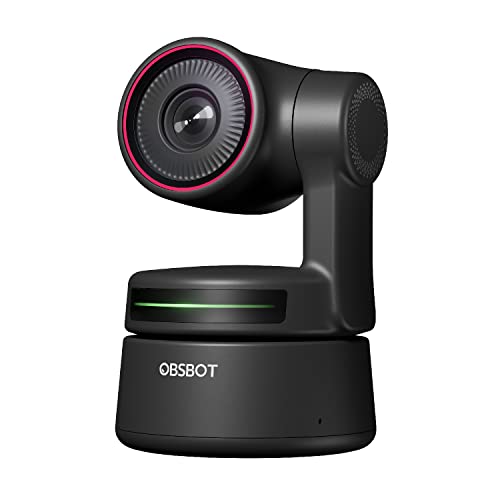
OBSBOT Tiny PTZ 4K
This is the camera built expressly for the headline problem. It sits on a two-axis motorized gimbal and uses AI to physically follow you as you move, rather than faking tracking by cropping into the sensor and losing pixels. That means a presenter can pace, turn to a board, or step back and stay framed at full quality. A Sony 1/2.8 inch sensor shoots up to 4K and 60 fps with HDR light correction, and hand gestures start tracking or trigger zoom with no remote in reach. Dual microphones with noise reduction round it out. It is the most capable mover here, and the premium price reflects the mechanical hardware inside.
Pros
- Motorized gimbal delivers true, full-resolution tracking
- 4K at 60 fps with HDR light correction
- Gesture control for hands-free operation
- Dual noise-reducing microphones built in
Cons
- Premium price versus fixed webcams
- Moving gimbal is one more mechanical part
Best for: presenters and streamers who move around and need the camera to genuinely follow them.
Insta360 Link 2C
If image quality is your priority, the Link 2C is the picture champion of this group. Its comparatively large 1/2 inch sensor captures true-to-life 4K with HDR and genuinely usable low-light performance, so you look sharp whether the room is bright or dim. Phase-detection autofocus locks on instantly with no hunting, and it can render a natural DSLR-style background blur straight from the controller software. Auto framing keeps one person or a small group in view, gesture and smartphone control handle tracking and zoom, and specialized DeskView and Whiteboard modes suit teaching and demos. For creators who care most about how the video looks, it is the standout.
Pros
- Large 1/2-inch sensor with strong low-light output
- HDR plus fast phase-detection autofocus
- Natural background bokeh and DeskView modes
- Gesture and smartphone control
Cons
- Premium pricing
- Digital framing, so no physical movement to follow you
Best for: creators and professionals who put picture quality first.
OBSBOT Meet 4K
The Meet 4K is the well-rounded middle pick, delivering AI framing and reliable autofocus in a fixed camera at a friendlier price. It tracks your movements with smooth zoom transitions and keeps your face in focus wherever you sit, then adds one-click background blur or replacement for a tidy, professional look. HDR auto light correction balances a bright window behind you, it shoots 4K at up to 60 fps, and a beauty mode and virtual backgrounds are available in the app while plug-and-play works with no software at all. The maker notes it can run warm under heavy use, which is normal for its performance. For most desk-based users it hits the sweet spot.
Pros
- Smooth AI framing and dependable autofocus
- One-click background blur and replacement
- HDR light correction for tricky lighting
- Plug-and-play with optional app features
Cons
- Can get warm during long sessions
- Fixed camera, so framing is digital only
Best for: desk-based workers and streamers who want polished framing without a premium price.
TONGVEO 3-in-1 4K Conference Webcam
Built for a small meeting room, this TONGVEO combines a 4K camera, a dual-microphone array, and a 3W speaker in one unit, so a huddle space needs no separate speakerphone. AI auto framing detects everyone in view and centers the group, while voice tracking finds and follows the active speaker within a few seconds. An included remote switches between 118, 100, and 88 degree fields of view for group calls or solo presentations, and offers 5x digital zoom, mute, and image flip. The 360 degree microphones pick up voices up to about 16 feet, and it is plug-and-play across Zoom, Teams, Webex, and the rest. For a shared room, the all-in-one design is the draw.
Pros
- Camera, microphones, and speaker in one unit
- Group auto framing plus active-speaker voice tracking
- Three switchable fields of view and 5x zoom
- Long-range 360-degree microphone pickup
Cons
- Overkill for a solo desk setup
- Built-in speaker quality trails a dedicated unit
Best for: small conference and huddle rooms that want one device for video and audio.
N newline 4K Webcam
The budget standout proves you do not have to spend heavily for real AI tracking. This newline camera shoots 4K and offers three AI modes, including auto framing and presenter tracking, switched with simple hand gestures so no remote or software is required. An OK gesture toggles modes and an L gesture triggers 5x digital zoom, while auto white balance and backlight compensation keep colors natural in strong or weak light. Four selectable fields of view adapt it to solo calls or small groups, autofocus keeps faces sharp from roughly two to six feet, and a privacy cover protects the lens. For the price, the feature list is generous.
Pros
- Real AI framing and presenter tracking at a budget price
- Gesture control with no remote or software needed
- Four fields of view and 5x zoom
- Auto white balance and backlight compensation
Cons
- Smaller sensor than premium models in dim light
- Digital framing only, no physical movement
Best for: budget-conscious buyers who still want genuine tracking and gesture control.
The verdict
Best Overall: the OBSBOT Tiny PTZ 4K. Its motorized gimbal is the only design here that physically follows you across a room at full resolution, which is exactly what “stay centered as you move” demands. For presenters who actually move, nothing else matches it.
Best Value: the N newline 4K. It delivers genuine AI framing, presenter tracking, and gesture control at a budget price, covering the core need without the premium outlay.
Best Premium: the Insta360 Link 2C. Its larger sensor, HDR, fast phase-detection focus, and natural bokeh make it the best-looking picture of the group for creators who prioritize image quality.
Frequently asked questions
What is the difference between auto-framing and tracking? Auto-framing crops and pans inside the sensor to keep you centered while you stay near the desk. True tracking, on a motorized camera, physically moves to follow you across a wider space at full resolution.
Do I need software to use the AI features? Not always. Several of these cameras are plug-and-play and switch modes with hand gestures or a remote. Apps are optional and mainly add fine-tuning like bokeh, presets, and beauty settings.
Is 4K worth it for video calls? Even when a call streams at 1080p, a 4K sensor gives the camera room to crop and zoom for framing while staying sharp. It also future-proofs recordings and looks cleaner in good light.
Will these work with Zoom and Teams? Yes. Every model here connects over USB as a standard webcam and works with Zoom, Teams, Webex, Google Meet, and similar apps with no special drivers.
Which is best for a small meeting room? A conference model with a wide field of view, group framing, and a built-in speaker and microphones, like the TONGVEO 3-in-1, covers a huddle room with a single device.
This article may contain affiliate links; see our Affiliate Disclosure.