Lop off the number pad, the function row, and the arrow cluster, and a keyboard suddenly stops fighting your mouse for desk space. What is left on a good 60% board is the part you actually touch all day, plus a layer of programmable shortcuts that puts every missing key one quick combo away.




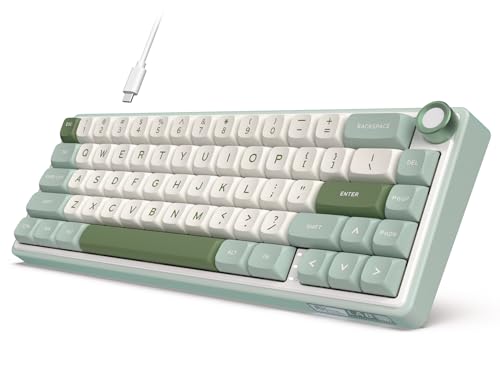


A 60% board worth buying does two things at once: it shrinks the footprint so your mouse hand has room to swing, and it gives back the keys it dropped through a programmable layer you reach with a function key. That trade suits a competitive shooter player who wants low-sensitivity aiming room, a typist clearing clutter off a small desk, someone packing light for travel, and anyone who simply likes a clean setup. The picks below lead with the best sellers, so the most-bought models come first.
| Keyboard | Standout features | Price | Link |
|---|---|---|---|
| Aula WIN60 HE (CORBOBO) | Hall effect magnetic switches, 0.02mm rapid trigger, 8000Hz polling, hot-swap, web driver | Mid-range | |
| MageGee MK-Box | 68-key layout with arrows and F-row, red switches, blue LED, plug and play | Budget | |
| Redragon K617 Fizz | 61 keys, hot-swap 3/5-pin sockets, red switches, 20 RGB modes, pro software | Budget | |
| RK R65 (Black, Cream) | Gasket mount, volume knob, QMK/VIA, hot-swap cream switches, MDA PBT keycaps | Premium | |
| RK R65 (Cyan) | Gasket mount, programmable knob, QMK/VIA, hot-swap linear switches, PBT keycaps | Mid-range | |
| Newmen GM611 | 61 keys, red switches, rainbow backlight, detachable cable, macro software | Budget | |
| Aula WIN60 HE (NSYCA) | Hall effect switches, 8000Hz polling, rapid trigger, PBT keycaps, web macro driver | Mid-range | |
| TISHLED Creamy | Tri-mode wireless, 68 keys, hot-swap, NKRO, PBT keycaps, programmable for Win/Mac | Mid-range | |
The price column shows a general tier only. Prices move often, so tap a link for the live figure on Amazon.
How to choose a 60% programmable keyboard
The headline spec on a compact board is its size, but the experience comes down to four other things: the switches under your fingers, how those keys are read for gaming, how deeply you can reprogram the layout, and how the keyboard is built. Get those right and a 60% board feels like a full keyboard that simply takes up less room.
Switch type: mechanical versus magnetic
Most boards here use traditional mechanical switches, where a physical contact registers the press. Linear red switches are the common choice for gaming: smooth, quiet, and bump-free, so taps feel fast and consistent. A few boards instead use magnetic Hall effect switches, which sense how far the key travels using a magnet rather than a physical contact. That unlocks an adjustable actuation point, near-zero wear, and the rapid trigger behavior covered below. If your priority is competitive aiming and the fastest possible resets, magnetic is the upgrade; for everyday typing and gaming, a good linear mechanical switch is plenty.
Rapid trigger and polling rate
Two specs matter most for fast shooters. Rapid trigger, found on the magnetic boards here, resets a key the instant you start lifting your finger instead of waiting for it to rise past a fixed point, which makes counter-strafing and quick repeated taps feel immediate; an actuation step as fine as 0.02mm means the keyboard reacts to the smallest movement. Polling rate is how often the board reports to the PC, measured in hertz, and the 8000Hz figure on the AULA models means it checks up to 8,000 times a second versus the usual 1,000. Both are headline gaming features; for typing and work they make no practical difference.
How programmable is it, really
This is where 60% boards earn their keep, because the missing keys live on a function layer you remap. There are three tiers here. The deepest is QMK/VIA, the open standard on the RK R65 boards, which lets you rebind any key, build layers, and assign macros in a visual app, with settings often saved to the keyboard itself. Next is a web-based or downloadable driver, as on the AULA, Redragon, Newmen, and TISHLED boards, which handles key remapping, macros, and lighting through the maker’s own software. The simplest, the MageGee, skips software entirely and relies on built-in Fn shortcuts. Match the tier to how much you want to tinker.
Hot-swap sockets and keycaps
A hot-swappable PCB lets you pull a switch out and press a new one in by hand, no soldering, so you can change the feel or sound later or replace a failed switch in seconds; most sockets here accept both 3-pin and 5-pin switches. Keycap material matters too. PBT plastic resists the shine and grease that builds on cheaper ABS over time and tends to feel more textured, which is why the higher-tier boards here use it. Doubleshot and double-injection legends are molded in rather than printed, so the letters never wear off.
Connection and build
Most of these are wired over USB, which is the simplest, lag-free option and what competitive play favors. One board, the TISHLED, adds tri-mode wireless: 2.4GHz for low latency, Bluetooth for tablets and phones, and USB-C when you want a cable, with a battery to recharge. On build, a gasket-mounted board like the RK R65 cushions the plate between layers of foam for a softer, quieter typing feel, while simpler boards mount the plate more rigidly. Detachable cables, adjustable feet, and south-facing LEDs are small touches that add up day to day.
Aula WIN60 HE (CORBOBO) – Magnetic Switches, 8000Hz, Rapid Trigger
The best seller in this group is also the most gaming-focused. Instead of ordinary mechanical switches, the WIN60 HE uses Hall effect magnetic switches that sense key depth with a magnet, which means no physical contact to wear out and a fully adjustable actuation point. That feeds a 0.02mm rapid trigger that resets the instant you lift, plus an 8000Hz polling rate, the combination FPS players chase for faster peeking and quick-stop shooting in titles like Valorant and CS2. It is hot-swappable, lit by 16.8 million RGB colors under PBT keycaps, and customized through a web-based driver that handles remapping, macros, and lighting from any browser with no install.
Pros
- Hall effect magnetic switches with adjustable actuation
- 0.02mm rapid trigger for instant key resets
- 8000Hz polling rate for ultra-fast reporting
- Hot-swappable with PBT keycaps and full RGB
- Web-based driver needs no software download
Cons
- Wired only; no wireless option
- Magnetic switch perks matter most for competitive gaming
- No dedicated arrow cluster, so arrows live on the Fn layer
Best for: competitive shooter players who want adjustable actuation and the fastest resets.
Mid-range tier. Check price on Amazon
MageGee MK-Box – 68 Keys with Arrows, Plug and Play
The MK-Box is the easy-living entry point, and a strong seller for good reason. Its 68-key layout is more forgiving than a strict 60% board because it keeps separate arrow keys and an F1-F12 row through the Fn function key, so you lose far less than the layout suggests. Linear red switches give a smooth, light, bump-free press that is easy to tap quickly, and a blue LED backlight offers around 16 effects adjusted entirely from the keyboard. There is no software at all: it uses a plain USB connection that is plug and play across Windows, Linux, and Mac, with full anti-ghosting so every key registers.
Pros
- 68-key layout keeps arrow keys and an F-row
- Smooth linear red switches for quiet, fast typing
- Blue LED backlight with around 16 onboard effects
- Plug and play; no drivers or software needed
- Wide compatibility with Windows, Linux, and Mac
Cons
- No software, so no custom macros or remapping
- Single-color blue backlight rather than RGB
- Not hot-swappable, so switches are fixed
Best for: a simple, affordable compact board for someone who wants arrows and zero setup.
Budget tier. Check price on Amazon
Redragon K617 Fizz – 61 Keys, Hot-Swap, Pro Software
The K617 Fizz packs a lot of enthusiast features into a budget board. Its 61 keys sit under white and gray keycaps for a fresh look, and the standout here is a hot-swappable socket compatible with most 3-pin and 5-pin switches, so you can swap the stock linear reds for a different feel without ever picking up a soldering iron. Up to 20 RGB backlight presets adjust for brightness and speed from the board itself, while Redragon’s downloadable software lets you design new lighting and bind macros and shortcuts. The compact footprint is pitched squarely at FPS players who want more mouse room.
Pros
- Hot-swappable sockets fit most 3/5-pin switches
- Quiet linear red switches with soft key travel
- Up to 20 onboard RGB presets, adjustable on the fly
- Pro software for custom effects and macros
- Budget price with a modding-friendly design
Cons
- Wired only; no wireless mode
- 61-key layout puts arrows on the Fn layer
- Keycap material not stated in the provided data
Best for: first-time modders who want hot-swap and RGB software without spending much.
Budget tier. Check price on Amazon
RK ROYAL KLUDGE R65 Black – Gasket Mount, Volume Knob, QMK/VIA
The R65 is the enthusiast pick of the group, built for feel and deep customization rather than raw gaming speed. A gasket mount cushions the PCB between five layers of sound-absorbing material with poron foam, which softens each keystroke and quiets the typical mechanical rattle into a creamier sound. It ships with custom pre-lubed linear cream switches that are smooth and thocky out of the box, a hot-swap PCB for 3-pin and 5-pin switches, and double-shot MDA-profile PBT keycaps that resist shine. A CNC aluminum volume knob and three status lights add desk-friendly polish, and crucially it supports QMK/VIA, so you can remap any key and build macros and layers in a visual editor.
Pros
- Gasket mount with five layers of foam for a soft, quiet feel
- Pre-lubed cream linear switches, smooth and thocky
- QMK/VIA programmable for full key and layer control
- Metal volume knob plus clear status indicator lights
- Double-shot MDA PBT keycaps resist shine and fade
Cons
- Premium tier, the highest price here
- Wired only; no wireless mode
- Built for typing feel more than competitive-speed gaming
Best for: typists and tinkerers who want a premium-feeling, fully QMK/VIA-programmable board.
Premium tier. Check price on Amazon
RK ROYAL KLUDGE R65 Cyan – Programmable Knob, Creamy Linear Switches
This is the same R65 platform in a cyan colorway, carrying the gasket-mounted, foam-cushioned build, the hot-swappable PCB, and the double-shot MDA PBT keycaps. It runs pre-lubed cream linear switches for that smooth, creamy keystroke, and the aluminum knob doubles as a programmable control rather than just volume, alongside the three indicator lights. QMK/VIA support means the full visual remapping, layers, and macros are all here too. If the colorway and a slightly lower tier appeal more than the black model, the day-to-day experience is essentially identical.
Pros
- Gasket mount with sound-absorbing foam layers
- Pre-lubed creamy linear switches, hot-swappable
- QMK/VIA programmable with a programmable knob
- Double-shot MDA PBT keycaps for durability
- Works across Windows and macOS
Cons
- Wired only; no wireless mode
- Cyan colorway will not suit every setup
- Tuned for typing feel over competitive-speed gaming
Best for: buyers who want the R65’s premium build and QMK/VIA in a brighter colorway.
Mid-range tier. Check price on Amazon
Newmen GM611 – 61 Keys, Rainbow Backlight, Macro Software
The GM611 is the most wallet-friendly board here and keeps things straightforward. Its 61-key layout trims to the essentials while staying usable for both gaming and typing, with linear red switches for smooth presses. A rainbow backlight offers 19 effects, four brightness levels, and five speed settings, shining through double-color injection keycaps so the legends glow. Despite the low price it still supports software customization for macros and key bindings, includes N-key rollover with anti-ghosting so fast inputs all register, and uses a detachable cable that makes it genuinely easy to throw in a bag.
Pros
- Lowest price in this comparison
- Smooth linear red switches for gaming and typing
- 19 rainbow backlight effects with brightness and speed control
- Software macros and key bindings supported
- N-key rollover, anti-ghosting, and a detachable cable
Cons
- Rainbow lighting rather than per-key true RGB
- Not hot-swappable, so switches are fixed
- 61-key layout puts arrows on the Fn layer
Best for: a low-cost, packable first mechanical board with real macro support.
Budget tier. Check price on Amazon
Aula WIN60 HE (NSYCA) – Hall Effect, Rapid Trigger, PBT Keycaps
This is the WIN60 HE again from a different seller listing, and it leads with the same competitive hardware: Hall effect magnetic switches, an adjustable actuation point, 8000Hz polling, and zero debounce delay for instant response. Rapid trigger with instant reset is built for Valorant, CS2, and rhythm games like OSU!, where faster counter-strafing and quick repeated taps decide rounds. Doubleshot shine-through PBT keycaps keep the legends from wearing off and resist grease, 16.8 million RGB colors handle the lighting, and a web-based driver sets macros, remaps keys, and syncs RGB with no download. One note from the listing: that driver is Windows-only and not compatible with macOS.
Pros
- Hall effect switches with adjustable actuation point
- 8000Hz polling and zero debounce for instant response
- Rapid trigger tuned for FPS and rhythm games
- Doubleshot PBT keycaps resist shine and wear
- Web driver for macros, remapping, and RGB sync
Cons
- Driver customization is Windows-only, not macOS
- Wired only; no wireless option
- Magnetic-switch advantages favor competitive gaming
Best for: Windows FPS and rhythm-game players who want magnetic switches and durable PBT caps.
Mid-range tier. Check price on Amazon
TISHLED Creamy – Tri-Mode Wireless, Hot-Swap, NKRO
The TISHLED is the only wireless board in the lineup, and that flexibility is its calling card. It connects three ways, 2.4GHz for low-latency play, Bluetooth 5.0 that remembers up to three devices, and wired USB-C, so it moves easily between a desktop, laptop, tablet, and phone. Its 68-key layout keeps the arrow keys while saving about 45% of the desk space of a full board, and custom creamy switches paired with OEM-profile PBT keycaps deliver a smooth, Hi-Fi sound. It is fully hot-swappable for 3-pin and 5-pin switches with NKRO across all 68 keys, lit by south-facing RGB for a clearer glow, and macro-programmable through both web and software drivers on Windows and macOS. A 3100mAh battery runs roughly 12 days with the backlight off.
Pros
- Tri-mode 2.4GHz, Bluetooth 5.0, and USB-C connectivity
- 68-key layout keeps arrows while saving desk space
- Hot-swappable with full NKRO and PBT keycaps
- South-facing RGB for a clearer backlight angle
- Macro-programmable on both Windows and macOS
Cons
- Battery lasts about 6 hours with the backlight on
- Maker advises against fast charging to protect the battery
- Wireless adds a touch more latency than a wired board for top-level play
Best for: anyone switching between several devices who wants wireless freedom and hot-swap.
Mid-range tier. Check price on Amazon
The verdict
Best overall
The Aula WIN60 HE (CORBOBO) takes the top spot. It is the best seller here and the most capable all-rounder for gaming: Hall effect magnetic switches with an adjustable actuation point, a 0.02mm rapid trigger for instant resets, and an 8000Hz polling rate put it ahead on the specs competitive play cares about, while the hot-swap PCB, PBT keycaps, and no-install web driver cover customization and longevity. For a compact board built to win rounds, it is the one to beat. Check price on Amazon
Best value
The MageGee MK-Box wins on value, with the Newmen GM611 close behind for the lowest price. The MK-Box keeps separate arrow keys and an F-row in a 68-key layout, runs smooth linear red switches, and works plug and play with no software at all, an easy, low-cost way into a compact mechanical board. If you want macro software and a detachable cable for travel at the lowest price, the Newmen GM611 is the pick. Check price on Amazon
Best premium
The RK ROYAL KLUDGE R65 is the premium pick. Its gasket mount and five layers of foam give a soft, quiet, creamy typing feel that the budget boards cannot match, the pre-lubed cream switches and double-shot PBT keycaps feel the part, and QMK/VIA support means truly deep, board-stored programmability with a metal volume knob on top. Choose the black model for the flagship build, or the cyan version for the same platform in a brighter colorway. Check price on Amazon
Frequently asked questions
How do I use the arrow keys and function keys on a 60% board?
They live on a secondary layer you reach by holding a function key, usually labeled Fn, then pressing the mapped keys. On most boards here the arrows sit under the right-hand cluster and the F1-F12 row sits under the number row. Boards with 68 keys, like the MageGee and TISHLED, instead keep a physical arrow cluster, which many people find easier to live with. If full programmability matters, the QMK/VIA boards let you place those keys wherever you like.
What is rapid trigger, and do I need it?
Rapid trigger resets a key the moment you begin lifting your finger, rather than waiting for it to rise past a fixed point, so repeated taps and direction changes register faster. It only exists on the magnetic Hall effect boards here, such as the AULA WIN60 HE, and it is a genuine advantage in fast shooters and rhythm games. For typing, browsing, and most everyday gaming, you will not notice its absence, so it is a feature to prioritize only if competitive speed is your goal.
What does hot-swappable mean, and is it worth it?
A hot-swappable keyboard lets you pull out a switch and press in a new one by hand, with no soldering, so you can change how the keys feel or sound later or replace a worn switch in seconds. Most hot-swap boards here accept both 3-pin and 5-pin switches. It is worth it if you think you might tinker or want to keep the board for years; if you just want something that works out of the box, a fixed-switch board like the MageGee or Newmen is perfectly fine.
Are these good for typing and work, not just gaming?
Yes. A 60% layout clears desk space and keeps your hands close together, which many typists prefer once the muscle memory for the Fn layer sets in. The gasket-mounted RK R65 in particular is tuned for a soft, quiet typing feel, and the PBT keycaps on the higher-tier boards resist the greasy shine that long work sessions create. For heavy spreadsheet or data-entry work that leans on a number pad, a board with a physical arrow cluster, or a larger layout, will feel less limiting.
Wired or wireless for a compact gaming keyboard?
Wired over USB is the simplest, most consistent option and what competitive players generally favor, since it avoids any wireless latency and never needs charging. Most boards here are wired. The TISHLED is the wireless choice, with 2.4GHz for low-latency play, Bluetooth for tablets and phones, and a USB-C cable when you want it, which is ideal if you move between several devices. For pure top-level FPS, wired still has the edge.
This article may contain affiliate links; see our Affiliate Disclosure.