You copy a 60GB video project to the NAS, glance at the progress bar, and it has not moved. Gigabit Ethernet has been the silent ceiling on home storage for years, and a 10G switch is the single part that lifts it, turning a transfer that crawled for ten minutes into one that finishes before you reach for coffee.




A great switch for fast storage does three things well: it gives you enough true 10G ports for the devices that need them, it negotiates politely with the 2.5G and gigabit gear you already own instead of dropping them to a crawl, and it runs cool and quiet enough to live in a closet or beside a desk. That holds whether you are a photographer feeding a workstation off a NAS, a Plex builder moving 4K files, a homelab tinkerer with a couple of servers, or a household that simply wants wired backups to finish fast. The picks below lead with the best sellers, so the most-bought switches come first.
| Switch | Standout features | Price | Link |
|---|---|---|---|
| TP-Link TL-SX105 (5-port) | 5 full 10G ports, 100Gbps capacity, fanless silent, 3-year warranty | Premium | |
| NICGIGA 6-Port (2x10G + 4×2.5G) | 2 full 10G plus 4 x 2.5G, fanless, 6KV surge, 60Gbps capacity | Budget | |
| NICGIGA 8-Port (8x10G) | 8 full 10G Base-T ports, 160Gbps capacity, rack or desktop | Premium | |
| Davuaz 8-Port (6x10G + 2 SFP+) | 6 x 10G Base-T plus 2 x 10G SFP+, fanless, 6KV surge, 160Gbps | Mid-range | |
| NETGEAR GS108MX (8x1G + 1x10G uplink) | 8 gigabit ports, one 10G uplink, fanless, energy-efficient 802.3az | Mid-range | |
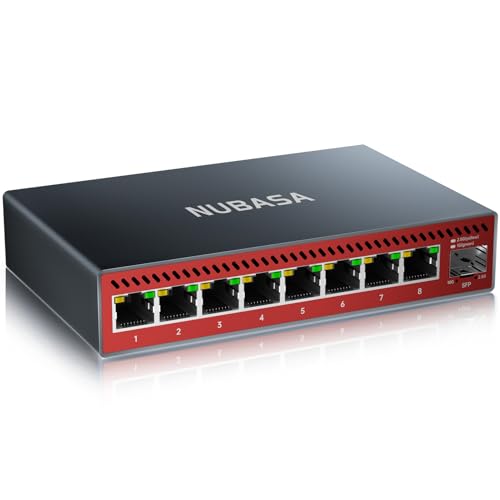
| NUBASA 8-Port (8×2.5G + 1 SFP+) | 8 x 2.5G plus one 10G SFP+ uplink, silent aluminum, fanless | Budget | |
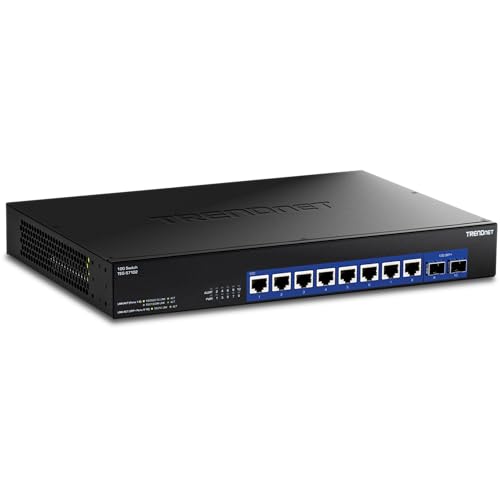
| TRENDnet TEG-S7102 (8x10G + 2 SFP+) | 8 x 10G plus 2 x 10G SFP+, 200Gbps, NDAA/TAA, lifetime protection | Premium | |
| SICSOLINK 8-Port (6x10G + 2 SFP+) | 6 x 10G RJ45 plus 2 x 10G SFP+, 160Gbps, low-noise fan, 6KV surge | Premium | |
| TP-Link TL-SG108S-M2 (8×2.5G) | 8 x 2.5G ports, 40Gbps capacity, fanless silent, plug and play | Budget | |
The price column shows a general tier only. Prices move often, so tap a link for the live figure on Amazon.
How to choose a 10G switch for a NAS or server
Port count is the headline, but it is not the whole story. The split between true 10G ports and slower multi-gig ports, the copper-versus-fiber question, and how much heat and noise you can tolerate all decide whether a switch quietly does its job for years or becomes the thing you keep moving to a farther shelf. Here is what separates a switch that fits your setup from one that almost does.
How many true 10G ports do you actually need?
Count the devices that genuinely move large files fast: the NAS, the workstation pulling from it, perhaps a second server or an editing rig. Each of those wants a real 10G Base-T port. Everything else, the laptop, the streaming box, the printer, is happy at 2.5G or gigabit. A switch with two or four full 10G ports plus a handful of multi-gig ports often covers a home setup more cheaply than an all-10G unit, while a busy homelab with several fast machines benefits from a full 8-port 10G switch. Buy for the fast devices you have plus a little room, not for a port chart.
Full 10G versus multi-gig versus a single uplink
These three layouts look similar on a box and behave very differently. A full 10G switch gives every port the top speed. A mixed switch pairs a few 10G ports with several 2.5G ports, a sensible budget for most homes. A single-uplink switch, like the NETGEAR here, has eight gigabit ports and just one 10G port meant to feed a faster backbone or a NAS; it is not a way to give many devices 10G, and reading the port spec carefully avoids that disappointment. A pure 2.5G switch with a 10G SFP+ uplink, like the NUBASA, is a fourth pattern: 2.5G to the room, 10G out to a storage server or another switch.
RJ45 copper versus SFP+ fiber
RJ45 10G Base-T runs over the Cat6A you can buy anywhere and plugs straight into a NAS or PC, which is why most home users start there; the trade-offs are more heat and a roughly 100-foot reach. SFP+ ports take a small module, fiber for long runs across a house or building, or a cheap direct-attach copper cable for short rack hops, and they run cooler. Several switches here offer both: RJ45 for devices, SFP+ for the uplink. If your NAS has an SFP+ slot, matching it can be the cleaner, cooler connection.
Fanless silence versus a fan you can hear
Ten-gigabit copper generates real heat, and that forces a choice. Fanless switches such as the TP-Link, NICGIGA 6-port, Davuaz, and NUBASA are silent, ideal for a desk, living room, or bedroom, but they tend to top out at fewer 10G ports because passive cooling can only shed so much. Dense 8-port 10G switches usually need a fan; the better ones use slower, quieter fans (SICSOLINK cites roughly 3200 RPM, TRENDnet a smart variable fan) rather than the small screamers found on cheap gear. If the switch lives in a closet or rack, a quiet fan is a non-issue; beside your head, fanless is worth paying for.
Unmanaged simplicity and the practical extras
Every switch here is unmanaged: plug in cables and it works, with auto-negotiation matching each device’s speed and no setup screen to learn. That is exactly right for most homes and small offices. Beyond that, watch the small things that matter over years of service: a metal case and surge protection (many list 6KV lightning protection) guard against spikes, a longer warranty signals confidence, and rack ears matter if the switch joins a cabinet rather than sitting on a shelf.
TP-Link TL-SX105 5-Port 10G Unmanaged Switch
The best seller in this group answers the most common home request: full 10G on every port, but quietly and without a rack. All five ports run true 10G Base-T and auto-negotiate across five speeds, 100Mb, 1G, 2.5G, 5G, and 10G, so a 10G NAS, a 5G adapter, and an old gigabit laptop can share the same switch and each runs as fast as it can. With up to 100Gbps of switching capacity and IEEE 802.3x flow control, it keeps multiple fast transfers honest at once. The standout is the fanless design in a sturdy metal case: it is silent enough for a desk or shelf, which a dense 10G switch with a fan cannot match. It is plug-and-play with no configuration, mounts on a desk or wall, and carries a 3-year warranty with expert support.
Pros
- All five ports are true 10G, not a mixed layout
- Auto-negotiates 100Mb/1G/2.5G/5G/10G per device
- Fanless and silent in a solid metal case
- Up to 100Gbps capacity with 802.3x flow control
- 3-year warranty with free expert support
Cons
- Five ports only; large setups may want more
- RJ45 only, no SFP+ fiber uplink option
- Premium tier for the full-10G capability
Best for: a desk or living-room setup that wants every port at 10G with zero fan noise.
Premium tier. Check price on Amazon
NICGIGA 6-Port 10G Switch (2x10G + 4×2.5G)
This NICGIGA is the smart-budget shape for a typical home: two full 10G ports for the NAS and the main workstation, plus four 2.5G ports for everything else, at a fraction of an all-10G switch. The two 10G RJ45 ports negotiate up to 10G, 5G, 2.5G, 1G, or 100Mb, while the four 2.5G ports cover laptops, access points, and game consoles without dropping them to gigabit. Switching capacity is 60Gbps, enough for the two fast links to run flat out together, and the whole thing is fanless and silent. A durable metal case with 6KV lightning protection, double-sided cooling vents, and a wide operating range adds resilience, and it mounts on a desk or wall. NICGIGA backs it with a one-year warranty and lifetime technical support.
Pros
- Two full 10G ports cover NAS plus workstation
- Four 2.5G ports keep other gear above gigabit
- Fanless and silent with 6KV surge protection
- Budget-friendly way into 10G storage speed
- One-year warranty with lifetime tech support
Cons
- Only two ports reach full 10G
- No SFP+ fiber uplink, RJ45 only
- 60Gbps capacity, lower than 8-port 10G units
Best for: a home network with one NAS and one fast PC, where the rest just needs 2.5G.
Budget tier. Check price on Amazon
NICGIGA 8-Port 10G Unmanaged Switch (8x10G)
When several machines all need to move data fast, this is the straightforward answer: eight true 10G Base-T ports, no mixed speeds to plan around. Every port negotiates 10G, 5G, 2.5G, 1G, or 100Mb, and the 160Gbps switching capacity lets multiple 10G streams run at once, which is the point in a homelab with a NAS, a couple of servers, and a fast desktop. It installs on a desk or in a 19-inch rack with the included ears, and it is plug-and-play with no configuration. Cooling for eight copper 10G ports comes from an industrial-grade fan rated around 24dB plus dual-side vents, so it is meant for a closet or rack rather than next to your ear. A durable metal case with 4KV lightning protection and a one-year warranty with lifetime support round it out.
Pros
- All eight ports are true 10G Base-T
- 160Gbps capacity handles many fast streams
- Desktop or 19-inch rack mount included
- 4KV lightning protection in a metal case
- One-year warranty with lifetime tech support
Cons
- Has a fan, so not silent like fanless picks
- RJ45 only, no SFP+ fiber uplink
- Premium tier given the full 10G port count
Best for: a homelab or studio where several machines each need a real 10G port.
Premium tier. Check price on Amazon
Davuaz 8-Port 10G Unmanaged Switch (6x10G + 2x10G SFP+)
The Davuaz earns its place by being a fanless 8-port 10G switch with fiber options, an unusual and useful combination. Six 10G Base-T ports handle copper devices, and two 10G SFP+ uplink ports take fiber for a long run across the house or a direct link to another switch or an SFP+ equipped NAS. All are backed by 160Gbps of switching capacity and auto-negotiate across 1G, 2.5G, 5G, and 10G, with clear LED rate indicators (an “L” light for 10G, an “R” for slower speeds) so you can confirm each link at a glance. The metal case keeps it silent and energy-efficient, and 6KV lightning protection guards the network from spikes. Davuaz offers a worry-free guarantee with quick replacement or refund support through Amazon.
Pros
- Six 10G copper ports plus two 10G SFP+ uplinks
- Fanless and silent despite eight ports
- SFP+ enables fiber runs or cool short hops
- 160Gbps capacity with per-port rate LEDs
- 6KV lightning protection in a metal case
Cons
- SFP+ modules or cables are bought separately
- Fanless build means watching placement under heavy load
- One feature note references 2.5G-class examples
Best for: a quiet 8-port 10G switch that also needs a fiber uplink to a NAS or distant switch.
Mid-range tier. Check price on Amazon
NETGEAR GS108MX 8-Port Multi-Gigabit Switch (8x1G + 1x10G uplink)
This NETGEAR fills a specific need: feeding a single fast pipe to a NAS or backbone while keeping a trusted brand and a fanless, energy-efficient design. It has eight standard gigabit ports for everyday devices and one 10G/multi-gig RJ45 uplink, the port you connect to a 10G NAS or to a larger switch so that traffic from all eight gigabit clients can converge on storage at full speed. It is plug-and-play with nothing to configure, mounts on a desk or wall, runs silently, and meets the IEEE 802.3az energy-efficiency standard to keep power and heat low. Read the layout carefully, though: this is one 10G port plus eight gigabit ports, not a way to give many devices 10G. As a NETGEAR-built switch it carries the brand’s established support.
Pros
- One 10G uplink feeds a NAS or backbone fast
- Eight gigabit ports for everyday devices
- Fanless, silent, and 802.3az energy-efficient
- Plug-and-play with desk or wall mounting
- Established NETGEAR brand and support
Cons
- Only one 10G port; the rest are gigabit
- Not for giving multiple devices 10G speed
- No 2.5G or 5G on the eight standard ports
Best for: giving a single NAS or backbone a 10G uplink while gigabit covers the rest.
Mid-range tier. Check price on Amazon
NUBASA 8-Port 2.5G Switch with 10G SFP+ Uplink
The NUBASA is the value way to get many devices off gigabit while still reaching a 10G storage server. Eight 2.5G RJ45 ports give every wired device more than double gigabit, and a single 10G SFP+ uplink takes a fiber or copper module to link the switch to a 10GbE router, server, or NAS without bottlenecking the backbone. Auto-negotiation across 10M to 2.5G keeps older gear working, and the full aluminum-alloy housing dissipates heat well enough to stay completely fanless and silent, a real plus for a home office or entertainment center. It is genuinely plug-and-play, detecting speeds automatically, and the compact, scratch-resistant build is made to sit unobtrusively for years. Note the SFP+ module is sold separately unless you choose a bundle.
Pros
- Eight 2.5G ports lift every device past gigabit
- 10G SFP+ uplink to a server, NAS, or router
- Silent fanless aluminum housing
- Auto-negotiation back to 1G and slower
- Compact, durable, set-and-forget design
Cons
- Client ports are 2.5G, not full 10G
- The 10G is an SFP+ uplink, not RJ45
- SFP+ module bought separately unless bundled
Best for: upgrading a whole room to 2.5G with one 10G fiber link out to storage.
Budget tier. Check price on Amazon
TRENDnet TEG-S7102 10-Port 10G Unmanaged Switch (8x10G + 2x10G SFP+)
This is the most capable switch in the group and the one built for the longest haul. Eight 10G Base-T ports run over ordinary Cat6A copper, and two dedicated 10G SFP+ ports add fiber uplinks or extra storage links, for ten 10G connections in total and a full 200Gbps of switching capacity, the highest here. The brand pedigree shows in the details: NDAA and TAA compliance for buyers who need it, a smart fan that throttles to cut both power and noise rather than running flat out, and TRENDnet’s Lifetime Manufacturer Protection in the US and Canada, the longest warranty in this comparison. It installs with no configuration and is rack-ready. For a serious homelab or a small business that wants headroom and a long warranty, it sets the ceiling.
Pros
- Eight 10G copper ports plus two 10G SFP+
- Highest capacity here at 200Gbps
- Smart fan lowers noise and power use
- NDAA and TAA compliant build
- Lifetime protection (US and Canada)
Cons
- Premium tier, the priciest in this group
- Has a fan, so not silent like fanless picks
- More capability than a simple home setup needs
Best for: a homelab or small business wanting maximum 10G ports, fiber uplinks, and a lifetime warranty.
Premium tier. Check price on Amazon
SICSOLINK 8-Port 10G Unmanaged Switch (6x10G + 2x10G SFP+)
The SICSOLINK pairs a flexible port mix with attention to the two things that bother people about dense 10G switches: noise and surges. Six 10G Base-T ports (negotiating 10G, 5G, 2.5G, and 1G) handle copper devices, and two 10G SFP+ ports add fiber or direct-attach uplinks for short rack hops or long building runs. All ports are non-blocking with 160Gbps of capacity and a 16K MAC address table. The cooling is the talking point: an upgraded fan rated around 3200 RPM, quieter than the 5000 RPM units common on budget gear, plus dual-side vents, so it runs more discreetly than most fanned 8-port switches. It adds 6KV surge protection, ships with full 19-inch rack hardware, and is backed by a one-year warranty with lifetime technical support.
Pros
- Six 10G copper ports plus two 10G SFP+
- Quieter upgraded fan, around 3200 RPM
- Non-blocking 160Gbps with 16K MAC table
- 6KV surge protection for safety
- Rack hardware included; lifetime tech support
Cons
- Still has a fan, not fully silent
- SFP+ modules or cables sold separately
- Premium tier for the full 10G mix
Best for: an 8-port 10G switch with fiber uplinks that runs quieter than typical fanned units.
Premium tier. Check price on Amazon
TP-Link TL-SG108S-M2 8-Port 2.5G Multi-Gigabit Switch
Not every storage upgrade needs full 10G, and this TP-Link is the affordable, silent step up that suits many homes. Its eight 2.5G ports give every wired device two and a half times gigabit speed, up to 40Gbps of switching capacity, which is plenty for faster NAS backups, smoother 4K streaming, and quick workstation transfers when the NAS itself is on a 2.5G or faster link. Auto-negotiation across 100Mb, 1G, and 2.5G keeps existing gear working, and the headline upgrade-without-rewiring promise holds: 2.5G runs over the cabling you already have. The fanless design makes it silent, fitting a LAN party, home office, or entertainment center. It is pure plug-and-play with nothing to configure. The one limit to know is that there is no 10G port at all, so a 10G NAS would connect at 2.5G.
Pros
- Eight 2.5G ports lift the whole network at once
- Fanless and silent for any room
- Up to 40Gbps capacity, plug-and-play setup
- Runs over existing cabling, no rewiring
- Budget tier and trusted TP-Link build
Cons
- No 10G port; tops out at 2.5G per device
- A 10G NAS would link at only 2.5G
- No SFP+ uplink for fiber or 10G backbone
Best for: a budget, silent jump to 2.5G everywhere when full 10G is more than you need.
Budget tier. Check price on Amazon
The verdict
Best overall
The TP-Link TL-SX105 takes the top spot. It is the best seller here, and it nails what most people want from a home 10G switch: five true 10G ports that auto-negotiate down to gigabit, up to 100Gbps of capacity, and a fanless metal case that stays silent on a desk or shelf. For a NAS, a workstation, and a few fast devices, it is the most complete and most trusted answer without committing to a noisy rack unit. Check price on Amazon
Best value
The NICGIGA 6-Port (2x10G + 4×2.5G) wins on value. At the budget tier it gives the NAS and the main workstation real 10G ports while four 2.5G ports keep everything else above gigabit, all fanless and with 6KV surge protection. For the common one-NAS, one-fast-PC home it covers the need for the least money. Check price on Amazon
Best premium
The TRENDnet TEG-S7102 is the premium pick. With eight 10G copper ports, two 10G SFP+ fiber uplinks, the highest 200Gbps capacity here, a noise-throttling smart fan, NDAA/TAA compliance, and a lifetime warranty, it offers the most headroom and the longest protection of any switch in this comparison. For a serious homelab or small business, nothing else here matches it. Check price on Amazon
Frequently asked questions
Do I need a 10G switch, or is 2.5G enough?
It depends on the NAS and the files. If your NAS and workstation both have 10G ports and you regularly move large videos, photo libraries, or disk images, a 10G switch removes the bottleneck and transfers finish several times faster. If your devices max out at 2.5G, or you mainly stream and browse, a 2.5G switch like the TP-Link TL-SG108S-M2 or NUBASA delivers a big jump over gigabit for much less, and you can move to 10G later.
What is the difference between a 10G RJ45 port and an SFP+ port?
RJ45 10G Base-T uses the familiar Ethernet plug and runs over Cat6A copper straight into a NAS or PC, easy and universal but warmer and limited to roughly 100 feet. SFP+ ports take a small module: fiber for long runs across a house or building, or a direct-attach copper cable for short rack hops, and they run cooler. Switches with both, like the Davuaz, SICSOLINK, and TRENDnet, use RJ45 for devices and SFP+ for the uplink. If your NAS has an SFP+ slot, matching it can be the cleaner connection.
Will a fanless 10G switch overheat?
The fanless switches here are designed to handle their port count passively, using metal or aluminum cases and cooling vents to shed heat, which is why fanless models tend to have fewer 10G ports than fanned ones. Give them airflow, do not stack other gear directly on top, and keep them out of a sealed cabinet, and they run reliably. Dense 8-port 10G switches generate more heat and generally include a fan for that reason; the quieter ones throttle it down when load is light.
Can I mix gigabit, 2.5G, and 10G devices on the same switch?
Yes. Every switch here is unmanaged with auto-negotiation, so each port independently runs at the fastest speed both the switch and the connected device support. A 10G NAS, a 2.5G laptop, and an old gigabit printer can share one multi-speed switch, and each link runs at its own top speed without slowing the others. Just confirm a port supports the speed you expect, since some switches mix full 10G ports with 2.5G or gigabit ports.
Are these switches managed, and do I need to configure anything?
All of these are unmanaged switches: you connect the cables and they work, with no web interface, VLANs, or setup to learn. That suits most homes and small offices perfectly. If you later need features like VLANs, link aggregation, or port monitoring, that is the point to consider a managed switch, but for fast, simple NAS and server connectivity, unmanaged plug-and-play is exactly the right tool.
This article may contain affiliate links; see our Affiliate Disclosure.