A 16-inch MacBook Pro draws power faster than almost any battery pack can give it, and most chargers quietly cap out at 60 or 100 watts, so the laptop sips instead of gulps and the percentage barely moves on a layover. A true 140W PD 3.1 pack changes the math: plug in during a half-hour gate wait and the battery jumps from nearly empty to past the halfway mark, no wall outlet involved.



A 140W pack earns its keep three ways: a single USB-C port that actually delivers the full 140W to a laptop rather than splitting it, enough stored capacity to refill that laptop at least once with juice to spare, and a Wh rating that keeps it legal in carry-on luggage. That combination serves a wide range of days, whether it is a developer pushing a build on a long flight, a photographer dumping cards in the field, a student in a library with no free outlet, or a gamer keeping a handheld alive on a road trip. The picks below lead with the best sellers, so the most-bought packs come first.
| Power bank | Standout features | Price | Link |
|---|---|---|---|
| UGREEN Nexode 25,000mAh 145W | 140W single-port USB-C, 25,000mAh, ~2-hour bidirectional recharge, digital display | Mid-range | |
| INIU 140W 27,000mAh | 140W PD 3.1, large 27,000mAh airline-approved cell, 3-year warranty | Mid-range | |
| Anker 737 (PowerCore 24K) | 140W max PD 3.1, 24,000mAh, smart display with recharge estimate, airline-safe | Premium | |
| UGREEN Nexode 25,000mAh 200W | 140W + 100W dual USB-C, 200W total, 25,000mAh (90Wh), color TFT display | Mid-range | |
| SIXTHGU PowerTower 20,000mAh | 140W max, 200W total, compact can-sized 20,000mAh, PD 3.1 + QC4.0 | Mid-range | |
| AOHI Future Starship 27,600mAh | 140W per port, 240W total, dual-laptop charging, 99.36Wh airline-legal | Premium | |
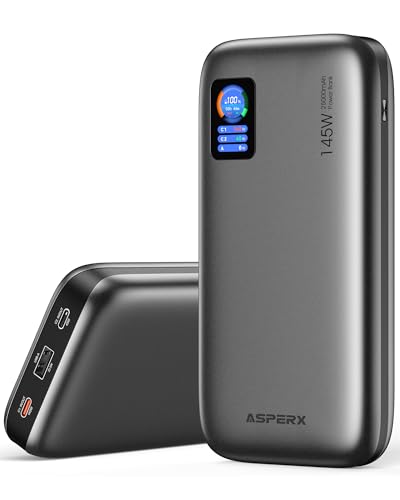
| AsperX 25,000mAh 140W | 140W single-port, ~1.8-hour recharge, 92.5Wh airline-approved, color TFT | Mid-range | |
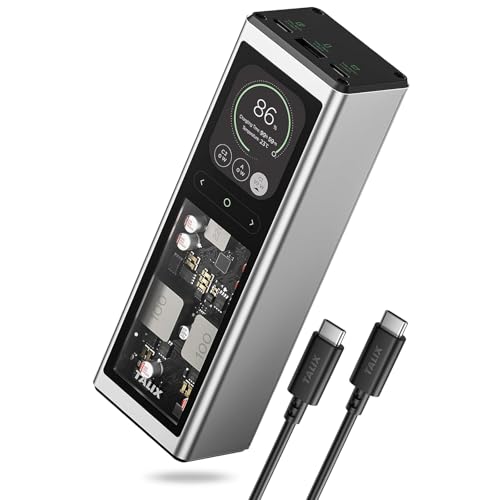
| TALIX 140W 20,000mAh | 140W PD 3.1 EPR single-port, compact 73Wh, hybrid pass-through charging | Mid-range | |
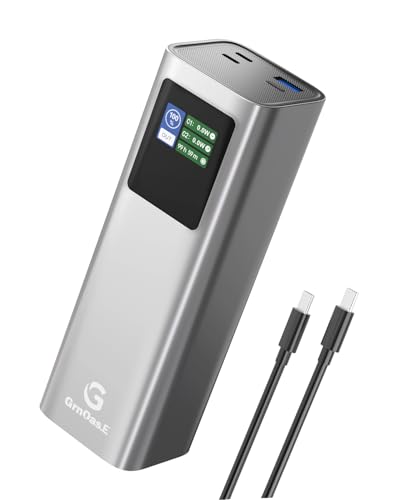
| GrnOas.E 27,000mAh (Dark Gray) | 140W two-way USB-C, big 99Wh cell, ~1-hour recharge, smart display | Budget | |
| GrnOas.E 27,000mAh (Silver Gray) | Same 140W 99Wh pack in a silver-gray finish | Budget | |
The price column shows a general tier only. Prices move often, so tap a link for the live figure on Amazon.
How to choose a 140W PD 3.1 power bank
Wattage is the headline, but it is not the whole story. Two packs that both say 140W can behave very differently depending on how that power is split, how much energy they store, and whether airport security waves them through. Here is what separates a pack that genuinely keeps a laptop alive from one that disappoints at the gate.
140W on a single port is the number that matters
A 16-inch MacBook Pro can pull up to 140W, and it only charges that fast if one USB-C port can deliver the full 140W by itself. Watch for the difference between total output and per-port output: a pack rated 200W or 240W total usually still tops out at 140W on its strongest port, with the rest reserved for a second device. For the fastest possible laptop charge, plug into the port the maker labels as the 140W (often USB-C1) and use nothing else on the pack at the same time.
PD 3.1 and the 5A cable you must use
140W charging relies on USB Power Delivery 3.1 Extended Power Range, which raises voltage above the old 100W ceiling. Two things have to line up: the laptop must support PD 3.1 EPR (recent MacBook Pro models do), and the cable must be a 5A, 140W-rated USB-C cable, usually one with an E-marker chip. Plug a 140W pack into a 60W or 100W cable and you are capped at the cable’s limit, not the pack’s. Every model here ships with a suitable cable, so keep that one with the pack rather than grabbing a random cord.
Capacity, and why Wh matters more than mAh
Capacity in mAh tells you roughly how many refills you get; the packs here range from 20,000mAh, good for a bit over one MacBook charge, up to 27,600mAh for more. But the number airlines care about is watt-hours (Wh). Most regions cap carry-on power banks at 100Wh, and several packs here sit deliberately just under that line, around 92 to 99.4Wh, to stay flight-legal. A bigger cell means fewer trips to the wall, at the cost of size and weight.
One device or several at once
If the laptop is all you ever charge, a clean single 140W port is ideal. If you routinely top up a phone and tablet alongside it, look at the three-port models, and at the dual-USB-C packs that can split power, for example 140W to a laptop while 100W goes to a second machine. Sharing power does reduce the laptop’s share, so it is a trade between speed and convenience.
Display, recharge speed, and warranty
A digital readout that shows remaining percentage, plus live input and output wattage, removes the guesswork of whether the pack is actually charging at full speed. Recharge speed varies widely: some packs refill in about an hour with a strong enough adapter, others take several, and using a weak 20W brick can stretch that to most of a day. Finally, warranty length is a fair signal of confidence, ranging here from 18 months to three years.
UGREEN Nexode 25,000mAh 145W Power Bank
The best seller in this group is also one of the most balanced. Its strongest USB-C port delivers the full 140W a 16-inch MacBook Pro can take, enough to lift it from empty to 56% in about half an hour, while a 145W total spread across three ports keeps a phone and tablet topped up too. The 25,000mAh cell is rated to refill a laptop roughly 1.3 times and a phone over five times, and bidirectional charging means the pack itself refills in around two hours from a 65W or stronger adapter, with a digital display showing exactly how much is left. It is compact for the capacity, and the bundled 5A USB-C cable is the one to keep for full-speed charging.
Pros
- Full 140W on a single port for top MacBook Pro speed
- Large 25,000mAh cell, about 1.3 laptop refills
- Bidirectional recharge in roughly two hours at 65W+
- Digital display shows remaining battery at a glance
- Three ports cover laptop, phone, and tablet
Cons
- Needs a 65W+ adapter to hit the fast two-hour recharge
- Best laptop speed requires the bundled 5A cable
- A 20W brick stretches a full recharge to around six hours
Best for: the all-round traveler who wants proven, full-speed laptop charging plus room for a phone and tablet.
Mid-range tier. Check price on Amazon
INIU 140W 27,000mAh Power Bank
INIU pairs one of the largest cells here with an unusually long warranty. The 140W PD 3.1 USB-C port is quick enough to bring a 16-inch MacBook Pro to 59% in thirty minutes, an iPad Pro to 64%, and a phone past 70% in the same window, and the 27,000mAh airline-approved capacity means more devices between recharges on a long trip. Three ports, a 140W in/out USB-C, a 45W USB-C, and a USB-A, let it charge several things at once, and a smart LED display reports both remaining charge and estimated time to full. The standout is support: a three-year warranty plus lifetime technical help, well beyond what most rivals offer.
Pros
- Large 27,000mAh airline-approved capacity
- 140W PD 3.1 port for fast MacBook Pro charging
- Three ports including a 45W second USB-C
- LED display shows charge and time-to-full
- Three-year warranty with lifetime support
Cons
- Larger cell makes it bulkier than 20,000mAh packs
- Full 140W speed needs a 5A PD 3.1 cable
- Second USB-C tops out at 45W, not another 100W
Best for: long trips where capacity and a long warranty matter as much as raw charging speed.
Mid-range tier. Check price on Amazon
Anker 737 Power Bank (PowerCore 24K)
The Anker 737 is the established name in this class, and it brings a polished, well-supported package. Its 140W max PD 3.1 output handles a MacBook Pro at speed, the 24,000mAh cell charges an iPhone 16 Pro about four times or a 13-inch iPad Pro around 1.3 times, and a clear smart display reports real-time input and output along with an estimated recharge time. At roughly 6.1 by 2.1 by 1.9 inches and about 22 ounces it meets airline carry-on rules, and the bundled 140W USB-C cable means full speed out of the box. It sits at the premium end of the group, reflecting the brand’s reputation and a refined design rather than the largest capacity.
Pros
- 140W max PD 3.1 for fast laptop charging
- Detailed smart display with recharge-time estimate
- Airline-safe size and weight for carry-on
- Bundled 140W cable enables full speed immediately
- Established brand with a 24-month warranty
Cons
- Premium price, the second-highest here
- 24,000mAh, smaller than the 27,000mAh packs
- Heavier feel relative to its capacity
Best for: buyers who prioritize a refined, well-supported pack from a known brand over maximum capacity.
Premium tier. Check price on Amazon
UGREEN Nexode 25,000mAh 200W Power Bank
This is UGREEN’s higher-output sibling, built for people who charge two demanding devices at once. One USB-C port still delivers the full 140W to a laptop, a second USB-C adds up to 100W, and used together they reach 200W total, so a MacBook Pro and a second machine or tablet can both charge quickly. The 25,000mAh (90Wh) cell stays under the 100Wh airline line, and a color TFT screen shows battery level, remaining time, and live voltage, current, and wattage in finer detail than a basic LCD. UGREEN rates the cells to keep over 80% capacity after 1,000 cycles, with temperature monitoring and active heat dissipation for sustained high-power output.
Pros
- 140W and 100W ports, 200W total output
- Charges two power-hungry devices at full pace
- Detailed color TFT display with voltage and current
- 90Wh stays under the 100Wh carry-on limit
- Rated above 80% capacity after 1,000 cycles
Cons
- Single-laptop users may not need the second 100W port
- Full 140W still requires the 5A cable
- Heavier than compact 20,000mAh packs
Best for: creators and pros who regularly charge a laptop and a second high-power device together.
Mid-range tier. Check price on Amazon
SIXTHGU PowerTower 20,000mAh Power Bank
If pocketability ranks high, the SIXTHGU PowerTower is the compact option. About the size of a soda can and listing a 12-ounce weight, it still pushes up to 140W to a laptop, enough to bring a 16-inch MacBook Pro (M4 Pro) to 50% in 28 minutes, and a 200W combined output across three ports for charging a laptop, tablet, and phone at once. It supports both PD 3.1 and QC4.0 high-speed protocols, and a smart digital screen shows input and output power, remaining charge, and estimated time. At 20,000mAh it trades some capacity for that smaller, lighter body, and it bundles an E-marked 240W USB-C cable so the full-speed path is covered.
Pros
- Compact, can-sized body that is easy to carry
- Up to 140W, MacBook Pro to 50% in 28 minutes
- 200W total across three ports for multi-device days
- PD 3.1 and QC4.0 protocol support
- Includes an E-marked 240W-rated cable
Cons
- 20,000mAh means fewer refills than larger packs
- Smaller cell empties faster on heavy laptop use
- 18-month warranty, shorter than some rivals
Best for: minimalist carriers who want real 140W laptop speed in the smallest, lightest body.
Mid-range tier. Check price on Amazon
AOHI Future Starship 27,600mAh Power Bank
The AOHI Future Starship is the heavy hitter, with the largest capacity here and the most headroom for charging two laptops. Its 27,600mAh (99.36Wh) cell sits right under the 100Wh airline cap, refilling an iPhone 16 about 5.6 times or a 16-inch MacBook Pro roughly once, and its 240W total output splits as 140W on one USB-C plus up to 100W on the second, so two laptops can charge together. A single port still drives a MacBook Pro from 0 to 50% in 28 minutes, and both USB-C ports accept up to 140W input, so the pack itself refills quickly through either. A smart display and a three-stage LED indicator show charging mode at a glance, and AOHI rates the cells past 1,000 cycles with layered safety protection. The included 140W cable is tucked under the packaging foam, easy to miss.
Pros
- Largest capacity here at 27,600mAh (99.36Wh)
- 140W + 100W ports charge two laptops at once
- MacBook Pro 0-50% in about 28 minutes
- Fast 140W recharge through either USB-C port
- Smart display plus a clear 3-stage LED indicator
Cons
- Premium price, the highest in this group
- Largest and heaviest pack to carry
- Bundled cable hides under the foam, easy to overlook
Best for: power users who need maximum capacity and the ability to charge two laptops on the go.
Premium tier. Check price on Amazon
AsperX 25,000mAh 140W Power Bank
The AsperX focuses on quick turnaround and a clear screen. Its 140W USB-C port charges a laptop at full speed, and it claims the fastest self-recharge in the group, refilling in about 1.8 hours from a 65W or stronger adapter, roughly three times quicker than ordinary packs. The 25,000mAh (92.5Wh) cell stays flight-legal under 100Wh and is rated to charge a MacBook Pro about 1.3 times and a phone around 4.5 times, comfortably more than a day of use. A 145W total spreads across two devices, an upgraded color TFT panel shows live battery, time, and power figures, and it supports a wide range of protocols including PD, QC, PPS, AFC, and UFCS, with a low-power mode for small accessories. It ships with a 5A cable and an 18-month warranty.
Pros
- 140W laptop charging on the main USB-C port
- Fast ~1.8-hour self-recharge at 65W+
- 92.5Wh stays under the airline 100Wh limit
- Color TFT display with live power readouts
- Broad protocol support plus a low-power mode
Cons
- Fast recharge needs a 65W+ adapter you supply
- Total output 145W, below the 200W+ packs
- 18-month warranty rather than two or three years
Best for: anyone who hates waiting on the pack itself and wants a fast, detailed-display recharge.
Mid-range tier. Check price on Amazon
TALIX 140W 20,000mAh Power Bank
TALIX leans into a clever pass-through trick alongside its compact size. The 140W PD 3.1 EPR port charges a MacBook Pro to 50% in about 32 minutes, and its hybrid charging technology lets the pack draw from a 65W wall adapter and its own cell at the same time, effectively turning one laptop charger into a hub that powers both a laptop and a phone. At 20,000mAh (73Wh) it is the lightest cell here at about 14.8 ounces and comfortably airline-legal, and it recharges fully in roughly 75 to 80 minutes at 100W input through either USB-C port. FCC and UL certifications and a compact 6.06 by 2.00 by 1.53-inch footprint round out a travel-minded design that also serves as backup for routers, fans, and lights in a pinch.
Pros
- 140W PD 3.1 EPR, MacBook Pro to 50% in ~32 min
- Hybrid pass-through powers laptop and phone together
- Lightest cell here, easy carry-on at 73Wh
- Fast ~75-80 minute self-recharge at 100W
- FCC and UL certified for added peace of mind
Cons
- 20,000mAh gives only about 1.2 laptop refills
- Smaller cell suits short trips more than long ones
- Pass-through needs a separate wall adapter
Best for: light packers and commuters who want pass-through hub charging in the smallest flight-safe pack.
Mid-range tier. Check price on Amazon
GrnOas.E 27,000mAh 140W Power Bank (Dark Gray)
The GrnOas.E is the value standout: a big 27,000mAh (99.9Wh) cell at the lowest price in the group, kept just under the 100Wh airline limit. Its USB-C1 port handles 140W input and output, fast enough to charge a MacBook Pro and to refill the pack itself in about an hour, while a smart screen shows remaining charge and live wattage. Three ports let it run a laptop plus a phone and a second device, with power intelligently shared up to 100W on the main port when all three are in use. A PC-and-aluminum body aids heat dissipation and durability, the cell supports broad protocols (PD 3.1, QC3.0, AFC, FCP, Apple 2.4A), and it carries a 24-month warranty. Note the bundled cable is rated 100W, so the included 140W-class cable for top laptop speed is worth confirming.
Pros
- Lowest price with a large 27,000mAh cell
- 140W two-way USB-C, ~1-hour self-recharge
- 99.9Wh stays inside the 100Wh carry-on rule
- Three ports with smart power sharing
- Smart display and a sturdy PC-aluminum build
Cons
- Bundled cable is 100W; full 140W needs a 5A cable
- Three-port use caps the main port near 100W
- Larger cell adds size and weight
Best for: budget-minded buyers who want the most capacity per dollar in an understated dark finish.
Budget tier. Check price on Amazon
GrnOas.E 27,000mAh 140W Power Bank (Silver Gray)
This is the same GrnOas.E pack as above in a silver-gray finish rather than dark gray, with identical performance: a 140W two-way USB-C1 port, a 27,000mAh (99.9Wh) airline-legal cell, three ports with smart power sharing, an roughly one-hour self-recharge, and the same smart display and PC-aluminum build. The only real decision between the two listings is color, so pick whichever finish you prefer; everything else, including the 24-month warranty and the broad protocol support, carries over. As with the dark version, the included cable is the 100W rating, so for the absolute fastest laptop charge pair it with a 5A, 140W-rated USB-C cable.
Pros
- Identical value and specs in a silver-gray finish
- 140W two-way USB-C with ~1-hour recharge
- Large 99.9Wh cell, still carry-on legal
- Three ports with smart power distribution
- Smart display and durable PC-aluminum shell
Cons
- Bundled cable is 100W; add a 5A cable for full speed
- Main port shares down near 100W with three devices
- Same size and weight as the dark-gray model
Best for: the same high-value pick for anyone who simply prefers the lighter silver-gray color.
Budget tier. Check price on Amazon
The verdict
Best overall
The UGREEN Nexode 25,000mAh 145W takes the top spot. It is the best seller here, and it nails the balance that matters most: a genuine 140W on a single port for full MacBook Pro speed, a generous 25,000mAh cell good for about 1.3 laptop refills, a two-hour bidirectional recharge, and a clear display, all at a mid-range price. For the widest range of travelers and working days, it is the most complete and most trusted answer. Check price on Amazon
Best value
The GrnOas.E 27,000mAh 140W wins on value. It pairs the largest-class capacity in the group, a flight-legal 99.9Wh cell, with the lowest price, a 140W two-way port, an hour-fast self-recharge, and a smart display. Pair it with a 5A cable for top laptop speed and it delivers more stored power per dollar than anything else here, in your choice of dark-gray or silver-gray. Check price on Amazon
Best premium
The AOHI Future Starship 27,600mAh is the premium pick. It carries the most energy here at 99.36Wh, still under the airline limit, and its 240W total output with 140W plus 100W ports can charge two laptops at once and refills itself fast through either USB-C. For heavy users who need maximum capacity and dual-laptop headroom, nothing else in the group matches it. Check price on Amazon
Frequently asked questions
Will a 140W power bank actually charge my MacBook Pro at full speed?
Yes, provided three things line up. The pack must deliver the full 140W on the single port you plug into (not split across devices), your MacBook Pro must support PD 3.1 Extended Power Range, which recent models do, and you must use a 5A, 140W-rated USB-C cable, usually one with an E-marker chip. Miss any of those and the laptop charges slower, at the limit of the weakest part of the chain.
Can I take these on a plane?
Most airlines allow power banks up to 100 watt-hours (Wh) in carry-on luggage, and several packs here are designed to sit just under that line, around 92 to 99.4Wh, specifically to stay legal. Power banks must travel in the cabin, never in checked baggage. Always confirm the figure printed on the unit and your airline’s current policy before flying, since limits and quantity rules can vary.
Why does my pack say 200W or 240W but only 140W reaches the laptop?
That higher number is the total output across all ports combined, not what any single port gives. The strongest USB-C port typically tops out at 140W, which is the most a 16-inch MacBook Pro can take anyway; the remaining wattage is there to charge a second device at the same time. For the fastest laptop charge, use only the labeled 140W port and nothing else on the pack.
Do I need to use the cable that came in the box?
For full 140W charging, yes, or another certified 5A, 140W-rated USB-C cable. Ordinary USB-C cables are often limited to 60W or 100W, which caps charging well below the pack’s potential no matter how capable the pack and laptop are. Keep the bundled cable with the power bank. A few packs here ship a 100W cable by default, so confirm your cable’s rating if you want the absolute fastest charge.
How long do these take to recharge themselves?
It depends heavily on the adapter you feed them. With a strong enough wall charger, several packs here refill in roughly one to two hours, and a couple support up to 140W input for an even quicker turnaround. Use a weak 20W brick instead and a full recharge can stretch to six hours or more, so a higher-wattage adapter is worth pairing with a high-capacity pack.
This article may contain affiliate links; see our Affiliate Disclosure.