It is 6:45 in the morning and four cables are fighting over two outlets: one phone at 11 percent, a watch that died overnight, a pair of earbuds nobody can find, and a tablet for the school run. A good charging station turns that scramble into a single tidy spot where everything lands, powers up, and is ready before anyone has finished breakfast.






The docks below split into two plain camps. Wireless stations cradle an iPhone, an Apple Watch, and AirPods on neat pads with almost no cables, while multi-port USB stations use a cluster of USB-C and USB-A jacks plus included cords to feed phones, tablets, and laptops of every brand. What separates a great pick is matching that format to the gear on your nightstand or kitchen counter. This guide serves a household syncing several phones at once, a couple who just want a clean bedside dock, a remote worker juggling a laptop and peripherals, and anyone tired of hunting for a free outlet.
At a glance
| Product | Standout features | Price tier | Link |
|---|---|---|---|
| GETPALS 3-in-1 Wireless Dock | Wireless phone, watch, and AirPods in a foldable, travel-ready stand | Budget | |
| Acer Gadget 7-in-1 | Two wireless phone pads, watch, earbuds, USB-A and USB-C, Bluetooth clock | Mid-range | |
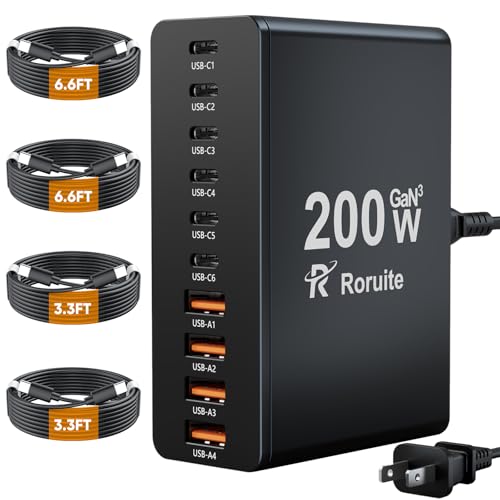
| Roruite 10-Port 200W GaN | 6 USB-C and 4 USB-A, 200W total, four cables included | Budget | |
| MSTJRY 5-Port USB-A Dock | 5 USB-A ports, 7 cables, removable dividers for tablets | Mid-range | |
| zutspzss 10-in-1 300W | 3-in-1 wireless plus 7 USB ports, dual 65W PD for laptops | Mid-range | |
| Zobirez 10-Port 750W | 5 USB-C at 120W each and 5 USB-A, one-piece slots | Mid-range | |
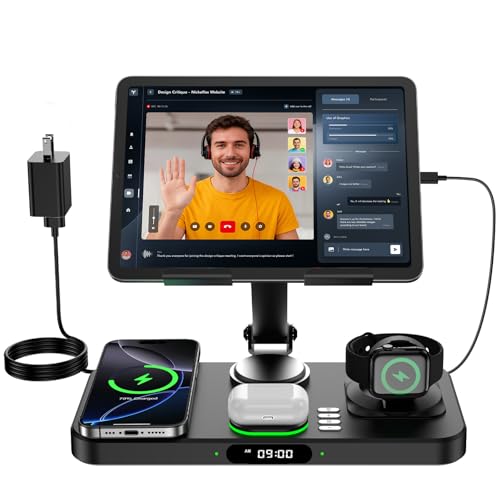
| Opinta 6-in-1 with Clock | Wireless phone, watch, earbuds, plus folding iPad stand and ambient light | Mid-range | |
| Gitryin 12-in-1 Power Hub | 4 AC outlets, 4 USB-C, 4 retractable 40W wall chargers, surge protection | Premium | |
| HSicily 190W 6-Port | 4 USB-A and 2 USB-C, 8 cables, plus watch and AirPods stands | Mid-range | |
How to choose a family charging station
Marketing leans on big port counts and wattage numbers, but only a few details decide whether a station actually clears the morning logjam. Here is what to weigh.
Wireless pads or cabled ports
Wireless stations are the cleanest answer if the household runs on recent iPhones, an Apple Watch, and AirPods, since those drop straight onto their pads with no cord to plug in. The trade-off is that wireless charging is slower and fussier about case thickness and alignment, and most wireless docks only charge the watch from Apple. Multi-port USB stations are the universal choice: they charge any brand and mix of phones, tablets, e-readers, and laptops, but you supply or store a cable for each device. Many busy homes end up wanting one of each.
Count the devices, then add headroom
Total the gadgets that need charging in one place at once, then pick a station with a port or two to spare. A bedside dock for two people might need only three or four spots, while a family hub or home office can easily fill five to ten. Stations here range from a compact 3-in-1 pad to a 10- and 12-port hub built to power everyone simultaneously.
Watch the per-port power, not just the total
A headline figure like 200W or 750W is the combined ceiling, not what any single device receives. The number that matters is the output of the specific port you plug into. Phones and tablets are happy with 20 to 30W, but a laptop wants a dedicated 60W or higher USB-C port to charge at a useful speed. If a laptop is in the mix, confirm at least one high-wattage USB-C port; if not, a station full of 20W ports is plenty and often the better value.
Cables, dividers, and case-friendliness
USB stations that include a set of mixed cables save a separate shopping trip, though built-in cords can be short. Removable or molded dividers let thicker phones and cased tablets stand upright instead of toppling. On wireless pads, case thickness is a real constraint — most want a case under roughly 2 to 4mm and no metal rings or magnets blocking the coil.
Nightstand manners
If the station lives in a bedroom, look for LED indicators you can dim or that switch off, and skip a bright always-on clock unless you want one. Several picks here add a clock, temperature readout, or adjustable ambient light; handy on a desk, optional by a bed. A physical power switch is a small luxury that lets you cut everything at once.
Safety and build
Look for over-current, over-voltage, and over-temperature protection, and flame-retardant housing on the higher-power units. Independent certifications such as UL, FCC, or ETL are reassuring on anything that draws serious wattage or plugs straight into the wall with AC outlets.
GETPALS 3-in-1 Wireless Charging Station
The runaway best-seller of this group is also the simplest idea done well: three wireless pads for an iPhone, an Apple Watch, and AirPods, folded into a stand light enough to drop in a bag. It delivers up to 7.5W to the phone, 2.5W to the watch, and 3W to earbuds, with LED status lights and a non-slip base. The foldable design is the standout — it collapses flat for travel, so the same dock that tidies the nightstand at home rides along to a hotel. It is the lowest-friction way for an Apple household to retire three separate chargers.
- Pros: Charges iPhone, Apple Watch, and AirPods at once with no cables to plug in; Foldable, lightweight design that packs for travel; Overcurrent, overvoltage, and overheating protection with clear LED indicators; Non-slip surface and case-friendly up to about 4mm; The most proven, best-selling pick here at a budget price.
- Cons: Apple-focused, so it is not the answer for Android or Galaxy phones; Modest 7.5W phone speed typical of wireless pads; Cases with metal rings or magnets must come off; AirPods need a wireless-charging case.
Best for: Apple households and frequent travelers who want a clean, foldable three-device dock at the lowest price.
Acer Gadget 7-in-1 Wireless Charging Station
This is the wireless dock for a couple or a busy nightstand, because it carries two wireless phone areas at once alongside an Apple Watch pad, an earbuds spot, and both a USB-A and a USB-C port for everything else. A 30W adapter feeds the lot, and a Bluetooth-syncing clock adds the date, day, and indoor temperature with adjustable warm or cool lighting. The two phone spots make it genuinely two-person friendly, and the wired ports stretch it beyond Apple to Galaxy and other Android phones for the cabled side.
- Pros: Two wireless phone areas plus watch, earbuds, USB-A, and USB-C in one base; Bluetooth time-sync clock with day, temperature, and adjustable ambient light; 30W adapter for fast simultaneous charging across the station; Wired ports add Android, Galaxy, and accessory support beyond Apple; 18-month warranty with 24-hour customer service.
- Cons: Wireless watch charging is Apple-only; not compatible with Samsung watches; Cases should be under about 2mm for the wireless pads; The always-on clock and light may be more than a dark bedroom wants.
Best for: Couples and crowded nightstands that want two phones plus a watch, earbuds, and a clock in one dock.
Roruite 10-Port 200W GaN Charging Station
If your household runs a mix of brands and you simply need a lot of cabled ports for not much money, the Roruite is the value workhorse. Six USB-C and four USB-A jacks share up to 200W total, enough to charge ten things at once — phones, watches, earbuds, a fan, a tablet — from one compact GaN block. It ships with four USB-C cables and a detachable five-foot power cord, so it is ready to go and easy to store. Each port tops out around 20W, which is ideal for phones and tablets but not for charging a laptop quickly.
- Pros: Ten ports total (6 USB-C, 4 USB-A) for charging many devices at once; 200W combined output in a compact GaN housing that runs cool; Four USB-C cables and a detachable 5ft cord included; Universal across iPhone, Android, Galaxy, tablets, and small electronics; 24-month warranty at a budget price.
- Cons: Per-port output caps around 20W, so it is not built for fast laptop charging; USB-A and USB-C cabling means you supply a cord for any device beyond the four included; No wireless pads or device cradles; it is a port block, not a stand.
Best for: Multi-brand homes that want the most cabled ports per dollar for phones, tablets, and small gear.
MSTJRY 5-Port USB-A Charging Station
The MSTJRY is a focused desk organizer for the still-huge world of USB-A cables, bundling seven short cords (three for iPhone, two Micro-USB, two USB-C) so five devices stand upright in one tidy tray. Smart detection adjusts current per device, and removable dividers flex wide enough to hold a tablet even in a thick case. A power switch gives a quick on-off and a visual cue that it is live. It is an unfussy, family-friendly hub for phones and tablets rather than a laptop-class fast charger.
- Pros: Five USB-A ports with seven mixed cables included for a ready setup; Removable dividers hold phones and even cased tablets upright; Smart per-port detection adjusts current to each device; Power switch with a clear on indicator; Cable and divider replacement service from the maker.
- Cons: USB-A only, so it lacks the higher-wattage USB-C ports newer devices prefer; Output is tuned for phones and tablets, not fast laptop charging; Included cables are short by design.
Best for: Desks and kitchen counters full of USB-A devices that need tidy, simultaneous charging.
zutspzss 10-in-1 300W Charging Station
This one tries to be the whole charging desk in a single unit, pairing a 3-in-1 wireless stand for iPhone, Apple Watch, and AirPods with a seven-port USB bank rated up to 300W total. Two of those are 65W USB-C ports aimed squarely at laptops, joined by two 30W USB-C and three 20W USB-A ports for everything smaller. GaN III internals keep it efficient, and the LED indicators glow briefly then go dark so they will not light up a bedroom. For a hybrid worker who wants a wireless phone cradle and real laptop charging at one station, it is a strong all-rounder.
- Pros: Combines 3-in-1 Apple wireless charging with a 7-port USB bank; Two 65W USB-C ports charge MacBooks and other laptops at speed; 300W total output covers Apple and Android devices together; GaN III efficiency with sleep-friendly LEDs that dim after a few seconds; Non-slip base and full suite of safety protections.
- Cons: Wireless charging is Apple-only; Android phones use the wired ports; It is a larger desk fixture rather than a travel piece; One labeled USB-C spot on the watch stand is non-charging, so read the layout.
Best for: Hybrid workers who want one station for a wireless phone, a watch, earbuds, and a laptop.
Zobirez 10-Port 750W Charging Station
Zobirez aims at the power user with the highest per-port figures here: five USB-C ports rated up to 120W each and five USB-A ports at up to 30W, for a 750W combined ceiling. That makes it one of the few stations that can fast-charge multiple laptops, an iPad Pro, and a stack of phones from one durable, one-piece slot design in flame-retardant ABS. Two wide center bays hold a laptop or a cased tablet upright, and a ten-cable kit gets you started. It is overkill for a simple nightstand but ideal for a shared home office or a household full of high-draw gear.
- Pros: Five USB-C ports at up to 120W each for genuine multi-laptop charging; Five USB-A ports at 30W for phones, earbuds, and daily gear; 750W total output, the highest ceiling in this lineup; Sturdy one-piece slots in flame-retardant ABS with wide laptop and tablet bays; Ten-cable kit plus six-way safety protection included.
- Cons: More power and size than a basic bedside dock needs; No wireless pads; it is a high-output cabled hub; Reaching the top per-port speeds requires compatible chargers and cables.
Best for: Home offices and power users charging multiple laptops, tablets, and phones at full speed.
Opinta 6-in-1 Wireless Charger with iPad Stand
The Opinta is the most feature-rich wireless option, stacking a phone pad, an Apple Watch spot, and an earbuds area beneath a folding, angle-adjustable iPad stand braced by a carbon-steel arm. A 30W adapter drives the wireless charging, and a clock display with seven ambient colors lets it double as a bedside or desk centerpiece you can dim or switch off at night. A short USB-C cable powers the iPad through the stand. It folds for travel too, making it a tidy command center for an Apple household that also props up a tablet for video or recipes.
- Pros: Wireless phone, watch, and AirPods charging plus a folding iPad stand; Adjustable-angle carbon-steel stand with a vented design; Clock display with seven ambient colors, fully dimmable or off; 30W adapter and foldable build for travel; Smart-chip safety protections for stable wireless charging.
- Cons: Wireless charging is Apple-only; the iPad uses the included short USB-C cord; Recommended case under about 3mm with no charging rings; The clock and lighting are extras a minimalist may not need.
Best for: Apple households that want a wireless dock doubling as an iPad stand for video, recipes, or calls.
Gitryin 12-in-1 Desktop Charging Station
This is the premium home-office hub, and it is really a smart power strip: four AC outlets, four USB-C ports, and four retractable 40W wall chargers with built-in cables that pull out 33 inches and snap back. ETL certification and 1020-joule surge protection guard a gaming PC or 4K TV alongside your phones, and a modular design means a single broken charger can be replaced rather than the whole unit. The 45-degree angled plug tucks behind furniture. It is the most expensive pick here and the most ambitious, built to be the one outlet hub a crowded desk or living-room console runs on.
- Pros: Four AC outlets, four USB-C ports, and four retractable 40W chargers in one hub; 1020J surge protection with ETL certification and fire-resistant casing; Retractable cables extend 33 inches and snap back to cut clutter; Modular design allows component-level charger replacement; 45-degree angled plug fits behind furniture; two-year warranty.
- Cons: The highest price in this roundup by a wide margin; Not suited to low-power devices like flashlights or some toys; More of a desk and living-room power center than a portable dock.
Best for: Crowded desks and living rooms that need AC outlets, USB-C, and surge protection in one premium hub.
HSicily 190W 6-Port Charging Station
The HSicily strikes a tidy middle ground: a six-port cabled station (four USB-A, two USB-C) up to 190W total that ships with eight longer cables plus separate stands for an Apple Watch and AirPods, so it covers wearables without a full wireless pad. Smart detection and a flame-retardant ABS body with anti-slip pads and a power switch make it a sensible family fixture, and the maker lists FCC and UL testing. Movable dividers stack phones and cased tablets, and a 65W single-port maximum gives one device a fast lane. It is a well-equipped, certified all-rounder for a household that wants cables and wearable stands together.
- Pros: Six ports (4 USB-A, 2 USB-C) with eight longer cables included; Bundled Apple Watch and AirPods stands cover wearables; Up to 65W on a single port for one faster-charging device; Flame-retardant ABS, anti-slip pads, and a power switch; Listed FCC and UL testing with a 24-month replacement service.
- Cons: Wearable stands rely on your own watch and earbud cables, not wireless pads; 190W total is shared, so heavy simultaneous use splits the budget; A desk-and-counter fixture rather than a travel dock.
Best for: Families wanting a certified cabled station that also stands up a watch and earbuds.
The verdict
Best Overall — GETPALS 3-in-1 Wireless Charging Station. The clear best-seller of the group wins by doing the everyday job with the least fuss: an iPhone, an Apple Watch, and AirPods all charging wirelessly on one foldable stand, at a budget price, with the travel-friendliness that keeps it useful far from home. For the large share of households built around Apple devices, nothing here delivers more proven, cable-free convenience for the money.
Best Value — Roruite 10-Port 200W GaN Station. If your home mixes brands and you just need many ports, ten of them across USB-C and USB-A for a budget price, with four cables in the box, is hard to beat. It charges nearly everything short of a laptop quickly and tidies an entire family’s gear at once.
Best Premium — Gitryin 12-in-1 Desktop Charging Station. When the goal is one hub that runs a whole desk or living room, the Gitryin’s four AC outlets, four USB-C ports, four retractable chargers, surge protection, and modular repairability justify the spend. For a high-power setup, the Zobirez 750W station is a strong alternative when you need maximum per-port wattage for multiple laptops.
Frequently asked questions
Should I get a wireless station or a multi-port USB one?
Choose wireless if your household is mostly recent iPhones, an Apple Watch, and AirPods and you want the cleanest, cable-free nightstand; the trade-off is slower charging and fussier case requirements. Choose a multi-port USB station if you mix brands or need to charge tablets and laptops, since it works with any device as long as you have the cable. Many homes keep one of each.
Will these charge Android and Samsung phones too?
The multi-port USB stations charge any phone, Android or iPhone, through their cables. The wireless docks here are built around the Apple ecosystem; some, like the Acer 7-in-1, add wired USB ports that support Galaxy and other Android phones, but their wireless watch pads are Apple-only.
Can one of these fast-charge a laptop?
Only if it has a high-wattage USB-C port. Look for a port rated 60W or higher: the zutspzss offers dual 65W USB-C, and the Zobirez provides 120W per USB-C port. Stations whose ports top out near 20W, like the Roruite, are excellent for phones and tablets but too slow for serious laptop charging.
Does the headline wattage go to every device?
No. A number like 200W or 750W is the combined ceiling shared across all ports, not what each device receives. The figure that matters is the rated output of the single port you plug into, and total draw is split when many devices charge at once.
Will a phone case stop wireless charging?
It can. Most wireless pads here want a case under roughly 2 to 4mm and warn against metal rings, magnets, or pop-sockets that block the coil. Thick or metal-backed cases may need to come off, and AirPods must have a wireless-charging case to sit on the earbuds pad.
This article may contain affiliate links; see our Affiliate Disclosure.