Every monitor here quotes a 1ms response time and not one of them quotes it the same way you would measure a panel. Look at the letters in the brackets: MPRT, VRB, MBR. Those are not panel speeds. They describe the backlight flashing off between frames to hide blur, which is a real trick with real costs, and it is a different thing from how fast the pixels actually change.



The second thing worth knowing before you compare anything: a refresh rate with the word overclock beside it is not the number the panel was built to run. Two monitors here are marketed on figures they only reach when pushed, and one of them is quietly the slowest native panel on the page.
At a glance
| Monitor | Standout feature | Price tier | Link |
|---|---|---|---|
| Sceptre 22-Inch | Cheapest here; 144Hz with speakers built in | Budget | |
| msi PRO MP243L | IPS with independently certified flicker-free | Budget | |
| SANSUI 24-Inch | 160Hz native; the cheapest way past 144 | Budget | |
| ASUS TUF 24-Inch | Blur reduction and adaptive sync at once | Mid-range | |
| SANSUI 27-Inch | 1500R curve with an in-game crosshair | Mid-range | |
| LG UltraGear 24 | IPS with G-SYNC compatibility | Mid-range | |
| Samsung Odyssey G55C | Best seller here; the only QHD panel | Premium | |
How to choose a monitor for fast-paced games
The 1ms figure is a backlight trick, not a panel speed
MPRT, VRB and MBR all describe the same technique under different brand names: the backlight strobes off between frames so your eye sees less smear. It genuinely works, and it costs you brightness, and on most monitors it cannot run at the same time as variable refresh, which is the thing that stops tearing. The measurement that describes the actual panel is gray-to-gray, and not one monitor on this page publishes a gray-to-gray figure. Every 1ms here is the strobe number. That is not fraud, it is the industry convention, and it means you cannot rank these monitors by it.
One monitor here solves the trade-off the rest ignore
If strobing usually rules out adaptive sync, you are normally picking one: sharp motion, or no tearing. ASUS built a specific answer to that and names it: ELMB Sync, which lets its blur reduction and variable refresh run simultaneously. That is the single most relevant feature on this page for fast-paced games, because it means you stop choosing. ASUS’s 27-inch model carries plain ELMB, which is the older version without the sync half. Read which one a listing says.
Overclocked is not native
LG markets its monitor at 144Hz and states, further down, 120Hz native speed with a 144Hz overclock. That makes it the slowest native panel on this page, at one of the higher prices. ASUS’s 24-inch is fair in the other direction, listing 144Hz overclocked to 146Hz, which is a small and clearly labeled boost. The SANSUI pair run 160Hz and Samsung and Acer run 165Hz without qualifiers. An overclock usually works fine; it is just worth knowing which number the panel was designed around.
For fast games, resolution is a cost, not a feature
Samsung’s QHD panel has 1.7 times the pixel density of the 1080p screens here, and every one of those extra pixels is work your graphics card does instead of pushing frames. That is a genuine upgrade for looking at things and a genuine tax on how many frames you get. The cheap 1080p monitors on this page are not compromised for competitive play; they are aimed at it. If you are chasing frame rate above all else, 1080p at 160Hz is the more direct route than QHD at 165Hz.
IPS or VA
Both appear here and they fail differently. IPS, on the msi, the ASUS 24 and the LG, gives wide viewing angles, msi quoting 178 degrees each way, and truer color, at the cost of contrast, with msi’s 1500:1 as the real example. VA, which is what the 4000:1 contrast on both SANSUI panels tells you, gives deeper blacks and can smear more in dark scenes, which is exactly where fast games hide people. For competitive play IPS is the safer choice; for atmosphere, VA looks better.
Flicker-free is a claim worth having certified
Nearly every monitor here says low blue light and anti-flicker. One had it checked: msi states TUV Rheinland certification for flicker-free and low blue light, and explains what it means by naming the roughly 200Hz flicker common on ordinary monitors. That is a third party confirming rather than a marketing bullet, and it is the same distinction as the response times above. Note the irony worth knowing: backlight strobing for motion clarity is deliberate flicker, so the two features work against each other.
Sceptre 22-Inch
The cheapest monitor here and the second best-selling, which together tell you most of what you need. It is 1080p at up to 144Hz across HDMI and DisplayPort, which is the specification that actually matters for fast games, at a price that makes an upgrade from 60Hz almost impulsive. Built-in speakers mean it works out of the box without a separate purchase, which at 22 inches on a desk is genuinely useful. Blue-Light Shift reduces harsh light for long sessions and the near bezel-free design keeps the frame out of the way. Nothing fancy, and nothing missing.
Pros:
- Cheapest monitor here; the second best seller
- 144Hz at 1080p, the right combination for fast games
- Built-in speakers; nothing else to buy
- HDMI and DisplayPort; minimal bezel
Cons:
- 22 inches is small for a modern desk
- No panel type, response time or adaptive sync stated
- Up to 144Hz, with no detail on how it gets there
Best for: leaving 60Hz behind for as little money as possible.
msi PRO MP243L
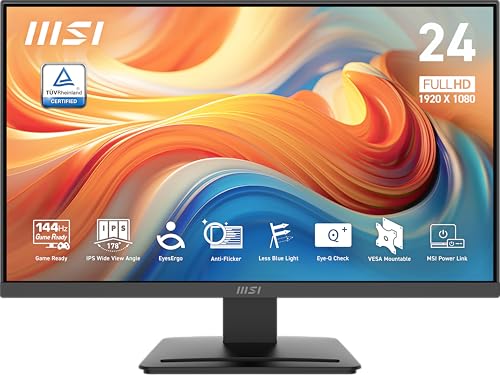
The best-documented cheap monitor here. It is a 23.8-inch IPS panel at 1080p and 144Hz, with 178 degree viewing angles both ways and a 1500:1 contrast ratio that msi publishes rather than hides, which is the real IPS trade stated plainly. The certification is the standout: TUV Rheinland verified flicker-free and low blue light, with msi explaining what that means by naming the roughly 200Hz flicker common on ordinary screens. An Eye-Q Check tool helps set the display up. It is described as a gaming office monitor, which is a fair summary of where it sits.
Pros:
- IPS with 178 degree viewing angles both ways
- TUV Rheinland certified flicker-free and low blue light
- Publishes its contrast ratio plainly at 1500:1
- 144Hz at 1080p; FreeSync and HDR ready
Cons:
- 1500:1 contrast; blacks are gray next to a VA panel
- No blur reduction mode mentioned
- 144Hz, where SANSUI gives 160 for similar money
Best for: an IPS panel with certification instead of adjectives.
SANSUI 24-Inch
The cheapest way past 144Hz, and 160Hz native beats an overclock to a similar figure. It is 1080p with FreeSync to keep the card and the panel in step, a 4000:1 contrast ratio that marks it out as a VA panel with genuinely deep blacks, 109% sRGB coverage and 300 nits. The game assistant tools are the sort of thing that used to cost extra: a crosshair overlay, plus RTS, FPS and racing presets. SANSUI is also refreshingly clear about what is missing, stating outright that there are no built-in speakers, and it puts an HDMI cable in the box.
Pros:
- 160Hz native, not an overclock, at a low price
- 4000:1 contrast; deep blacks from a VA panel
- FreeSync, crosshair overlay and genre presets
- States plainly that there are no speakers; HDMI cable included
Cons:
- VA can smear in dark scenes, which is where fast games hide people
- The 1ms figure is MPRT, a strobe, not panel speed
- No speakers
Best for: the highest native refresh here for the least money.
ASUS TUF 24-Inch
The one that fixes the problem the rest of this page has. Backlight strobing sharpens motion and normally cannot run alongside variable refresh, so you pick between clear motion and no tearing. ELMB Sync runs both at once, and on a page where every monitor advertises a strobe-derived 1ms, that is the meaningful difference. It is a 23.8-inch IPS panel at 1080p, 144Hz overclocked to 146Hz, which is a small and clearly labeled boost rather than a marketing figure. Shadow Boost lifts dark areas without blowing out the bright ones, and DisplayWidget Center handles settings by mouse.
Pros:
- ELMB Sync runs blur reduction and adaptive sync together
- IPS panel; the safer choice for competitive play
- Real about its overclock: 144Hz to 146Hz
- Shadow Boost brightens dark areas without over-exposing
Cons:
- 146Hz is below the 160 and 165Hz panels here
- Sells poorly against the cheaper monitors
- No contrast ratio or brightness published
Best for: competitive play, without choosing between blur and tearing.
SANSUI 27-Inch
Three inches more screen and a curve, at 160Hz native. The 1500R curvature is a gentler bend than Samsung’s and SANSUI explains what it is for: reducing distortion at the edges, which on a 27-inch panel close to your face is a real effect rather than a styling choice. Contrast is 4000:1 with 300 nits and 110% sRGB coverage. The game assistant is the most complete here, with a black level shadow booster to lift dark corners, a crosshair, a timer and a counter, plus preset modes. At 1080p across 27 inches the pixels are visible, which for fast games matters less than the frames.
Pros:
- 160Hz native across 27 inches
- 1500R curve genuinely reduces edge distortion
- The most complete game assistant here: shadow booster, crosshair, timer
- 4000:1 contrast and 110% sRGB
Cons:
- 1080p stretched over 27 inches; pixels are visible
- The 1ms figure is MPRT, a backlight strobe
- VA panel, with the dark-scene smearing that implies
Best for: a big curved screen at a high native refresh, cheaply.
LG UltraGear 24
An IPS panel with the UltraGear name and NVIDIA G-SYNC compatibility, which matters if you own a GeForce card and want variable refresh that is verified rather than assumed. HDR10 and up to 99% sRGB coverage give it good color, and 1ms MBR handles motion blur by strobing. Read the refresh rate carefully, because LG does state it plainly further down: 120Hz native, boosted to 144Hz by overclock. That makes it the slowest native panel here while carrying one of the higher prices, and it is at least plain enough to print both numbers.
Pros:
- IPS panel with NVIDIA G-SYNC compatibility
- HDR10 and up to 99% sRGB color coverage
- States both native and overclocked refresh rates
- An established gaming monitor line
Cons:
- 120Hz native; the slowest panel here, marketed at 144
- Costs more than 160Hz native monitors on this page
- 1ms MBR is a strobe, not a panel figure
Best for: a GeForce card and a name you know, if 120Hz native is enough.
Samsung Odyssey G55C
The best-selling monitor here by a wide margin and the only one that is not 1080p. QHD gives it 1.7 times the pixel density of everything else on this page, spread across 32 inches, which is where a bigger screen stops looking coarse and starts looking sharp. The 1000R curve is the tightest here, wrapping the picture around your field of view, and 165Hz with AMD FreeSync keeps card and panel in step. HDR10 adds range. Understand the trade: those extra pixels are frames your graphics card spends on looking good rather than reacting fast.
Pros:
- The best-selling monitor here by a distance
- The only QHD panel; 1.7 times the pixel density of the rest
- 165Hz with AMD FreeSync and HDR10
- 1000R curve across 32 inches; the most immersive here
Cons:
- Most expensive here, and QHD costs your card frames
- The 1ms figure is MPRT, like everything else
- Blur reduction and FreeSync are not stated to run together
Best for: a big sharp curved screen, if frames are not your only goal.
The verdict
Two rules before the picks. Every 1ms on this page is a backlight strobe figure, not a panel measurement, so it cannot rank anything. And a refresh rate with overclock beside it is not what the panel was built for.
Best overall: ASUS TUF 24-Inch. The only monitor here that resolves the trade the whole category dances around. Blur reduction normally cannot run with variable refresh, so you pick sharp motion or no tearing; ELMB Sync runs both together, and for fast-paced games that is the feature that matters. It is IPS, which is the safer panel for competitive play, and ASUS labels its overclock plainly at 144 to 146Hz rather than rounding up in the title.
Best value: Sceptre 22-Inch. The cheapest thing here and the second best-selling, giving you 1080p at up to 144Hz over HDMI and DisplayPort, with speakers built in so nothing else is needed. It is 22 inches and it publishes no panel type or sync technology. As the cheapest possible way to stop playing at 60Hz, it is hard to argue with.
Best premium: Samsung Odyssey G55C. The best seller on this page and the only QHD screen, at 32 inches with a 1000R curve and 165Hz with FreeSync. It is the one monitor here you would choose for how games look rather than only how they move, and those extra pixels are frames your card spends on the picture. That is a fair trade, and worth making deliberately.
FAQ
Why does every monitor claim 1ms?
Because they are all quoting MPRT, VRB or MBR, which are names for strobing the backlight off between frames to hide blur. The figure describing the panel is gray-to-gray, and nothing on this page publishes one. It is the industry convention rather than a trick, and it means the number cannot separate these monitors.
What is ELMB Sync and why does it matter?
Backlight strobing usually cannot run at the same time as variable refresh, so you normally choose between clear motion and no tearing. ASUS’s ELMB Sync runs both together. On the 24-inch TUF here it is ELMB Sync; ASUS’s plain ELMB is the older version without the sync half.
Is an overclocked 144Hz the same as native 144Hz?
Not quite. LG states 120Hz native with a 144Hz overclock, which makes it the slowest native panel here despite the marketing. ASUS labels 144Hz to 146Hz, a small clear boost. The SANSUI pair run 160Hz and Samsung 165Hz without qualifiers. Overclocks usually work; just know which number is the design.
Should I buy 1440p for fast games?
Only if you also care how they look. Samsung’s QHD panel has 1.7 times the pixels of the 1080p screens here, and every one is work your card does instead of pushing frames. For pure frame rate, 1080p at 160Hz beats QHD at 165Hz.
IPS or VA?
IPS for competitive play: wide angles, truer color, weaker contrast, which msi states plainly at 1500:1. VA for looks: the 4000:1 on both SANSUI panels means deep blacks, and VA can smear in dark scenes, which is exactly where fast games hide people.
This article may contain affiliate links; see our Affiliate Disclosure.