Four keyboards in this search claim a latency of 0.125 milliseconds. All four also claim an 8,000 Hz polling rate. Divide one second by 8,000 and you get 0.125 milliseconds exactly. It is not a second measurement. It is the first one written twice, and only one listing on the page has the clarity to put the words “theoretical value” next to it.




At a glance
| Product | Actually Hall effect? | Price tier | Link |
|---|---|---|---|
| AULA WIN68 HE | Yes. But its range and its step size disagree | Budget | |
| ATTACK SHARK X68 HE | Yes, and it labels its latency theoretical | Budget | |
| SteelSeries Apex 3 | No. Not magnetic, and not mechanical either | Budget | |
| AULA F75 Pro | No. Ordinary mechanical switches | Mid-range | |
| Womier SK75 | Yes, and wireless, and hot-swappable | Premium | |
| SteelSeries Apex Pro TKL Gen 3 | Yes. Rates itself in levels, not millimeters | Premium | |
| Corsair Vanguard PRO 96 | Yes. 150 million keypresses. Software pending | Premium | |
How to choose
Two of these are not Hall effect keyboards
The search says Hall effect. One board here ships pre-lubed Reaper switches on a hot-swappable base taking 3-pin and 5-pin mechanical switches, which is a very nice ordinary mechanical keyboard and not a magnetic one. Another rates itself for 20 million keypresses on whisper quiet gaming switches, which is neither magnetic nor mechanical. Both are decent products in the wrong search, and the giveaway is what they never say: no magnet, no adjustable actuation, no rapid trigger.
The whole point is that nothing touches
A Hall effect switch reads a magnet’s position with a sensor, so the key never closes a physical contact. One listing here puts it plainly: it actuates without physical contact, eliminating the wear associated with traditional mechanical switches. That is why the magnetic board on this page rates its switches for 150 million keypresses while the non-magnetic one rates its own at 20 million. It also means the board can tell how far down the key is at any moment, rather than just whether it is pressed, and every feature below comes from that.
Adjustable actuation and rapid trigger are the same fact twice
Because the board knows the depth, you can tell it where “pressed” begins: shallow for a hair trigger, deep to stop your resting fingers firing. That is adjustable actuation. Rapid trigger is the same information used differently, resetting the key the instant it starts moving back up instead of waiting for it to return past a fixed point. Both are the sensor reading a distance. Neither is possible on a switch that only reports open or closed.
Two numbers, and most listings mash them together
Every magnetic board quotes a range, roughly 0.1mm to 3.4mm, which is how shallow or deep you can put the trigger. Most also quote a step, 0.01mm or 0.02mm, which is the finest increment you can move it by. Those are different things, and one listing here mashes them into a single sentence that cannot be true: it claims an actuation range starting at 0.02mm while stating that each key adjusts in units of 0.1mm. If your smallest step is 0.1mm, you cannot set 0.02mm. Its own siblings get it right.
0.125ms is the polling rate wearing a hat
Four boards here advertise 8,000 Hz polling and a 0.125 millisecond latency as though they were two achievements. One second divided by 8,000 is 0.125 milliseconds, so the second figure is the first one restated: it is how often the board is asked, not how quickly it answers. Only one listing marks it as a theoretical value. And notice that one brand publishes 0.3 milliseconds for one 8,000 Hz board and 0.125 for another, which means at least one of those numbers came from somewhere else entirely.
Levels is a more accurate unit than millimeters
The premium board here does not quote a step size at all. It says 40 levels of adjustable actuation, which sounds less impressive than 0.01mm and tells you more, because it describes what the software will actually let you pick rather than how many decimal places it will print. A board claiming 0.01mm steps is claiming 340 distinct positions across its travel. Take the decimals as a display format, not a promise about the sensor.
Check the software before the switches
These boards are only as configurable as the thing configuring them. Three here use a browser-based driver with nothing to install, which is genuinely convenient, and all three say the same thing in the small print: Windows only, no Mac. One premium board’s listing ends with a note that its own software support is coming soon, which on a keyboard whose entire value is per-key tuning is worth knowing before you buy rather than after.
AULA WIN68 HE
The cheapest genuine magnetic board here, with 8,000 Hz polling, per-key actuation tuning, and separate press and reset sensitivity you can set in software to match how you type. 68 keys in a 60 percent layout with the arrows kept, south-facing LEDs, a detachable USB cable, and a web driver covering rapid trigger, SOCD, dual-key and toggle functions with nothing to install. Its actuation bullet does contradict itself, offering a range from 0.02mm while saying the smallest adjustable unit is 0.1mm, and it quotes 0.3ms latency where its siblings quote 0.125.
Pros:
- Real magnetic switches at the lowest price here
- Press and reset sensitivity set separately per key
- Web driver with RT, SOCD, DKS, MT and toggle
- 8,000 Hz polling; detachable cable; south-facing LEDs
Cons:
- Range starts at 0.02mm but steps are 0.1mm; both cannot hold
- Driver is Windows only, by its own note
- Quotes 0.3ms where the same brand quotes 0.125
Best for: trying magnetic switches for the least money.
ATTACK SHARK X68 HE
The one listing on this page that tells the truth about its own headline number: it quotes 0.125ms and then writes “theoretical value” beside it. Everything else lines up properly too, with a 0.1mm to 3.4mm actuation range and a separate 0.01mm rapid trigger accuracy, kept as two figures rather than blended into one. Dynamic keystroke binds four functions to one key by depth. It has an aluminum alloy plate, a top-mounted structure, double layer PORON, Cherry profile double-shot PBT, and it switches between Windows and Mac with a button.
Pros:
- The only listing here labeling its latency theoretical
- Range and step quoted correctly as separate figures
- Four functions per key by press depth
- Aluminum plate, top mount, PORON, PBT keycaps
Cons:
- 66 keys; a tight layout to adapt to
- Wired only, with no wireless option
- The wrist rest is fixed to a compact board
Best for: the accurate spec sheet, and a proper build under it.
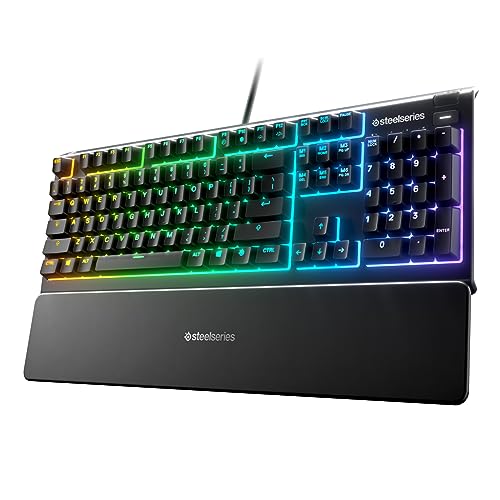
SteelSeries Apex 3
A pleasant, quiet, spill-resistant keyboard that has no business in a Hall effect search. It is IP32 water resistant, has ten-zone RGB, dedicated media controls, a magnetic wrist rest that genuinely supports your palm, and works with Windows, Mac, Xbox and PlayStation. Its switches are rated for 20 million keypresses, against the 150 million the magnetic board here claims, and that gap is the whole story: there is no magnet, no depth sensing, no adjustable actuation and no rapid trigger, because none of that is possible on this switch.
Pros:
- IP32 water resistant; survives a knocked-over drink
- Genuinely quiet; a good shared-room keyboard
- Magnetic wrist rest and dedicated media controls
- Works with Windows, Mac and both consoles
Cons:
- Not a Hall effect keyboard; not mechanical either
- 20 million keypresses against 150 million elsewhere
- No adjustable actuation and no rapid trigger
Best for: quiet full-size typing, not what this search asked for.
AULA F75 Pro
A lovely custom-style mechanical board, and an ordinary one. Pre-lubed Reaper switches on a hot-swappable base take 3-pin or 5-pin replacements, five layers of silicone filling kill the hollow sound, and the 75 percent layout keeps the arrows and adds a knob that switches between gaming and office modes on a long press. Tri-mode connection across Bluetooth, 2.4GHz and USB with a 4000mAh battery, and side-printed PBT. There is no magnet anywhere in it, and nothing on this page it competes with.
Pros:
- Hot-swappable; takes 3-pin or 5-pin mechanical switches
- Five layers of silicone damping; no hollow sound
- Bluetooth, 2.4GHz and USB, with a 4000mAh battery
- Multi-function knob; 75 percent layout keeps the arrows
Cons:
- Not a Hall effect keyboard at all
- No adjustable actuation or rapid trigger
- Costs the same as genuine magnetic boards here
Best for: custom mechanical typing, in a different search.
Womier SK75
The board that refuses to make you choose. It is magnetic and wireless and hot-swappable, which normally means picking two: 2.4GHz, Bluetooth and USB-C across three devices, an 8000mAh battery, a CNC aluminum body, and a socket taking both mechanical switches and most brands of magnetic switch. Actuation runs 0.1mm to 3.5mm at 0.01mm sensitivity, with SOCD, DKS, MT and RT in a web driver that, unusually here, works across Mac, Windows and Linux rather than Windows alone.
Pros:
- Magnetic, wireless and hot-swappable together
- Takes mechanical or magnetic switches in one socket
- Mac, Windows and Linux; not Windows-only
- CNC aluminum body; 8000mAh battery; PBT keycaps
Cons:
- Quotes 0.125ms, which is just its polling rate
- Aluminum and a big battery make it heavy
- Among the higher prices here
Best for: one board that does everything, on any operating system.
SteelSeries Apex Pro TKL Gen 3
The board that quotes a unit it can stand behind. 40 levels of adjustable actuation is a smaller-sounding claim than a hundredth of a millimeter and a more useful one, because it says what you can actually select. Protection Mode is the genuinely original idea here: press a key and the sensitivity of its neighbors drops, so a shallow trigger stops firing your ring finger by accident. That is a real answer to the real cost of a hair trigger. Rapid Trigger, Rapid Tap, game-ready presets, an OLED display and PBT keycaps in a TKL frame.
Pros:
- Quotes 40 levels rather than a decimal that flatters
- Protection Mode drops neighboring key sensitivity
- Rapid Trigger and Rapid Tap; game-ready presets
- OLED display; PBT keycaps; USB-C; TKL layout
Cons:
- High price for a tenkeyless board
- Presets mean leaning on the brand’s own software
- Its listing carries a typo in a headline bullet
Best for: a shallow trigger you can actually live with.
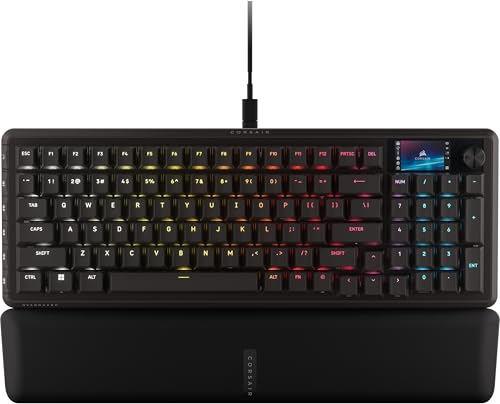
Corsair Vanguard PRO 96
The most keyboard here and the most caveated. A 96 percent layout squeezes arrows, a number pad, six programmable keys, a rotary dial and a 1.9 inch color screen into roughly a tenkeyless footprint. The magnetic switches are pre-lubed, support dual actuation, and are rated for 150 million keypresses, which is more than seven times the non-magnetic board on this page and is exactly the durability argument for magnets. Its listing then closes with a note saying its own software support is coming soon.
Pros:
- 150 million keypress rating; the contactless payoff
- 96 percent: number pad and arrows in a TKL footprint
- 1.9 inch color LCD, rotary dial, six programmable keys
- 8,000 Hz polling; dual actuation; rapid trigger
Cons:
- Its own listing says software support is coming soon
- The highest price on this page
- A screen and a dial are a lot to configure
Best for: everything in one frame, if you can wait for the software.
The verdict
Two of the ten results in a Hall effect search are not Hall effect boards, four quote their polling rate twice and call the second one latency, and one publishes a range and a step size that cannot both be true. The technology is real and the reason is simple: nothing touches, so the board knows how far down the key is.
Best overall: SteelSeries Apex Pro TKL Gen 3. It is the only board here that answers the actual problem with a shallow trigger, which is that a shallow trigger fires when you did not mean it to. Protection Mode drops the sensitivity of the keys around the one you are pressing, so your resting fingers stay quiet. It also quotes 40 levels instead of a flattering decimal, which is the one spec on this page that describes what you can really select.
Best value: ATTACK SHARK X68 HE. The only listing in the search that writes “theoretical value” next to its 0.125ms, and the difference in candour runs right through it: the actuation range and the rapid trigger accuracy stay as two separate figures instead of being blended into one impressive-looking number. Under that clarity is a real board, with an aluminum plate, a top mount, PORON damping, PBT caps and a Mac switch.
Best premium: Corsair Vanguard PRO 96. A number pad, arrows, six macro keys, a dial and a color screen inside a tenkeyless footprint, on magnetic switches rated for 150 million presses. That rating is the argument for the whole category in one number, against 20 million for the non-magnetic board here. Buy it knowing its listing says software support is still coming, which matters on a keyboard you buy to configure.
FAQ
What makes a keyboard Hall effect?
A sensor reads a magnet in the switch, so the key never closes a physical contact. That is why one board here rates its switches for 150 million presses against 20 million for a non-magnetic one, and why the board can tell how far down a key is rather than just whether it is pressed.
Is 0.125ms latency real?
It is the polling rate restated. One second divided by 8,000 Hz is exactly 0.125 milliseconds, so it describes how often the board is asked, not how fast it answers. Four listings here quote both figures as separate achievements; one adds “theoretical value”.
What is rapid trigger?
The key resets the moment it starts moving back up, instead of waiting to pass a fixed release point. It is the same depth reading that adjustable actuation uses, applied to the upstroke. Neither works on a switch that only reports open or closed.
Is 0.01mm adjustment better than 40 levels?
Not necessarily. 40 levels describes what the software lets you choose; 0.01mm describes how many decimals it prints. One board here claims a 0.02mm range floor and a 0.1mm minimum step in the same bullet, which cannot both be true.
Do these work on a Mac?
Often not. Three boards here use a browser-based driver with nothing to install, and all three say Windows only in the small print. Two on this page do support Mac, one switching with a button and one covering Mac, Windows and Linux.
This article may contain affiliate links; see our Affiliate Disclosure.