Halfway through the quarterly review, someone types “you’re breaking up” into the chat. The slides were ready, the numbers were right, and none of it landed because a laptop microphone was fighting a dishwasher two rooms away.
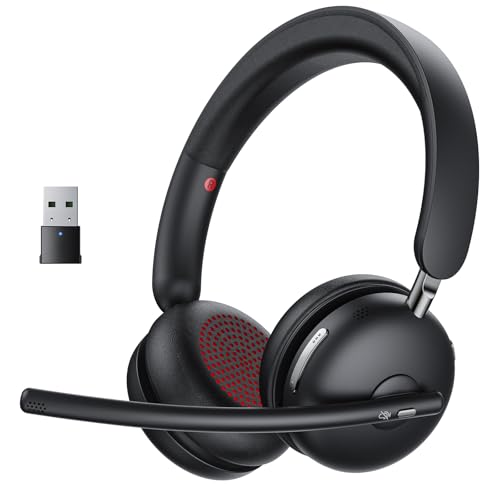


A conferencing headset earns its keep on the microphone side, not the music side. What separates a good one is a boom that sits near the mouth, noise handling that removes the room without swallowing your voice, and a mute button you can hit by feel. The five below cover wired and wireless, one ear and two, for anyone who spends real hours on calls: support staff, teachers, freelancers taking client meetings from a kitchen table.
| Product | Standout feature | Price tier | Link |
|---|---|---|---|
| Waxop Wireless Headset with Mic | Bluetooth and USB dongle, one-tap mute, 65-hour battery | Mid-range | |
| Plantronics EncorePro HW510 (Renewed) | Call-center build with wideband audio, quick-disconnect cable | Budget | |
| EPOS Sennheizer SC 60 USB ML | Double-sided fit, HD sound, bendable boom arm | Mid-range | |
| Poly Blackwire 3210 | USB-C or USB-A, Dynamic EQ, metal headband | Mid-range | |
| Plantronics Savi 8200 Series (Renewed) | DECT wireless, switches across three devices | Premium | |
How to choose a headset for calls
Wired, Bluetooth, or DECT
Wired USB headsets are the least dramatic option and that is the point. They draw power from the port, they never need pairing, and they cannot run flat during a call. Bluetooth models buy you the freedom to stand up and pace, though they add a charging habit and a pairing step. DECT is the third path: a dedicated radio system with its own base station, built for people who walk to the printer mid-call and want the audio to hold. Range and stability are the reason offices still buy DECT rather than defaulting to Bluetooth.
One ear or two
Monaural, or single-ear, keeps one ear on the room. That suits an open desk where a colleague might lean over, or a home office where a child could appear. Binaural, or double-sided, closes both ears and pulls you into the meeting, which helps in a noisy household but makes your own voice sound odd until you adjust. Neither is better in the abstract. Pick against the room you actually sit in.
The microphone is the whole job
Two different things get called noise canceling and they are worth separating. Mic-side noise canceling cleans up what other people hear from your end, which is what matters on calls. Speaker-side noise canceling quiets the world for you. A conferencing headset should prioritize the first. A boom arm that reaches toward the mouth beats any processing, because a close mic simply picks up less room to begin with. Look for a bendable or rotating boom you can position, rather than a stub mic near the earcup.
Controls you can find without looking
Mute is the control that matters. An inline pod or a dedicated button lets you kill the mic before you cough, without hunting for the meeting window. Software mute in the app works, but only when the right window has focus, which is exactly what fails at the wrong moment. Volume on the cord is a smaller convenience that adds up over a long day.
Comfort over an eight-hour stretch
Clamping force and weight decide whether a headset is still tolerable at four in the afternoon. Lightweight builds around 160 grams disappear on the head. Leatherette cushions seal better and get warmer; cloth breathes and seals less. An adjustable headband is not a luxury when more than one person shares the desk.
Platform compatibility
Most USB headsets are plug and play across Windows and Mac, and work with the common meeting platforms without drivers. The place to read carefully is call-answer buttons, which are often certified for one platform and merely functional elsewhere. Also check the connector: a USB-A plug and a laptop with only USB-C ports is a solvable problem, but easier to avoid at purchase.
The quick-disconnect detail worth knowing
Professional headsets often end in a quick-disconnect plug rather than a finished USB connector. The idea is sensible in an office: the headset separates from the cable, so you can walk away from a desk phone without unplugging anything, and a chewed cable gets replaced for a fraction of the headset’s cost. The catch for a home buyer is that a quick-disconnect headset needs a matching cable to reach a computer, and that cable is not always in the box. It is not a flaw, just a second purchase to plan for.
What you can safely ignore
Driver counts and frequency-response numbers sell headphones, not headsets. Voice occupies a narrow band and a 40mm driver will not make a colleague more intelligible. Ignore claimed noise-reduction percentages too; they come from manufacturer conditions nobody can reproduce, and a well-placed boom does more for clarity than any figure on a box. Spend your attention on mic position, mute placement, connector type and weight. Those four decide whether a headset gets worn or drawered.
Waxop Wireless Headset with Mic
This is the volume seller of the group, and the reason is easy to see: it hands you both wireless paths at once. Pair over Bluetooth 5.3 to a phone, or drop the USB dongle into the laptop and skip pairing entirely, then switch between them as the day moves from desk to sofa. The 270-degree boom swings down to the mouth and folds up out of the way, the one-tap mute sits under a thumb, and the quoted 65-hour battery means charging becomes a weekend chore rather than a daily anxiety. The listing claims AI noise canceling that removes up to 98% of background noise, which is a manufacturer figure rather than an independent measurement, but the close boom position is doing real work regardless.
- Pros: Bluetooth and USB dongle in one headset; one-tap hardware mute; long quoted battery life with fast charging; 270-degree adjustable boom; folds flat for a bag.
- Cons: A lesser-known brand than the office names; wireless still means remembering to charge it.
Best for: anyone splitting calls between a laptop and a phone who wants one headset to cover both.
Plantronics EncorePro HW510 (Renewed)
The EncorePro line was built for rooms where headsets get worn for eight hours and dropped on desks for years. It is a single-ear wired design with a noise-canceling mic and wideband audio, and it is sold here as a Renewed unit, which is how a professional-grade headset lands in the budget tier. Renewed means inspected and refurbished rather than new in a sealed box, so expect the cosmetics of a working tool. Note the quick-disconnect design: the headset ends in a QD plug and needs a matching cable or adapter for your computer, which is standard in call centers and a surprise to anyone expecting USB in the box.
- Pros: Built for all-day professional use; strong mic noise canceling; wideband audio for natural voice; padded earcup and headband; the cheapest way into a serious headset.
- Cons: Renewed rather than new; quick-disconnect cable is a separate consideration; single ear will not block a loud room.
Best for: high call volume on a tight budget, where durability beats packaging.
EPOS Sennheizer SC 60 USB ML
The double-sided one, and the pick for a household that does not go quiet just because a meeting started. Both ears covered means the room recedes and you stop straining to follow a soft talker on a bad connection. The neodymium drivers give it more musical range than a typical office headset, so it doubles as something you can leave on between calls. The boom arm is bendable and holds its shape rather than drifting, the inline pod covers answer, end, volume, mute and redial, and it connects over plain USB with no driver hunt. EPOS lists a two-year warranty, which is a fair signal of intent for a headset in this tier.
- Pros: Double-sided for focus in a noisy space; HD sound quality; bendable boom that stays put; full inline call controls; USB plug and play; two-year warranty.
- Cons: Closed on both ears, so you lose track of the room; wired only; USB-A connector.
Best for: concentrating through calls in a busy home or shared space.
Poly Blackwire 3210
The connector question, solved. The Blackwire 3210 terminates in USB-C and ships with a USB-A adapter, so it works with a modern thin laptop and an older desktop without an adapter drawer. Poly’s Dynamic EQ is the useful trick here: it tunes for voice while you are on a call and shifts to a fuller sound profile when you switch to music, rather than making you choose one tuning for both. The metal headband is a durability decision that also keeps the weight down, and the single-ear design leaves one ear on the room. Inline controls handle answer, end, mute and volume.
- Pros: USB-C plus USB-A adapter included; Dynamic EQ adapts between calls and music; lightweight metal headband; inline controls; certified for the major meeting platforms.
- Cons: Single ear only; no wireless option; sound is tuned for voice first.
Best for: a desk that mixes a USB-C laptop with older hardware, in an office where you need one ear free.
Plantronics Savi 8200 Series (Renewed)
A different class of product: a headset system with a base station, aimed at someone whose calls do not keep them in a chair. DECT gives it range and stability that Bluetooth does not attempt, and it bridges three devices, so a desk phone, a computer and a mobile all reach the same set of ears without re-pairing anything. Close conversation limiting is the feature that gets overlooked and matters in an open office: it reins in how far your side of the call carries. Active noise canceling handles the room on the listening side. This is a Renewed listing, which is the only reason an enterprise system appears at this price.
- Pros: DECT range and reliability; connects across three devices; close conversation limiting for privacy; active noise canceling; enterprise-grade wireless security.
- Cons: Premium tier even renewed; base station needs desk space and power; more system than a single-laptop setup needs.
Best for: heavy call days spent moving around, or a desk juggling a phone and a computer at once.
Verdict
Best Overall – Waxop Wireless Headset with Mic. It is the strongest seller of the group by a clear margin, and the specification explains why. Bluetooth and a USB dongle cover both ways people actually connect, the mute is physical, the boom reaches the mouth, and the battery is long enough to stop being a factor. For most people weighing up a conferencing headset, this is the one that asks the fewest compromises.
Best Value – Plantronics EncorePro HW510 (Renewed). A headset engineered for call-center punishment, in the budget tier because it is refurbished. If you take calls all day and care more about the mic and the build than the box, nothing else here competes on cost per hour worn. Budget for the quick-disconnect cable.
Best Premium – Plantronics Savi 8200 Series (Renewed). DECT wireless, three-device switching and conversation privacy make it the pick for the busiest call schedules. It is more infrastructure than a single laptop needs, and worth it precisely when a Bluetooth link would be the weak point in your day.
FAQ
Do I need a headset if my laptop already has a microphone?
A laptop mic sits an arm’s length from your mouth and points at the whole room, so it collects keyboard clatter and echo along with your voice. A boom mic sits centimeters away and picks up far less of everything else. It is the single cheapest upgrade to how you sound on calls.
Is a single-ear or double-sided headset better for meetings?
It depends on the room rather than the headset. Single-ear leaves you aware of colleagues, deliveries and family; double-sided blocks the room and helps you concentrate when it is loud. People sharing an office often prefer one ear; people working from a busy home often prefer two.
What does “Renewed” mean on these listings?
Renewed products are pre-owned units that have been inspected, tested and refurbished to work like new, then sold at a lower price. They may show light cosmetic wear and typically come with a return promise rather than the original retail warranty. It is a common way to get professional-grade hardware for less.
Will these work with Teams, Zoom and Google Meet?
The USB and Bluetooth models here work as standard audio devices, so any meeting platform will see them. The finer point is button certification: a headset may be certified for one platform, meaning answer and end buttons trigger calls correctly there, while elsewhere the buttons may do less even though audio is fine.
Does mic noise canceling remove sound for me or for the other person?
Mic-side noise canceling cleans up what the other person hears. Speaker-side noise canceling quiets the room for you. Product listings often blur the two, so check which one a claim refers to. For calls, the mic side is what protects the meeting.
This article may contain affiliate links; see our Affiliate Disclosure.