Look down at your desk and count what the monitor’s factory stand is eating: a wedge of prime real estate right where your notebook, coffee, or keyboard tray wants to be. A monitor arm lifts the screen onto a single slim post, hands that space back, and, almost as a bonus, floats the display to the exact height your neck has been quietly begging for.


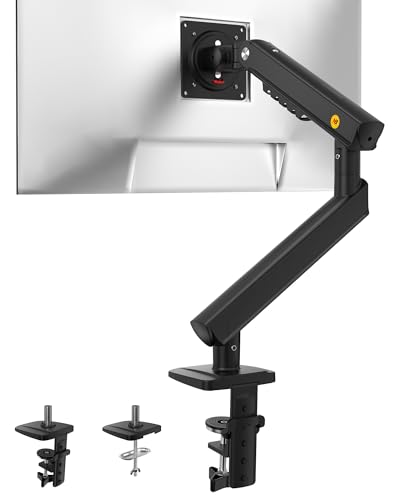

A great arm holds your screen rock-steady, moves with one finger when you want it to, and clamps to your desk without a wobble. The best pick depends less on brand and more on fit: your monitor’s weight, its VESA pattern, and how your desk is built. The five below cover a solo screen on a budget, a premium single arm you set and forget, and a dual mount for two-monitor workflows, so a coder, a student, and someone who lives on video calls all find something here. Beyond the space it saves, an arm quietly fixes ergonomics too: raising the top of the screen to eye level is one of the simplest ways to stop the slow neck ache that builds over a long day hunched toward a low display.
At a glance
| Product | Standout feature | Price tier | Link |
|---|---|---|---|
| Amazon Basics Single Monitor Arm | Simple, steady, fits 13-30 in screens | Budget | |
| ErGear Single Monitor Arm | Tool-free VESA, fits up to 34 in | Budget | |
| HUANUO FlowLift Pro | MechaSpring, tension window, ACA-endorsed | Premium | |
| NB SmooVex Monitor Mount | Mechanical spring, slim wall-friendly build | Mid-range | |
| MOUNTUP Dual Monitor Stand | Two screens, independent positioning | Mid-range | |
How to choose a monitor arm
An arm is one of the few upgrades that improves posture and desk space at the same time. Getting the right one comes down to a short checklist that is worth walking before you buy, because a mismatch on any single point can mean a screen that sags, wobbles, or will not mount at all.
VESA pattern, screen size, and weight
Three numbers decide compatibility. VESA is the square hole pattern on the back of the monitor, almost always 75 by 75 mm or 100 by 100 mm on desktop screens; every arm here supports both. Then check your monitor’s diagonal size and its weight, because arms list a range for each. Most of these hold up to around 19.8 pounds and screens into the low 30-inch range, which covers the vast majority of displays, but ultrawides and heavier panels can exceed the limit and cause droop. If a monitor has no VESA holes, you need a separate adapter bracket.
Spring type: gas, mechanical, or tension
The mechanism is what makes an arm feel premium or fiddly. A gas spring glides smoothly and repositions with one finger, though very cheap ones can lose pressure and start sagging over the years. A newer mechanical spring, used by the HUANUO and NB picks, avoids gas entirely, so it resists that slow droop and tends to hold its set position longer. A basic tension arm, like the budget models, uses a hex-key screw you tighten to your monitor’s weight; it is reliable and cheap, just less effortless to nudge around all day.
Range of motion
Height is the adjustment that saves your neck, so look at how far the arm lifts the screen above the desk. Reach, or extension, decides whether you can pull the display close for detail work or push it back for a movie. Tilt and swivel let you angle the panel to kill glare, and full 360-degree rotation flips it into portrait for reading long documents or code. More motion is generally better, but even the simplest arm here covers the essentials.
Mounting: clamp, grommet, and your desk
Every model offers two ways to attach. A C-clamp grips the back edge of the desk and installs in minutes with no permanent marks, ideal for renters and most setups. A grommet mount bolts through a hole in the desktop for a more solid anchor. Two cautions matter: check that your desk’s thickness falls inside the clamp’s range, and make sure the underside of the desk is a solid wood panel, not a hollow shell or a spot blocked by a crossbeam, or the clamp has nothing firm to bite.
Single versus dual, and cable management
If you run one screen, a single arm reclaims the most desk for the least money. Two screens call for a dual mount, which balances both displays on one base and lets you position each independently. Either way, look for channels or clips that route cables along the arm; a clean arm with wires tucked away is what actually makes the desk look, and feel, twice as big.
Stability and build
An arm is only as good as its steadiness. A screen that bounces every time you type, or drifts down an hour after you set it, undoes the whole point. Steel construction, a snug VESA head with little play, and a firm base all fight wobble, and most quality arms are cycle-tested through tens of thousands of movements so the joints stay tight over years of daily use. The practical tip is to match the tension carefully to your monitor’s weight during setup; too loose and it sags, too tight and it will not glide, and getting that balance right is what separates an arm that feels premium from one that annoys you.
Amazon Basics Single Monitor Arm
The default choice for a reason, this steel single arm does the core job without drama or a big outlay. It fits screens from 13 to 30 inches up to 22 pounds, offers 360-degree rotation for portrait mode, tilts across a wide range, and adjusts height along its post. A detachable VESA plate and included hardware make setup quick, and a simple cable-management channel keeps cords off the desk. It is not the fanciest to reposition, but for a fixed, tidy setup it is hard to beat on value.
Pros:
- Strong value from a widely trusted line
- Holds heavier screens up to 22 pounds
- Full tilt, swivel, and 360-degree rotation
- Detachable VESA plate and cable management included
Cons:
- Tension arm is less effortless than a spring
- Tops out at 30-inch screens
Best for: a dependable, low-cost single arm for a set-and-forget desk.
ErGear Single Monitor Arm
ErGear stretches the budget category to fit screens up to 34 inches, which brings ultrawides and larger panels into play at a low price. A tool-free VESA plate lets you snap the monitor on without wrestling screws one-handed, and tool-free cable clips make tidying wires fast. It delivers generous height and reach adjustment plus the full tilt, swivel, and rotation set, and mounts by clamp or grommet. For anyone wanting big-screen compatibility and easy setup without paying up, it is a standout.
Pros:
- Fits large and ultrawide screens up to 34 inches
- Tool-free VESA mounting and cable clips
- Wide height and reach range
- Clamp or grommet install
Cons:
- Weight limit still suits mainstream, not the heaviest, panels
- Single-monitor only
Best for: a large or ultrawide screen on a tight budget.
HUANUO FlowLift Pro
The FlowLift Pro is the pick for someone who wants a premium feel without a premium price. Its MechaSpring mechanism skips gas, so it resists the slow sag that afflicts cheaper arms, and a clever tension window with a moving indicator shows you exactly when the balance matches your monitor’s weight, ending the usual guesswork. A snap-in VESA plate makes mounting genuinely quick, and the design carries an ergonomics endorsement plus a safety certification. It holds firm for focused work yet moves smoothly when you want to reposition.
Pros:
- Gas-free MechaSpring resists sagging over time
- Tension window removes setup guesswork
- Tool-free snap-in VESA plate
- Ergonomics endorsement and safety certification
Cons:
- Tops out at 32-inch screens
- Feature set is more than a simple setup needs
Best for: a refined single arm you adjust often and trust to hold.
NB SmooVex Monitor Mount
NB is a long-standing name in mounts, and the SmooVex leans on a precision mechanical spring that avoids gas loss and the sag that comes with it. Its slim profile is the quiet highlight: a thinner build helps the arm reach screens up to 32 inches without the joint bumping into a wall behind the desk, a common frustration with bulkier arms in tight corners. Smooth 360-degree rotation, a wide tilt range, and a long height-travel span let you place the screen precisely, and it installs solo by clamp or grommet.
Pros:
- Mechanical spring avoids gas loss and droop
- Slim build clears walls in tight setups
- Long height travel and smooth rotation
- Simple solo install
Cons:
- Single-screen design only
- Fewer bundled extras than some rivals
Best for: a desk pushed against a wall where arm clearance is tight.
MOUNTUP Dual Monitor Stand
Two screens usually mean two bulky stands hogging the desk; this dual mount collapses them onto a single base. It carries two monitors from 17 to 32 inches, each on its own arm so you can angle, raise, and rotate them independently rather than in lockstep. Pneumatic arms give smooth movement, cable management hides the extra wires that a two-screen setup creates, and it installs with a clamp or grommet. Balancing two panels takes a little tuning, but the payoff is a clean, flexible workspace for anyone juggling documents, code, or a call and a browser side by side.
Pros:
- Holds two screens on one base
- Independent tilt, swivel, and rotation per monitor
- Cable management for the extra wires
- Clamp or grommet mounting
Cons:
- Two panels need careful tension balancing
- Takes more desk-edge space than a single arm
Best for: two-monitor workflows that need each screen positioned separately.
The verdict
Best Overall: the Amazon Basics Single Monitor Arm is the safe, popular pick. It handles heavier screens than most budget rivals, covers all the core adjustments, and costs little, which is exactly why so many desks already have one.
Best Value: the ErGear Single stretches a budget price to fit screens up to 34 inches and adds tool-free mounting, giving big-screen owners premium convenience for less.
Best Premium: the HUANUO FlowLift Pro earns it with a gas-free MechaSpring that resists sag, a genuinely useful tension window, and quick snap-in mounting, making it the one to buy if you reposition your screen all day and want it to hold for years.
If two screens are the goal, the MOUNTUP Dual is the clear answer, and if your desk sits against a wall, the NB SmooVex’s slim build is the detail that keeps the arm from bumping the wall behind it. Whichever you choose, confirm the VESA pattern and weight first, since fit, not features, is what decides whether the arm works the moment it is on your desk.
Frequently asked questions
How do I know if my monitor will fit a VESA arm? Check the back of the screen for four threaded holes in a square. If they measure 75 by 75 mm or 100 by 100 mm, any arm here fits. Also confirm your monitor’s weight falls within the arm’s limit, usually around 19.8 pounds, and note the screen size range each model supports.
Will a monitor arm damage or hold on my desk? A C-clamp grips the desk edge without drilling and leaves no marks, so it is renter-friendly. The key is that the desk is solid where the clamp sits, ideally wood, with the underside clear of a crossbeam. For extra security, or on thin or glass tops, use the grommet mount through a bolt hole instead.
Is a gas spring or a mechanical spring better? Both let you reposition easily. A gas spring is smooth and common, but the cheapest ones can lose pressure and sag over the years. A mechanical spring avoids gas altogether, so it tends to hold its position longer. If you set the screen once and rarely move it, a simple tension arm is fine too.
How much desk space does an arm actually free up? A factory stand occupies a broad footprint under the screen; an arm replaces it with one slim clamp at the desk’s back edge. That opens the whole area beneath the monitor for a keyboard, notebook, or laptop, and lets you push the screen back to gain depth as well.
Can one arm hold an ultrawide monitor? Some can, if the ultrawide stays within the arm’s weight and size limits; the ErGear here reaches 34 inches, for example. Very large or heavy ultrawides may exceed a single arm’s rating and sag, so check the exact weight and, for the biggest panels, look for an arm rated specifically for heavy or ultrawide screens.
This article may contain affiliate links; see our Affiliate Disclosure.