A monitor sitting on its factory stand is almost always too low — which is why the end of a desk day lives in your neck and shoulders. A monitor arm floats the screen at true eye level, frees the footprint the stand was hogging, and swings out of the way when the desk needs to be a desk.


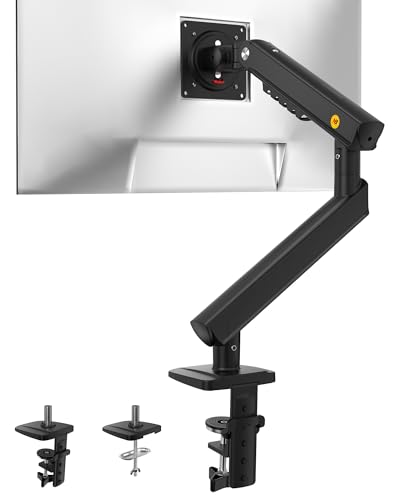


Monitor arms split by their lifting mechanism — fixed-height posts, gas springs, and the newer mechanical springs — and by how much screen they can carry. The group below runs from a bare-bones post that costs less than a pizza night to spring arms that float a 34-inch ultrawide with one finger, including two dual-arm options for anyone whose desk really runs two screens.
| Arm | Standout features | Price | Link |
|---|---|---|---|
| Amazon Basics Single | 13–30" screens to 22 lb, 360° rotation, proven basic post design | Budget | |
| WALI Single | Up to 34" and 26.4 lb, 19.3" extension, wide VESA head | Budget | |
| HUANUO FlowLift | Gas spring, automotive-grade core, 3-minute install | Budget | |
| ErGear Single | 13–34" screens, tool-free VESA, 17.5" lift, tool-free cable clips | Budget | |
| ErGear Dual | Two independent arms, tool-free VESA, tighter 50%-smaller-gap head | Mid-range | |
| HUANUO FlowLift Pro | Mechanical spring, visible tension window, snap-in VESA | Mid-range | |
| NB SmooVex A5 | Mechanical spring, slim anti-wall-block build, 230mm height travel | Mid-range | |
| MOUNTUP Single | 20,000-cycle tested tension arm, 19.6" extension, snap-on cable covers | Budget | |
| MOUNTUP Dual | Two pneumatic arms, 17–32" screens, in-arm cable concealment | Mid-range | |
| Acer Gas Spring | 17–34" screens, 20,000 motion tests, 18.1" max lift | Mid-range | |
How to choose a monitor arm
Four checks decide whether an arm delights or disappoints: compatibility with your exact screen, the lifting mechanism, reach, and how it clamps to your desk.
Check three numbers before anything else
Your monitor’s diagonal size, its weight (stand removed), and its VESA pattern — the four screw holes on the back, almost always 75×75mm or 100×100mm. Every arm here takes both VESA patterns; weight limits run from 19.8 to 26.4 pounds. A too-heavy screen sags no matter how you crank the tension; a too-light one drifts upward. Curved ultrawides usually pass on weight but check the maker’s size ceiling — several arms here explicitly support 34-inch curved panels.
Post, gas spring, or mechanical spring
Fixed-post arms like the Amazon Basics set height by moving a joint along a pole — solid and cheap, but adjusting means loosening and retightening. Gas-spring arms (HUANUO FlowLift, Acer, MOUNTUP’s pneumatic dual) counterbalance the screen so it floats: grab, move, release, done. The newest wave is mechanical springs — the FlowLift Pro and NB SmooVex — which replace the gas cartridge with a steel spring that cannot leak pressure over the years, trading a little smoothness for long-term consistency. If you reposition your screen daily, a spring of either kind is worth it; if you set height once and never touch it, the post saves real money.
Reach, lift, and portrait mode
Extension is what lets you pull the screen close for detail work and push it away to read a document. The full-motion arms here reach 18 to 20 inches and lift 16 to 18 inches above the desk. All rotate 360 degrees for portrait orientation — handy for code, documents, and long feeds — and tilt ranges up to -60/+90 degrees cover everything from a standing-desk downangle to a near-flat drafting view.
Clamp, grommet, and desk health
Every arm here includes both a C-clamp, which grips the desk edge, and a grommet mount, which bolts through a cable hole. Clamps fit desk tops roughly 0.4 to 3.9 inches thick depending on model — measure yours, especially on thin IKEA-style tops, and put a scrap of plywood between clamp and particleboard if the desk is fragile. Grommet mounting holds harder and suits standing desks that get shoved around.
Cable management and the second screen
Routing power and video through the arm’s clips or channels is the difference between a floating screen and a floating screen with a cable beard. Snap-on covers (MOUNTUP) and tool-free clips (ErGear) make re-routing painless when you swap machines. And if your workload genuinely spans two screens, the dual versions from ErGear and MOUNTUP in this lineup cost far less than buying two singles.
Amazon Basics Single Monitor Arm
The best seller in this group is the simple one: a steel post-and-arm design that holds 13-to-30-inch screens up to 22 pounds, adjusts from 7.9 to 14.2 inches of height, tilts from -15 to +85 degrees, and spins to portrait. No springs to tune or wear out — you set your ergonomic position with the included tools and it stays put through anything. Cable management and a detachable VESA plate round it out.
Pros:
- Nothing to leak, drift, or lose tension — ever
- Detachable VESA plate simplifies solo installation
- Strong 22-pound capacity for the price
- One-year warranty behind the lowest cost here
Cons:
- Height changes require loosening a joint, not a one-hand float
- Shorter maximum height than the spring arms
Best for: set-once-and-forget setups where price beats effortless adjustment.
WALI Single Monitor Arm
WALI’s arm carries the biggest load rating in the lineup — 26.4 pounds, screens to 34 inches flat or curved — while extending 19.3 inches and lifting 17.3 above the desk. A wider VESA head and tight-fitting panel address the wobble that plagues cheap arms with heavy screens. Clamp and grommet bases are both included, fitting tops from 0.39 to 2.76 inches.
Pros:
- Highest weight capacity here — happily carries heavy ultrawides
- Long 19.3-inch extension for push-back-and-read workflows
- Wider VESA head visibly reduces screen wobble
- Budget price for 34-inch support
Cons:
- Newer listing with a shorter public track record
- Bulkier head than the minimalist designs
Best for: big or heavy screens — 32s and 34s — on a small budget.
HUANUO FlowLift Gas Spring Arm
HUANUO’s standard FlowLift is the affordable way into true float-anywhere adjustment: an automotive-grade gas spring the maker rates as 80% sturdier than typical arms, holding 13-to-32-inch screens between 4.4 and 19.8 pounds at any angle without slow droop. The one-piece design assembles in about three minutes, and both clamp and grommet mounts ship in the box.
Pros:
- Genuine gas-spring float at a fixed-arm price
- Holds position at any angle without creep
- Fastest assembly in the group
- Fits 75mm and 100mm VESA patterns
Cons:
- 4.4-pound minimum weight — very light screens may ride up
- Tension adjustment is by feel, not the Pro’s visible window
Best for: the first gas-spring arm — daily repositioners on a budget.
ErGear Single Monitor Arm
ErGear’s single arm modernizes the install: the VESA plate snaps on tool-free, so you never balance a screen with one hand and an Allen key with the other. It spans 13-to-34-inch screens to 19.8 pounds, lifts 17.5 inches, reaches 18.1, and its 40%-wider VESA head tightens up the wobble. The cable clips open without tools when you inevitably re-route.
Pros:
- Tool-free VESA mounting makes solo setup genuinely easy
- 34-inch and ultrawide support at a budget price
- Wider head design keeps heavy screens steady
- Tool-free cable clips simplify re-cabling
Cons:
- 19.8-pound ceiling trails the WALI’s 26.4
- Newer product line, shorter track record
Best for: anyone installing alone who wants modern conveniences cheap.
ErGear Dual Monitor Arm
The same tool-free ErGear formula, doubled: two independent full-motion arms for 13-to-32-inch screens up to 19.8 pounds each, with a VESA head gap 50% smaller for a tighter fit. Each screen positions on its own — one portrait for documents, one landscape for everything else — and the shared base costs a fraction of two separate mounts and half the desk clamping.
Pros:
- Independent positioning for both screens
- Tool-free VESA plates, twice as valuable with two monitors
- One base and clamp instead of two
- Tidy in-clip cable routing for both screens
Cons:
- 32-inch per-screen ceiling, a notch under the single’s 34
- Two loaded arms demand a sturdy desk edge
Best for: two-screen workstations that want float adjustment without double cost.
HUANUO FlowLift Pro
The Pro swaps the gas cartridge for HUANUO’s MechaSpring — a mechanical spring the maker rates for twice the service life, since there is no pressurized gas to slowly escape. A tension window makes setup visible instead of guesswork, the LockSteady joints resist droop while still moving with one hand, and the snap-in VESA plate mounts in seconds. The design carries an American Chiropractic Association endorsement for its ergonomic intent.
Pros:
- Mechanical spring cannot lose pressure with age
- Visible tension window ends trial-and-error adjustment
- One-hand movement with firm hold at rest
- Snap-in VESA plate for the easiest mounting here
Cons:
- Three compatibility conditions to verify before buying
- Costs more than the standard FlowLift
Best for: buyers planning to keep one arm for many years without maintenance.
NB SmooVex A5
NB’s A5 makes the same no-gas argument with a slim twist: its narrow build sits closer to the wall than bulkier arms, solving the common problem of an arm that will not fold flat behind the screen. The precision mechanical spring drives 230mm of height travel, tilt from -25 to 90 degrees, and full 360-degree rotation for screens up to 32 inches, and installation is a three-step solo job on clamp or grommet.
Pros:
- Slim profile folds flatter against walls than most arms
- Mechanical spring avoids long-term gas sag
- Wide tilt range suits standing-desk angles
- Simple three-step solo installation
Cons:
- 32-inch ceiling excludes 34-inch ultrawides
- Less brand familiarity in Western markets
Best for: desks pushed against a wall where fold-flat depth matters.
MOUNTUP Single Monitor Mount
MOUNTUP’s single arm leads with proof: its tension system passes 20,000 movement cycles before leaving the factory. The ranges are generous — 19.6 inches of extension, 16.5 of lift, tilt from -45 to +90, and the usual portrait spin — for 17-to-32-inch screens. Snap-on covers hide HDMI and power inside the arm, and heavy steel keeps the whole thing planted.
Pros:
- Factory 20,000-cycle tension testing
- Longest extension in the group at 19.6 inches
- Snap-on covers fully conceal cabling
- Aggressive tilt range for unusual viewing angles
Cons:
- 17-inch minimum screen size excludes small portables
- Grommet mounting recommended for maximum stability
Best for: heavy daily adjusters who want tested durability with hidden cables.
MOUNTUP Dual Monitor Stand
MOUNTUP’s dual pairs two pneumatic gas arms on one base for 17-to-32-inch screens from 4.4 to 17.6 pounds each. Both arms float independently through 17.3 inches of lift, wires disappear inside the arms, and the quality testing carries over from the single. For a two-screen setup it delivers the floating-glass feel at a price that undercuts premium single arms.
Pros:
- True gas-spring float on both screens
- In-arm cable concealment keeps a two-screen desk clean
- Independent positioning for mixed portrait/landscape work
- Strong value against buying two spring singles
Cons:
- 17.6-pound per-arm limit — check heavier 32s
- Needs a solid desk; two floating screens amplify wobble
Best for: dual-screen users upgrading both monitors to float at once.
Acer Gas Spring Monitor Arm
Acer’s entry brings a monitor maker’s name to the arm market: automotive-grade pneumatic cores, 20,000 motion-test cycles, and an 80% sturdiness claim over typical arms. It carries 17-to-34-inch screens up to 19.8 pounds, lifts 18.1 inches, and tilts through a huge -60 to +90 range. The one-piece design installs in about five minutes on desks from 15 to 80mm thick.
Pros:
- 34-inch support from an established display brand
- Widest tilt range in the lineup
- Tested pneumatic cores with high lift ceiling
- Fits unusually thick desks (to 3.15 inches)
Cons:
- Costs more than functionally similar budget arms
- Brand premium buys assurance more than extra specs
Best for: big-screen owners who want a recognizable brand behind the spring.
Verdict
Best Overall: Amazon Basics Single Monitor Arm. The most-bought arm here for a reason: steel construction, full rotation and tilt, 22-pound capacity, and nothing that can wear out — at a price that makes ergonomic correction an impulse buy.
Best Value: HUANUO FlowLift. True gas-spring floating adjustment for barely more than a fixed post. If you move your screen more than once a week, this is where the money goes.
Best Premium: HUANUO FlowLift Pro. The mechanical spring, visible tension window, and snap-in plate make it the arm to buy once and forget for a decade.
FAQ
How do I know if my monitor is VESA compatible?
Look at the back for four screw holes in a square — 75×75mm or 100×100mm covers nearly every desktop monitor. Every arm in this guide includes both patterns. Some thin or design-focused monitors hide the holes behind a panel or lack them entirely; those need a maker-specific adapter.
What height should the screen actually sit at?
Top edge of the screen at or slightly below eye level, roughly an arm’s length away. That keeps your neck neutral instead of craned down at a stand-height screen — the posture these arms exist to fix.
Will a C-clamp damage my desk?
On solid wood or metal, no. On particleboard and hollow-core tops, concentrated clamp pressure can dent or crush — spread the load with a reinforcement plate or scrap plywood above and below, or use the grommet mount through a cable hole instead.
Why does my new arm sink or drift upward?
Spring tension is set for a heavier or lighter screen than yours. Every spring arm here has an adjustment bolt — tighten if the screen sinks, loosen if it rises. The FlowLift Pro’s tension window shows the setting directly, which is exactly why it exists.
Single arm or dual arm for two screens?
A dual mount is cheaper than two singles, clamps once, and keeps spacing consistent. Two separate singles make sense only when the screens sit far apart or on different desk edges.
This article may contain affiliate links; see our Affiliate Disclosure.