A smart speaker answers questions. A smart display shows you the answer, then puts your calendar, your front door camera, your recipe, and your morning weather on a screen you can glance at from across the room. Once one lands on a kitchen counter or a nightstand, it quietly becomes the busiest gadget in the house, which is exactly why picking the right screen and the right voice assistant matters.


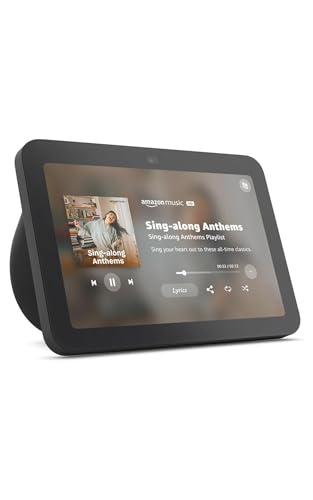


The choice really comes down to two things: how big a screen you want, and whether your home runs on Alexa or Google Assistant. Screen size decides whether the display is a glanceable clock and controller or a genuine little TV. The assistant decides which apps, cameras, and smart devices play nicely with it. The five proven sellers below span both camps and every size, from a compact nightstand screen to a dedicated smart-home control panel.
At a glance
| Display | Standout feature | Price tier | Link |
|---|---|---|---|
| Echo Show 5 | Compact 5.5-inch Alexa screen, improved bass | Budget | |
| Echo Hub | 8-inch wall panel to run your whole smart home | Mid-range | |
| Echo Show 8 | 8-inch HD, spatial audio, 13 MP camera | Mid-range | |
| Google Nest Hub (2nd Gen) | 7-inch Google Assistant screen, tidy design | Premium | |
| Google Nest Hub (1st Gen) | 7-inch Google display, YouTube and Spotify | Premium | |
How to choose a smart display
Alexa or Google Assistant
This is the first and biggest decision, because it shapes everything else. Alexa, which runs the Echo devices, has the widest range of compatible smart-home gadgets and a huge library of voice skills, and it leans into shopping, lists, and routines. Google Assistant, on the Nest Hub, tends to answer general questions more conversationally and ties neatly into Google Photos, Calendar, Maps, and YouTube. If your phone and accounts already live in one ecosystem, matching the display to it saves friction. If you are undecided, Alexa’s broader device support makes it the safer default for a smart-home-heavy setup.
Screen size
A 5-to-6-inch screen is perfect on a nightstand or a small counter: big enough to read the time, the weather, and a video call, small enough to disappear. A 7-to-8-inch screen crosses into everyday-media territory, comfortable for following a recipe, watching a show while you cook, or seeing a doorbell feed clearly. Bigger screens also tend to carry better speakers, so they double as a more satisfying music player.
Sound quality
If the display will also be your music or podcast speaker, sound matters. The compact models here deliver clearer vocals and more bass than you might expect for their size, while the larger Echo Show 8 adds spatial audio for a fuller, room-filling sound. For a bedroom or bathroom, compact is plenty. For a kitchen or living space where music plays for hours, the bigger speaker earns its place.
Camera and video calling
A built-in camera lets you make hands-free video calls and check in on home cameras. Larger displays add higher-resolution, auto-framing cameras that keep you centered as you move, which makes calls feel far more natural. If you value privacy, note that these devices include a physical shutter or a mic and camera off switch. The Echo Hub is the outlier: it deliberately omits a camera because it is built to control your home, not to make calls.
Smart-home control
Every display here can dim lights, adjust a thermostat, or pull up a camera by voice or tap. If running the home is the main goal, the Echo Hub goes further: it is a wall-mountable control panel with a built-in hub that speaks Zigbee, Matter, Thread, and more, so it syncs directly with locks, sensors, and thermostats without extra bridges. The Echo Show models with a built-in hub can do much of this too, while doubling as a screen for everything else.
New or certified refurbished
Buying a certified refurbished unit, sometimes labeled like-new or renewed, is a smart way to get a bigger display for less. These are tested to look and work like new and carry the same limited warranty as a new device, so the main trade-off is generic packaging rather than performance. It is a genuine way to move up a size on a tighter budget.
Placement and setup
Where the display lives shapes which one fits. A nightstand or a bathroom shelf calls for a compact screen with a gentle clock face and a soft night mode. A kitchen counter benefits from a larger screen you can read across the room and speakers strong enough to carry over a running tap. An entryway or hallway is where a wall-mounted control panel makes the most sense. Setup on any of them is quick: connect to Wi-Fi, sign into the matching account, and step through a short on-screen guide. If you want to hide cables on a wall-mounted unit, plan for an outlet nearby or the optional pass-through and power accessories.
Amazon Echo Show 5
The Echo Show 5 is the runaway best seller here, and it is the easiest smart display to recommend to almost anyone. Its 5.5-inch screen is ideal on a nightstand, showing the time, weather, and a photo slideshow at a glance, then handling alarms, timers, video calls, and quick smart-home taps without taking over the room. This version brings noticeably deeper bass and clearer vocals, so it holds its own as a bedside music player. Add a built-in camera with a physical shutter and Alexa’s enormous device support, and it becomes the affordable heart of a connected home.
Pros
- Compact 5.5-inch screen suits nightstands and small counters
- Improved bass and clearer vocals for its size
- Built-in camera with a physical privacy shutter
- Lowest price and the widest Alexa device support
Cons
- Small screen is tight for watching shows
- Single modest speaker rather than room-filling sound
Best for: a bedside or small-counter display that covers the essentials at the lowest price.
Amazon Echo Hub
The Echo Hub is a different animal: an 8-inch, wall-mountable control panel built to be the command center for a smart home. Instead of a media screen, you get a customizable dashboard of controls and widgets, so lights, plugs, camera feeds, thermostats, and routines are all one tap away. A built-in hub supports Wi-Fi, Bluetooth, Zigbee, Matter, Thread, and Sidewalk, letting it talk to thousands of devices directly, and it can even arm or disarm a compatible security system. Mount it by the door and it turns a scattered app-based setup into a single tidy panel.
Pros
- Purpose-built dashboard for controlling the whole home
- Built-in hub for Zigbee, Matter, Thread, and more
- Wall-mountable for a clean, fixed control point
- Can arm and disarm a compatible security system
Cons
- No camera, so no video calling
- Overkill if you only own a few smart devices
Best for: a device-heavy smart home that wants one wall panel to run everything.
Amazon Echo Show 8
The Echo Show 8 is the step up for a kitchen or living space, and buying it certified refurbished makes that jump easier on the wallet. The 8-inch HD touchscreen is genuinely comfortable for streaming, following recipes, and video calls, and spatial audio gives it room-filling sound that the smaller models cannot match. A 13 MP auto-framing camera keeps you centered during calls, and a built-in smart-home hub means it pairs directly with Zigbee, Matter, and Thread devices. It is the most capable all-rounder Alexa screen in this group.
Pros
- Roomy 8-inch HD screen for media and recipes
- Spatial audio for fuller, room-filling sound
- 13 MP auto-framing camera for natural video calls
- Built-in smart-home hub, offered certified refurbished for less
Cons
- Larger footprint needs more counter space
- Refurbished units may arrive in generic packaging
Best for: a kitchen or living-room hub that doubles as a capable media screen and video-call station.
Google Nest Hub (2nd Gen)
For a Google household, the Nest Hub is the natural pick. Its 7-inch screen blends into a nightstand, shelf, or countertop, and Google Assistant shines at answering everyday questions and pulling in your Calendar, commute, and Google Photos. It plays nicely with YouTube and other Google services, and its clean, fabric-based design looks at home almost anywhere. This version supports multiple global languages out of the box, which is handy in a multilingual home or for travel.
Pros
- Google Assistant is strong at everyday questions
- Deep ties to Google Photos, Calendar, and YouTube
- Tidy 7-inch design that suits any room
- Multi-language support out of the box
Cons
- Priced at the top of this group
- Fewer compatible smart devices than the Alexa side
Best for: a Google-centric home that wants a clean 7-inch display with a capable assistant.
Google Nest Hub (1st Gen)
The first-generation Nest Hub is the other Google option, offering the same core experience on a bright 7-inch touchscreen. Google Assistant is built in for hands-free control, and it streams music and video from YouTube, Spotify, Pandora, and more with clear sound. It works with a wide range of smart lights, cameras, and thermostats, and Voice Match tailors your calendar and reminders to whoever is speaking. For a Google fan who wants a display without the latest extras, it covers the fundamentals. It is worth checking the price against the second-generation model before you buy, since the two sit close together and the newer version adds small refinements; whichever comes in lower is the better deal for a Google home.
Pros
- Full Google Assistant on a bright 7-inch screen
- Streams YouTube, Spotify, and Pandora with clear audio
- Voice Match personalizes results per person
- Works with a broad set of Google-compatible devices
Cons
- Older generation without the newest refinements
- Google device support is narrower than Alexa’s
Best for: a Google user who wants the essential smart-display experience without extras.
The verdict
Best Overall: Echo Show 5. As the top seller by a wide margin, it nails the core smart-display job at the lowest price. It fits anywhere, sounds better than its size suggests, and taps into Alexa’s unmatched device support. For most homes, it is the smart place to start.
Best Value: Echo Show 8 (refurbished). Buying the larger screen certified refurbished gets you HD media, spatial audio, and a better camera for a mid-range outlay. It is the most capable all-rounder here without a premium price.
Best Premium: Google Nest Hub (2nd Gen). For a Google household, this is the polished choice, with a clean design and an assistant that excels at everyday questions. The Echo Hub is the specialist pick if controlling a large smart home, rather than watching or calling, is your real goal.
In short, let your existing accounts and your intended spot decide. Alexa for the widest device support and the lowest entry price, Google for a tidy screen tied to Google services, a compact model for a nightstand, and a larger or wall-mounted one for a kitchen or a busy smart home.
FAQ
Do I have to pick Alexa or Google, or can I switch later? Each display is tied to its own assistant, so an Echo runs Alexa and a Nest Hub runs Google Assistant. You cannot swap the assistant on a device, which is why matching it to the accounts and apps you already use is the key first choice.
Can a smart display replace a TV? Not really, but a larger 8-inch screen is comfortable for a show while you cook, video calls, and recipe videos. For serious viewing you will still want a real TV; these shine as glanceable, hands-free helpers.
Are smart displays good for privacy? They include hardware controls: a mic and camera off switch, and a physical camera shutter on models with a camera. The camera-free Echo Hub sidesteps the concern entirely. Turning the mic off when you want quiet is always an option.
Which is best for a bedroom? A compact 5-to-7-inch model like the Echo Show 5 or a Nest Hub. They show a gentle clock and photos, handle alarms and timers, and take up little space on a nightstand.
Do I need a separate hub for smart-home devices? Often not. The Echo Hub and the hub-equipped Echo Show 8 include built-in radios for Zigbee, Matter, and Thread, so many devices connect directly. Simpler Wi-Fi and Bluetooth gadgets pair without any hub at all.
Is a refurbished unit reliable? Certified refurbished devices are tested and certified to look and work like new and carry the same limited warranty, so they are a dependable way to save, usually at the cost of plainer packaging.
Can these displays make and receive video calls? Any model with a built-in camera can make hands-free video calls to contacts on the matching app or a compatible device, and larger cameras auto-frame you as you move. The camera-free Echo Hub is the exception, since it is built for control rather than calling.
Will one display work for the whole family? Yes. Features like Voice Match on the Google side and household profiles on the Alexa side recognize different voices and return the right calendar, reminders, and music for each person sharing the device.
This article may contain affiliate links; see our Affiliate Disclosure.