Your laptop’s built-in camera is grainy and backlit, shot from an angle that finds every chin you own. An external webcam fixes that for less than a nice lunch. The catch is that nearly every model claims 1080p, and the number tells you almost nothing about whether you will actually look good.




Resolution is the cheapest thing to put on a box. What separates a good webcam from a bad one is how it handles the light in a real room, how tightly it frames you, and whether the microphone makes you sound present or distant. The picks below suit anyone on daily video calls, teaching or studying online, or streaming, with options from a small budget to a properly good camera.
At a glance
| Webcam | Standout feature | Price tier | Link |
|---|---|---|---|
| NexiGo N60 | Glass lens, noise-canceling mic, software control | Budget | |
| EMEET C960 | Two noise-reduction mics, low-light correction | Mid-range | |
| EMEET C950 | Tight 70° framing, physical privacy slide | Budget | |
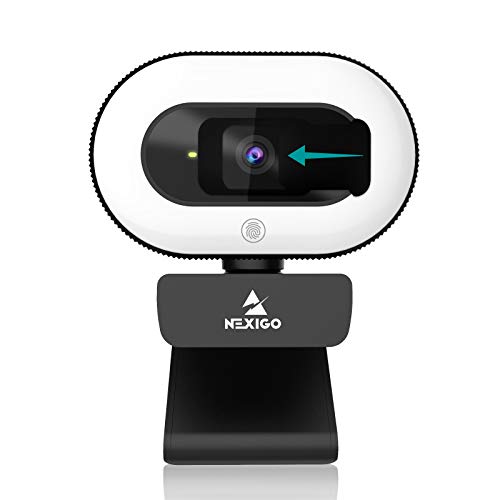
| NexiGo StreamCam N930E | Built-in three-level ring light plus autofocus | Mid-range | |
| AVerMedia PW310P | Autofocus, dual stereo mics, NDAA compliant | Premium | |
How to choose a 1080p webcam
Light beats resolution, every time
A 1080p sensor in a dim room produces a noisy, smeared image that looks worse than 720p in good light. Webcam sensors are physically tiny, so they are starved for light, and the camera compensates by cranking gain, which is where the grain comes from. This is why low-light correction and automatic exposure adjustment appear on nearly every listing here, and why a built-in ring light is a real feature rather than a gimmick. Before you spend anything, try putting a lamp behind your monitor pointing at your face. If your room has a bright window behind you, no webcam at any price will save the shot.
Field of view: narrow is usually better
This spec quietly decides how professional you look, and wider is not better for a desk. A 70 to 75 degree lens frames your head and shoulders and crops out the laundry pile. A 90 degree lens starts including your room. Anything near 100 degrees is built for a conference table with several people, and pointed at one person sitting at a desk it makes you look small and distant while showing your whole background. Solo callers should aim for the narrow end. The picks here run from a tight 70 degrees up to 90.
Fixed focus or autofocus
Fixed focus sets a sharp zone at typical desk distance and never hunts. It is reliable, cheaper, and plainly fine if you sit still at a normal distance from the screen. Autofocus keeps you sharp when you lean in, move around, or hold something up to the lens, which matters for teaching, demos, and streaming. The tradeoff is that autofocus can hunt and breathe in poor light, drifting in and out at the worst moment. Sit still at a desk and fixed focus wins on reliability; move around and autofocus earns its cost.
The microphone is half the job
People forgive a soft image and hang up on bad audio. Webcam mics sit an arm’s length away, so they collect room echo and keyboard noise along with your voice. Two mics beat one, because the pair gives the processor a reference for what is voice and what is background hum, so noise reduction has something to work with. Stereo pairs capture a more natural voice. None of these will match a dedicated headset or desk mic, but the gap between a single cheap mic and a well-implemented pair is audible on any call.
Mounting, privacy and drivers
Check three practical things. The clip should grip your monitor without wobbling, and a tripod thread helps if your screen is unusual. A physical privacy cover is worth having even if you trust your software, because a sliding shutter is the only protection that cannot be bypassed. And plug-and-play via USB Video Class support means the camera works without installing anything, which matters on a locked-down work computer where you cannot install drivers.
NexiGo N60
The N60 is the popular default in this category, and it earns that with a spec most budget cameras skip: a 3.6mm glass lens rather than plastic. Glass keeps edges cleaner and resists the slight haze plastic elements pick up over time. It shoots 1920 by 1080 at 30fps from a 2MP CMOS sensor, includes a noise-canceling mic, and adds a privacy cover. NexiGo also ships software control, so you can adjust the image rather than accept whatever the camera decides, which is unusual at this price and genuinely useful under office fluorescents.
Pros:
- 3.6mm glass lens rather than the usual plastic
- Software control for manual image adjustment
- Built-in noise-canceling microphone
- Physical privacy cover included
- Plug and play over USB 2.0 or 3.0, no drivers, works with Mac and Windows
Cons:
- Fixed focus, so leaning in or holding objects up goes soft
- Single microphone rather than a pair
Best for: most people on daily calls who want a clear, reliable upgrade over a laptop camera without overthinking it.
EMEET C960
The C960 is the audio pick of the budget group. Two omnidirectional noise-reduction mics give the processor a genuine reference for separating your voice from the air conditioning, and that shows up on calls more than any pixel count. The five-layer anti-glare lens is aimed at the classic webcam problem of a bright window or a lamp washing the frame, and automatic low-light correction keeps the image usable as the afternoon fades. The 90 degree view is wide enough for two people at a desk, and the foldable body travels well.
Pros:
- Two omnidirectional noise-reduction microphones
- Five-layer anti-glare lens helps against windows and lamps
- Automatic low-light correction
- 90 degree view fits two people at one desk
- Broad compatibility including Windows, macOS, Linux and Android TV
Cons:
- 90 degrees shows more of your room than a solo caller wants
- Fixed focus only
Best for: calls where being heard clearly matters most, and desks where two people sometimes share the frame.
EMEET C950
The cheapest camera here is also the one framed best for a single person. Its 70 degree lens is the narrowest in this group, which sounds like a limitation and works as a feature: it keeps you centered and quietly crops out the room behind you, no virtual background required. It runs 2MP at 30fps with low-light correction, carries an omnidirectional mic, and the privacy cover is a proper slide that presses on and pulls across. For a spare desk, a student, or a second machine, it is a lot of the useful part of a webcam for very little.
Pros:
- Tight 70 degree lens keeps you centered and hides the room
- Lowest price in this comparison
- Low-light correction for dim rooms
- Physical sliding privacy cover
- Wide compatibility, including UVC devices, so no drivers needed
Cons:
- Single microphone, weakest audio here
- 70 degrees is too tight if two people share the frame
- Fixed focus
Best for: solo callers on a budget, students, and anyone who wants a flattering crop without buying software tricks.
NexiGo StreamCam N930E
The N930E attacks the actual problem instead of the spec sheet. Its built-in ring light offers three brightness levels on touch control, which means the fix for a dim room is on the camera rather than a separate lamp you have to buy, place, and plug in. Since light is what limits every webcam image, adding it does more for how you look than another megapixel ever would. It pairs that with autofocus, so leaning toward the screen or holding up a document stays sharp, and a 75 degree lens that frames one person properly. The clip sits on a monitor or a tripod.
Pros:
- Three-level adjustable ring light with touch control, the standout feature here
- Autofocus keeps you sharp when you move or hold objects up
- 75 degree lens, well judged for a single person
- Privacy cover included
- Plug and play over USB 2.0, no driver install
Cons:
- Ring light is a flat frontal source, less flattering than a lamp off to one side
- Single built-in microphone
- Bulkier on the monitor than the plain cameras
Best for: rooms with poor lighting, and anyone who wants a working fix for looking dim without rearranging the desk.
AVerMedia PW310P
AVerMedia builds capture hardware for broadcast, and the PW310P is the grown-up option in this group. It combines HD autofocus with adjustable video settings, so you can tune the picture rather than accept the camera’s guess, and dual stereo microphones capture a more natural voice than a single mic can. The 73 degree field of view is properly judged for one person. The detail that matters in corporate and government settings is NDAA compliance, which is a procurement requirement in plenty of workplaces and rules out most cheap cameras outright.
Pros:
- HD autofocus with adjustable video settings
- Dual stereo microphones for a natural voice
- 73 degree field of view, well suited to a single person
- NDAA compliant, which some workplaces require
- Built-in privacy shutter and a swivel tripod clip
Cons:
- Most expensive pick here by a wide margin
- Caps at 1080p 30fps, same as cameras costing a third as much
- No built-in light
Best for: people on calls all day, workplaces with procurement rules, and anyone who wants control over the image.
The verdict
Best Overall: NexiGo N60. It is the most popular pick here and the balance is right: a glass lens where rivals use plastic, software control to fix what the camera gets wrong, a noise-canceling mic, and a privacy cover, all for a budget price. For the everyday reality of joining calls from a desk, it clears the bar without asking for more.
Best Value: EMEET C950. The cheapest camera here has the tightest, most flattering crop for a single person and still corrects for low light. If the job is simply to stop looking like a laptop webcam, this does it for the least money.
Best Premium: AVerMedia PW310P. Autofocus, stereo mics, sensible framing, and NDAA compliance justify the step up if you live on video calls. If your problem is a dark room rather than image control, spend less on the NexiGo StreamCam N930E instead, since its ring light will do more for how you look than any sensor upgrade.
FAQ
Is a 1080p webcam actually better than my laptop camera?
Almost always, and usually by a lot. Many laptop cameras are 720p and squeezed into a thin lid, which forces a tiny sensor and lens. An external webcam has room for better optics and sits at eye level on top of your monitor rather than pointing up at you from below. That angle change alone is half the improvement.
Do I need 4K instead?
For work calls, no. Most conferencing platforms compress video hard and often cap what they transmit well below 4K, so the extra resolution is discarded before anyone sees it. Money spent on lighting, framing, and microphones changes how you appear on a call far more than resolution does.
Why do I look grainy even with a good webcam?
Because the room is too dark. Small sensors amplify a weak signal to brighten the image, and that amplification is the noise you see. Add light in front of you, ideally from slightly off to one side, and the grain disappears. Also check what is behind you: a bright window makes the camera expose for the window and turn you into a silhouette.
Will these work without installing software?
Yes. All of these are plug and play over USB and follow the USB Video Class standard, so they work on Windows and macOS without drivers. This matters on a managed work laptop where you cannot install anything. The NexiGo software and AVerMedia settings are optional extras that unlock manual adjustment.
Fixed focus or autofocus for meetings?
Fixed focus is fine and arguably better if you sit at a normal distance and stay put, since it never hunts at an awkward moment. Choose autofocus, as on the N930E or PW310P, if you lean in and out, hold documents or products up to the camera, or move around while presenting.
This article may contain affiliate links; see our Affiliate Disclosure.