Three hours into a session your hand should still feel like your hand, not a cramped claw curled around a slab of plastic. A right-handed ergonomic mouse is shaped to fill the palm and drop the thumb into a natural groove, so the mouse conforms to you instead of forcing your wrist to conform to it. Get the shape right and comfort and control stop competing.



A great ergonomic mouse for the right hand matches your hand size, tracks precisely, and stays comfortable long after a standard mouse would have your wrist aching. This roundup covers two paths: contoured palm-grip gaming mice built for speed and buttons, and vertical ergonomic mice built to relieve wrist strain first. That range serves a competitive shooter player, a long-session strategy gamer, and anyone whose wrist starts complaining after a full day at the desk.
At a glance
| Product | Standout feature | Price tier | Link |
|---|---|---|---|
| Corsair IRONCLAW Wireless SE | Palm-grip shape for larger hands, 10 buttons | Premium | |
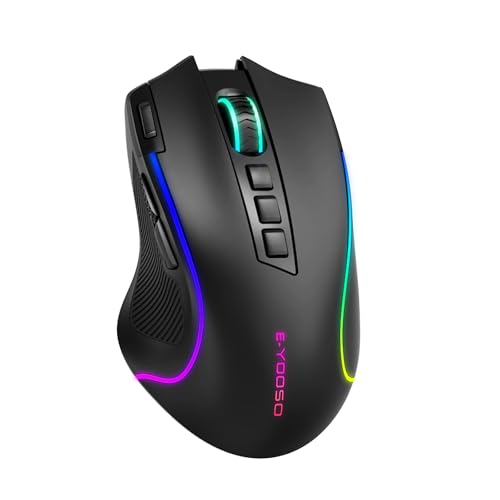
| E-YOOSO Wireless Gaming Mouse | Thumb groove, tri-mode, rapid-fire key | Mid-range | |
| Evoluent VM4RW Vertical Mouse | Sculpted vertical shape, programmable buttons | Premium | |
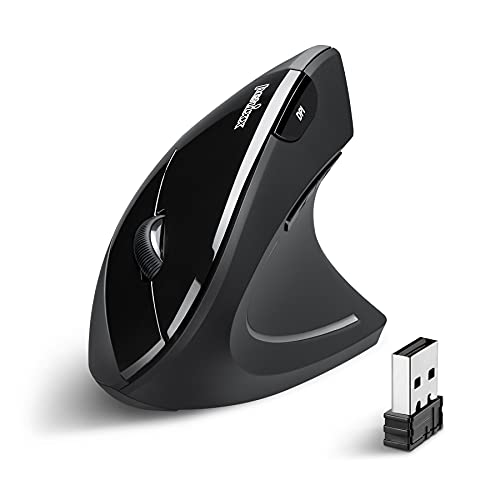
| Perixx PERIMICE-713 Vertical | Neutral wrist angle, quiet clicks, wireless | Budget | |
| Seenda MOE302 Vertical | 57-degree angle, palm rest, rechargeable, silent | Budget | |
How to choose an ergonomic right-handed mouse
Ergonomic means the mouse fits your hand and keeps your wrist relaxed, but that goal splits into two designs that feel very different. Knowing which suits you, and why, is the whole decision.
Grip style: palm, claw, or fingertip
How you hold the mouse shapes what you should buy. A palm grip rests the whole hand flat along the shell, spreading contact and load, which is the most relaxed hold for long sessions and the reason larger, contoured shapes exist. A claw grip arches the fingers for quicker clicks, and a fingertip grip uses just the tips for flick-heavy aiming. If your hand naturally lies flat and your palm meets the back of the mouse, you are a palm-gripper, and a taller, filled-out right-handed shell will feel best.
Hand size and shape
An ergonomic shell only works if it matches your hand. Larger hands want a taller, longer body that fills the palm, or the fingers overhang and the benefit disappears. Smaller-to-medium hands do better with a more compact shape they can actually wrap around. Right-handed ergonomic mice are asymmetric on purpose, with a sculpted thumb rest on the left side, so they are built for the right hand specifically rather than being ambidextrous.
Palm-grip gaming shape versus vertical
This is the fork in the road. A palm-grip gaming mouse keeps the classic low, sculpted profile, so your aim, flicks, and muscle memory work exactly as expected while the shape reduces fatigue. A vertical mouse turns the hand into an upright handshake position, which takes pressure off the wrist far more aggressively and is the go-to for wrist pain or strain relief. The trade-off is that vertical mice take a week or two to adjust to and give up some of the fast, precise aiming that competitive gaming rewards. Pick the palm-grip shape if performance leads; pick vertical if comfort and wrist relief lead.
Connection, sensor, and buttons
Wireless has caught up with wired for latency, and the best gaming mice offer a low-latency 2.4GHz link plus Bluetooth, sometimes with a wired option too. For gaming, a modern optical sensor with a high polling rate matters more than a giant DPI number, since almost nobody games at extreme DPI; a steady sensor and a fast response are what you feel. Extra programmable buttons and software for macros are a real advantage in shooters, strategy games, and productivity alike, while simple ergonomic mice trade those for plug-and-play ease.
Weight, glide, and quiet
Lighter mice flick faster and tire the hand less over a marathon session, while smooth glide feet keep movement effortless. If you share a room or record audio, silent-click buttons on several ergonomic mice keep the noise down. None of these details replace a good shape, but together they decide whether a comfortable mouse also feels fast.
Getting comfort right after you buy
Even the best-shaped mouse only helps if the rest of the setup cooperates. Keep the mouse close to the keyboard so your arm is not reaching, sit with your forearm supported and level, and let the larger arm muscles move the mouse rather than flicking from a planted wrist. A slightly lower DPI encourages that fuller arm movement, which is easier on the wrist over a long session. If you are switching to a vertical shape, give it a week or two before judging it, since the upright hold feels strange at first and then, for many people, becomes the more comfortable habit. A soft wrist rest or a supportive pad can round out either style.
Corsair IRONCLAW Wireless SE
The most popular pick here is a purpose-built right-handed palm-grip gaming mouse, and it is aimed squarely at larger hands. Its asymmetric shell fills the palm and cradles the thumb, so a flat, relaxed hold stays comfortable through long sessions without cramping the wrist. Ten programmable buttons and Corsair’s software cover macros and keybinds for shooters, strategy, and role-playing games alike, and a high-precision sensor with surface calibration tracks accurately on any pad. Wireless battery life stretches across marathon sessions on the low-latency link, and there is Bluetooth and customizable lighting on top. For a palm-gripper who wants gaming performance and ergonomic comfort together, this is the standout.
Pros:
- Contoured palm-grip shape built for larger right hands
- Ten programmable buttons with full software
- Precise sensor with surface calibration
- Long wireless battery life, plus Bluetooth
Cons:
- Large shell is too big for small hands
- Priced above simple ergonomic mice
Best for: larger-handed palm-grip gamers who want performance and comfort.
E-YOOSO Wireless Gaming Mouse
This is the value gaming pick, an asymmetric right-handed mouse with a deep, contoured thumb groove that keeps the grip secure and stops the thumb dragging on the pad. It punches above its price with a genuine optical gaming sensor, adjustable DPI, and a fast polling rate for low input lag, plus tri-mode connectivity across 2.4GHz, Bluetooth, and wired. A dedicated rapid-fire button fires a quick burst on one press, and everything is programmable through software. Battery life covers long sessions, and mechanical micro-switches give a crisp click. For a gaming-first ergonomic shape without the flagship price, it is a lot of mouse.
Pros:
- Deep thumb groove for a secure right-handed grip
- Real gaming sensor with fast polling rate
- Tri-mode wireless, Bluetooth, and wired
- Programmable rapid-fire key and macros
Cons:
- Shape suits medium hands more than very large ones
- Software polish trails the big brands
Best for: budget-minded gamers who want an ergonomic grip and low latency.
Evoluent VM4RW Vertical Mouse
From the company that pioneered the vertical mouse, the VM4RW is the premium choice when wrist relief is the priority. It holds the hand in an upright, neutral handshake position that takes strain off the wrist, with a sculpted body and a broad bottom lip for support during long stretches. Six programmable buttons and Evoluent’s software let you tailor functions per program, and pointer speed adjusts from the side without releasing your grip. It connects over USB and works across Windows, Mac, and Linux. It is not a twitch-aim gaming mouse, but for someone who games and works long hours and feels it in the wrist, it is the comfort-first upgrade.
Pros:
- Upright neutral posture for serious wrist relief
- Six programmable buttons with per-program profiles
- Side-adjustable pointer speed on the fly
- Broad support lip for long sessions
Cons:
- Most expensive here, and not built for twitch aiming
- Vertical shape needs an adjustment period
Best for: long sessions and wrist strain where comfort outranks fast aiming.
Perixx PERIMICE-713 Vertical Mouse
The Perixx is the affordable way into a vertical mouse, and it is often recommended for repetitive-strain relief. Its upright shape keeps the wrist neutral, a soft rubber-coated surface gives a secure grip, and quiet left and right clicks keep the noise down in shared spaces. Adjustable DPI and dedicated back and forward buttons make everyday navigation easy, and it runs wireless over a stable 2.4GHz link with a generous range. As the maker notes, expect a short adjustment period as your hand learns the upright hold. For a right-handed user curious about vertical ergonomics without a big outlay, it is an easy first step.
Pros:
- Neutral wrist angle at a budget price
- Quiet primary clicks and grippy coating
- Wireless with a long, stable range
- Back and forward buttons for navigation
Cons:
- Buttons are not programmable
- More an ergonomic office mouse than a gaming one
Best for: a low-cost first vertical mouse for comfort and long days.
Seenda MOE302 Vertical Mouse
The Seenda takes the vertical idea and adds a built-in palm rest, so the base of the hand is supported rather than rubbing the desk. Its angled body holds the wrist in a relaxed handshake posture, a contoured thumb rest and textured surface steady the grip, and it suits small-to-medium hands well. Silent clicks and adjustable DPI cover quiet, precise everyday use, and it is rechargeable with both USB-A and USB-C receivers, so it connects to almost anything without an adapter. A one-click show-desktop shortcut is a nice productivity touch. It is a comfortable, affordable vertical option for anyone easing wrist strain during work and casual play.
Pros:
- Angled vertical shape with a supportive palm rest
- Silent clicks and adjustable DPI
- Rechargeable with USB-A and USB-C receivers
- Comfortable for small-to-medium hands
Cons:
- Buttons are not programmable
- Aimed at comfort and work rather than competitive gaming
Best for: small-to-medium hands wanting a supported, quiet vertical mouse.
The verdict
Best Overall: the Corsair IRONCLAW Wireless SE is the top pick for right-handed palm-grip gaming. It combines a shell built for larger hands, ten programmable buttons, a precise sensor, and long wireless life, which is why it leads the pack in popularity and performance together.
Best Value: the E-YOOSO Wireless delivers a genuine gaming sensor, tri-mode connectivity, and an ergonomic thumb groove for a fraction of the flagship price, making it the smart buy for a gaming-first ergonomic shape.
Best Premium: the Evoluent VM4RW is the one to choose when wrist relief comes first. Its pioneering vertical design and programmable buttons make long work-and-play days far kinder on the wrist, provided you accept the adjustment period and softer aiming. If you want that relief for less, the Perixx and Seenda verticals get you most of the way.
Frequently asked questions
What does palm grip mean, and how do I know I use it? Palm grip means your whole hand lies flat along the mouse, with the palm resting against the back of the shell and fingers extended over the buttons. If your hand naturally relaxes flat rather than arching up, you are a palm-gripper, and a taller, contoured right-handed shape will feel most comfortable and stable.
Are vertical mice good for gaming? They are excellent for comfort and wrist relief, and they are fine for slower or casual games and everyday work. For fast, competitive aiming they give up some speed and precision, and they take a week or two to get used to. If twitch performance is your priority, a palm-grip gaming shape suits better; if your wrist is the priority, a vertical wins.
Does a high DPI number make a better gaming mouse? Not on its own. Very few people game at extreme DPI, so a huge number is mostly marketing. What you actually feel is a steady, accurate sensor and a fast polling rate for low latency. Any of the gaming mice here has far more DPI than you will use, so judge them on shape, sensor consistency, and buttons instead.
Is wireless a disadvantage for gaming? Not anymore. A modern low-latency 2.4GHz connection performs essentially like wired for gaming, while freeing you from cable drag. Bluetooth is handy for connecting to a second device but has higher latency, so use the dedicated 2.4GHz receiver for play and save Bluetooth for casual use.
How big should my hand be for a large ergonomic mouse? Larger shells like the Corsair suit hands that would otherwise overhang a compact mouse, roughly medium-large and up. If your fingers hang off the front of a normal mouse, size up; if a large mouse leaves your palm floating and your grip strained, choose a more compact ergonomic shape instead.
This article may contain affiliate links; see our Affiliate Disclosure.