Load a night map on an OLED panel and the letterbox bars simply stop existing. No gray wash, no backlight glow leaking from the corners, just the parts of the frame meant to be lit and a black that ends where the bezel begins. Then something moves fast across the screen and there is no smear dragging behind it.



An OLED panel is the easiest upgrade to see and the hardest to walk back from once you have lived with it. What separates a good machine from a merely bright one is whether the graphics card can actually feed the panel, whether the cooling holds up once the fans have been running for an hour, and whether the refresh rate suits what you play. The five below span a 15-inch all-rounder to a dual-screen halo machine, and they suit competitive players, single-player scenery hunters and anyone who edits video between sessions.
At a glance
| Product | Standout feature | Price tier | Link |
|---|---|---|---|
| Lenovo Legion 5a | Best seller here; 15.3-inch 165Hz OLED with 32GB memory | Mid-range | |
| Lenovo Legion 5 15IRX10 | RTX 5070 and a 24-core i9 at just over four pounds | Mid-range | |
| Lenovo Legion Pro 5i 16 | 16-inch OLED and RTX 5070 for the least money here | Mid-range | |
| Acer Predator Helios Neo 16S | 240Hz OLED and RTX 5070 Ti with 12GB of video memory | Mid-range | |
| ASUS ROG Zephyrus Duo | Two 3K OLED touchscreens and an RTX 5090 | Premium | |
How to choose an OLED gaming laptop
What OLED actually buys you
Each pixel makes its own light and switches off completely, so black is the absence of light rather than a dimmed backlight. That is why shadow detail in a dark corridor reads properly instead of turning into a gray smudge. The second gain is speed: OLED pixels change state almost instantly, which removes the faint trail that follows moving objects on many LCD panels. Color is the third, and every panel here covers a wide gamut, which matters as much for grading footage as for games.
The panel is only as good as the GPU behind it
A 240Hz screen is decoration if the card cannot push frames that fast. These five run from an RTX 5060 in the Legion 5a to an RTX 5090 in the Zephyrus Duo, and that spread matters more to your frame rate than anything about the glass. Video memory deserves a look too: the RTX 5070 units here carry 8GB, the Acer’s 5070 Ti carries 12GB, and texture-heavy titles at 2.5K can lean on that difference.
Refresh rate: match it to what you play
The range here is 120Hz on the Zephyrus Duo, 165Hz on both Legion 5 models and the Pro 5i, and 240Hz on the Acer. For story-driven and open-world games, 120 to 165 is comfortable and easy to feed. Competitive shooters are where 240Hz earns its place, and only if you are willing to drop settings to reach those frame rates. Buying 240Hz to run a cinematic single-player title at 70fps is money spent on a number you will not see.
Burn-in: real, manageable, worth knowing about
OLED wear is uneven rather than sudden. Static bright elements left on screen for hundreds of hours, a taskbar, a persistent HUD, a streaming overlay, can eventually leave a faint ghost. The fixes are unglamorous and effective: auto-hide the taskbar, use dark themes, let the screen sleep, and leave the panel-refresh routines the manufacturer ships turned on. Handled that way an OLED laptop panel holds up fine for normal mixed use. If your machine will display one static dashboard eight hours a day, an LCD is the saner choice.
Size, weight and the desk you use
Fifteen inches travels; sixteen inches immerses. The Legion 5 15IRX10 is about 4.19 pounds, which is genuinely portable for this class, while the 16-inch machines trade that for screen area and roomier cooling. Remember the charger. High-core HX processors and desktop-class GPUs need mains power to hit their quoted speeds, so battery life is a commuting number, not a gaming one.
Glossy glass and where you sit
Gaming OLED panels are glossy, which is what makes the contrast pop and also what makes a window behind you show up in the picture. Check your room before you commit. A bright office with an unshaded window facing the screen will undo a lot of what you paid for.
Lenovo Legion 5a: the one people actually buy
By sales rank this is the most popular OLED gaming laptop of the group by a clear margin, and the appeal is a balanced sheet rather than a headline number. You get a 15.3-inch WQXGA OLED at 165Hz, a Ryzen 7 processor, 32GB of memory and a 1TB drive in Lenovo’s Eclipse Black chassis. The real catch is the graphics card: the RTX 5060 is the entry point of this lineup, and two machines below cost less while carrying an RTX 5070. If you want the OLED experience with plenty of memory for background tabs, streaming and a game at once, this is a sensible landing spot. If you rank frames above all else, keep reading.
Pros:
- Clearly the best-selling OLED gaming laptop in this comparison
- 15.3-inch WQXGA OLED at 165Hz, a well-matched pairing
- 32GB of memory and a 1TB drive as standard
- 15-inch chassis is easier to carry than the 16-inch options
Cons:
- RTX 5060 is the weakest GPU here, and it costs more than two RTX 5070 machines
- The listing is thin on cooling and port detail
Best for: buyers who want a proven, well-rounded 15-inch OLED machine and play at moderate settings.
Lenovo Legion 5 15IRX10: the spec-per-dollar standout
Line this one up against the Legion 5a and the arithmetic gets awkward for the best seller. For less money the 15IRX10 brings an RTX 5070 with GDDR7 memory, a 24-core i9-14900HX, the same 32GB of DDR5 and 1TB of Gen4 storage, behind a 15.1-inch WQXGA OLED. It also weighs about 4.19 pounds and still finds room for Gigabit Ethernet alongside Wi-Fi 7 and Bluetooth 5.4, which matters if your router is a floor away and you would rather not argue with wireless during a raid. The i9 is a previous-generation part, and that is precisely why the rest of the configuration lands where it does.
Pros:
- RTX 5070 with GDDR7, a real step up from the best seller
- 24-core i9-14900HX handles streaming and heavy multitasking
- 32GB DDR5-5600 and a 1TB Gen4 NVMe drive
- About 4.19 pounds, with wired Gigabit LAN and Wi-Fi 7
Cons:
- Previous-generation processor, however capable
- 8GB of video memory is the ceiling for high-texture titles
Best for: players who want the strongest balance of frame rate, memory and portability without moving up a tier.
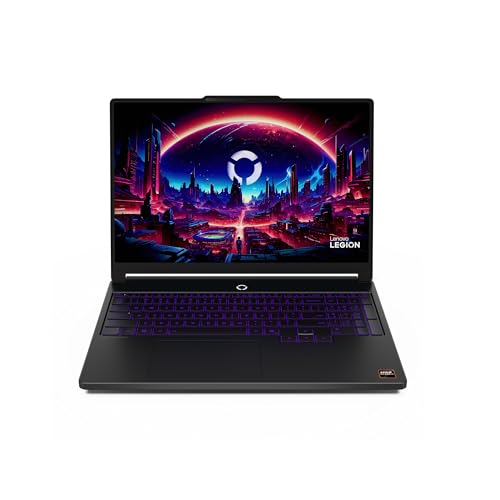
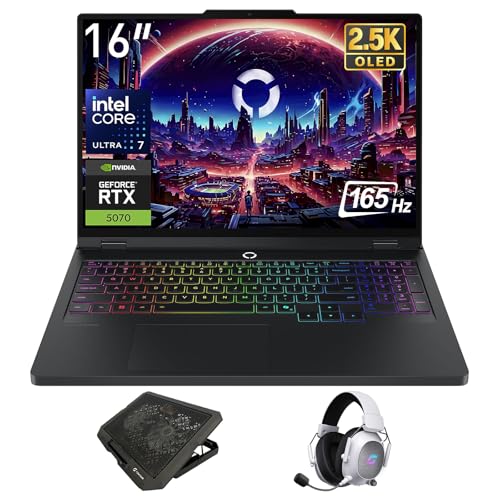
Lenovo Legion Pro 5i 16: the cheapest way to a 16-inch OLED
This is the least expensive machine in the group and it does not read like it. The 16-inch 2.5K PureSight OLED runs at 165Hz, the GPU is an RTX 5070, and the processor is a 20-core Intel Core Ultra 7 255HX. The Pro chassis brings the HyperChamber cooling system with turbo fans and 3D heat pipes, plus an acoustic profile you can flip with a keyboard shortcut, so sustained sessions are not fighting a single small fan. Ports are generous, including Thunderbolt 4 and Ethernet. The compromise is memory: 16GB where its stablemates give 32GB. It is sold as a bundle with third-party accessories, so read the listing for exactly what arrives in the box.
Pros:
- Largest OLED here at the lowest price in the group
- RTX 5070 paired with a current-generation Core Ultra 7 255HX
- HyperChamber cooling with switchable performance modes
- Thunderbolt 4, Ethernet and Wi-Fi 7
- TrueStrike keyboard and SteelSeries Nahimic audio
Cons:
- 16GB of memory where others in the group ship 32GB
- Third-party accessory bundle rather than a plain retail box
Best for: anyone who wants the biggest, smoothest OLED for the least outlay and is happy to add memory later.
Acer Predator Helios Neo 16S: the fast panel
If the reason you want OLED is response time, this is the machine that leans into it. The 16-inch 2.5K panel runs at 240Hz and 500 nits, and behind it sits the strongest realistic pairing here: an RTX 5070 Ti with 12GB of GDDR7 and a 24-core Core Ultra 9 275HX that peaks at 5.4GHz. That extra video memory is the quiet advantage over the 5070 machines. Connectivity is thorough, with Thunderbolt 4, HDMI 2.1, an SD card reader and Wi-Fi 6E, and it ships with Windows 11 Pro. Wi-Fi 6E rather than Wi-Fi 7 is the one place it trails the Lenovos, and it too arrives as a bundle with extra accessories.
Pros:
- 240Hz OLED, the fastest panel in this comparison
- RTX 5070 Ti with 12GB of video memory and DLSS 4 support
- 24-core Core Ultra 9 275HX with on-chip AI acceleration
- Thunderbolt 4, HDMI 2.1 and an SD 4.0 card reader
- Windows 11 Pro rather than Home
Cons:
- Wi-Fi 6E where the Lenovo machines offer Wi-Fi 7
- Sold with third-party extras bundled in
Best for: competitive players chasing high frame rates, and creators who want the extra video memory.
ASUS ROG Zephyrus Duo: two panels, no compromises, no restraint
Two 16-inch 3K OLED touchscreens, a detachable magnetic keyboard, and five ways to fold the thing, including a tent mode meant for two people playing across the same machine. Under it all sits an RTX 5090 and a 16-core Core Ultra 9 386H with a 50-plus TOPS NPU, 32GB of fast LPDDR5X and a vapor chamber with a kickstand that opens the intakes. The chassis is milled from a single aluminum billet. This is a workstation that games rather than a gaming laptop that works, and the second screen is genuinely useful if you stream, edit or keep reference material open. The refresh rate is the lowest here at 120Hz, which is the trade for that resolution and HDR panel.
Pros:
- RTX 5090, the most powerful GPU in this group by a distance
- Dual 3K OLED HDR touchscreens with five usage modes
- CNC-milled aluminum chassis with vapor-chamber cooling
- Detachable keyboard and dual Thunderbolt 4
- 32GB LPDDR5X at 8533MHz for heavy creative work
Cons:
- Costs roughly as much as two of the other machines here combined
- 120Hz is the slowest panel in the group
- 1TB of storage is modest for the money
Best for: streamers, editors and anyone who wants a second screen everywhere they go and will pay for it.
The verdict
Best overall: Lenovo Legion 5a. It outsells everything else here by a wide margin, and the package explains why: a 165Hz OLED matched to a 15-inch body you can carry, with 32GB of memory and a terabyte of storage. Go in knowing the RTX 5060 is the modest part of the deal.
Best value: Lenovo Legion Pro 5i 16. The lowest price in the group buys the biggest OLED, an RTX 5070 and the Pro chassis cooling. Budget for a memory upgrade and it beats machines costing more.
Best premium: ASUS ROG Zephyrus Duo. An RTX 5090 and two 3K OLED panels put it in its own category. Nothing else here comes close, and nothing else here costs close either.
If you want the short answer: the Legion 5 15IRX10 is the one to compare everything against, because an RTX 5070, an i9 and 32GB at that weight is the hardest combination here to argue with.
FAQ
Is burn-in going to ruin an OLED gaming laptop?
Not under normal mixed use. Wear comes from the same bright, static element sitting in the same pixels for hundreds of hours, so the risk lives with taskbars, HUDs and overlays rather than with games as such. Auto-hide the taskbar, run dark themes, set a short screen-off timer, and leave the maintenance routines the manufacturer ships enabled. If instead you plan to leave one unchanging dashboard on screen all day every day, buy an LCD and spend the difference elsewhere.
Do I really need 240Hz?
Only if you play competitive shooters and will lower settings to reach those frame rates. The panel can only show frames the GPU produces, so a 240Hz screen fed 90fps is showing you 90fps. For single-player and open-world games, the 165Hz panels on the Legion machines are the better-matched buy, and the money saved is better spent on the graphics card.
Is 8GB of video memory enough?
For most titles at these resolutions, yes, especially with upscaling turned on. The pressure point is high-resolution texture packs and ray tracing at 2.5K, where 8GB can run short and force you to step settings down. That is the practical argument for the Acer’s RTX 5070 Ti with 12GB, and it applies just as much to video editing and 3D work as it does to games.
Why do OLED gaming laptops start so high?
Two reasons stack up. The panel itself costs more than an equivalent LCD, and manufacturers tend to fit OLED to their better-specified configurations rather than their entry ones, so you rarely find one paired with a modest processor and a small drive. That is why this group clusters where it does, with no true budget option among them.
Can I game on battery?
Not at full speed. Every machine here uses a high-power processor and a discrete GPU that need mains power to reach their quoted clocks, so unplugged performance drops sharply by design. OLED can be gentle on battery when the content is dark, but take these as desk machines that travel rather than laptops you game on from a train seat.
This article may contain affiliate links; see our Affiliate Disclosure.