Footsteps are somewhere behind you and to the left, and you genuinely cannot tell whether you heard that or your headset guessed it. The fix is either a better headset or a better signal chain feeding the headphones you already own, and those two paths cost different money and solve different problems. Picking the wrong one is how people spend twice.

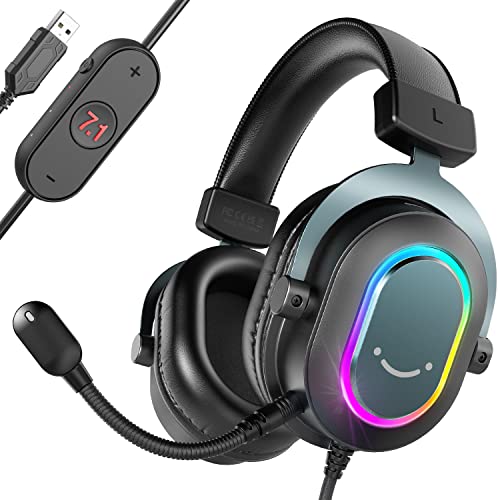



The comparison here is between two upgrade routes. A gaming headset is one purchase that arrives complete, with a microphone attached and surround processing built in. A DAC and amp is a box that improves the signal before it reaches headphones, which you supply separately. The picks below cover both sides so the trade is visible rather than assumed.
At a glance
| Product | Standout feature | Price tier | Link |
|---|---|---|---|
| Jeecoo V20U USB Pro Gaming Headset | 50mm drivers, built-in USB sound card, retractable mic, in-line controller | Budget | |
| FIFINE AmpliGame H6 Gaming Headset | Three switchable EQ modes on an in-line control, works on PC and consoles | Budget | |
| Edifier G2II Gaming Headset | Lightest here at 9.38 ounces, detachable mic, full software suite | Mid-range | |
| Fosi Audio K5 Pro DAC Headphone Amp | Mic input on a desktop DAC, bass and treble knobs, 1000mW into 16 ohms | Mid-range | |
| SteelSeries GameDAC | ESS Saber DAC, 121 dB dynamic range, DTS Headphone:X v2.0, PS5 support | Premium | |
How to choose between the two routes
The hidden cost of the DAC route
Start here, because it is the fact that decides most of these purchases. A DAC and amp is not a complete solution. It produces no sound on its own. It improves the signal going to headphones you supply, and it usually does not supply a microphone either. Compare a headset price against a DAC price and the DAC looks competitive; add the headphones it needs and a separate mic, and it is a different budget entirely.
That does not make it the wrong route. If you already own good headphones, it is by far the cheaper way to a better result. If you own nothing, a headset is one purchase that arrives working.
A USB headset already contains a DAC
This trips people up constantly. When a headset connects by USB, the digital-to-analog conversion happens inside the headset, using its own built-in sound card. Every headset picked here is USB. Plugging a USB headset into an external DAC does nothing at all, because the signal never passes through the external box.
External DACs only help analog headphones connected by a 3.5mm or quarter-inch plug. So the two routes are genuinely exclusive: buy a USB headset and the DAC is redundant, or buy a DAC and pair it with wired analog headphones. Choosing both is a common and expensive mistake.
What 7.1 surround actually means
There are two drivers in the headset, one per ear, and there always were. Virtual 7.1 is processing that shapes timing and frequency cues so your brain places a sound behind or beside you rather than inside your head. It is a real effect and it can genuinely help with directional awareness in a shooter. It is not seven speakers.
Quality varies enormously and it is a matter of taste. Some players find it helps them place footsteps; others find it smears detail and turn it off in favor of clean stereo. Take it as a feature you can experiment with, not a specification that makes one headset better than another.
The microphone problem
A headset comes with a mic that is positioned correctly and works out of the box. The DAC route normally does not. It is the single biggest practical gap in the comparison, and it is why one of the picks below adding a mic input matters so much. If you talk to people while you play, a DAC on its own leaves you needing a separate microphone, which is another purchase and another thing on the desk.
Impedance, and when an amp genuinely matters
Amplification helps when headphones are hard to drive. Impedance, quoted in ohms, is the rough guide: most gaming headsets and consumer headphones sit at 32 ohms or below, and a phone or motherboard can drive those to painful volume unaided. Studio and audiophile headphones can run to 250 or 600 ohms, and those genuinely need an amp to reach proper volume and keep control of the bass.
If your headphones are 32 ohms, an amp buys you a cleaner noise floor and better volume control, not a transformation. Be clear about which situation you are in before spending.
What a good DAC actually fixes
The gains are real but specific: a lower noise floor, so silence is silent instead of hissing; no interference from a motherboard sharing a board with everything else; better dynamic range, meaning the gap between the quietest and loudest sounds is wider; and enough power to drive the headphones properly. What it does not do is add detail that the recording or the headphones cannot produce. A DAC feeding cheap headphones sounds like cheap headphones.
Jeecoo V20U USB Pro Gaming Headset
The most popular pick in this group, and a clean demonstration of what the headset route is for: one cable, one purchase, everything included. Fifty-millimeter drivers with neodymium magnets sit behind a USB connection with its own audio sound card and 7.1 surround processing, so nothing else on your desk needs to change.
The practical touches are what people keep. The mic is unidirectional to cut room noise, retractable so it is out of the way when you are not talking, and switchable at the in-line controller along with both volumes. That controller clips to your shirt, which sounds trivial until you have hunted for a volume wheel mid-match. Construction is an adjustable metal headband with thick memory foam pads.
- Pros: The clear best-seller here; complete solution with mic, surround, and sound card in one; large 50mm drivers; retractable mic keeps the desk clear; clip-on in-line controller for volume and mic mute; metal headband and memory foam pads; the cheapest route to a working setup.
- Cons: USB only, so no console flexibility and no way to benefit from an external DAC; 7.1 needs a software download; built-in sound card quality is fixed and cannot be upgraded; RGB is not to everyone’s taste.
Best for: Anyone starting from nothing who wants voice chat and directional audio working today.
FIFINE AmpliGame H6 Gaming Headset
The close second, and the one that gives you a tone control without opening software. Three switchable EQ modes live on the in-line controller: one voiced for games, one for music, one for general use. Flipping between a game profile and a music profile without alt-tabbing is a small convenience that gets used every day, and it partly answers the criticism that gaming headsets are voiced badly for music.
Virtual 7.1 handles directional cues, and FIFINE is explicit about the intent: hearing footsteps and combat by direction and distance. It works on PC and on PlayStation consoles, which is broader than several rivals. The comfort case is made with a lightweight headband and cushioned earmuffs, and FIFINE specifically notes glasses wearers, which is a real and usually ignored problem.
- Pros: Three hardware EQ modes on the in-line control, no software needed; works on PC and PlayStation, not PC alone; explicitly considered for glasses wearers; virtual 7.1 for directional cues; RGB lighting; strong seller in its own right.
- Cons: Costs more than the Jeecoo for a similar package; USB connection means an external DAC can never help it; EQ modes are fixed presets, not adjustable; mic is not detachable.
Best for: Players who switch between games and music and want the tone to follow without touching a menu.
Edifier G2II Gaming Headset
The headset for long sessions, and the one from a company that also makes speakers for a living. At 9.38 ounces it is the lightest here by a clear margin, which is the specification that decides whether hour four is comfortable or a headache. Soft over-ear leather earmuffs, a flexible headband, and a plush pad spread what weight there is.
The mic detaches entirely, so the same headset works as ordinary headphones when you leave the desk, and it rotates after insertion to sit where you want it. Edifier’s software goes deeper than most: a 7.1 virtual speaker shifter, an equalizer, environment effects, and mic controls. Fifty-millimeter drivers do the work. One limitation stated plainly by Edifier: it works with PC, PS4, and Mac, but not Xbox.
- Pros: Lightest headset here at 9.38 ounces, which matters most over long sessions; detachable mic turns it into normal headphones; deepest software suite of the three, with a real equalizer; 50mm drivers; audio brand with speaker engineering behind it.
- Cons: Nearly double the Jeecoo’s price; explicitly not compatible with Xbox; USB only, so no DAC upgrade path; leather earmuffs get warm; sells in noticeably lower volume than the budget pair.
Best for: Long sessions where weight and comfort decide, and a mic you can remove afterwards.
Fosi Audio K5 Pro Gaming DAC Headphone Amplifier
This is the DAC that takes the microphone problem seriously, which is precisely what makes it relevant to this comparison. It is an upgraded Q4 with a mic function added, so the usual objection to the DAC route, that you lose voice chat, is answered in the box rather than with another purchase.
The engineering is clear about what it is. A Texas Instruments NE5532 op-amp in a circuit optimized for a low noise floor, taking USB Type-C, optical, or coaxial in and putting out RCA and 3.5mm. USB runs to 24-bit/96 kHz, optical and coaxial to 24-bit/192 kHz, with distortion quoted at or below 0.003 percent and signal-to-noise at 110 dB or better. Output is 1000mW into 16 ohms, which is ample for consumer headphones. Master volume plus separate bass and treble knobs give physical control, and a headphone splitter, cables, and optical lead are included.
- Pros: Mic function built in, which fixes the DAC route’s biggest gap; physical bass, treble, and volume knobs; three digital inputs including optical for consoles and TVs; strong measured specifications for the price; 1000mW drives most headphones easily; generous accessory bundle.
- Cons: Needs headphones you supply, so the real cost is higher than the sticker; USB caps at 24-bit/96 kHz where the optical input reaches 192; another box and more cables on the desk; useless with the USB headsets above.
Best for: Anyone who already owns wired analog headphones and still needs to talk to teammates.
SteelSeries GameDAC
The premium end of the DAC route, and the pitch is direct: bypass the poor converters inside console controllers, USB headsets, and PC sound cards, and feed your headphones from a proper one instead. An ESS Saber DAC and amp deliver 121 dB of dynamic range with distortion and noise at minus 115 dB, and it carries Hi-Res Audio certification at 96 kHz / 24-bit with no down-sampling.
What separates it from a general-purpose DAC is that it was built for this job. DTS Headphone:X v2.0 provides the surround processing, so you get positional audio through whatever headphones you prefer rather than only through a headset that has it baked in. It works with an Arctis headset, high-end headphones, or any other gaming headset. It supports PS5 and PS4 as well as PC, which most desktop DACs do not properly manage. SteelSeries advises keeping firmware current through its software.
- Pros: Best measured performance here by some distance, with an ESS Saber DAC and 121 dB dynamic range; certified Hi-Res at full 96 kHz / 24-bit; DTS Headphone:X v2.0 brings surround to any headphones; proper PS5 and PS4 support; lets you keep headphones you already like.
- Cons: By far the most expensive pick, before you have bought headphones; no microphone input, so voice chat needs a separate solution; requires firmware maintenance through software; sells in low volume compared with the headsets; overkill for 32 ohm consumer headphones.
Best for: Console and PC players with headphones they already love who want the signal chain to stop being the weak link.
The verdict
Best Overall: Jeecoo V20U USB Pro Gaming Headset. It leads this group in sales by a wide margin, and for the question most people are actually asking, it is the right answer. One USB cable delivers drivers, a sound card, surround processing, and a working microphone, at the lowest cost of anything here. The DAC route only beats it once you already own headphones worth feeding.
Best Value: FIFINE AmpliGame H6 Gaming Headset. A little more money buys hardware EQ modes you will use daily and console compatibility the Jeecoo lacks. If the same headset has to handle a playlist as well as a match, this is the more flexible one.
Best Premium: SteelSeries GameDAC. The only pick that meaningfully raises the ceiling on sound quality, with measurements no headset here approaches and surround processing that follows whatever headphones you plug in. Buy it if you own the headphones and can solve the mic separately; skip it if you are starting from zero.
Common questions
Will a DAC make my gaming headset sound better?
If the headset connects by USB, no. The conversion already happened inside the headset and the external DAC is never in the signal path. If your headset plugs in with a 3.5mm analog jack, then yes, a DAC and amp can lower the noise floor and drive it more cleanly. Check which connector you have before buying anything.
Is virtual 7.1 better than plain stereo for competitive play?
It depends on you, and opinions among serious players are genuinely split. The processing adds cues that help many people judge direction and distance, particularly front-to-back, which stereo handles poorly. Others find it blurs fine detail and prefer clean stereo. Both headsets and dedicated DACs here let you switch it off, so try it both ways over a few sessions.
Do I need an amp for 32 ohm headphones?
Not for volume. A phone or a motherboard will drive 32 ohm headphones to uncomfortable levels without help. An amp still buys a quieter background and finer volume control, which is worth something on a noisy PC, but it is a refinement rather than a fix. Amplification becomes genuinely necessary at 250 ohms and above.
Which route is cheaper overall?
The headset, clearly, if you own nothing. One purchase covers drivers, conversion, surround, and a mic. The DAC route is cheaper only when you already own headphones you like, in which case a box on the desk upgrades them for less than replacing them. Where it gets expensive is buying a DAC and then discovering you need headphones and a microphone too.
This article may contain affiliate links; see our Affiliate Disclosure.