The cheapest result in this search for gaming RAM is laptop memory. It says so quietly, in the title, as SODIMM and 262-pin. A desktop motherboard takes 288-pin sticks and a 262-pin module physically will not go into one. The most expensive result is not memory at all: it is a complete gaming PC. Between those two, one kit here is measurably 22% quicker than another and twenty dollars cheaper, and nothing on the page tells you so.


At a glance
| Product | Speed, latency, real nanoseconds | Price tier | Link |
|---|---|---|---|
| Crucial SODIMM | Laptop memory. 262-pin, will not fit a desktop | Budget | |
| Lexar ARES Gen2 | 6400 CL30, about 9.4ns. The quickest here | Budget | |
| CORSAIR Vengeance White | 6000 CL36, about 12ns. Intel profiles only | Budget | |
| CORSAIR Vengeance RS | Same speed, both platforms, and cheaper | Budget | |
| CORSAIR Vengeance Black | Identical to the white one, for ten dollars more | Budget | |
| Crucial Pro 6400 | 6400 CL32, about 10ns | Mid-range | |
| Crucial Pro 6000 | Same CL36 as Corsair. Much tighter sub-timings | Mid-range | |
| Skytech Crystal PC | An entire computer, in a memory search | Premium | |
How to choose
Megahertz alone tells you almost nothing
Memory speed and memory latency pull against each other, and the only figure that combines them is real time in nanoseconds. Divide the CL number by the speed and you have it. Do that across this page and the ranking inverts: a 6400 CL30 kit lands around 9.4 nanoseconds, a 6400 CL32 kit around 10, and the 6000 CL36 kits sit at 12. That is a 22% spread in the number that actually reaches your frame rate, and the quickest kit here is also the cheapest desktop kit here. Two sticks advertising 6000 and 6400 look a generation apart on the box and are separated by one arithmetic step you can do on your phone.
CL36 at 6000 is not one product
Two kits here advertise exactly the same headline, 6000MHz at CL36, and then print their full timings. One reads 36-44-44-96 and the other 36-38-38-80. Those numbers after the CL are the rest of the memory’s response, and tighter is faster on every one of them. Same headline, same nanosecond figure for the first number, and one kit is doing meaningfully better work on the other three. The full timing string is the only place that shows up, and only some listings print it.
Your advertised speed is not your default speed
DDR5 boots at a slow, safe standard speed and stays there until you switch on the memory profile in your BIOS. Until you do, your 6400 kit is running well below what you paid for, and a great many kits sit like that for years in machines that never had the setting touched. One brand here leads every single listing with a disclaimer saying exactly this: maximum speed requires overclocking and BIOS adjustment, and depends on your board and CPU. It is the first bullet, on all three of its kits, and nobody else on this page mentions it at all.
XMP or EXPO decides whether it works on your CPU
Those memory profiles come in two flavors, one Intel’s and one AMD’s, and a kit carrying only one of them will not switch on for the other platform. Two kits here carry Intel profiles only. Their own sibling, at ten dollars less, carries both. If you are on AMD and you buy the Intel-only kit, you get a slow standard speed and no obvious explanation why. Check this before the RGB, before the latency, before anything.
Only one listing names a motherboard
Compatibility here is mostly vibes. One kit is best for one generation of Intel and one of AMD. Another names a different pair. A third names a third set, in a sentence garbled enough that it is hard to tell whether a very common AMD platform is included or excluded. Exactly one listing on this page prints an actual motherboard chipset list, naming four series across both brands, which is the only claim here you could check against your own machine in thirty seconds.
Watch the voltage on the fast kits
Speed at tight timings gets bought with voltage, and the numbers are printed. The standard sticks here run 1.1 volts, the mid-range kits 1.35, and the quickest kit on this page runs 1.4. That is not a fault and it is a trade: more volts means more heat inside your case, working the sticks harder for their whole life. It is worth knowing that the fastest number here has the highest voltage behind it, because the listing does not connect those two facts for you.
Check what you are actually buying
Two of these results are not desktop memory kits. One is a 262-pin SODIMM, which is laptop memory, and it will not physically enter a desktop slot. Only two listings on this page state their pin count at all, and they are, inevitably, the two that differ. The other is a whole gaming computer at three times the price of any kit here, ranking in a memory search because it has memory in it.
Crucial SODIMM
The cheapest result and the wrong shape. It is 262-pin SODIMM, which is laptop memory, and it says so plainly in the title and again in the last bullet alongside the form factor, the pin count, the voltage and the rank configuration. That last bullet is the most complete spec listing on the page, which is exactly the problem: the information was there and the search put it in front of desktop builders anyway. If you are upgrading a laptop, it is a proper Micron kit at 5600 with a 1.1 volt standard profile and both memory profile standards supported.
Pros:
- Publishes form factor, pin count, voltage and rank configuration
- Runs at 5600, 5200 or 4800; downclocks cleanly
- 1.1 volts; cool and standard
- Both memory profile standards on the same module
Cons:
- 262-pin SODIMM; will not fit a desktop board
- 5600 is the slowest speed here
- Listed among desktop gaming kits
Best for: a laptop, which is not what you searched for.
Lexar ARES Gen2
6400 at CL30 works out to roughly 9.4 nanoseconds, which is the quickest real latency on this page, and it is the cheapest desktop kit here. It publishes the whole timing string at 30-38-38-76, states 288-pin UDIMM so you know it fits, supports both memory profile standards, and carries a lifetime limited warranty. The trade is printed and worth reading: 1.4 volts, the highest on this page, which is how the timings got that tight and means it runs hotter than its rivals for its whole life.
Pros:
- About 9.4 nanoseconds; the quickest here
- The cheapest desktop kit on this page
- States 288-pin UDIMM; you know it fits
- Full timings published; both profile standards; lifetime warranty
Cons:
- 1.4 volts; the highest here, and it runs hotter for it
- Names no motherboards or CPU generations
- No disclaimer that the speed needs a BIOS change
Best for: the fastest kit here, at the lowest price.
CORSAIR Vengeance RGB White
Identical in every specification to the black version further down this page, and roughly ten dollars cheaper, which is worth knowing before you pick a color. Ten addressable LEDs per stick behind a panoramic bar, onboard voltage regulation for steadier overclocking through software, and custom profiles you can save per application. Its opening bullet is the real disclaimer nobody else prints. Note the profile support: Intel only, on a kit whose sibling costs less and does both.
Pros:
- Ten dollars cheaper than the identical black version
- Leads with a disclaimer that speed needs BIOS work
- Ten addressable LEDs per module; onboard voltage regulation
- Custom profiles saved per application
Cons:
- Intel profiles only; no AMD support
- About 12 nanoseconds; the slowest desktop kit here
- Sub-timings at 44-44-96; loose against a rival’s 38-38-80
Best for: the same kit as the black one, for less.
CORSAIR Vengeance RGB RS
The only kit on this entire page that names the motherboards it works with: four chipset series across both brands, printed in the last bullet with the part number. That is the difference between compatibility as a claim and compatibility as something you can verify against your own machine before ordering. It carries both memory profile standards where its two siblings are Intel-only, and it costs less than either of them. It has the same real disclaimer, the same onboard voltage regulation, and a more restrained light bar.
Pros:
- The only kit here naming supported motherboard chipsets
- Both memory profile standards, where its siblings are Intel-only
- Cheaper than both of its own siblings
- Leads with the real speed disclaimer; part number published
Cons:
- About 12 nanoseconds; slower than cheaper rivals
- Sub-timings at 44-44-96
- Less RGB than the Vengeance kits, if that matters to you
Best for: knowing it will work before it arrives.
CORSAIR Vengeance RGB Black
The most expensive of the three Corsair kits here and the least capable of them. It is specification-for-specification the same as the white version, roughly ten dollars dearer, and it lacks the AMD profile support that the cheaper RS model carries. What you get is genuinely good hardware: ten-zone addressable lighting, onboard voltage regulation that makes overclocking steadier than leaving it to the motherboard, and saveable custom profiles. It is also the only one of the three with no motherboard list.
Pros:
- Ten-zone addressable RGB behind a panoramic bar
- Onboard voltage regulation for steadier overclocking
- Saveable custom profiles per application
- The real speed disclaimer, first bullet
Cons:
- Ten dollars more than the identical white version
- Intel profiles only; the cheaper RS does both
- About 12 nanoseconds; the joint slowest here
- No motherboard list, unlike its own sibling
Best for: nothing its two siblings do not do better or cheaper.
Crucial Pro 6400 CL32
6400 at CL32 lands around 10 nanoseconds, second-fastest here, with the full string at 32-40-40-103 so you can check the working. Micron silicon, both memory profile standards, and a named compatibility set covering the newest Intel and AMD desktop parts. It is the second-dearest kit on this page and it is beaten on latency by something sixty dollars cheaper, which is the whole argument of this page in one comparison. The heat spreader comes in white or matte black camo, if that decides things.
Pros:
- About 10 nanoseconds; second-quickest here
- Full timings published at 32-40-40-103
- Both memory profile standards; Micron silicon
- Names the CPU families it targets
Cons:
- Beaten on latency by a kit sixty dollars cheaper
- The tRAS figure of 103 is the loosest on this page
- No voltage published; no motherboard list
Best for: Micron silicon, if you are paying for the name.
Crucial Pro 6000 CL36
On the box it looks identical to the Corsair kits: 6000MHz, CL36, about 12 nanoseconds. Read the full string and it is a different product. 36-38-38-80 against Corsair’s 36-44-44-96 means every timing after the first is meaningfully tighter, and those are the numbers doing the work between the headline reads. It is the most expensive kit here and the argument for it is entirely in that string. Its compatibility bullet is garbled enough to be worth checking yourself before ordering.
Pros:
- Sub-timings of 38-38-80 against a rival’s 44-44-96
- Full timing string published; Micron silicon
- Both memory profile standards supported
- Genuinely different from kits with identical headlines
Cons:
- The highest price of any kit here
- About 12 nanoseconds; joint slowest on the first number
- Its compatibility sentence is garbled; verify your CPU
- No voltage published
Best for: the timings behind the headline.
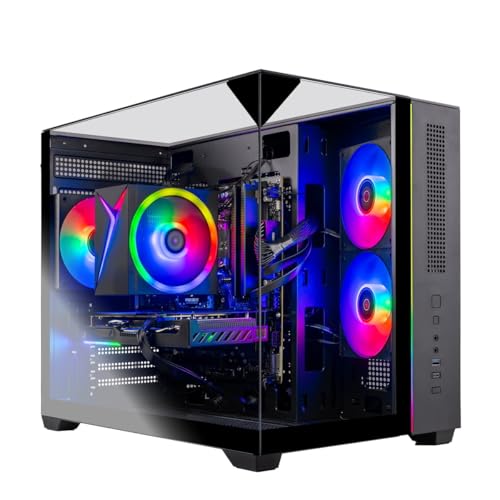
Skytech Crystal Gaming PC
It is a computer. It ranks here because it contains 32GB of DDR5 at 5600, which is the slowest desktop speed on this page and the only spec it shares with the rest. On its own terms it is a coherent machine: a Ryzen 7, an RTX 5060 Ti, a 1TB NVMe drive, a 650W gold supply, Windows, a year of parts and labor, and a keyboard and mouse thrown in. Its last bullet lists twenty games it runs at 1080p and 60fps, which is more accurate than most prebuilt listings manage.
Pros:
- A complete working machine; nothing to assemble
- Names the resolution and frame rate it targets: 1080p, 60fps
- 650W gold supply; year of parts and labor; no bloatware
- Keyboard and mouse included
Cons:
- It is not a memory kit
- Its DDR5 runs at 5600; the slowest desktop speed here
- Roughly three times the price of any kit on this page
Best for: someone who wanted a PC, not RAM.
The verdict
One division sorts this whole page. Divide CL by speed and the marketing order collapses: the cheapest desktop kit is the quickest, and the dearest is joint slowest on the headline figure. Everything else comes down to whether the profile matches your CPU brand.
Best overall: Lexar ARES Gen2. 6400 at CL30 is about 9.4 nanoseconds, the quickest real latency on this page, and it is also the cheapest desktop kit here, which is not a combination you see often. It publishes its full timing string, states 288-pin so you know it physically fits, supports both Intel and AMD profiles so your CPU brand is not a trap, and carries a lifetime warranty. The 1.4 volts is real and it is printed; that is the price of those timings and it is a fair one.
Best value: CORSAIR Vengeance RGB RS. It is the only kit on this page that names the motherboard chipsets it supports, which turns compatibility from a hope into a thirty-second check. It carries both memory profile standards where its own two siblings are Intel-only and cost more, which is a strange way to price a range and a good deal for you. Corsair is also the only brand here that tells you, in its first bullet on every kit, that the speed on the box needs a BIOS setting you have to go and switch on.
Best premium: Crucial Pro 6000 CL36. Buy this for the numbers after the CL. It looks identical to the Corsair kits on the box, 6000 and CL36, and its full string reads 36-38-38-80 against their 36-44-44-96, which means it is doing tighter work at every stage past the headline. That is the only thing separating two products with the same advertised spec, and it is the reason to spend the extra. Check the CPU compatibility yourself, because its own sentence on the subject is a mess.
FAQ
Is 6400 faster than 6000?
Not necessarily. Divide CL by speed for real nanoseconds. 6400 CL30 is about 9.4, 6400 CL32 about 10, and 6000 CL36 about 12. The headline number alone can rank kits in the wrong order.
Two kits say 6000 CL36. Are they the same?
No. Read the full string. One reads 36-44-44-96 and another 36-38-38-80, and tighter is faster on every one of those. The headline hides three quarters of the specification.
Will my RAM run at the advertised speed?
Not until you switch on the memory profile in your BIOS. DDR5 boots slow and safe. One brand here says this in its first bullet on every kit; nobody else mentions it.
Does XMP or EXPO matter?
Yes, and it is the first thing to check. They are Intel’s and AMD’s profile standards, and a kit carrying only one will not enable on the other platform. Two kits here are Intel-only, and their cheaper sibling does both.
Why is the cheapest kit a trap?
Because it is laptop memory. It says SODIMM and 262-pin in the title, and a desktop slot takes 288-pin. Only two listings here give a pin count, and they are the two that differ.
This article may contain affiliate links; see our Affiliate Disclosure.