These devices sit between you and a server’s BIOS, so every key you send crosses the network, including the root password you type at a rescue prompt. Seven of these eight describe that connection as secure, encrypted or private. Exactly one names the cipher. On a page of products whose entire purpose is carrying your most privileged keystrokes, that is the specification, and seven listings decided you would rather read about latency.





At a glance
| Product | How it reaches you, and what it names | Price tier | Link |
|---|---|---|---|
| Sipeed NanoKVM Lite | Tailscale. Open source firmware and hardware. One watt | Budget | |
| AweSun Q1 | The only listing here that names a cipher | Budget | |
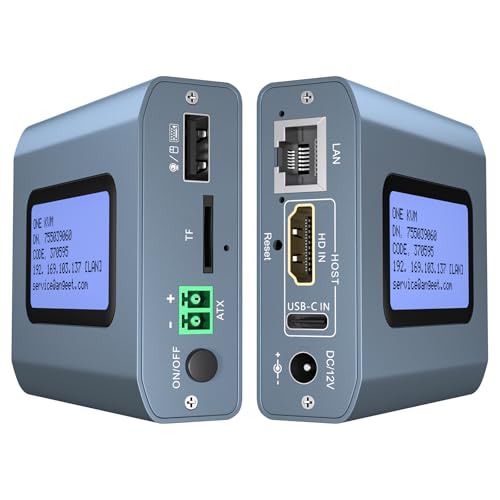
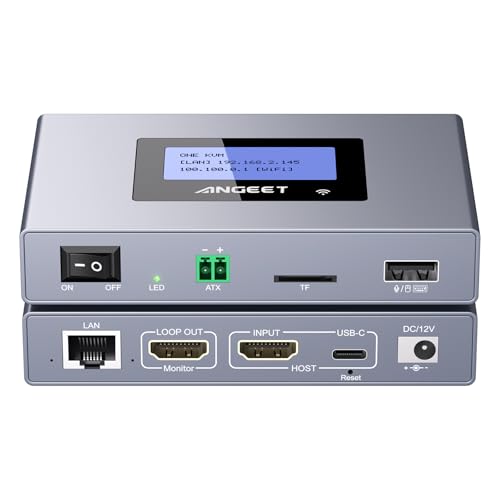
| ONEKVM 4K | ZeroTier, and you may point it at your own server | Budget | |
| ONEKVM Wi-Fi | The same, plus a second way in over wireless | Budget | |
| JetKVM | The vendor’s cloud, free. And 30 to 60ms published | Mid-range | |
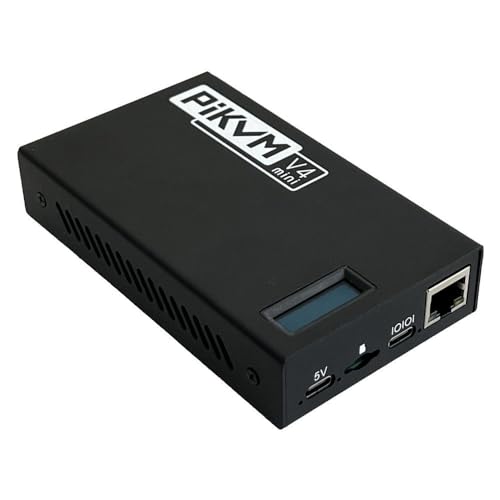
| PiKVM V4 Mini | Silent on NAT. Publishes 2.67 watts at idle | Mid-range | |
| TinyPilot Voyager 3 | Tailscale, eight users, roles, and a console server | Premium | |
| MT-VIKI 16-Port | VGA, 16 ports, and a client on a CD | Premium | |
How to choose
One listing names its cipher
Secure. Encrypted. Private. Protects your workflows. Those words are on almost every listing here and none of them is a specification. Exactly one device says what it actually uses: RSA at a stated key length, with AES. That is a claim with a shape, one an engineer could argue with, and it is the only one on this page. It does not make that device the most secure product here. It makes it the only one that told you anything at all, on a page of boxes designed to carry your BIOS password.
The route matters as much as the cipher
Your server sits behind a router that refuses incoming connections, and getting past that is the real work. Four answers appear here. Two devices are Tailscale-ready, meaning a private mesh between machines you own with nobody’s relay in the middle. Two run ZeroTier and add the sentence that matters most on this page: they support a custom cloud server, so you can host the relay yourself. One runs the vendor’s own cloud and offers it free. And one never raises the subject at all, which for a two-hundred-and-eighty-dollar device is a curious omission.
Free relay, on a BIOS session
One listing offers 100% free cloud access, and describes the connection as encrypted and direct, bypassing restrictive NAT. That description is accurate when the technique succeeds; when it fails, traffic falls back to a relay, and the relay is the vendor’s. This is not an accusation, and the device is well specified in every other respect. It is simply the question to ask about anything carrying your console for free, and two cheaper devices on this page have already answered it by letting you run the server yourself.
Open source firmware is common; open hardware is not
Three devices here publish their code, which on a box with this much access is the difference between trust and hope. One goes further and publishes the hardware design too, and it is the cheapest thing on this page by a wide margin. Another builds on a Raspberry Pi, which is not open hardware but is at least a documented, known platform rather than an anonymous board. Two listings say nothing about either.
The cheap ones publish latency; the dear ones do not
Thirty to sixty milliseconds, says one, over H.264 at 1080p and 60 frames. Under sixty at 4K, say two others. Those are the cheap devices. The two costing three and ten times more publish no latency figure at all, on products whose whole job is moving a pointer you are watching. And look at the resolution: an eighty-nine dollar device claims 4K60 while a hundred-and-thirty dollar one claims 1080p60. Four times the pixels for less money, and nobody says how either was measured.
Watch what happens when the watcher fails
You buy one of these for the day the server hangs. So what happens when the KVM hangs? One device here has a built-in watchdog that resets it automatically, which is the only answer to that question on this page and the only listing that seems to have asked it. Everything else assumes the box that recovers your server will never need recovering itself.
Power draw, because it never turns off
This thing runs 24 hours a day for years, so its idle draw is a real number. Two devices publish it: 2.67 watts for one, and 0.2 amps at 5 volts for another, which is about one watt. The rest publish nothing. On a home lab that difference is trivial; on a rack of them it is not, and either way it is the sort of figure that only appears when someone has measured their own product.
Check what generation you are buying
One product here is a different era. It is a sixteen-port rackmount switch with VGA cables in the box, a maximum of 1920 by 1440, a client that installs from an included CD, and a compatibility list running back through Windows 95 and DOS. That is not a criticism of the hardware, which daisy-chains to 256 machines and does things no single-port device can. It is a warning that VGA and HDMI are not the same purchase, and the listing’s own supported-OS list tells you how long this design has been on sale.
Sipeed NanoKVM Lite
A fifth the price of the cheapest serious rival, and the only device on this page publishing both its firmware and its hardware design, which on a box with BIOS access is the strongest trust claim available. It is Tailscale-compatible, so the session crosses your own mesh rather than anyone’s cloud, and it works with Wake-on-LAN and SSH. Twenty-three by thirty-seven millimeters and 0.2 amps at 5 volts, which is about a watt, running on a RISC-V core with USB storage emulation for remote OS installs. It says outright it is smaller than a thirtieth of its best-known rival.
Pros:
- Open-source firmware and hardware; the only one publishing both
- Tailscale, Wake-on-LAN and SSH; your own mesh, no vendor relay
- About one watt; 23 by 37 millimeters
- USB storage emulation for remote OS installation
- By far the lowest price here
Cons:
- 100Mbps Ethernet; the slowest link on this page
- No latency or resolution figure published
- No ATX power control mentioned; OLED is an expansion
Best for: open hardware and your own mesh, for forty dollars.
AweSun Q1
It names its cipher. Two thousand and forty-eight bit RSA and AES, printed in the title, on a page where seven rivals offer the word secure and stop. It is also the only device with a watchdog, which resets the KVM itself if the KVM is what stops responding, and that is the failure nobody else has planned for. It publishes its dimensions to the hundredth of a millimeter and its weight at 63 grams, controls Windows, macOS, iOS and Android with the screen off, and needs nothing installed on the machine it is watching.
Pros:
- Names its encryption: RSA at a stated key length, plus AES
- The only watchdog here; it recovers itself
- Publishes exact dimensions and weight
- Controls Windows, macOS, iOS and Android; no host software
- Smaller than a credit card; 4K and BIOS-level access
Cons:
- Never says how it gets through NAT
- No latency figure, no open-source claim
- No ATX power control mentioned
Best for: the only cipher named on this page.
ONEKVM 4K
It runs ZeroTier and says you may point it at a custom cloud server, which means the relay carrying your console can be one you own, and that is the plain answer to the free-cloud question two rivals leave hanging. It is also the only listing here that itemizes its box: the unit, a USB A-to-C cable, a 12V adapter, HDMI, Ethernet, a Phoenix connector, a 1.5m DuPont wire and a manual. Real ATX power through the motherboard’s front panel header, and it states plainly that laptops are not supported. 4K at 60Hz, under 60 milliseconds.
Pros:
- ZeroTier with support for a cloud server you host yourself
- The only complete package contents list on this page
- Real ATX power via the front panel header
- Says outright that laptops are not supported
- 4K60 claimed at under 60ms; states no personal data is collected
Cons:
- Its network mesh requires an online upgrade
- 4K60 under 60ms from a cheap device, unexplained
- No encryption cipher named; Ethernet only
Best for: knowing exactly what arrives, and hosting your own relay.
ONEKVM Wi-Fi
The same device as above with wireless added, and its listing gives the right reason: 2.4 and 5 GHz alongside Ethernet eliminates a single point of failure. Think about when you reach for this. The switch has died, or someone pulled the wrong cable, and the unit that still answers over your building’s Wi-Fi is the one that saves the trip. That is the most sensible six dollars on this page. Same ZeroTier with custom server support, same real ATX power, same 4K60 claim, plus a local monitor loop-out.
Pros:
- Wi-Fi and Ethernet; two independent paths to the device
- ZeroTier with a custom cloud server you can host
- Local monitor and keyboard loop-out; LCD shows the IP
- Real ATX power; states desktops only
Cons:
- Much of its feature list sits under a bullet headed Upgrade For More Features
- Its mesh is marked a mandatory online upgrade
- No cipher named; no latency method given
Best for: a second way in, for six dollars more.
JetKVM
The most specific performance claim here: 30 to 60 milliseconds over H.264 at 1080p and 60 frames, with the codec named. It is fully open source in Linux and Go, with the source published and SSH into your own unit, so you can read what it does rather than trust a bullet. A touchscreen for status, an expansion port, ATX header power and DC switching for 12 to 20 volt mini PCs with the barrel sizes given. Its cloud is the vendor’s, free, and it appears on this page twice under identical bullets.
Pros:
- Publishes 30 to 60ms and names the codec
- Fully open source; code published; SSH into your own unit
- ATX and DC power control, with barrel sizes named
- Touchscreen status; expansion port; no fees
Cons:
- The vendor’s own free cloud carries your BIOS session
- 1080p60, where cheaper rivals claim 4K60
- Extension power control sold separately
- Listed twice on this page at the same price
Best for: published latency and code you can read.
PiKVM V4 Mini
The bullets an engineer would write. It presses the real reset and power buttons through the actual connector functions, so a wedged machine gets a physical press rather than a polite request. Mass storage emulation lets you boot any ISO and reinstall from your desk. It is fanless with a passive heatsink, draws 2.67 watts at idle, and has a locator LED so you can find it in a rack. Open source on a documented Raspberry Pi. It says nothing whatsoever about how you reach it from outside your network.
Pros:
- Real hardware reset and power presses via the connector
- Mass storage emulation; boot any ISO and reinstall remotely
- Publishes idle draw at 2.67 watts; fanless and silent
- Locator LED; open source on a known platform
Cons:
- Never mentions NAT, VPN or how you connect at all
- No latency, resolution or encryption published
- Seven times the price of a Tailscale-ready open-hardware rival
Best for: a documented platform, if you bring your own network.
TinyPilot Voyager 3
The only device here that expects more than one person: unlimited accounts with admin and operator roles, eight simultaneous users, and local access that keeps working while they are connected. It is also two products in one, with a built-in console server for the serial ports on your switches, firewalls and PDUs, which is exactly what you need on the day the network itself is what broke. Tailscale-ready, so your own mesh carries the session. HDMI passes straight through, so anyone at the rack still has a screen. Virtual media for ISOs, and a bright LCD.
Pros:
- Accounts and roles; the only team-capable device here
- Eight simultaneous users; local access stays live
- Built-in console server for switches, firewalls and PDUs
- Tailscale-ready; no vendor relay in the path
- Transparent HDMI passthrough; virtual media
Cons:
- No latency, resolution or cipher published
- No open-source claim, unlike three cheaper rivals
- Ten times the price of a Tailscale-ready alternative
Best for: a second administrator, and the day the switch dies.
MT-VIKI 16-Port
A different product from everything above it: sixteen ports in a rackmount console, daisy-chaining to 256 machines, switched by OSD menu, button, hotkey or over IP, with BIOS-level control on all of them. If you have a rack of servers, no single-port device on this page competes. Read the details before buying, though. The cables in the box are VGA, the ceiling is 1920 by 1440, the recommended IP client installs from an included CD, and the supported operating systems begin at DOS and Windows 95.
Pros:
- Sixteen ports, daisy-chaining to 256 computers
- Four switching methods including OSD and hotkey
- Rackmount console with 16 cables included
- Multi-layer security access; four USB ports
Cons:
- VGA cables and a 1920 by 1440 ceiling; not HDMI
- The recommended IP client ships on a CD
- Its OS list starts at DOS and Windows 95
- The highest price here by a wide margin
Best for: a rack of older machines with VGA ports.
The verdict
Latency is what these listings compete on and it is not the question. These boxes carry your console and your keystrokes, so the two things worth knowing are what encrypts them and whose infrastructure they cross. One listing answers the first. Four answer the second, three different ways.
Best overall: AweSun Q1. It is the only device on this page that names its encryption rather than gesturing at the word secure, and naming RSA at a stated key length alongside AES is a claim you could take to someone who knows. It is also the only one with a watchdog, meaning the box that rescues your server can rescue itself, which is the failure every other listing here has quietly ignored. Published dimensions, published weight, no host software, and it works on phones and tablets as well as servers. It will not tell you how it gets through your router, so plan that yourself.
Best value: Sipeed NanoKVM Lite. Forty dollars for open-source firmware and open-source hardware, which is the strongest trust position available on a device with BIOS access, and Tailscale support so the session crosses a mesh you own with no vendor relay anywhere. It draws about a watt and fits in a matchbox. The 100Mbps link is the compromise and it is a fair one at this price. If you were going to run your own VPN anyway, this is the whole job for a fifth of what the famous alternatives charge.
Best premium: TinyPilot Voyager 3. Buy it when a second person needs access. Real accounts, admin and operator roles and eight concurrent users is not a luxury when two of you support the same rack; it is the difference between a shared password and knowing who did what. The built-in serial console server is a genuine second device, and it is what you reach for when the network is the thing that failed. Tailscale-ready, and HDMI passes through so nobody at the rack loses their screen.
FAQ
What should I check first?
What encrypts the session and whose relay it crosses. One listing here names a cipher. Four name their network method: two Tailscale, two ZeroTier with a self-hosted option, one a free vendor cloud. Latency is the thing they all want to talk about instead.
Is a free cloud a problem?
It is a question worth asking about anything relaying your BIOS console for nothing. The connection is described as encrypted and direct, which is what these techniques do when they work and not what they do when they fall back to a relay. Two cheaper devices here let you host the relay yourself.
Why do the expensive ones publish less?
No good reason we can see. The two cheapest give latency, resolution and power draw. The devices at three and ten times the price give none of the three, on products whose job is moving a pointer you are watching.
Will it power on a dead machine?
If it wires to the front panel header, yes, and three listings say so. That is a real button press rather than a request to an OS that stopped answering. Two note it works on desktops only, since laptops have no such header.
What if the KVM itself hangs?
One device has a watchdog that resets it. Every other listing on this page assumes the box rescuing your server will never need rescuing.
This article may contain affiliate links; see our Affiliate Disclosure.