The 96W brick that came with your laptop is the size of a deck of cards and charges exactly one thing. A 100W GaN charger does the same job from something that fits in a coat pocket, and feeds your phone and earbuds while it is at it. The catch nobody prints on the box: that 100W is a budget to be shared, not a promise to every port.


What separates a good 100W charger from a merely adequate one is how it behaves when every port is full, how small it stays while doing it, and whether the plug folds. Beyond that, the differences are real but specific: a display that shows what is happening, international pin adapters, a cable in the box, or simply the lowest price for a charger that does the job. These five suit a one-bag traveler, a desk that has run out of outlets, and anyone tired of carrying three bricks.
| Product | Standout feature | Price tier | Link |
|---|---|---|---|
| Anker Nano 100W | 34% smaller than a 96W laptop brick, 100W cable included | Mid-range | |
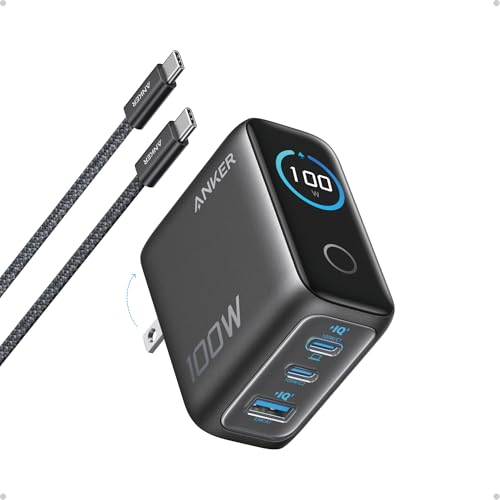
| Anker 100W with Smart Display | Live readout of status, temperature and per-port power | Premium | |
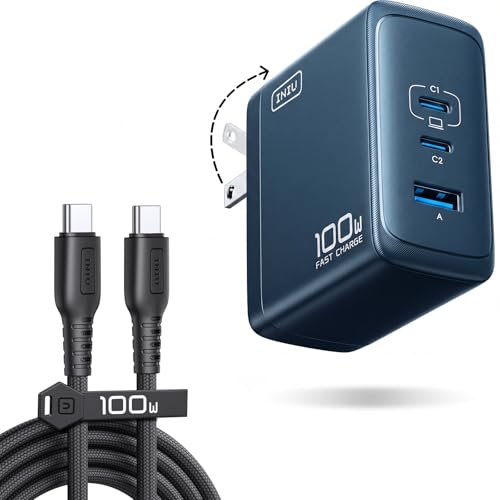
| INIU 100W GaN | Three ports and a cable at the lowest price, foldable | Budget | |
| Belkin 100W | 8-point SmartProtect safety system, 33% smaller than a 96W brick | Budget | |
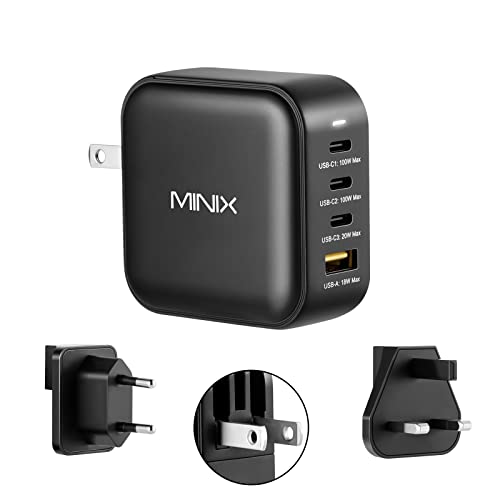
| MINIX NEO P3 100W | Four ports, UK and EU pin converters in the box | Mid-range | |
How to choose a 100W GaN travel charger
100W is a shared budget, not a per-port rating
This is the single most misunderstood thing about multi-port chargers, and it is worth getting straight before buying. When one USB-C device is plugged in alone, it can draw the full 100W. Plug in a second and a third, and the charger divides that 100W between them according to a fixed internal scheme. Your laptop might drop to 65W while the phone takes 20W and the earbuds take a trickle.
That is normal and fine – a laptop charging at 65W still charges – but it means “100W, 3 ports” never means 300W. Check how each charger splits power, because the schemes differ. The MINIX is explicit: its USB-C ports run to a maximum of 100W or 20W depending on the port, and the USB-A tops out at 18W. Anker’s display model automatically drops to a 95W + 5W low-current mode when a port sits at or below 5W for a minute, so earbuds get a safe trickle without stealing from the laptop.
Why GaN, in one paragraph
Gallium nitride switches faster and wastes less energy as heat than the silicon in an old-style brick, so the transformer and heatsink can shrink dramatically. That is the whole reason these chargers are pocket-sized. Anker quotes its Nano as 34% smaller than an original 96W MacBook brick and Belkin quotes 33% for its own. Less waste heat also means a charger that runs cooler in a bag or behind a couch, which is a safety point as much as a comfort one.
Ports: how many, and of what kind
Three ports covers the common case – laptop, phone, earbuds. Four helps if a tablet or watch joins, and the MINIX is the one offering that. The USB-A question is worth a thought: USB-A is slower and older, but it is what a lot of cables and older accessories still use, and having one saves carrying an adapter. The MINIX pairs three USB-C ports with an 18W USB-A. If everything you own is USB-C, the three-port chargers give you more full-speed ports for the space.
Traveling with it
Foldable prongs are close to essential – fixed prongs snag fabric and gouge whatever they share a bag with. All five here fold. The other travel question is the wall itself: chargers of this type generally accept 100-240V, so they work worldwide with a plug adapter, but the MINIX is the only one here that states worldwide 100-240V support and ships UK and EU pin converters in the box, which removes the adapter from the packing list entirely.
Cables, safety, and the small print
A 100W charger needs a cable rated to carry 100W – that means a 5A-capable USB-C to USB-C cable, and a cheap 60W cable will quietly cap your laptop’s charging. Anker’s Nano includes a 5 ft 100W cable rated for 5,000+ bends, the display model includes a 4.9 ft cable, and INIU includes a Type-C cable. Belkin and MINIX do not list one, so budget for a proper cable. On safety, Belkin’s SmartProtect is the most thorough spec here – an 8-point system covering over-voltage, over-wattage, short circuit, surges, over-temperature, over-current, signal interference, and electrostatic discharge – while MINIX’s over-current, over-voltage, over-temperature, and short-circuit protections cover the basics.
Anker Nano 100W – the best seller, and the easy recommendation
This outsells everything else here by a wide margin, and the reasons are unglamorous and correct. It is 34% smaller than an original 96W MacBook brick, either USB-C port will deliver the full 100W, and it charges three devices at once. Crucially, a 5 ft 100W USB-C to USB-C cable comes in the box, rated for over 5,000 bends – which matters more than it sounds, because a charger this capable is worthless behind a 60W cable, and buying one separately eats the price difference against the cheaper options. Anker’s GaN II design is what gets the size down, and an 18-month warranty backs it.
It has no display and no international pin adapters, and it sits at the mid-range price rather than the budget one. For a single charger to replace a laptop brick and a phone charger in one bag, it is the safest pick in the group.
- Pros: By far the best seller here; 34% smaller than a 96W laptop brick; full 100W from either USB-C port; charges three devices at once; includes a 5 ft 100W cable with a 5,000+ bend rating; GaN II keeps it small and cool; 18-month warranty.
- Cons: Mid-range price; no display or per-port readout; no international pin converters; three ports rather than four.
Best for: Replacing a laptop brick and phone charger with one pocket-sized block, cable included.
Anker 100W with Smart Display – the one that shows its working
The display sounds like a gimmick until you have spent an evening wondering why a laptop is charging slowly. This one shows charging status, temperature, and per-port performance in real time, which turns the invisible power-splitting described above into something you can actually see – and it is the fastest way to discover that the cable, not the charger, is the bottleneck. Touch control sits alongside it.
The rest is well judged. It measures 2.72 x 2.17 x 1.34 inches with a foldable plug, holds a steady 100W on any USB-C port, and Anker claims it sustains peak output roughly twice as long as an average 100W charger – a heat management claim rather than a speed one, and heat is what makes chargers throttle. The low-current mode is the thoughtful touch: when a port draws 5W or less for a minute, it switches to a 95W + 5W split so earbuds charge safely without taking a bite out of the laptop’s share. A 4.9 ft USB-C cable and an 18-month warranty are included. It is the priciest option here, and the display is the reason.
- Pros: Live display of status, temperature, and per-port power; sustains peak output longer than average by Anker’s account; steady 100W on any USB-C port; very compact with a foldable plug; automatic 95W + 5W low-current mode for earbuds; cable included; 18-month warranty.
- Cons: Premium price, the highest here; the display is genuinely useful but not essential; three ports; no international pin converters.
Best for: Anyone who wants to see where the watts are going, and who charges a mix of high- and low-power devices together.
INIU 100W GaN – the value play, cable and all
The third-best seller here and the joint cheapest, which is a combination worth paying attention to. It is a three-port 100W GaN charger with a foldable plug and a Type-C cable in the box – that last detail is what separates it from other budget chargers, since a 100W-rated cable bought separately would erase the saving. It supports PD 2.0 and PD 3.0, so it plays nicely with laptops, phones, and tablets without compatibility hunting, and it will fast-charge two devices simultaneously.
INIU’s listing is light on the specifics that the Anker and Belkin pages spell out – there is no published per-port power breakdown and no detailed safety certification list. For a budget charger from a well-selling brand that includes the cable, that is the trade. If the goal is one small block that charges a laptop and a phone on a trip without spending much, it does that.
- Pros: Joint lowest price and a strong seller; 100W across three ports; Type-C cable included, unusual at this price; compact and foldable for travel; supports PD 2.0 and PD 3.0 for broad compatibility; replaces a power strip and three chargers on a desk.
- Cons: No published per-port power split; less detailed safety documentation than Belkin or Anker; no display; no international pin converters.
Best for: Getting a laptop-capable travel charger and a usable cable for the least money.
Belkin 100W – the safety-first option
Belkin’s pitch is protection, and it is specified more thoroughly than anyone else’s here. SmartProtect is an 8-point system covering over-voltage, over-wattage, short circuit, surges, over-temperature, over-current, signal interference, and electrostatic discharge, with separate over-heat protection to keep the surface temperature down. For a charger that will be left plugged in overnight next to a bed, or pushed into an unfamiliar hotel socket, that list is a reasonable thing to buy on.
The rest is solid and unshowy: 33% smaller than an original 96W MacBook brick, foldable prongs, and support for USB-C laptops and PD devices generally. Belkin quotes 0-50% in about 21 minutes for a recent iPhone Pro and about 20 minutes for a MacBook Air 13″, which are the manufacturer’s own figures. No cable is listed, so add a 100W-rated one to the basket.
- Pros: Joint lowest price; the most thoroughly specified safety system here, with 8-point SmartProtect plus over-heat protection; 33% smaller than a 96W laptop brick; foldable prongs; broad PD device support; a long-established brand.
- Cons: No cable in the box, and a 100W cable is a required extra; no display; no international pin converters; weaker sales position than the Anker and INIU options.
Best for: Charging overnight or in unfamiliar sockets, where protection circuitry matters more than extras.
MINIX NEO P3 100W – the one built for the airport
Four ports and a bag of pin converters make this the travel specialist. Three USB-C ports and one 18W USB-A cover a laptop, phone, tablet, and an older accessory at once, and the power is distributed between them rather than cut off. The important part for anyone crossing borders: built-in foldable plugs, worldwide 100-240V support, and UK and EU pin converters included, which means no separate travel adapter for two of the most common plug standards.
It also supports PD, QC, and PPS up to 45W, which is a broader protocol spread than most – PPS in particular matters for fast-charging recent Samsung phones properly. The real limits: it is the weakest seller in this group, the maximum on the secondary USB-C ports is 20W rather than 100W, the USB-A caps at 18W, and no cable is included. Four ports on a 100W budget also means the split gets thin when all four are busy.
- Pros: Four ports, three of them USB-C; UK and EU pin converters included and worldwide 100-240V support; foldable plugs with no loose cables; supports PD, QC, and PPS up to 45W; over-current, over-voltage, over-temperature, and short-circuit protection.
- Cons: Only one USB-C port reaches 100W; USB-A limited to 18W; no cable in the box; the lowest-selling option here; four devices on a 100W budget leaves little each.
Best for: International travel with several devices, especially anyone tired of packing a separate plug adapter.
The verdict
Best Overall – Anker Nano 100W. It leads this group on sales by a distance and it earns that. Full 100W from either USB-C port, three devices at once, 34% smaller than the laptop brick it replaces, and – the detail that quietly decides it – a proper 5 ft 100W cable in the box. Buy it, put the original brick in a drawer, and stop thinking about it.
Best Value – INIU 100W GaN. The joint cheapest here, a strong seller, three ports, foldable, and a cable included. The documentation is thinner than Belkin’s or Anker’s, but for a laptop-capable charger at this price with a usable cable, it is the most charger for the money.
Best Premium – Anker 100W with Smart Display. The display turns power-splitting from guesswork into information, the low-current mode handles earbuds gracefully, and Anker’s claim of sustaining peak output longer addresses the real limit on these chargers, which is heat. It costs the most and it is the most polished.
Two specific cases: if the charger will live in a hotel socket or beside a bed, Belkin’s 8-point protection is the most thoroughly specified safety story here. If you cross borders often, the MINIX arrives with UK and EU pins in the box and a fourth port.
FAQ
Will a 100W charger actually give my laptop 100W?
Alone on a USB-C port, yes. Sharing with other devices, no – the 100W is divided between the ports. A laptop might settle at 65W while a phone takes 20W, which still charges the laptop, just not at full speed. If you need maximum laptop speed, unplug the others.
Do I need a special cable?
Yes, and this trips up more people than anything else. A 100W connection needs a USB-C cable rated to carry 5A. A standard 60W cable will cap the charge no matter how good the charger is. The Anker Nano, the Anker display model, and the INIU all include a suitable cable; with the Belkin and MINIX, buy one.
Is GaN safe to leave plugged in?
Yes. GaN chargers waste less energy as heat than older silicon bricks, which is why they can be so much smaller. All five here list protection circuitry; Belkin’s 8-point SmartProtect system is the most fully specified, covering surges, over-voltage, over-temperature, and electrostatic discharge among others.
Will these work abroad?
Chargers of this type generally accept 100-240V, so the electricity is not the problem – the socket shape is. The MINIX states worldwide 100-240V support and includes UK and EU pin converters, so it needs nothing extra in those regions. For the others, a plain plug adapter is enough; no voltage converter is required.
This article may contain affiliate links; see our Affiliate Disclosure.