Sim racers and flight sim pilots keep arriving at the same conclusion: the headset is only half the purchase. A tethered PC VR rig is a chain – the display on your face, the cable carrying compressed video down to it, and the audio that convinces your brain the cockpit is real. Get the cable wrong and a powerful graphics card ends up delivering a smeary picture at half the fidelity you paid for.


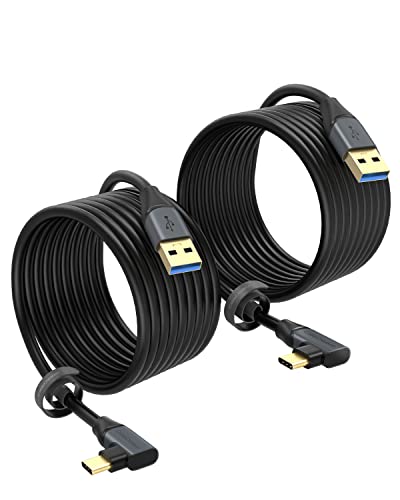
This comparison covers a tethered PC VR setup end to end rather than pretending the market is full of interchangeable headsets – it is not. Two headsets here genuinely drive VR from a gaming PC, and the rest is the gear that makes the tether work properly: the link cable that carries the signal, and audio that seals you into the world. Sim racers, flight sim pilots and anyone chasing high-fidelity visuals will care most about the cable section, which is the part most people skip.
At a glance
| Product | Standout feature(s) | Price tier | Link |
|---|---|---|---|
| Meta Quest 3 512GB | 4K+ Infinite Display; Snapdragon XR2 Gen 2; runs PC VR or standalone | Premium | |
| SARLAR VR Gaming Headphones | 45mm drivers; custom-length cable; noise-isolating pads | Budget | |
| YSerendept Fiber Optic USB-C, 33 ft | 10 Gbps over fiber; 40% slimmer than standard USB-C; Kevlar-reinforced | Mid-range | |
| Oculus Rift S | Native PC VR; Halo headband; inside-out Insight tracking | Mid-range | |
| CableCreation Link Cable 16 FT, 2-pack | 5 Gbps USB 3.1 to USB-C; right-angle plug; two cables | Budget | |
How to build a tethered PC VR setup
Two routes to PC VR, and they feel different
A standalone headset like the Quest 3 has its own processor and runs games by itself, then connects to a PC over a link cable when you want your graphics card doing the work. A native PC headset like the Rift S has no computer inside at all – it is a display and sensors on the end of a wire, permanently dependent on the tower. The standalone route is more flexible and more popular by an enormous margin. The native route has one real advantage: no battery to run flat mid-race, and no compression stage between the PC and your eyes.
The cable is part of the system, not an accessory
When a Quest 3 runs PC VR, your graphics card renders frames, compresses them, and pushes them down a USB cable to be decompressed on your face. Bandwidth sets how hard that compression has to squeeze. A cable rated 5 Gbps, like the CableCreation, is the accepted working baseline; the YSerendept fiber cable carries 10 Gbps. Skimping here caps the picture quality no matter what card you own – which is why “my expensive GPU looks blurry in VR” is nearly always a cable or a USB port problem.
Length, weight and the tug on your head
Sim racing is stationary, so a 16-foot cable is plenty and the tether just needs to reach the rig. Room-scale VR is different: you turn, you step, and a short cable becomes a leash. The CableCreation’s right-angle plug matters more than it sounds – a straight plug sticking out sideways levers against the headset port every time you turn your head, and that port is the most common thing to break on a Quest. The YSerendept’s 0.15-inch diameter, about 40% slimmer than typical USB-C, is a genuine comfort difference over a long session.
Fiber or copper
Copper is cheap, universally compatible, and fine at 16 feet. Optical cable carries data as light, so it holds signal integrity over runs where copper starts degrading, and it is thinner and lighter. The YSerendept runs 33 feet at 10 Gbps – impossible territory for cheap copper. It also uses one-way data flow, which is worth understanding before you buy: excellent for a PC-to-headset video feed, but a limitation you should check against your intended use.
Audio is half the immersion
Built-in headset speakers are open by design so you can hear the room. In sim racing that is exactly wrong – you want the engine, not the dishwasher. Over-ear cups like the SARLAR’s protein pads seal noise out and put 45mm drivers next to your ears, which is the cheapest immersion upgrade in VR. Weight is the counter-argument, since every gram on a headset multiplies over an hour. Latency is the thing to watch either way: wired 3.5mm connections stay in sync, while Bluetooth introduces delay that VR punishes.
What the PC needs
Tethered VR renders two high-resolution views at a high frame rate, and dropped frames in VR are not cosmetic – they make people ill. You need a dedicated graphics card and a proper USB 3 port, ideally straight off the motherboard rather than a front-panel header.
Meta Quest 3 512GB
Not merely the best seller of this group – one of the strongest-selling products in its entire category, and by a distance nothing else here approaches. For PC VR the case rests on the display: a 4K+ Infinite Display with nearly 30% more resolution than the generation before, which is precisely what sim racing rewards, since reading a distant apex or a cockpit gauge is a pixel problem. Twice the graphical processing power from a Snapdragon XR2 Gen 2 and 8GB of RAM mean it stands alone when you are not at the desk, and dual RGB color cameras give full-color passthrough so you can find your wheel without lifting the headset. The 512GB storage suits a standalone library. Connect it to a PC with a link cable and your graphics card takes over.
- Pros: Highest resolution here with a 4K+ display; powerful XR2 Gen 2 processor and 8GB RAM; works tethered to a PC or completely standalone; full-color passthrough from dual RGB cameras; huge software library plus a 3-month Meta Horizon+ trial; overwhelmingly the category best seller.
- Cons: Link cable is not included and the picture quality depends on it; PC VR runs through a compression stage the Rift S avoids; roughly 2 hours of battery for standalone use; the most expensive item here.
Best for: almost everyone – a high-resolution PC VR display that also works untethered when you want it to.
Oculus Rift S PC-Powered VR Gaming Headset
The purist’s tether: a headset with no computer inside, no battery, and no compression between your graphics card and the lenses. For a seated sim rig that is a coherent argument – you cannot run out of charge two hours into an endurance race. The Halo headband takes weight off your face and onto your crown, adjusting with a twist of a fit wheel, which suits long sessions better than a strap that squeezes your cheekbones. Insight tracking works from cameras on the headset itself, so there are no external base stations to mount, and the Touch controllers translate hand movement directly. Improved lenses reduce the screen-door effect that older VR was known for. Worth knowing before you buy: an account login is required, and the two listings for this headset differ enormously in price, which points to third-party stock rather than a consistent supply.
- Pros: Native PC VR with no battery and no compression stage; Halo headband is comfortable over long seated sessions; inside-out Insight tracking needs no external sensors; established Touch controllers; large existing game library; costs well under the Quest 3.
- Cons: Substantially lower resolution than the Quest 3; tethered only, so it does nothing without a PC; account login required; pricing across listings is erratic and sales rank is weak; an older design.
Best for: a permanent seated sim rig where the headset never leaves the desk and battery life should never be a factor.
CableCreation Link Cable 16 FT, 2-Pack
The cable that turns a Quest into a PC VR headset, and the item most people underspend on. USB 3.1 to USB-C at 5 Gbps is the bandwidth PC VR expects, and 2A charging means the headset gains battery while you play rather than draining – the difference between an evening’s racing and a forced interval. Sixteen feet reaches from a tower to a rig with slack to spare, and it chains onto an extension if your setup is further away. The right-angle plug is the detail worth paying for: it sits flush against the headset instead of sticking out to be levered on every head turn, which protects both cable and port. It ships as two cables with four management straps, so a spare lives in the drawer.
- Pros: 5 Gbps meets the PC VR baseline; 2A charging keeps the headset topped up while tethered; right-angle plug reduces strain on the headset port; 16 ft with extension support; two cables plus straps in the box; cheap.
- Cons: Copper, so it is heavier and shorter-reaching than fiber; 5 Gbps rather than 10; listed compatibility centers on Quest 2 and Pro, so check your model; no published sales rank.
Best for: the default, sensible tether for a desk-side PC – buy this before spending more on anything else.
SARLAR VR Gaming Headphones
Purpose-built for Quest headsets, and the fix for the one weakness of built-in audio: it leaks the room in. Enlarged protein ear pads seal around the ear so the only thing you hear is the sim, and 45mm drivers are large enough to give engine noise actual body rather than the thin sound of a small speaker near your temple. The 3.5mm cable is cut to a custom length for Quest 2 and Quest 3 – no loop of slack catching on the strap – and wired means minimal latency, which matters when an audio cue tells you the rear is stepping out. The package includes an extension cable, a lens protection cover, a Velcro tie, a cleaning cloth and a carry case, which covers most of what a new headset owner needs anyway.
- Pros: Designed specifically for Quest 2 and Quest 3 with a custom-length cable; 45mm drivers; protein pads isolate outside noise; wired 3.5mm keeps latency minimal; bundle adds a lens cover, extension cable, case and cloth; lightweight.
- Cons: Over-ear cups add bulk and warmth next to a headset strap; Quest-specific, so less useful if you switch platforms; no microphone mentioned for team comms.
Best for: Quest owners chasing full immersion – sealing out the room is the cheapest upgrade in VR.
YSerendept Fiber Optic USB-C Cable, 33 ft
The tether for people who have decided the cable is the bottleneck. Data travels as light rather than electrical signal, which buys two things copper cannot: 10 Gbps sustained – three times a typical copper link cable – and 33 feet of it without the signal degrading along the way. That bandwidth is headroom for compression, and compression headroom is picture quality. The physical build matters as much: 0.15 inches in diameter, roughly 40% slimmer than standard USB-C, Kevlar-reinforced, with a right-angle plug that sits flat against the headset. Over an hour that slimness stops being a specification and starts being the reason you forget the cable exists. One important caveat: transmission is unidirectional by design, so check that against your setup before buying. A 12-month replacement warranty backs it.
- Pros: 10 Gbps over fiber, triple common copper cables; 33 ft with no signal loss over distance; 40% slimmer and far lighter than standard USB-C; Kevlar reinforcement; right-angle plug protects the headset port; 1-year replacement warranty.
- Cons: Costs many times what a copper link cable does; one-way data flow is a real limitation worth checking; marketed as a general-purpose optical cable rather than a VR-specific one; no published sales rank.
Best for: room-scale PC VR at maximum fidelity, where cable weight and reach both matter.
The verdict
Best overall: Meta Quest 3 512GB. It is not close. The resolution is the highest here, which is the specification sim racing and flight sim actually reward, and it doubles as a standalone headset when you are not at the PC. Its sales lead over everything else in this comparison is enormous, and the software library follows that. Budget for a link cable on top – it is not in the box, and the picture you get depends on it.
Best value: Oculus Rift S. Considerably cheaper than the Quest 3 and, for a fixed seated rig, arguably purer: no battery to die, no compression between your card and the lenses. You trade resolution and flexibility for that, and the erratic pricing across listings means checking carefully before you commit.
Best premium: YSerendept Fiber Optic USB-C, 33 ft. If the tether is the bottleneck, this is the fix – 10 Gbps over fiber, three times the throughput of common copper, in a Kevlar-reinforced cable 40% slimmer than standard USB-C and long enough for genuine room-scale movement. It costs more than most link cables by a wide margin, and for a desk-bound sim rig it is overkill. For room-scale at maximum fidelity, it is the only cable here that gets you there.
For the rest of the chain: the CableCreation 2-pack is the sensible default tether at a fraction of the fiber price, and the SARLAR headphones are the cheapest upgrade here that meaningfully changes how a sim feels.
Frequently asked questions
Can the Quest 3 play PC VR games, or only its own?
Both. It runs its own library standalone on the XR2 Gen 2 chip, and connects to a gaming PC over a link cable so your graphics card renders instead. That is the whole reason it appears in a tethered comparison – it is two headsets in one shell, which the Rift S is not.
Does the link cable really change image quality?
Yes. Tethered Quest video is compressed on the PC and decompressed in the headset, and available bandwidth determines how aggressively it gets squeezed. A cable that cannot sustain its rated speed forces heavier compression, which shows up as smearing and blockiness in exactly the high-detail scenes you bought the headset for. It is also worth using a USB 3 port directly on the motherboard.
Why not just go wireless?
Wireless PC VR works, but it compresses harder over a shared Wi-Fi channel and adds latency, and the headset battery drains while it does. A cable gives consistent bandwidth and charges as you play. For sim racing, where you are strapped into a seat and not walking anywhere, a tether costs you nothing and gives you a better picture.
Do I need separate headphones?
Not strictly, but it is the cheapest meaningful upgrade available. Built-in speakers are deliberately open so you stay aware of your room, which is the opposite of what a sim needs. Sealed cups like the SARLAR’s block the household out and put the engine where it belongs. Keep it wired – Bluetooth latency is very noticeable in VR.
This article may contain affiliate links; see our Affiliate Disclosure.